Course 06 · 7 steps · 4 chapters · about 8 minutes
Your own kit
Your own drum sounds on the pads, in a groove.
Play your own sounds from the FM-1's pads. Take your kit, roll a beat for it, then tune, shorten and balance every pad until it grooves.
First, make your kit in Your own sounds
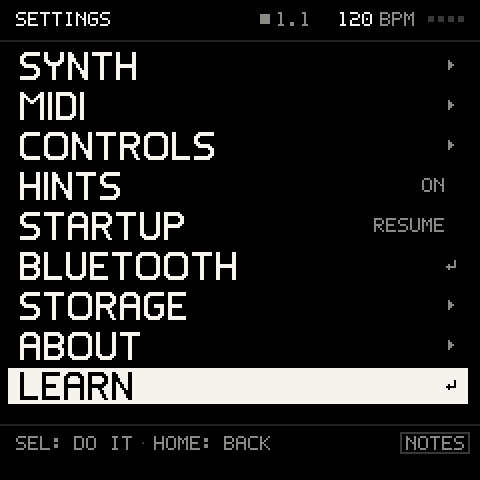
Comes with Groove OS 1.4, with five more courses. On your FM-1, tap GLO (SETTINGS), then LEARN.

Try it right here: the FM-1 above runs the real Groove OS, with the course's own guide. Sound on, and play its knobs, buttons and keys below.Your own sounds play on your FM-1. In the browser, this course starts on a built-in kit.
7 steps · 4 chapters
What you'll play.
A step counts once you have played it; skip any and come back to it any time.
Chapter 1 · Your sounds1
- 01Bring your sounds · make your kit first
Chapter 2 · The beat2
- 02Roll a beat
- 03Hear your kit
Chapter 3 · Shape3
- 04Tune a pad
- 05Shape its length
- 06Balance the pads
Chapter 4 · Keep1
- 07Keep your kit song
On your FM-1
How to open it.
Four presses, wherever you are. No computer, no internet, nothing to add.Comes with Groove OS 1.4.
- 01Tap GLO.SETTINGS opens.
- 02Turn ALGORITHM to LEARN, the last row, and press SEL.The six courses, in order.
- 03Turn ALGORITHM to YOUR OWN KIT and press SEL.The FM-1 asks first, because the music stops.
- 04Turn ALGORITHM to START and press SEL.The course begins at its first step, on a fresh song. Your saved songs stay as they are; the course takes a song slot only if you save it at the end.