Skip to content

Groove OS 1.1 · Every feature

Everything your FM-1 can do now.

Groove OS turns the M-VAVE FM-1 into a groovebox: up to eight tracks, a second synth engine, a whole drum kit on one track, a step sequencer with parameter locks, chords that stay in key and a view made for playing live. 105 features, every one on the FM-1 today, with its numbers, where it lives on the panel and, where there is one, its limit.

Counts at a glance · 29 numbers

Tracks
1 to 8 per project (new projects and starters: 4)
Track types
5: FM sound, VA sound, FM kit, VA kit, MIDI OUT
Synth engines
2: the FM-1's FM engine (6 operators, 32 algorithms) and the Groove OS VA engine
Voices
12 FM, shared by FM tracks and FM kits · 8 VA, shared by VA tracks and VA kits
Sounds
179: 3 kits, 32 GROOVE FM sounds, 16 VA presets, 128 stock FM presets (banks A–D) · plus the sound pack: 63 VA sounds, installed from this site
Named macros
48 sounds with four macros of their own, and every sound in the pack
Drum kits
3 (PUNCH, DUSTY, STEEL), each as FM or VA drums
Pads per kit
8, each one of 12 drum sounds or the track's own sound
Loop length
1 to 8 bars per track, 4/4
Tempo
40 to 240 BPM, set from any screen (hold PLAY, turn K1)
Steps
1 to 64 per pattern (4 bars of 16), up to 4 notes a step
Stored patterns
16 per project (A to P), shared by all tracks
Pattern chain
Up to 16 entries per track
Step conditions
11 (FILL, NOT FILL, 1:2, 2:2, 1:3 to 3:3, 1:4 to 4:4), plus CHANCE in 5 % steps
Rates
6 (1/4, 1/8, 1/8T, 1/16, 1/16T, 1/32), for patterns and the arp
Parameter locks
64 per project
Automation
96 breakpoints per track
Scales
12, on any of 12 roots · 4 IN KEY modes (OFF, SNAP, FILTER, WHITE)
Chord pads
8 · 5 colours × 4 voicings × 4 spreads × 8 strum times
Arp
5 modes (UP, DOWN, UP-DOWN, RANDOM, ORDER), 1 to 4 octaves
Effects
6 in one reorderable chain: FILTER, REVERB, DELAY, DRIVE, CHORUS, PHASER
Scenes
11 (A to K, the black keys on PERFORM)
Perform
8 punch-ins · 4 throws
Undo
16 steps, across all tracks
Starters
5 (FIRST GROOVE, PUNCH, DUSTY, STEEL, EMPTY)
Project slots
3, plus an autosave
Project file
.groove, typically 2–4 KB, at most 11,968 bytes
MIDI
A channel per track (1–16) in · MIDI OUT tracks on any of 16
Install
About 2 minutes over USB, from Chrome or Edge

105 features in 11 groups

01 · Sound engines14 features

The FM-1's own six-operator FM engine plus a virtual analog engine, a sound per track. 179 sounds to start from, a pack of 63 VA sounds to install from this site, four macros on K1–K4 for each, and DX7 patches in over MIDI.
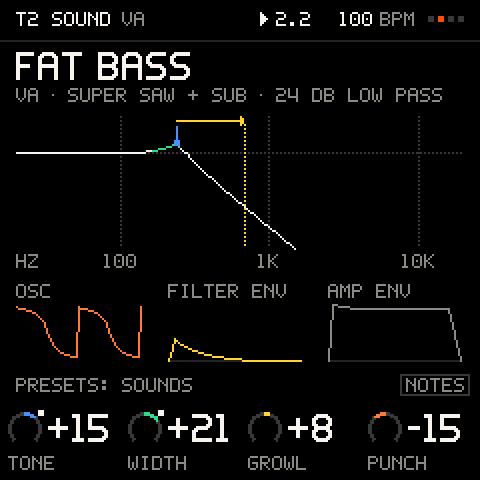
SOUND on a VA track: the filter's response drawn as the four macros shape it
  • A track that plays the FM-1's own FM engine with a sound of its own, so several FM sounds play at once.

    A track that plays the FM-1's own FM engine with a sound of its own, so several FM sounds play at once. The stock FM-1 plays one at a time.

    Where
    + ADD TRACK > FM SOUND · TRACK menu > ENGINE
    Numbers
    6 operators · 32 algorithms · 12 voices shared by FM tracks and FM kits
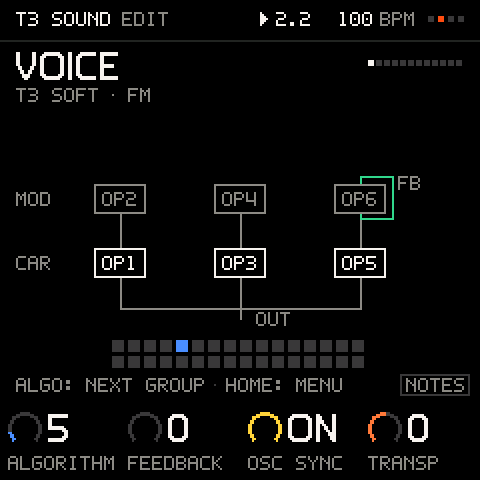
    FM VOICE: the algorithm, the feedback loop, where it sits among the 32.
  • A second synth engine, virtual analog, added by Groove OS: subtractive basses, pads, leads and plucks next to the FM sounds.

    A second synth engine, virtual analog, added by Groove OS: subtractive basses, pads, leads and plucks next to the FM sounds.

    Where
    + ADD TRACK > VA SOUND · TRACK menu > ENGINE
    Numbers
    SAW, SQUARE, TRIANGLE, SINE · SUPER up to 7 copies · SUB · NOISE · DRIFT · LP24, LP12, BP, HP filter · 8 voices
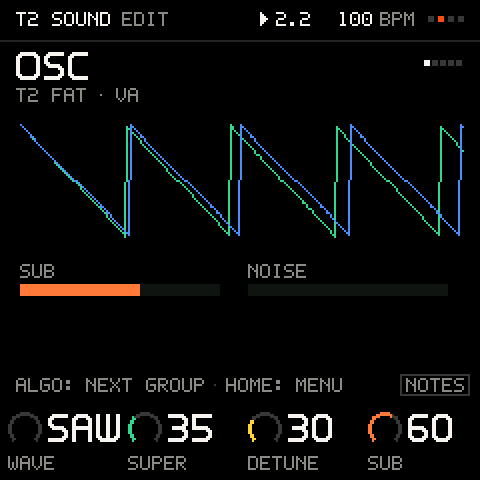
    The VA oscillator: wave, SUPER copies, detune, sub and noise.
  • A track remembers its FM sound and its VA sound.

    A track remembers its FM sound and its VA sound. Switch the engine and back, and nothing is lost.

    Where
    TRACK menu > ENGINE
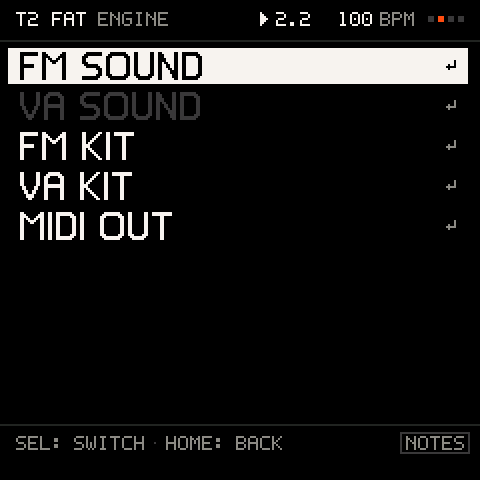
    ENGINE: a track is an FM SOUND, a VA SOUND, an FM KIT, a VA KIT or MIDI OUT.
  • K1–K4 on a track are four controls named for its sound: a kick gets TUNE, CLICK, DECAY, DIRT; an EP gets TONE, CHORUS, BARK, DECAY.

    K1–K4 on a track are four controls named for its sound: a kick gets TUNE, CLICK, DECAY, DIRT; an EP gets TONE, CHORUS, BARK, DECAY. 0 is the sound as designed, and both directions change it. Every other sound gets TONE, ATTACK, DECAY, CHAR (FM) or CUTOFF, RESO, ENV, DRIVE (VA).

    Where
    TRACKS, cursor on a track · SOUND view
    Numbers
    48 sounds with their own four, and every pack sound · −50 to +50 · 1 a click, 10 with SEL held
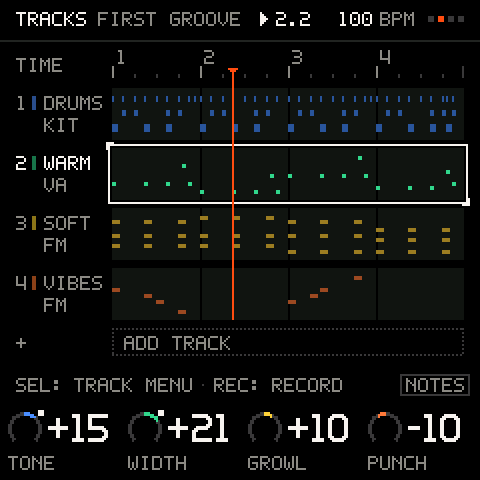
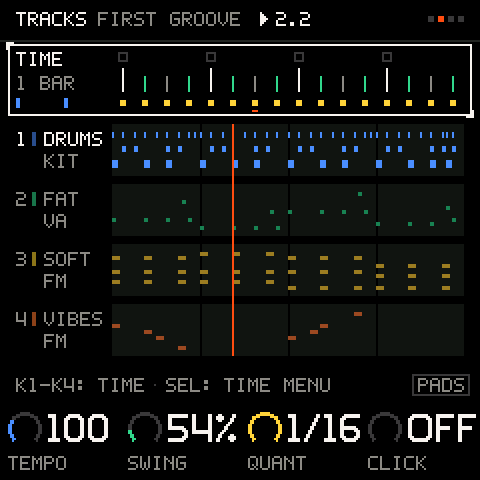
    TRACKS: a lane per track in its colour, the playhead, K1–K4 the selected track's four macros.
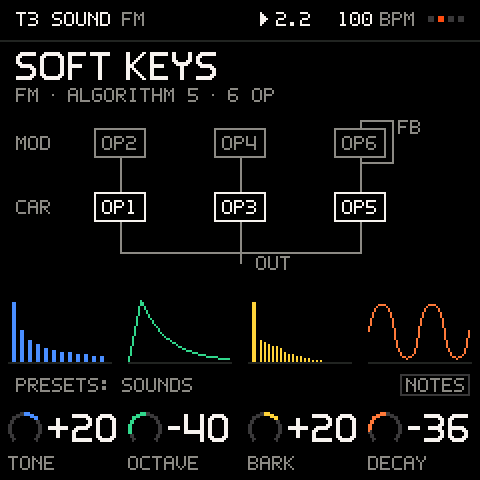
  • The selected track's sound as a picture: for FM the algorithm as a wiring diagram and a picture over each macro, for VA the filter curve as the macros shape it.

    The selected track's sound as a picture: for FM the algorithm as a wiring diagram and a picture over each macro, for VA the filter curve as the macros shape it.

    Where
    SEL on a track > SOUND · EDIT
    SOUND on an FM track: the algorithm as a wiring diagram, a picture above each of the four macros.
  • Edit an FM sound four knobs at a time, SHIFT for four more: VOICE, OP1–OP6, PITCH ENV, LFO, AMP ENV, PLAY and NAME.

    Edit an FM sound four knobs at a time, SHIFT for four more: VOICE, OP1–OP6, PITCH ENV, LFO, AMP ENV, PLAY and NAME.

    Where
    EDIT · ENV opens AMP ENV · LFO opens LFO
    Numbers
    6 operators · Level, ratio, fine, detune and ADSR per operator · Names of 10 characters
    Limit
    Operator EG levels, keyboard scaling, curves, velocity sensitivity and fixed frequency are not on a knob (a loaded or imported sound keeps them). AMP ENV, the LFO's wave and speed, mono and glide belong to the synth, shared by every FM track.
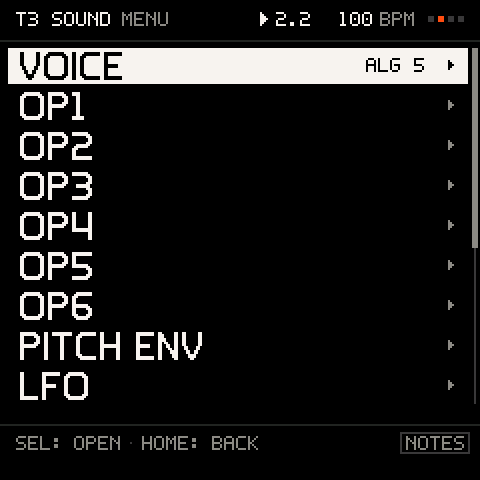
    The FM SOUND menu: VOICE, OP1–OP6, PITCH ENV, LFO, AMP ENV, PLAY, NAME.
  • Edit a VA sound in five pages of four knobs, SHIFT for more: OSC, FILTER, FILTER ENV, AMP ENV and LFO.

    Edit a VA sound in five pages of four knobs, SHIFT for more: OSC, FILTER, FILTER ENV, AMP ENV and LFO.

    Where
    EDIT on a VA track
    Numbers
    Wave, SUPER, detune, SUB, NOISE, pulse width, DRIFT · Cutoff, resonance, drive · 2 ADSRs · LFO to pitch and cutoff
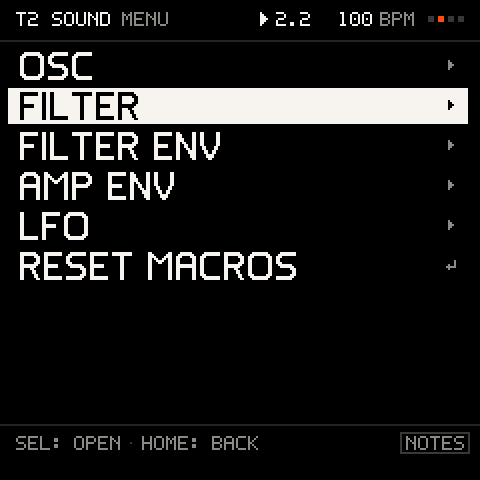
    The VA SOUND menu: OSC, FILTER, FILTER ENV, AMP ENV, LFO.
  • Every sound and kit in one list.

    Every sound and kit in one list. The first turn of PRESETS opens it and already moves one sound. Browsing auditions on a spare voice without changing the track; SEL takes it, on the next bar while the loop plays.

    Where
    Turn PRESETS
    Numbers
    179 entries, 242 with the pack · ALL, FAVOURITES, RECENT, PACK, SYSEX · 7 types · RECENT holds 8
    Limit
    A VA preset auditions only while a track slot is free: with 8 tracks it is silent while browsing (picking it still works). The stock banks have no type.
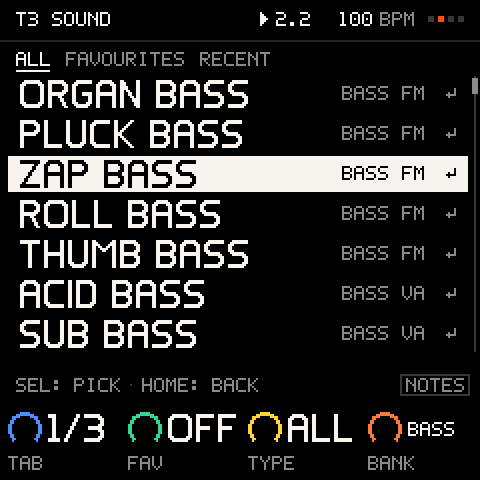
    PRESETS: one list by type, FM, VA and KIT side by side; turn to audition.
  • 32 FM sounds made for beat-making, levels matched to the factory presets: 14 drums and percussion, 6 basses, 8 keys, chords and stabs, 2 pads, a lead and an FX riser.

    32 FM sounds made for beat-making, levels matched to the factory presets: 14 drums and percussion, 6 basses, 8 keys, chords and stabs, 2 pads, a lead and an FX riser.

    Where
    Turn PRESETS, by type
    Numbers
    32 sounds
  • 16 VA sounds: ACID BASS, SUB BASS, FAT BASS, SUPER PAD, WARM PAD, PWM PAD, SAW LEAD, SQR LEAD, SCREAM, VA KEYS, ORGAN, PLUCK, BELL PLUCK, STAB, NOISE FX and INIT VA.

    16 VA sounds: ACID BASS, SUB BASS, FAT BASS, SUPER PAD, WARM PAD, PWM PAD, SAW LEAD, SQR LEAD, SCREAM, VA KEYS, ORGAN, PLUCK, BELL PLUCK, STAB, NOISE FX and INIT VA.

    Where
    Turn PRESETS
    Numbers
    16 sounds
  • 63 more VA sounds in nine styles, each with four macros that suit it: basses, subs and 808s, leads, pads and strings, keys and organs, plucks, stabs, brass and textures.

    63 more VA sounds in nine styles, each with four macros that suit it: basses, subs and 808s, leads, pads and strings, keys and organs, plucks, stabs, brass and textures. Add it from this site over USB and PRESETS lists them with the rest, each in its type and marked VA. It lives in its own part of the flash, outside your projects. Each style has a demo song. A song keeps the pack sounds it uses, so it plays the same on an FM-1 without the pack.

    Where
    /sounds · Turn PRESETS
    Numbers
    63 sounds · 9 styles, a demo song each
    Limit
    It installs while the music is stopped.
  • Copy a sound onto another track, start one from INIT, or put its macros back to 0.

    Copy a sound onto another track, start one from INIT, or put its macros back to 0.

    Where
    SOUND menu: COPY SOUND, PASTE SOUND, INIT SOUND, RESET MACROS
  • A DX7 voice sent over MIDI becomes the selected track's sound; a 32-voice bank opens as a SYSEX tab in the browser, after asking.

    A DX7 voice sent over MIDI becomes the selected track's sound; a 32-voice bank opens as a SYSEX tab in the browser, after asking.

    Where
    Send from a computer · Turn PRESETS > SYSEX
    Numbers
    One voice or a whole 32-voice bank
    Limit
    A received bank stays in the browser until it closes; it is not stored as a bank.
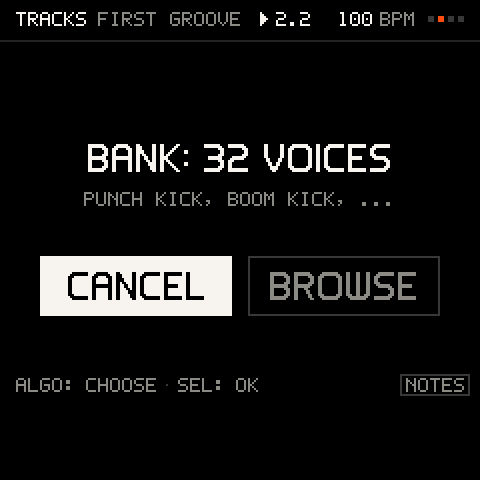
    A 32-voice bank arrives: cancel or browse it.
  • Three faults of the stock engine are patched at install: operator detune too wide, fast LFOs too slow, and a note that kept sounding after a velocity-0 note-on.

    Three faults of the stock engine are patched at install: operator detune too wide, fast LFOs too slow, and a note that kept sounding after a velocity-0 note-on.

    Where
    Automatic
    Numbers
    3 fixes · Algorithms 4 and 6 left stock

02 · Drums10 features

Eight pads on one track, from three kits as FM or VA drums. A drum-machine step grid, settings for every hit, and DICE for a fresh beat on the same sounds.
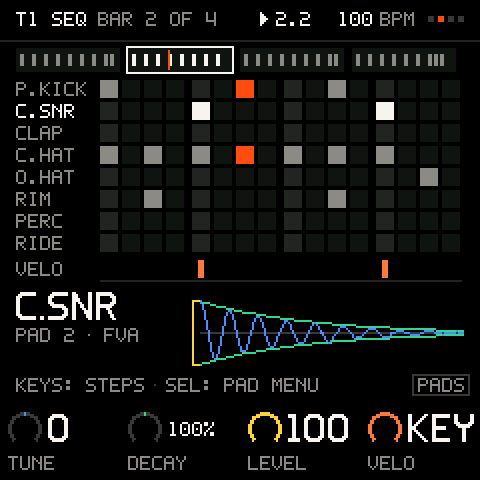
KIT: the pads by the 16 steps of a bar, the selected pad's hit below
  • A drum kit on one track: eight pads programmed and mixed as one part, so the drums take one track, not four.

    A drum kit on one track: eight pads programmed and mixed as one part, so the drums take one track, not four.

    Where
    + ADD TRACK > FM KIT or VA KIT · Turn PRESETS > KITS on an empty track
    Numbers
    8 pads
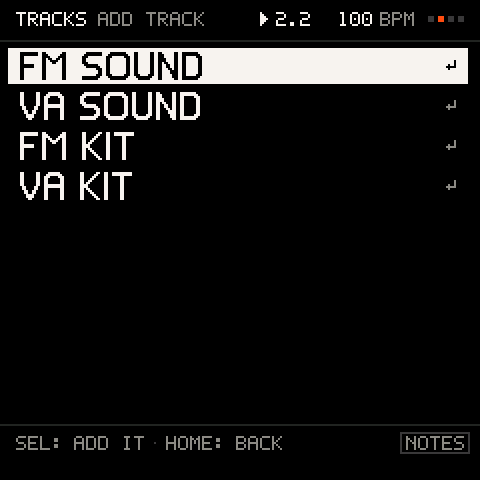
    ADD TRACK: an FM or VA sound, an FM or VA kit.
  • PUNCH, DUSTY and STEEL.

    PUNCH, DUSTY and STEEL. Picking another kit swaps the sounds under the same beat.

    Where
    Turn PRESETS > KITS · KIT menu > KIT
    Numbers
    3 kits · Each as FM or VA drums
  • Each pad plays one of 12 drum sounds or the track's own sound.

    Each pad plays one of 12 drum sounds or the track's own sound. A VA kit plays the VA model of the same name.

    Where
    PAD menu > SOUND
    Numbers
    PUNCH, BOOM, RUMBLE, DUSTY kicks · CRACK, DUSTY snares · CLAP · CLOSED HAT · OPEN HAT · RIDE · RIM · PERC
  • Per pad: TUNE, DECAY, LEVEL, CHOKE (a closed hat cuts the open one), SEND to the effects (or the track's own) and MUTE.

    Per pad: TUNE, DECAY, LEVEL, CHOKE (a closed hat cuts the open one), SEND to the effects (or the track's own) and MUTE.

    Where
    KIT view K1–K4: TUNE, DECAY, LEVEL, VELO · PAD menu
    Numbers
    TUNE ±12 semitones · DECAY −18 to +12 · LEVEL 0–100, 1 a click · 2 choke groups · SEND TRACK or 0–100 %, 1 a click
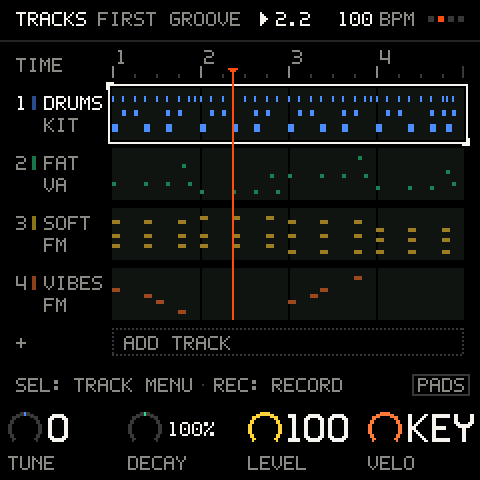
    A KIT track selected: K1–K4 are the pad's TUNE, DECAY, LEVEL and VELO.
  • Pads by steps, TR style: the white keys are the 16 steps of the bar (tap to set, hold for the cursor), the black keys pick the pad, OCT− and OCT+ the bar.

    Pads by steps, TR style: the white keys are the 16 steps of the bar (tap to set, hold for the cursor), the black keys pick the pad, OCT− and OCT+ the bar. The grid follows the playhead.

    Where
    SEQ on a kit track
    Numbers
    16 steps a bar · Up to 4 bars
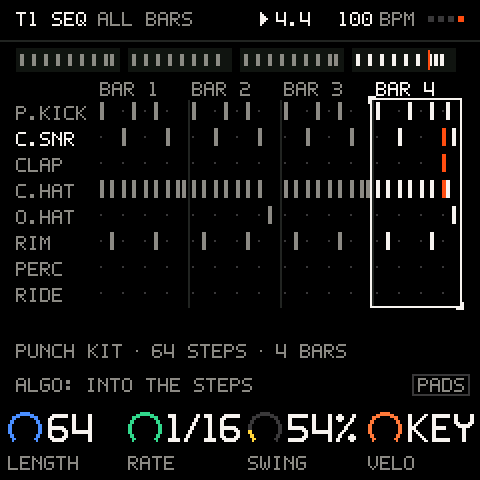
    Every pad over the four bars.
  • Every hit has its own velocity, condition, chance, ratchet, flam and nudge.

    Every hit has its own velocity, condition, chance, ratchet, flam and nudge. On a hit the PAD menu opens on HIT VELO, and it comes back to the row you used last.

    Where
    SEL on a hit: PAD menu
    Numbers
    RATCHET 1–4 · FLAM about 15 ms · 11 conditions
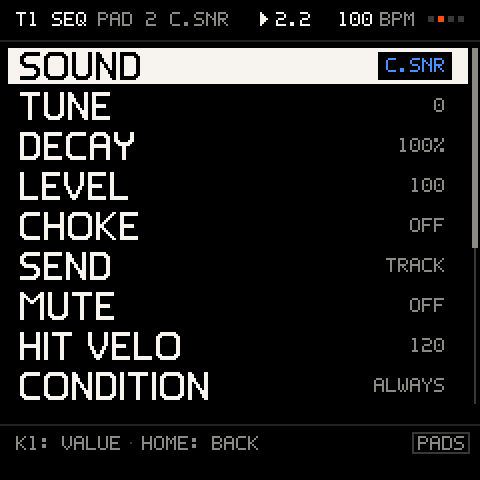
    The PAD menu: SOUND, TUNE, DECAY, LEVEL, CHOKE, SEND, MUTE, HIT VELO, CONDITION ...
  • Fixed or key velocity for the whole kit, tune or decay every pad at once, clear every hit.

    Fixed or key velocity for the whole kit, tune or decay every pad at once, clear every hit. Make the beat longer and its bars repeat into the new ones, one undo to take them back.

    Where
    KIT menu: KIT, VELO, ALL TUNE, ALL DECAY, CLEAR ALL HITS · Pattern row: LENGTH, RATE, SWING (the project's), VELO
    Limit
    A kit's grid runs at 1/16, and kits have no stored patterns A–P: a kit's beat is its track's recording.
  • With a kit track selected, the keys play its pads and REC records them like notes.

    With a kit track selected, the keys play its pads and REC records them like notes.

    Where
    TRACKS, a kit track selected
  • Each pad has one voice (a new hit cuts the last) and all kits together use at most 6 of the 12 FM voices, so a busy beat does not steal the bass's notes.

    Each pad has one voice (a new hit cuts the last) and all kits together use at most 6 of the 12 FM voices, so a busy beat does not steal the bass's notes. The starters stay within 10 of 12, with room to play along.

    Where
    Automatic
    Numbers
    6 of 12 FM voices for drums
  • One press writes a new beat for the selected kit, on the same sounds.

    One press writes a new beat for the selected kit, on the same sounds. Each roll is one undo.

    Where
    SHIFT + SEQ on a kit track

03 · Sequencer16 features

Up to eight tracks, each looping over its own 1 to 8 bars. Patterns of up to 64 steps with conditions, ratchets and parameter locks, 16 stored patterns and chains.
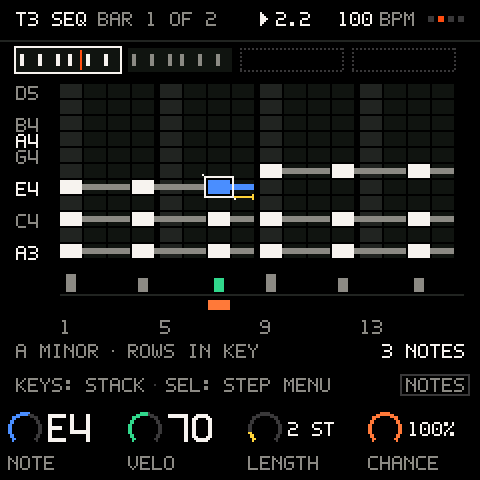
SEQ: a pattern as a grid in key, chords stacked on the steps
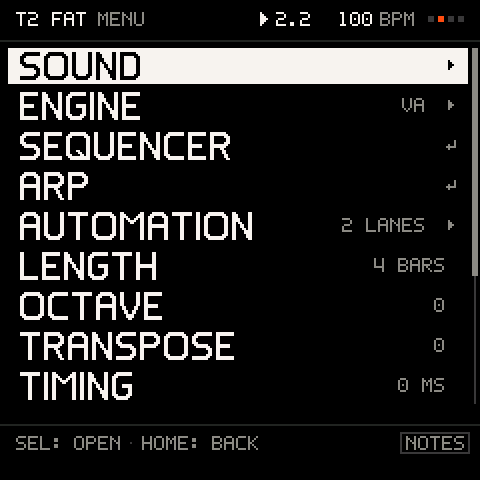
  • Add, duplicate, rename and delete tracks; each is a lane on TRACKS with its notes, its loop end and the playhead.

    Add, duplicate, rename and delete tracks; each is a lane on TRACKS with its notes, its loop end and the playhead.

    Where
    TRACKS · + ADD TRACK · TRACK menu: RENAME, DUPLICATE, CLEAR, DELETE
    Numbers
    1–8 tracks · 5 track types · Names of 5 letters
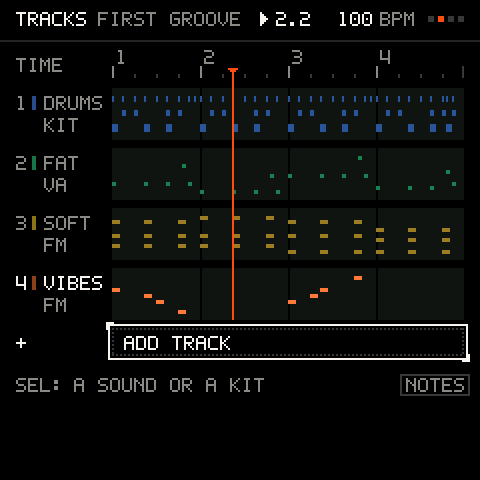
    + ADD TRACK under the lanes: up to eight tracks.
  • Each track loops over its own length, so a 1-bar hat and a 4-bar chord part run together and line up again by themselves.

    Each track loops over its own length, so a 1-bar hat and a 4-bar chord part run together and line up again by themselves. A longer loop repeats what was there, and one undo takes the copies and the length back.

    Where
    TRACK menu > LENGTH · SHIFT + F3, G3, A3, B3
    Numbers
    1–8 bars · 4/4
    SEL on a track: SOUND, ENGINE, SEQUENCER, ARP, AUTOMATION, LENGTH, OCTAVE ...
  • REC, mutes, solos, pattern and length changes wait for the next beat or bar line, so they land in time.

    REC, mutes, solos, pattern and length changes wait for the next beat or bar line, so they land in time. What is waiting blinks.

    Where
    TIME menu > LAUNCH · SHIFT + C4, D4, E4
    Numbers
    OFF · BEAT · BAR
  • Tempo and swing for the project, and tap tempo from three places.

    Tempo and swing for the project, and tap tempo from three places.

    Where
    TRACKS time row: K1 TEMPO, K2 SWING · TIME menu > TAP TEMPO · SHIFT + F#5
    Numbers
    40–240 BPM · Swing 50–75 %
    The TIME row: TEMPO, SWING, QUANT and CLICK on the knobs.
  • Hold PLAY and turn K1 on any page: the tempo moves 1 BPM a click and the music keeps playing when you let go.

    Hold PLAY and turn K1 on any page: the tempo moves 1 BPM a click and the music keeps playing when you let go. PLAY starts on the press and stops on the release, unless the hold set the tempo.

    Where
    Hold PLAY + K1 · SHIFT + SELECT
    Numbers
    1 BPM a click
  • Shift one track's pitch or its timing against the others.

    Shift one track's pitch or its timing against the others. OCT− and OCT+ change only the selected track's octave.

    Where
    TRACK menu: TRANSPOSE, OCTAVE, TIMING · OCT−, OCT+
    Numbers
    Transpose ±24 · Octave ±3 · Timing ±12 ticks, shown in ms
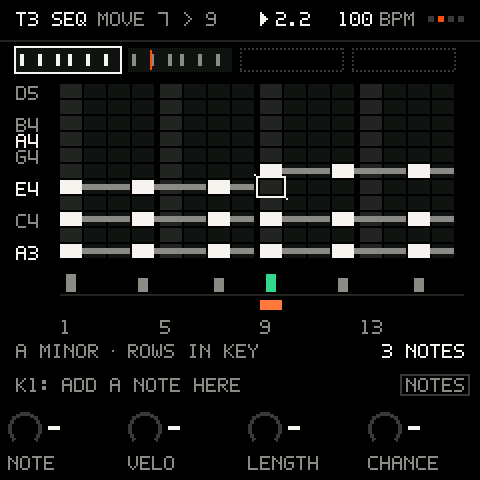
  • Every sound track has its own step pattern on a grid: steps across, the scale's notes down (named as they sound, after the track's octave), each note's length as a bar.

    Every sound track has its own step pattern on a grid: steps across, the scale's notes down (named as they sound, after the track's octave), each note's length as a bar. All the patterns play together. SEQ opens the selected track's grid and switches its pattern on; on the grid, SEQ switches it off.

    Where
    SEQ
    Numbers
    1–64 steps · 16 a page · Up to 4 notes a step · 11 note rows on screen
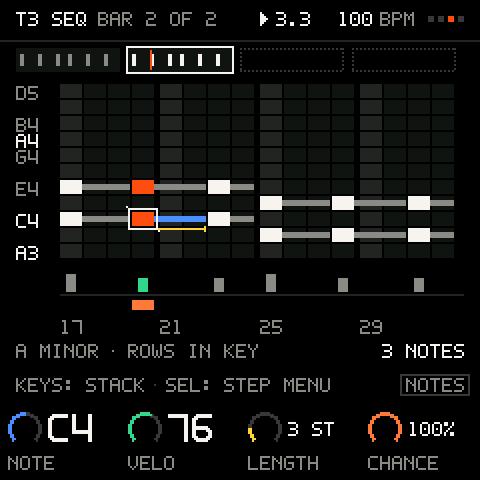
    Bar 2 of a two-bar chord pattern; the bar strip above shows both.
  • A key writes its note at the cursor and steps on; keys held together write a chord, and the view follows its lowest note.

    A key writes its note at the cursor and steps on; keys held together write a chord, and the view follows its lowest note. SEQ + a key writes a rest. SEL + a white key jumps to that step of the cursor's bar, SEL + OCT picks the bar, and the header names the step (STEP 11 OF 32). Hold SEL and turn ALGORITHM to move a step.

    Where
    SEQ view
    Hold SEL and turn: carry a step somewhere else.
  • Per step: each note's velocity, RATCHET, CONDITION, CHANCE, ACCENT, SLIDE, TIE, FLAM and TRANSPOSE; copy, paste and clear.

    Per step: each note's velocity, RATCHET, CONDITION, CHANCE, ACCENT, SLIDE, TIE, FLAM and TRANSPOSE; copy, paste and clear.

    Where
    SEQ view K1–K4: NOTE, VELO, LENGTH, CHANCE · SEL on a step: STEP menu
    Numbers
    RATCHET 1–4 · CHANCE in 5 % steps · 11 conditions
    Limit
    The notes of one step share its length.
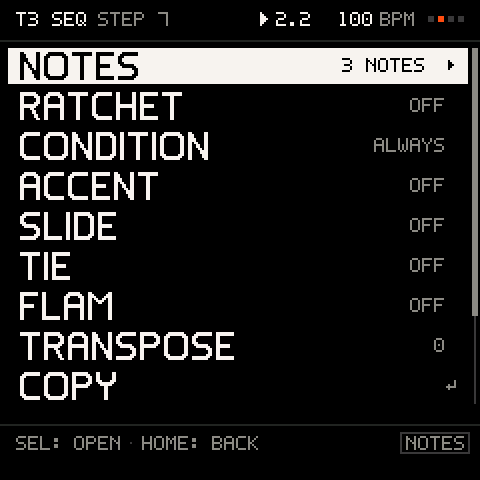
    The STEP menu: NOTES, RATCHET, CONDITION, ACCENT, SLIDE, TIE, FLAM ...
  • Pattern length, rate, swing, gate, play direction and transpose.

    Pattern length, rate, swing, gate, play direction and transpose. Make a pattern longer by whole bars and its bars repeat into the new ones, one undo to take them back.

    Where
    SEQ pattern row K1–K4: LENGTH, RATE, SWING, GATE · PATTERN menu
    Numbers
    1–64 steps · 6 rates · Gate 10–100 %, 1 a click · FWD, REV, PING, RAND
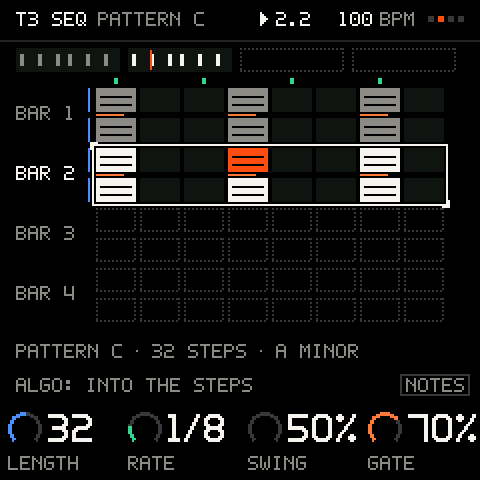
    The pattern row: LENGTH, RATE, SWING, GATE over an overview of every bar.
  • Keep up to 16 patterns per project, switch a track between them at the pattern's end, and chain them per track.

    Keep up to 16 patterns per project, switch a track between them at the pattern's end, and chain them per track.

    Where
    PATTERN menu: PATTERN, STORE, LOAD, CHAIN
    Numbers
    16 patterns (A–P), shared by all tracks · Chains of up to 16
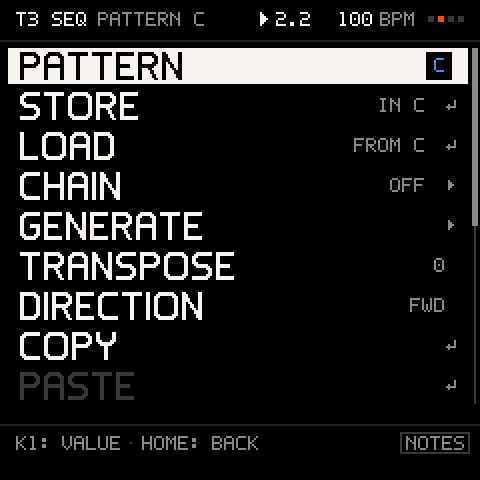
    The PATTERN menu: store, load and chain patterns A–P, GENERATE, TRANSPOSE ...
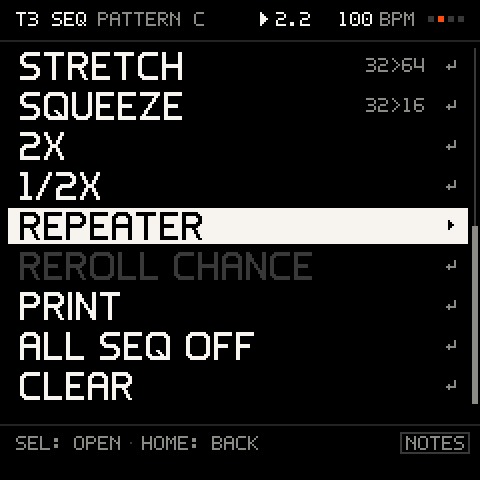
  • Reshape a pattern in one move: STRETCH, SQUEEZE, 2X, 1/2X, REPEATER (repeat a run of steps), REROLL CHANCE, COPY, PASTE, CLEAR.

    Reshape a pattern in one move: STRETCH, SQUEEZE, 2X, 1/2X, REPEATER (repeat a run of steps), REROLL CHANCE, COPY, PASTE, CLEAR. While playing, they land at the pattern's end.

    Where
    PATTERN menu
    STRETCH, SQUEEZE, 2X, 1/2X, REPEATER, REROLL CHANCE, PRINT.
  • While playing, the grid shows the bar being played; after an edit it holds still for 2 s.

    While playing, the grid shows the bar being played; after an edit it holds still for 2 s.

    Where
    SEQ and KIT views
    Numbers
    Holds 2 s
  • Hold a step and turn a knob: that step plays with its own macro values (SEQ) or its own pad tune, decay, level and velocity (KIT).

    Hold a step and turn a knob: that step plays with its own macro values (SEQ) or its own pad tune, decay, level and velocity (KIT). Locked steps are marked.

    Where
    Hold SEQ + K1–K4 (SEQ view) · Hold a step key + K1–K4 (KIT view)
    Numbers
    64 per project
    Limit
    A VA lock holds from its step to the next note. MIDI OUT tracks have none, and DUPLICATE, PASTE and PRINT do not carry locks.
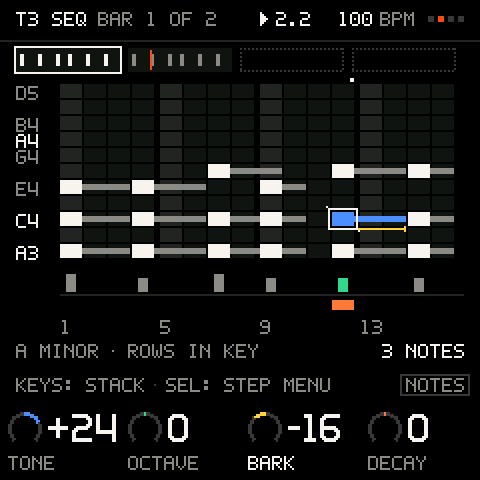
    Hold SEQ and turn: the step gets its own value of a macro (a p-lock).
  • Turns a step pattern or the arp into a recording on its track in one press: one take, undoable.

    Turns a step pattern or the arp into a recording on its track in one press: one take, undoable.

    Where
    SHIFT + SAVE on SEQ or ARP
    Numbers
    The track's whole length
  • One press writes a new line for the selected sound track, in key, with the same rhythm feel.

    One press writes a new line for the selected sound track, in key, with the same rhythm feel. GENERATE sets how.

    Where
    SHIFT + SEQ · PATTERN menu > GENERATE
    Numbers
    DENSITY AUTO or 1–100 % · RANGE 1–3 octaves · KEEP FREE, RHYTHM or NOTES

04 · Keys and chords8 features

Pick one of 12 scales on any of 12 roots and the keys keep to it. Chord pads, chords on every key, and an arpeggiator with 5 modes over 1 to 4 octaves.
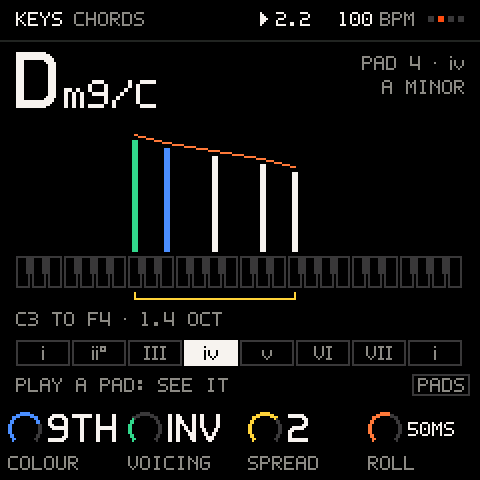
The CHORDS editor: a Dm9/C chord, its notes on the keys
  • Hold a chord and the arp plays it on the selected track, in time with the loop; LATCH keeps it going, PRINT records it.

    Hold a chord and the arp plays it on the selected track, in time with the loop; LATCH keeps it going, PRINT records it. A picture shows what it will play.

    Where
    ARP: K1–K4 MODE, RATE, OCTAVES, GATE · SEL: LATCH, SWING, VELOCITY, CHORDS
    Numbers
    5 modes · 1–4 octaves · 6 rates · Gate 10–100 % · Swing to 75 %, 1 a click · Holds 10 notes
    Limit
    One arp, on the selected track. A track plays its ARP or its SEQ, not both.
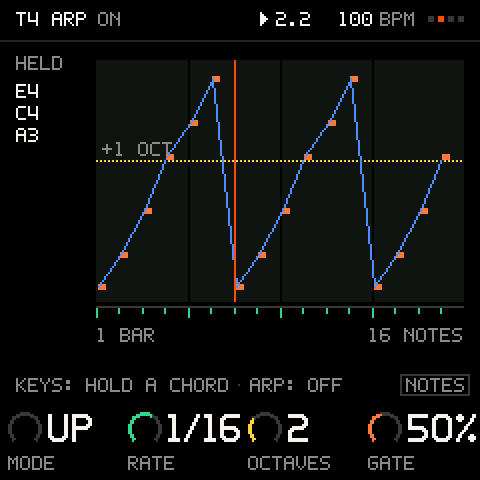
    ARP: the pattern it plays from the chord held, drawn over one bar.
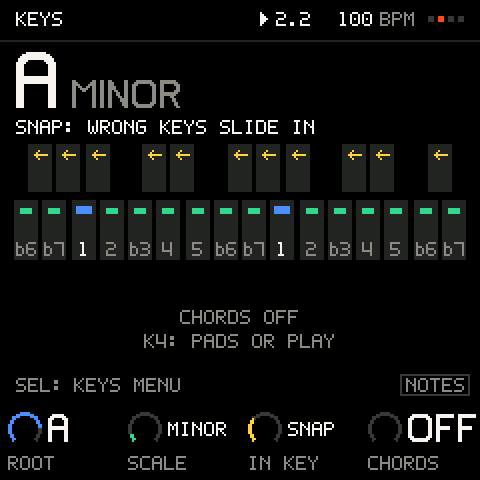
  • The keys play only the chosen scale: SNAP slides a wrong key to the nearest right note, FILTER silences it, WHITE puts the scale on the white keys.

    The keys play only the chosen scale: SNAP slides a wrong key to the nearest right note, FILTER silences it, WHITE puts the scale on the white keys. The scales: MAJOR, MINOR, DORIAN, PHRYGIAN, LYDIAN, MIXOLYDIAN, LOCRIAN, HARMONIC MINOR, MELODIC MINOR, MAJOR PENTA, MINOR PENTA, BLUES.

    Where
    KEYS view: K1 ROOT, K2 SCALE, K3 IN KEY
    Numbers
    12 scales · 12 roots · 4 modes
    KEYS: A minor; SNAP slides a wrong key to the nearest right one.
  • The eight white keys from C are chord pads, and each plays the chord of your key on its own letter: in A minor the A key plays Am, the D key Dm.

    The eight white keys from C are chord pads, and each plays the chord of your key on its own letter: in A minor the A key plays Am, the D key Dm. The keys to their left LATCH, arpeggiate up or down, invert up or down, SPLIT (bass, then chord) and L+R.

    Where
    KEYS: K4 CHORDS = PADS · SHIFT + SEL toggles OFF and PADS
    Numbers
    8 pads, C to C, rising · 6 performance keys + latch
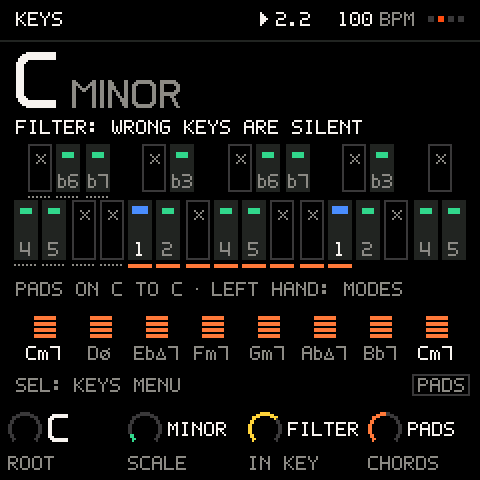
    FILTER: wrong keys stay silent; chord PADS on the left hand.
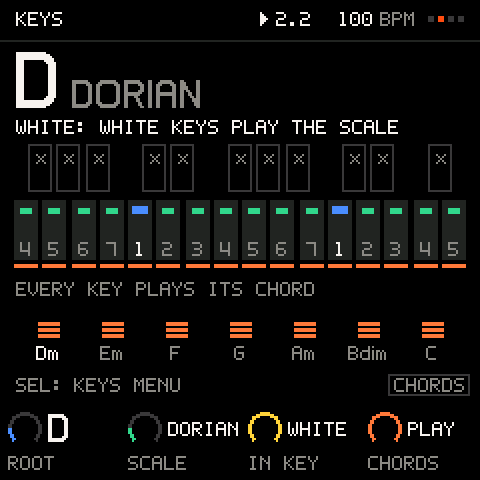
  • Every in-key key plays the chord on its degree.

    Every in-key key plays the chord on its degree.

    Where
    KEYS: K4 CHORDS = PLAY
    WHITE: the scale on the white keys; CHORDS PLAY: every key plays its chord.
  • How the chords sound: COLOUR (triads to extended), VOICING (root position, voice-led inversions, substitutes, borrowed chords), SPREAD (close to about 3 octaves) and ROLL, a strum.

    How the chords sound: COLOUR (triads to extended), VOICING (root position, voice-led inversions, substitutes, borrowed chords), SPREAD (close to about 3 octaves) and ROLL, a strum.

    Where
    KEYS menu > CHORDS
    Numbers
    5 colours · 4 voicings · 4 spreads · 8 strum times, 0–150 ms
    The CHORDS editor: COLOUR, VOICING, SPREAD, ROLL, the chord's notes on the keys.
  • A chord pad played on the SEQ view writes its chord into the step.

    A chord pad played on the SEQ view writes its chord into the step.

    Where
    SEQ view, CHORDS on
    Numbers
    Up to 4 notes a step
  • Latch, a velocity curve or a fixed velocity, scale lights on the keys, and picking the root by pressing a key.

    Latch, a velocity curve or a fixed velocity, scale lights on the keys, and picking the root by pressing a key.

    Where
    KEYS menu: LATCH, VELO CURVE, FIXED VELO, SCALE LEDS, ROOT BY KEY
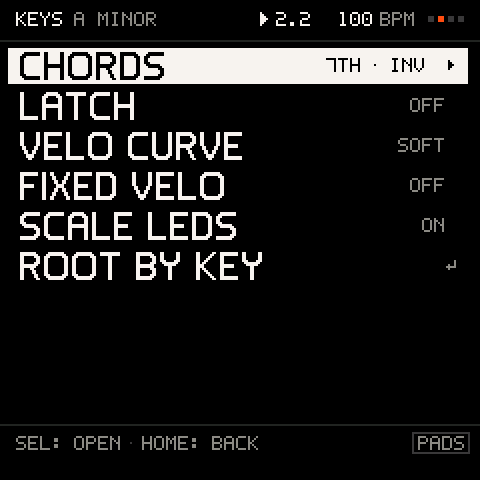
    The KEYS menu: CHORDS, LATCH, VELO CURVE, FIXED VELO, SCALE LEDS, ROOT BY KEY.
  • The screen always says what the keys do now (NOTES, PADS, CHORDS, MUTES, LETTERS); the key LEDs light the in-key notes, the root and, on PERFORM, what is playing.

    The screen always says what the keys do now (NOTES, PADS, CHORDS, MUTES, LETTERS); the key LEDs light the in-key notes, the root and, on PERFORM, what is playing.

    Where
    Every view
    Numbers
    5 key modes
    Limit
    The key LEDs are on or off, with no dim level.

05 · Mix and effects5 features

A strip per track with level, mute, solo and send, a master strip, and the six effects in one chain you can reorder. A soft limiter keeps loud mixes from clipping.
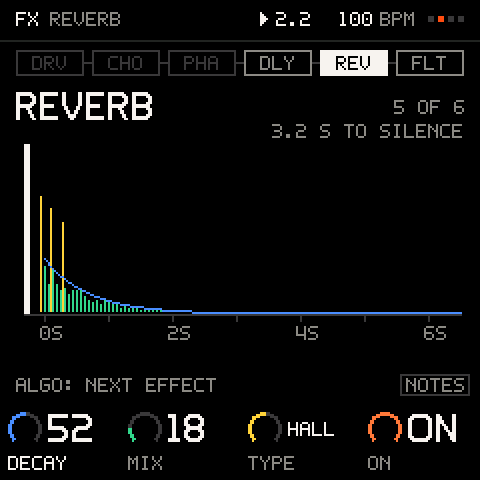
FX: the reverb in the chain, its decay drawn
  • One strip per track: level, mute, solo and send to the effects.

    One strip per track: level, mute, solo and send to the effects. Mutes and solos wait for the launch line; SOLO is exclusive, SHIFT adds more.

    Where
    MIX view: K1 LEVEL, K2 MUTE, K3 SOLO, K4 SEND
    Numbers
    Level 0–100 · SEND 0–100 % · 1 a click, 10 with SEL held · 5 strips on screen, scrolling
    Limit
    The meter shows that a track is playing, not a measured level.
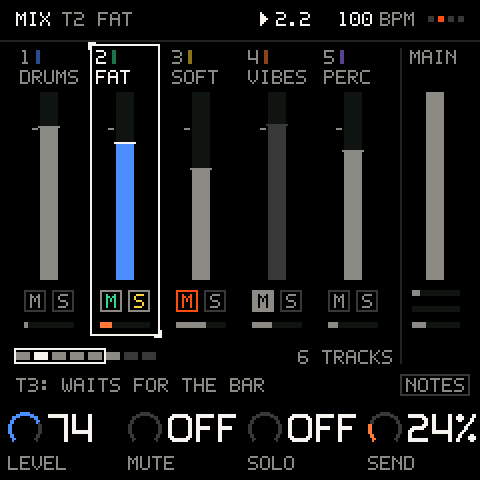
    MIX: a strip per track, LEVEL, MUTE, SOLO and SEND on the knobs, MAIN pinned.
  • The four master moves on one strip: reverb amount, delay amount, drive and the master filter.

    The four master moves on one strip: reverb amount, delay amount, drive and the master filter.

    Where
    MIX > MAIN: SPACE, ECHO, DRIVE, FILTER · SEL opens FX
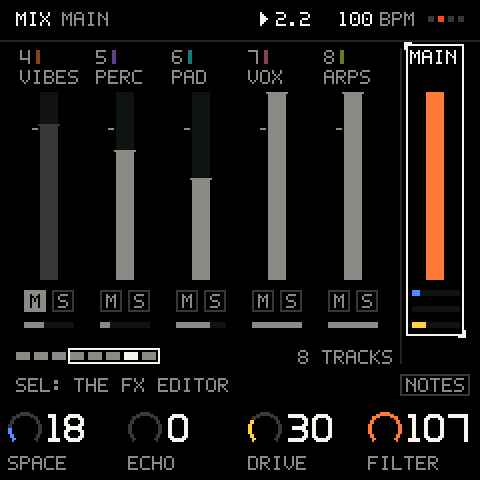
    MAIN: SPACE, ECHO, DRIVE, FILTER for the whole mix; SEL opens the FX.
  • The FM-1's six effects in any order, one page each with a picture: FILTER (LP, BP, HP), REVERB (ROOM, HALL, PLATE), DELAY, DRIVE, CHORUS and PHASER.

    The FM-1's six effects in any order, one page each with a picture: FILTER (LP, BP, HP), REVERB (ROOM, HALL, PLATE), DELAY, DRIVE, CHORUS and PHASER. Each on or off, a bypass for all, saved with the project. REVERB, DELAY, CHORUS and PHASER switch on and off by their mix, with no dip in the sound.

    Where
    FX · MIX > MAIN > SEL
    Numbers
    6 effects · 3 or 4 values each
    Limit
    One chain, shared by every track. An effect's first switch-on since power-up, FILTER or DRIVE on or off, a type, the order and the bypass still fade the sound for a moment.
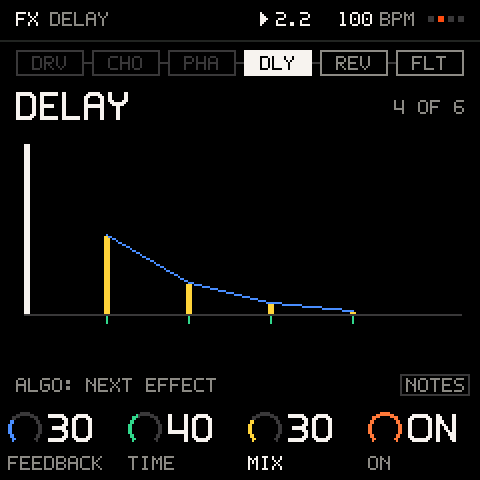
    FX, one effect at a time in chain order, each with its picture: DELAY, the repeats drawn.
  • Each track and each kit pad sets how much of it goes through the effects, so the kick stays dry while the chords get the reverb.

    Each track and each kit pad sets how much of it goes through the effects, so the kick stays dry while the chords get the reverb.

    Where
    MIX: K4 SEND · PAD menu > SEND
    Numbers
    0–100 % · A pad: TRACK or 0–100 %
  • A soft limiter after the effects keeps loud mixes from clipping hard, without pumping.

    A soft limiter after the effects keeps loud mixes from clipping hard, without pumping.

    Where
    Automatic
    Numbers
    From −1.2 dBFS
    Limit
    There is no clip light on screen.

06 · Performance10 features

A view built for the stage: 8 mutes and 8 punch-in effects on the white keys, 11 scenes on the black keys, and four throws on K1–K4 that never change the song.
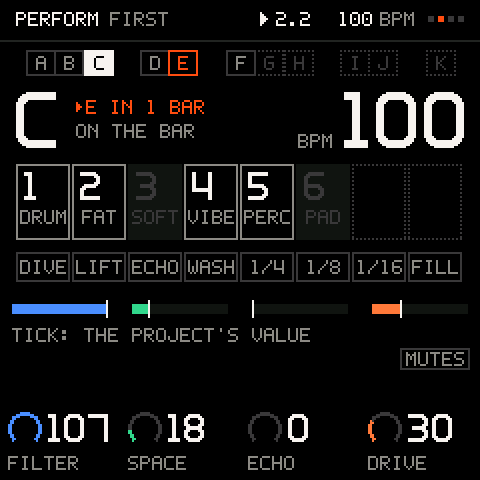
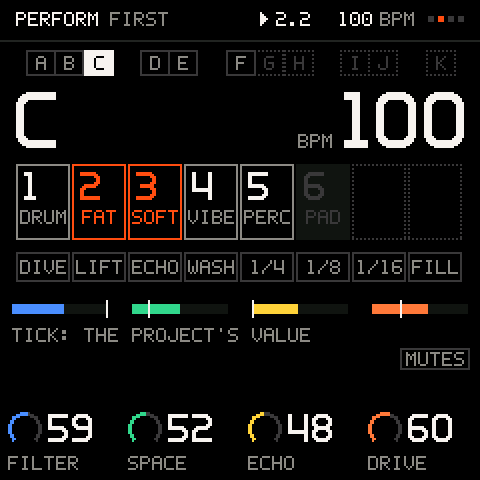
PERFORM: scenes on the black keys, mutes and punch-ins on the white
  • A screen for playing a song live: big type for scenes and tempo, a cell per track, the punch-ins and the throws, readable at arm's length.

    A screen for playing a song live: big type for scenes and tempo, a cell per track, the punch-ins and the throws, readable at arm's length.

    Where
    SELECT to PERFORM
    PERFORM: the mutes landed together on the bar.
  • White keys 1–8 mute and unmute tracks on the next launch line.

    White keys 1–8 mute and unmute tracks on the next launch line. Hold one to solo it while held; hold SHIFT and tap several to drop them in or out together.

    Where
    PERFORM: white keys 1–8
    Numbers
    8 tracks
    SHIFT held: tapped mutes are staged and land together.
  • Mute a kit's pads instead of the whole kit, for the classic drop: hold SEL and tap white keys 1–8, and the kick drops out on the launch line while the hats play on.

    Mute a kit's pads instead of the whole kit, for the classic drop: hold SEL and tap white keys 1–8, and the kick drops out on the launch line while the hats play on. The keys show which pads play.

    Where
    PERFORM: hold SEL + white keys 1–8
    Numbers
    8 pads
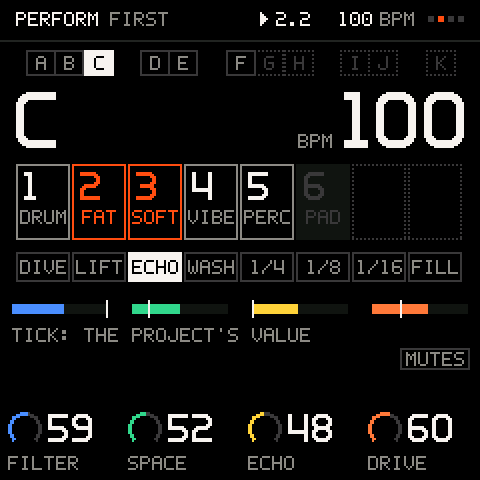
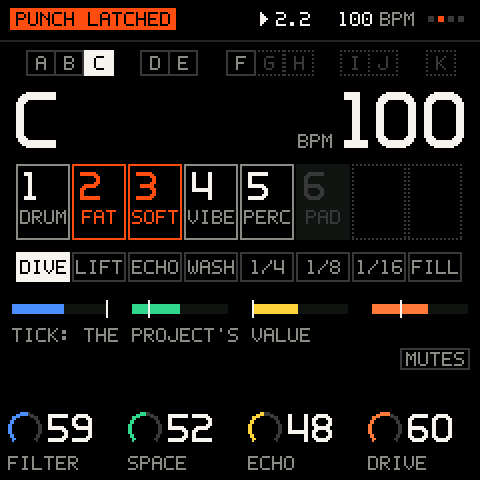
  • White keys 9–16 are effects you hold, or tap to latch: DIVE (filter down), LIFT (filter up with resonance), ECHO (every note three times), WASH (more reverb), REPEAT 1/4, 1/8, 1/16 (loop the current slice) and FILL.

    White keys 9–16 are effects you hold, or tap to latch: DIVE (filter down), LIFT (filter up with resonance), ECHO (every note three times), WASH (more reverb), REPEAT 1/4, 1/8, 1/16 (loop the current slice) and FILL.

    Where
    PERFORM: white keys 9–16
    Numbers
    8 punch-ins
    A punch-in latched: DIVE, held over the mix.
  • K1–K4 sweep the filter, reverb, delay and drive of the whole mix and stay where you leave them; SHIFT + SEL glides all four back over one bar.

    K1–K4 sweep the filter, reverb, delay and drive of the whole mix and stay where you leave them; SHIFT + SEL glides all four back over one bar. A throw never changes the song.

    Where
    PERFORM: K1–K4 · SHIFT + SEL
    Numbers
    4 throws · Back in 1 bar
    Limit
    A throw only works on an effect that is on (the starters have them on).
  • Hold the FILL key: steps marked FILL play, NOT FILL steps rest, and kit tracks without such steps play a busier variation.

    Hold the FILL key: steps marked FILL play, NOT FILL steps rest, and kit tracks without such steps play a busier variation. Nothing is stored.

    Where
    PERFORM: white key 16 · Step CONDITION
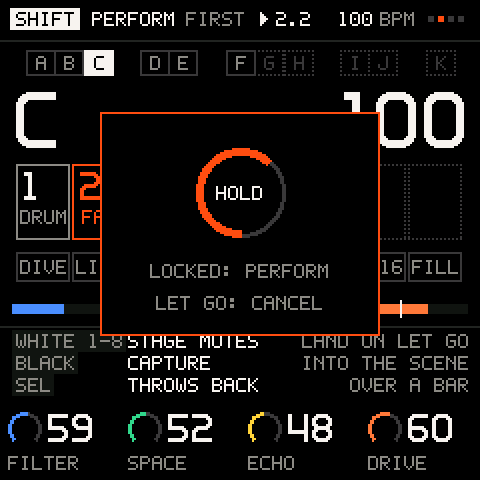
  • While playing, nothing on PERFORM can delete, and a knock on SELECT does not leave the view: it takes two detents.

    While playing, nothing on PERFORM can delete, and a knock on SELECT does not leave the view: it takes two detents.

    Where
    PERFORM
    Hold SHIFT + REC: PERFORM locks, nothing on stage deletes anything.
  • SEL taps the tempo.

    SEL taps the tempo.

    Where
    PERFORM: SEL
  • A scene is which stored pattern each track plays, plus the mutes.

    A scene is which stored pattern each track plays, plus the mutes. Capture one onto a black key; press it to launch on the next bar, press again before the bar to cancel. The header says what is coming (E IN 1 BAR). Saved with the project.

    Where
    PERFORM: SHIFT + black key captures · Black key launches
    Numbers
    11 scenes (A–K)
    Limit
    No scene menu (rename, copy, clear), no automatic next scene and no per-scene transpose. REC on PERFORM records notes, not scene changes.
    PERFORM: scenes on the black keys, a mute and a scene queued to the bar.
  • Switch a track to another stored pattern while the loop plays: the switch lands at the pattern's end, and a chain plays its patterns in turn.

    Switch a track to another stored pattern while the loop plays: the switch lands at the pattern's end, and a chain plays its patterns in turn.

    Where
    PATTERN menu
    Numbers
    16 patterns · Chains of 16

07 · Recording and undo9 features

Every recorded pass is a take you can undo, and SHIFT + SAVE keeps the loop you just played even with REC off. Knob moves record as automation; undo has 16 steps across all tracks.
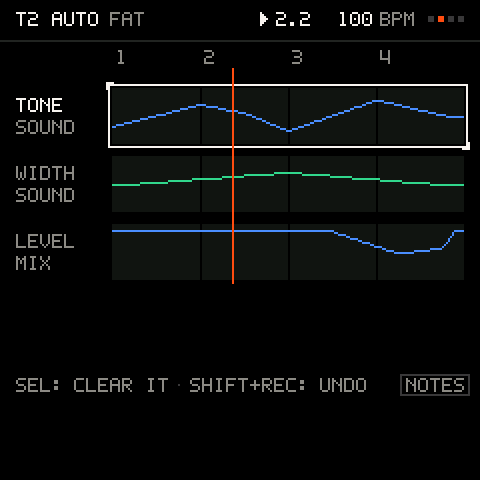
AUTOMATION: a lane per recorded knob move
  • REC records the selected track while the loop plays; every pass is a take that undo can take back.

    REC records the selected track while the loop plays; every pass is a take that undo can take back. A count-in and a click help.

    Where
    REC · TIME menu: COUNT-IN, CLICK VOL · SHIFT + A4 click, B4 count-in, F4 and G4 quantise
    Numbers
    Count-in 1 bar · Click with its own volume · Input quantise OFF or 1/16
    Limit
    Overdub only, with no replace mode; 4/4 only.
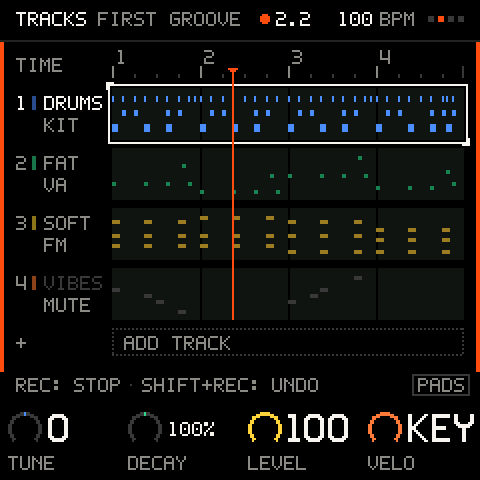
    Recording onto a lane: the header turns red, the take lands as you play.
  • Play along without recording; when a pass was good, keep it: the last loop of the selected track, notes and knob moves, becomes a take.

    Play along without recording; when a pass was good, keep it: the last loop of the selected track, notes and knob moves, becomes a take. Pressed up to a beat after the loop comes round, it keeps the whole pass that just ended.

    Where
    SHIFT + SAVE
    Numbers
    Remembers 128 note on and off events · 64 knob moves
  • REC records knob moves with the notes, and they play back every loop.

    REC records knob moves with the notes, and they play back every loop. Each track shows its moves as lanes; hold SEL and turn a knob to clear its lane.

    Where
    REC + turn · TRACK menu > AUTOMATION · Hold SEL on TRACKS
    Numbers
    96 breakpoints per track · Macros, level, SEND and 7 effect values
    Limit
    On FM tracks a macro move takes effect from the next note, not inside a held one. Lanes cannot be reshaped (no depth, offset or smoothing).
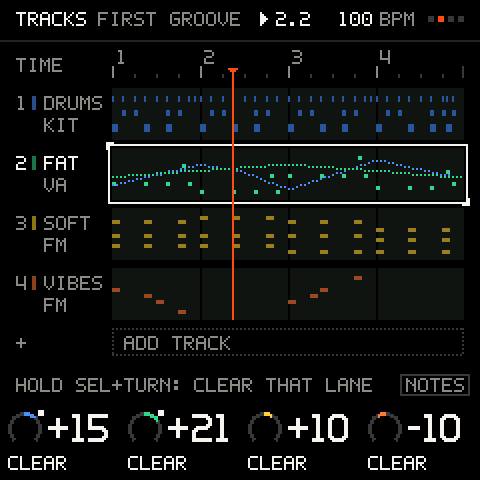
    Hold SEL on TRACKS: the track's knob lanes over its notes.
  • How much a recording holds.

    How much a recording holds. A note is 2 events; step patterns do not count against it.

    Numbers
    384 events per track · 1,536 per project
    Limit
    A take past these numbers stops, and the screen says FULL.
  • Undo takes back the last thing done on any track and redo brings it back, in order, and the screen names it (UNDO T3 DICE): takes, PRINT, capture, clears, DICE, a longer loop, a deleted track, pattern transforms and lock edits.

    Undo takes back the last thing done on any track and redo brings it back, in order, and the screen names it (UNDO T3 DICE): takes, PRINT, capture, clears, DICE, a longer loop, a deleted track, pattern transforms and lock edits. After each new one a toast says what undo would take (SHIFT+REC: UNDO T3 DICE).

    Where
    Tap SHIFT + REC undo · SHIFT + PLAY redo
    Numbers
    16 steps
    Limit
    Pattern edits (DICE on a pattern, transforms, clearing a step) and lock edits keep only their newest undo.
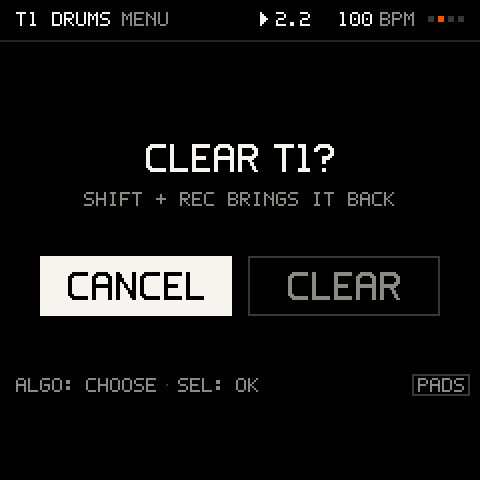
  • Every destructive action is one gesture on whatever the cursor is on, and it asks first, with CANCEL as the default.

    Every destructive action is one gesture on whatever the cursor is on, and it asks first, with CANCEL as the default.

    Where
    Hold SHIFT + REC, everywhere
    Anything that deletes asks first, CANCEL first; SHIFT + REC brings it back.
  • Copy and paste a step, a pattern, a pad or a sound; duplicate a track.

    Copy and paste a step, a pattern, a pad or a sound; duplicate a track.

    Where
    STEP, PATTERN, PAD and SOUND menus · TRACK menu > DUPLICATE
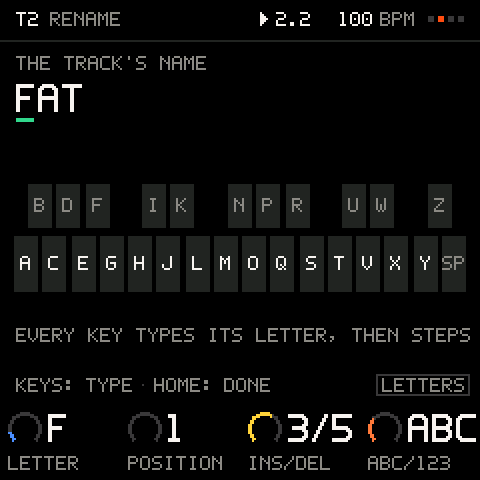
  • Each key types a letter, for track and project names; the first key starts a new name.

    Each key types a letter, for track and project names; the first key starts a new name. A new song can be named before its first save.

    Where
    TRACK menu > RENAME · PROJECT slot > RENAME
    Numbers
    Tracks 5 letters · Projects 12
    RENAME: every key types its letter.
  • Every value from 0 to 100 moves one step a click, so you land on any number: macros, levels, sends, the click, gate, density, swing.

    Every value from 0 to 100 moves one step a click, so you land on any number: macros, levels, sends, the click, gate, density, swing. Knobs speed up as you turn faster, and holding SEL moves any number ten at a time, on every page.

    Where
    Any number
    Numbers
    1 a click · ×10 with SEL

08 · Projects7 features

Three slots and an autosave on the unit, five starters that play the moment you load them, and projects as .groove files you can copy to a computer.
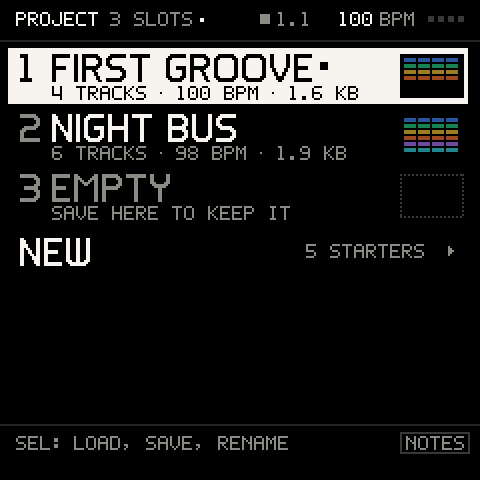
PROJECT: three slots, each with its tracks, tempo and size
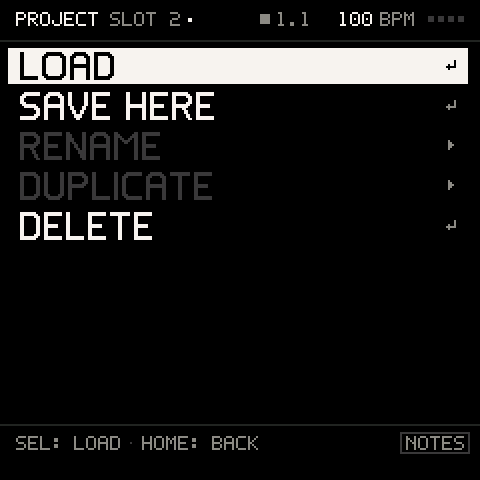
  • Save, load, rename, duplicate and delete projects on the FM-1.

    Save, load, rename, duplicate and delete projects on the FM-1. Each slot shows tracks, tempo, size and a thumbnail of the lanes; a dot in the header marks unsaved changes.

    Where
    SAVE · PROJECT view
    Numbers
    3 slots
    A slot: LOAD, SAVE HERE, RENAME, DUPLICATE, DELETE.
  • Ready-made projects with drums, bass, chords and a lead already playing their patterns, a variation stored next to each, in A minor with IN KEY on.

    Ready-made projects with drums, bass, chords and a lead already playing their patterns, a variation stored next to each, in A minor with IN KEY on.

    Where
    PROJECT > NEW
    Numbers
    5 starters: FIRST GROOVE 100, PUNCH 124, DUSTY 86, STEEL 130, EMPTY 120 BPM · 4 tracks each
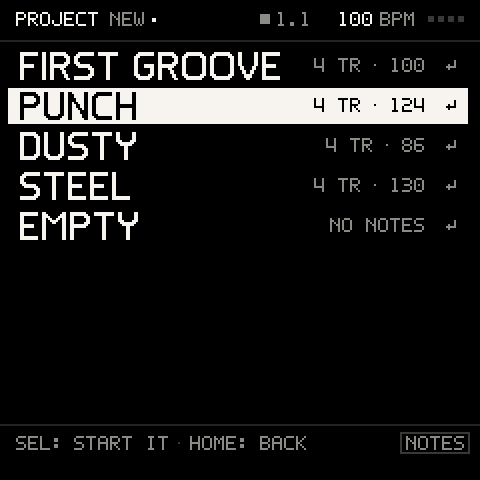
    FIRST GROOVE, PUNCH, DUSTY, STEEL, EMPTY: each a groove that plays at once.
  • A factory-fresh unit starts on FIRST GROOVE: press PLAY and it plays.

    A factory-fresh unit starts on FIRST GROOVE: press PLAY and it plays.

    Where
    First boot
  • While stopped, the session is saved every 2 minutes and when you leave PROJECT.

    While stopped, the session is saved every 2 minutes and when you leave PROJECT. Power-on, or the restart after a crash or a power cut, resumes it.

    Where
    Automatic · SETTINGS > STARTUP: RESUME or NEW
    Numbers
    Every 2 min · 1 autosave
  • Everything: tracks and their FM and VA sounds, kits, recordings, automation, the working and 16 stored patterns, chains, locks, scenes, mix, effects, tempo, keys and chord settings, track names and octaves, favourites and recent sounds.

    Everything: tracks and their FM and VA sounds, kits, recordings, automation, the working and 16 stored patterns, chains, locks, scenes, mix, effects, tempo, keys and chord settings, track names and octaves, favourites and recent sounds.

    Numbers
    Typically 2–4 KB · At most 11,968 bytes
  • Copy projects to a computer as .groove files and put them back, over USB from this site.

    Copy projects to a computer as .groove files and put them back, over USB from this site. A file is also how you share a project.

    Where
    /projects on this site
    Numbers
    .groove · 2–4 KB a file
  • See the free space, put a stock bank back to factory, or erase every project.

    See the free space, put a stock bank back to factory, or erase every project.

    Where
    SETTINGS > STORAGE: FREE, RESET BANK, ERASE ALL
    Numbers
    Banks A–D

09 · MIDI and sync8 features

Each track on its own MIDI channel, MIDI OUT tracks for other gear, clock in and out, and the panel and the effects under remote control.
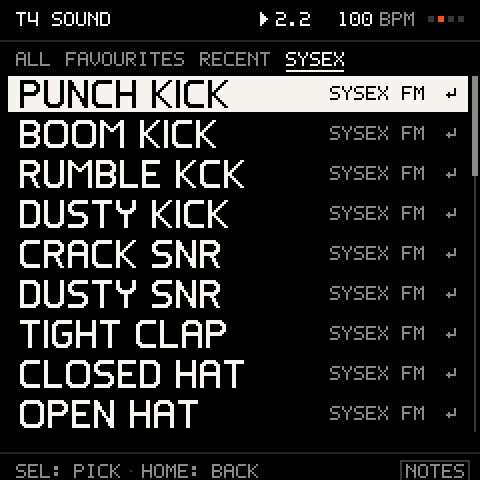
A DX7 bank received over MIDI, browsed in the SYSEX tab
  • Each track listens on its own channel, so a DAW or a controller can play and record into any track.

    Each track listens on its own channel, so a DAW or a controller can play and record into any track.

    Where
    TRACK menu > MIDI CH · SETTINGS > MIDI > MIDI CH
    Numbers
    Channels 1–16 · Tracks 1–4 default to 1–4
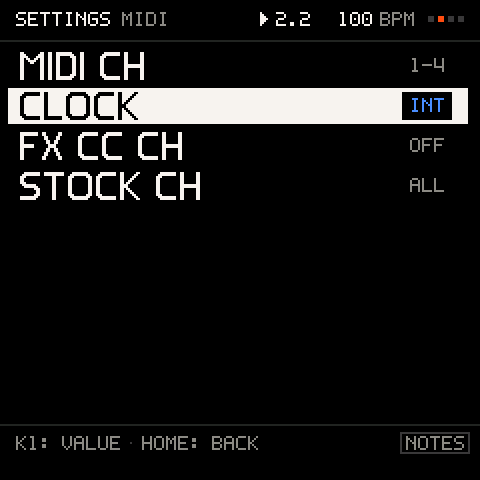
    SETTINGS > MIDI: channel, clock, FX CC channel.
  • Notes arriving over USB, Bluetooth or the wired MIDI port are recorded like the keys.

    Notes arriving over USB, Bluetooth or the wired MIDI port are recorded like the keys.

    Where
    REC
    Numbers
    USB · Bluetooth · Wired MIDI
  • Run on the FM-1's own tempo, send clock with start and stop to other gear, or follow an external clock with start, continue, stop and song position.

    Run on the FM-1's own tempo, send clock with start and stop to other gear, or follow an external clock with start, continue, stop and song position.

    Where
    TIME menu > MIDI CLOCK · SETTINGS > MIDI > CLOCK
    Numbers
    INT · OUT · EXT · 24 PPQN
    Limit
    Clock out is checked over USB; the wired and Bluetooth outputs are unconfirmed.
  • A track that plays another instrument: its recording, pattern, arp and keys go out on a MIDI channel instead of a sound.

    A track that plays another instrument: its recording, pattern, arp and keys go out on a MIDI channel instead of a sound.

    Where
    TRACK menu > ENGINE > MIDI OUT · MIDI OUT CH
    Numbers
    Channels 1–16
    Limit
    Out over USB; the wired and Bluetooth outputs are unconfirmed. Kit tracks cannot be MIDI OUT, and MIDI OUT tracks have no parameter locks.
    ENGINE: a track is an FM SOUND, a VA SOUND, an FM KIT, a VA KIT or MIDI OUT.
  • Control changes drive the panel: K1–K4, the encoders, SEL, HOME, PLAY and REC, plus each track's level and mute.

    Control changes drive the panel: K1–K4, the encoders, SEL, HOME, PLAY and REC, plus each track's level and mute.

    Where
    Any track's channel
    Numbers
    CC 20–29 · CC 7 level · CC 9 mute
  • A web page can follow the FM-1 over the USB cable and play its panel, paced like a hand.

    A web page can follow the FM-1 over the USB cable and play its panel, paced like a hand. A link mark in the FM-1's header shows while a page is linked.

    Where
    /sounds, for the pack
    Numbers
    Chrome or Edge · USB
    Limit
    Anything destructive still asks on the FM-1's screen. Firmware only goes in through /install.
  • The six effects' parameters by control change.

    The six effects' parameters by control change.

    Where
    SETTINGS > MIDI > FX CC CH (off by default)
    Numbers
    CC 0–23
  • Load a sound onto the selected track by number.

    Load a sound onto the selected track by number.

    Where
    The selected track's channel
    Numbers
    0–127: GROOVE, then banks A, B, C

10 · Install and safety11 features

Installs from Chrome or Edge over USB in about 2 minutes, and M-VAVE's original V15 can go back on from the same page. Safe mode, crash reports and saves that keep the old copy until the new one is written.
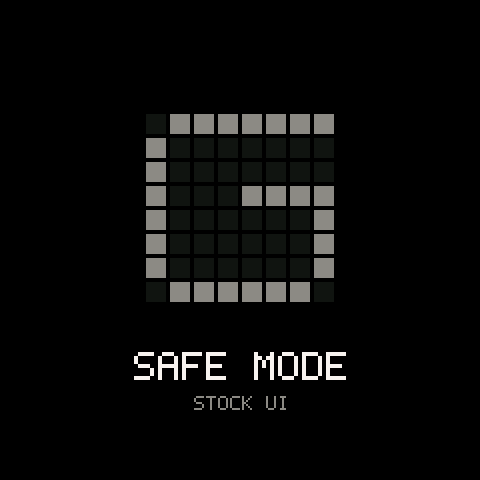
SAFE MODE at power-on: the stock FM-1, one boot away
  • Connect the FM-1 by USB and install from a web page: no tools, no download mode.

    Connect the FM-1 by USB and install from a web page: no tools, no download mode. The page checks the unit and the file, keeps the tab and the screen awake, shows the time left and finishes an interrupted install.

    Where
    /install
    Numbers
    About 2 minutes · SHA-256 checked · Chrome or Edge on Mac, Windows, Linux, ChromeOS
  • If a new release stores projects elsewhere, the installer says so before writing and offers to export them all first.

    If a new release stores projects elsewhere, the installer says so before writing and offers to export them all first.

    Where
    /install
  • The same page puts M-VAVE's own V15 back on, from any state, including a unit stuck in its updater.

    The same page puts M-VAVE's own V15 back on, from any state, including a unit stuck in its updater.

    Where
    /install > go back to V15
    Numbers
    2 steps
    Limit
    You supply M-VAVE's FM-1.fwsc (only that exact file is accepted), and it erases saved Groove projects: export them first.
  • See the three slots and the autosave of a connected FM-1, download any of them as a .groove file, or upload one into a slot.

    See the three slots and the autosave of a connected FM-1, download any of them as a .groove file, or upload one into a slot. The FM-1 checks the whole file before it replaces anything.

    Where
    /projects, signed in
    Numbers
    3 slots + the autosave
  • The real Groove OS, compiled to WebAssembly, with sound: play the panel and hear FIRST GROOVE on this site.

    The real Groove OS, compiled to WebAssembly, with sound: play the panel and hear FIRST GROOVE on this site.

    Where
    The home page · /emu
    Numbers
    FM and VA as on the unit
    Limit
    The effects are approximated.
  • One payment on Stripe Checkout, and every 1.x update is included.

    One payment on Stripe Checkout, and every 1.x update is included. Buying signed out works by an emailed sign-in link.

    Where
    /buy
    Numbers
    Paid once · Every 1.x update included
  • Sign up with email and password or a magic link.

    Sign up with email and password or a magic link. The account page shows access, purchases, the last 20 firmware downloads and the profile.

    Where
    /signup · /login · /account
  • Hold OCT− and OCT+ while powering on: the FM-1 runs as stock, with the stock screens, until the next power cycle.

    Hold OCT− and OCT+ while powering on: the FM-1 runs as stock, with the stock screens, until the next power cycle.

    Where
    Power-on
    SAFE MODE at power-on: the stock FM-1, one boot away.
  • After a crash the unit restarts, says RESTARTED AFTER A CRASH · REPORT SAVED, and keeps a report with no notes, sounds or names in it.

    After a crash the unit restarts, says RESTARTED AFTER A CRASH · REPORT SAVED, and keeps a report with no notes, sounds or names in it. SEL sends the reports over USB.

    Where
    SETTINGS > ABOUT > CRASH LOG, CLEAR LOG
    Limit
    A report is read with a command-line tool, not on this site.
  • Every part of a project is checked on load.

    Every part of a project is checked on load. Projects from older builds of the same format load; a damaged file is refused, not half loaded.

    Where
    Automatic
  • A new save is written in full before the old copy is let go.

    A new save is written in full before the old copy is let go. A save that cannot complete keeps the old one and says SAVE FAILED: OLD SAVE KEPT.

    Where
    Automatic
    Numbers
    At most 11,968 bytes a project

11 · Interface and help7 features

Five views on the SELECT encoder and one way to work on all of them. Hold any button for a card that says what it does; hold HOME to see what SHIFT does.
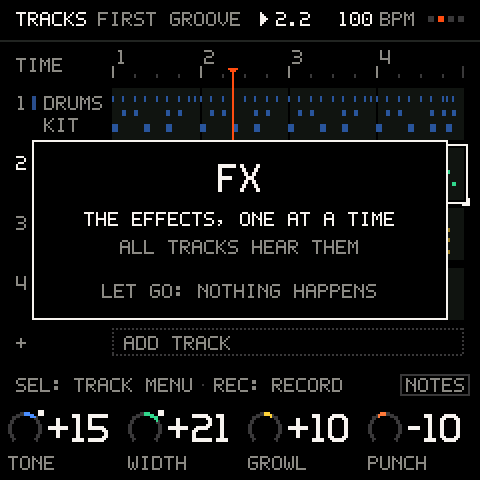
Hold a button for a second: a card says what it does
  • SELECT turns between TRACKS, MIX, KEYS, PERFORM and PROJECT.

    SELECT turns between TRACKS, MIX, KEYS, PERFORM and PROJECT.

    Where
    SELECT
    Numbers
    5 views
  • ALGORITHM is the cursor, K1–K4 change what it is on, SEL opens its menu or does it, HOME goes back.

    ALGORITHM is the cursor, K1–K4 change what it is on, SEL opens its menu or does it, HOME goes back. The same on every view.

    Where
    Every view
  • SEQ, ARP and FX open their screens from anywhere (press again to go back; on the grid, SEQ switches the pattern off); ENV opens the amp envelope, LFO the LFO, EDIT the sound editor, GLO the settings, and a turn of the PRESETS encoder opens the browser.

    SEQ, ARP and FX open their screens from anywhere (press again to go back; on the grid, SEQ switches the pattern off); ENV opens the amp envelope, LFO the LFO, EDIT the sound editor, GLO the settings, and a turn of the PRESETS encoder opens the browser.

    Where
    The printed buttons · The PRESETS encoder
  • Hold HOME and every button, knob and key is its SHIFT version at once; held a moment longer, the screen lists what SHIFT does on this page, what undo and redo would take back, and the SHIFT keys with their current values.

    Hold HOME and every button, knob and key is its SHIFT version at once; held a moment longer, the screen lists what SHIFT does on this page, what undo and redo would take back, and the SHIFT keys with their current values.

    Where
    Hold HOME
    Numbers
    LENGTH · LAUNCH · QUANT · CLICK · COUNT-IN · TAP
  • Hold any button for a second and a card says what it does on this view.

    Hold any button for a second and a card says what it does on this view.

    Where
    Any button
    Numbers
    1 s hold
    Hold a button for a second: a card says what it does.
  • One line at the bottom of the screen names the next moves.

    One line at the bottom of the screen names the next moves. When they do not fit, it shows them in turns every 3 seconds: the page's main moves, then its hidden gestures (PLAY+K1: TEMPO, SEQ+KEY: REST, HOLD SEL+TURN: TENS). On by default.

    Where
    Every view · SETTINGS > HINTS
    Numbers
    A new set every 3 s
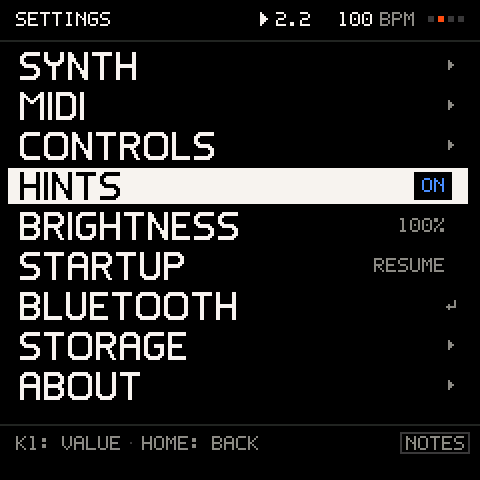
  • Synth (bend range, glide, poly or mono), MIDI, controls (back-tap time, wheel settle, preview), hints, startup (resume or new), Bluetooth pairing, storage and about.

    Synth (bend range, glide, poly or mono), MIDI, controls (back-tap time, wheel settle, preview), hints, startup (resume or new), Bluetooth pairing, storage and about.

    Where
    GLO
    SETTINGS: the top level, from SYNTH and MIDI to STORAGE and ABOUT.

1.x · Updates included

Complete today. Better with every update.

Everything on this list is in Groove OS 1.1 now. Every 1.x update is included in the one-time $29, and each one installs like the first: from Chrome or Edge over USB, in about 2 minutes. You can switch back to M-VAVE's original firmware from the install page whenever you want.