Chapter 11
MIDI
The FM-1's MIDI connections (USB and Bluetooth) are run by the stock firmware, and Groove OS listens in. Each track has its own MIDI channel, so a controller or a DAW can play and record any track. The FM-1 can follow an external MIDI clock, Program Change picks sounds, a CC map drives the panel, and DX7 voices and banks you send become track sounds.
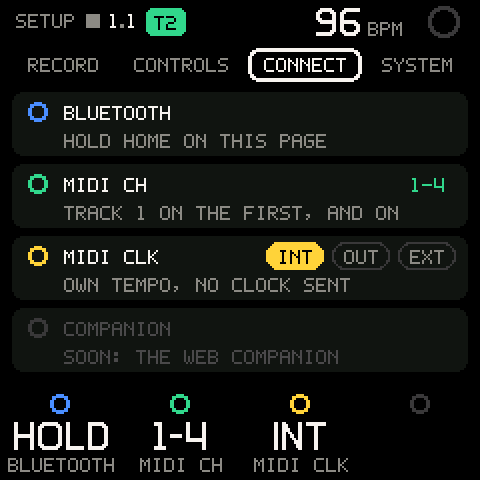
The MIDI settings live on SETUP > CONNECT (see Settings):
| Row | Values | What it sets |
|---|---|---|
K2 MIDI CH | 1-4 (four tracks, default) and on, one channel per detent | The first track's channel; each next track listens on the channel after it. |
K3 MIDI CLK | INT, OUT, EXT | INT: own tempo. OUT: own tempo, clock out with Start / Stop (see Clock). EXT: follows MIDI clock and Start/Stop. Default INT. |
Neither is saved: at power-on they're back to 1-4 (track 1 on channel 1) and INT. A project load leaves them as they are.
Channels
Track 1 listens on the first channel, track 2 on the next, and so on for as many tracks as the session has. MIDI CH shows the range: 1-4 with four tracks, 1-8 with eight. The range wraps past 16: first channel 15 with four tracks shows 15-2 (tracks on 15, 16, 1, 2). The range follows when you add or delete a track.
| What you send | What happens |
|---|---|
| Notes on the selected track's channel | Play at once through the stock engine, with the selected track's sound, just like the keys. The looper sees them too: they record on the track while REC is on, and a plain SAVE can capture them afterwards. |
| Notes on another track's channel | Play with that track's sound, and record into that track while the tape records. Nothing is captured for a plain SAVE. |
| Notes on a channel no track uses | Left to the stock firmware: it plays them only if they're on its own MIDI channel (SETUP > SYSTEM > STOCK GLOBAL). |
| Pitch bend, aftertouch, other CCs on the selected track's channel | Go to the stock firmware as before (the channel is rewritten to the stock's own). |
| Pitch bend, aftertouch, other CCs on another track's channel | Dropped. |
A note-off always takes the way its note-on took, so a held note never gets stuck when you change the selected track.
Pro tip: A MIDI keyboard or a DAW clip is a good way to record a part that's hard to play on the FM-1's short keybed. Arm REC on the FM-1, then play the part from the controller, on the channel of the track you want.
Notes out
The keys you play go out over USB MIDI as on a stock FM-1: the stock firmware sends them. Groove OS itself sends no notes: what the tape, SEQ and the arp play stays inside the FM-1.
Clock
MIDI CLK | What happens |
|---|---|
INT | The FM-1 runs on its own tempo. Incoming clock, Start, Stop and Song Position are ignored. |
OUT | The FM-1 runs on its own tempo and makes 24 clocks per beat, with Start when you press PLAY and Stop when it stops. See the note below. |
EXT | The FM-1 follows 24-per-beat MIDI clock. |
With EXT:
- The tempo follows the incoming clock and the BPM on screen shows it. Small wobbles are smoothed out; the tempo changes for a real change (0.8 BPM), or for a slow drift of 0.3 BPM after two bars.
- Start starts the tape from the top on the next clock.
- Continue after a Song Position waits for the sender to reach the start of the FM-1's next loop, then starts the tape from the top, so the two line up.
- Stop stops the tape.
- If the clock stops for a quarter of a second, the FM-1 keeps the last tempo and runs on it. The next clock starts the measurement afresh.
- PLAY and the tempo control still work: a tempo you set by hand holds until the next clock corrects it.
Note: Clock out goes out over USB MIDI, the way the keys' own MIDI goes out. It is new in this build: if another device doesn't follow it, make the FM-1 the follower (
EXT) instead and tell us.
MIDI OUT tracks
A track whose ENGINE is MIDI plays an external synth instead of a sound: everything the track plays (its recording, its pattern, the arp, your keys while it is selected) goes out as MIDI notes on its own channel (MIDI CH, 1-16; track 1 starts on channel 1, track 2 on 2 ...). The velocity follows the track's VELO, its level sends CC 7 when you move it, mute ends what the tape holds, and STOP lets go of every note the tape and the pattern held. A note always ends on the channel it started on, even if you change the channel or the engine while it sounds. A panic sends All Notes Off and Sustain Off on every MIDI OUT channel. While a MIDI OUT track is selected, the FM-1 doesn't also echo the raw keys on its own channel. A KIT track set to MIDI still plays its own drums (drum MIDI out comes later).
Program Change
A Program Change on the selected track's channel loads a preset onto the selected track, as the browser does:
| Program | Preset |
|---|---|
| 0-31 | GROOVE bank, G 01-G 32 |
| 32-63 | Bank A, A01-A32 |
| 64-95 | Bank B |
| 96-127 | Bank C |
The track's four macros go back to 0, and the project shows unsaved changes. A Program Change is ignored while the preset browser is open, and on a KIT track it shows KIT TRACK: NO PROGRAM CHANGE. Program Changes on other channels are dropped: they never load a stock preset while Groove OS runs.
The CC map
CCs on any track's channel drive the panel, as if you touched the control:
| CC | Control | How |
|---|---|---|
| 20 | K1 | Knob: the change in value is the number of detents (a jump from 60 to 63 is three detents right). The first value after power-on only sets the start point. |
| 21 | K2 | As CC 20. |
| 22 | K3 | As CC 20. |
| 23 | K4 | As CC 20. |
| 24 | ALGORITHM | As CC 20. |
| 25 | SELECT | As CC 20. |
| 26 | SEL | Button: 64-127 presses it, 0-63 lets it go. Held for 0.8 s it counts as a long press. |
| 27 | HOME | As CC 26. |
| 28 | PLAY | As CC 26. |
| 29 | REC | As CC 26. |
| 7 | The level of the channel's track | 0-127 scales to 0-100. |
| 9 | The mute of the channel's track | 64-127 mutes, 0-63 unmutes. It follows the launch grid, as a mute on MIX does. |
The panel CCs go the same way as the physical controls, but only on Groove OS pages: a control that would open a stock screen (STOCK GLOBAL, the stock tools) is dropped, and on a stock screen the panel CCs do nothing. There is no CC for SAVE or SHIFT.
Sounds over SysEx
Send a DX7 voice or a DX7 bank to the FM-1 and Groove OS takes it: a voice becomes the selected track's sound, a bank opens a question and then the preset browser, where you pick the voice you want. Nothing is written to the FM-1's own presets. The sound lives in your session, and a project save keeps it like any other sound (see PROJECT).
| What you send | What happens |
|---|---|
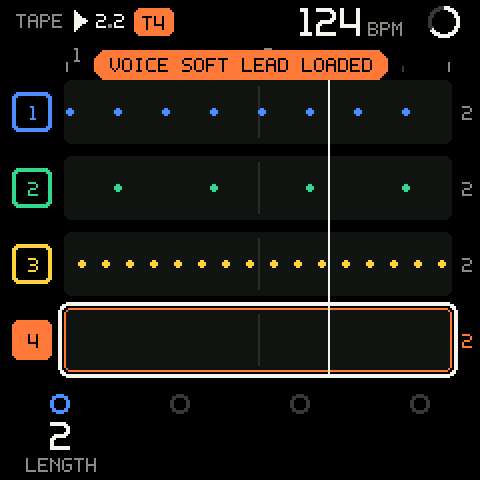
One voice: F0 43 0n 00 01 1B, 155 bytes, checksum, F7 (163 bytes) | Becomes the selected track's sound at once: the voice as it came, all four macros at 0, the LFO following it. Shows VOICE <NAME> LOADED in the track's colour. The project shows unsaved changes. |
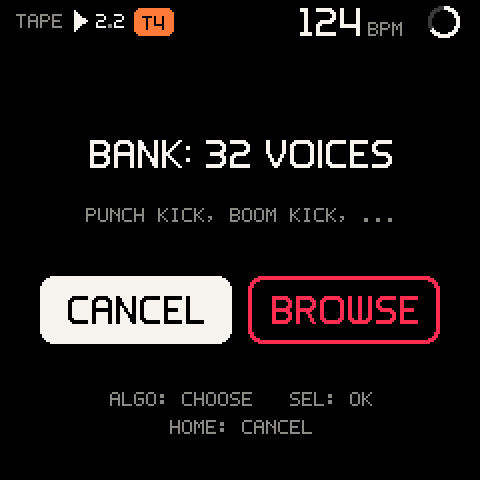
A 32-voice bank: F0 43 0n 09 20 00, 4096 bytes, checksum, F7 (4104 bytes) | Asks BANK: 32 VOICES with the first names under it. CANCEL is highlighted first. BROWSE opens the preset browser on a SYSEX tab with the 32 voices. |
A DX7 parameter change (F0 43 1n ...), any other SysEx | Left to the stock firmware, as before. |
n can be any device number (MIDI channel 1-16). Each message is checked before anything changes: its length, and its DX7 checksum. Values outside the DX7's ranges (an algorithm of 40, say) are brought into range, so a damaged voice can't upset the engine.
A bank: the question, then the browser
| Control | What it does |
|---|---|
| ALGORITHM | Chooses CANCEL or BROWSE. |
| SEL | Does what is highlighted. |
| HOME | Cancels. The bank is dropped. |
BROWSE opens the browser on S 01, the bank's first voice, and loads it on the selected track so you hear it. From there the browser works as always (see the preset browser): each detent of PRESETS or ALGORITHM loads the next voice and previews it, K1 BANK steps between the banks, SEL keeps the voice, HOME puts back the sound the track had before BROWSE.
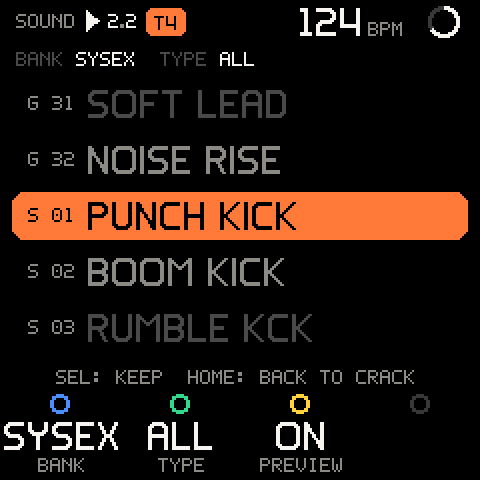
The SYSEX tab is temporary. When the browser closes (SEL, HOME, another control, or 4 s without a turn) the tab and the bank are gone and the memory they used is freed. The voice you kept stays on the track. To use another voice from the same bank later, send the bank again.
Pro tip: Select the track first (SHIFT + ALGORITHM), then send. A voice or a bank always goes to the selected track.
What gets refused
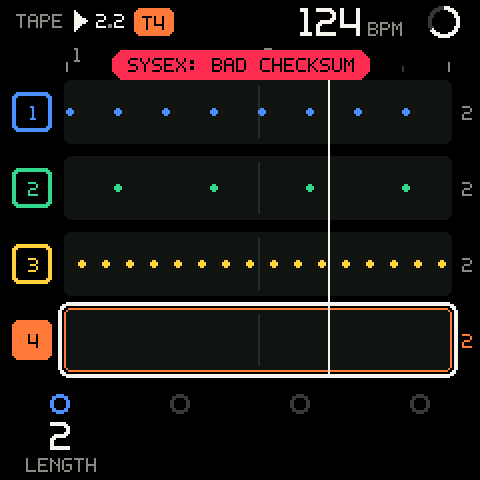
| Toast | Why |
|---|---|
SYSEX: BAD CHECKSUM | The data doesn't match its checksum. Send it again. |
SYSEX: WRONG LENGTH | The message ended early or ran long, or another MIDI message (a note, a CC) cut into it. Clock and other real-time bytes inside a dump are fine. |
BANK IGNORED: ONE IS OPEN | A bank is already waiting or open in the browser. Close it first. |
BANK: NO MEMORY | The FM-1 had no 4 KB free for the bank. Try again after a moment. |
KIT TRACK: NO SYSEX VOICE | A voice can't replace a KIT. Select a synth track. |
CLOSE PRESETS FOR SYSEX | A voice arrived while the browser was open. Close it (SEL) and send again. |
SYSEX: ONE AT A TIME | A second voice came before the first was loaded (only while a project saves). Send it again. |
The FM-1's own presets
While Groove OS runs, DX7 dumps never reach the stock firmware, so they can't overwrite banks A to D any more. To replace the FM-1's own presets with a bank (the stock bank screen, K1-K4 for bank A-D) or a single voice, start the FM-1 in safe mode (hold OCT- and OCT+ while you switch it on) and send it there. See safe mode.
The Groove sound kit is available as one DX7 bank, fm1-groove-kit-bank.syx (32 voices), on the website's download section. The same sounds are built into Groove OS as the GROOVE bank of the preset browser, so you don't need to load them to use them (see KIT and the GROOVE bank).
Bluetooth
Bluetooth MIDI is the stock implementation. To turn it on or off, open SETUP (GLO) and hold HOME for a second on that page: the stock firmware toggles Bluetooth and HOME's LED shows the state. On every other page a long HOME press is SHIFT and never touches Bluetooth.
Coming in v1.1: a web companion over WebMIDI for backing up projects and importing sounds (the dim
COMPANIONcard on SETUP > CONNECT).
Troubleshooting
| What happens | Why, and what to do |
|---|---|
| Notes from my controller don't sound | Send them on a track's channel: SETUP > CONNECT > MIDI CH shows the range (1-4: track 1 on channel 1). |
| Notes from my controller play the wrong track's sound | Each channel is a track. Change the controller's channel, or MIDI CH on SETUP > CONNECT. |
| Notes on another track's channel sound but don't record | They record only while the tape records (REC on). A plain SAVE captures only the selected track's notes. |
| My DAW gets no clock from the FM-1 | Set SETUP > CONNECT > MIDI CLK to OUT. If it still gets none, set EXT and let the DAW send clock. |
| The FM-1 doesn't follow my DAW's tempo | Set SETUP > CONNECT > MIDI CLK to EXT, and have the DAW send clock. |
On EXT the tempo I set by hand jumps back | The incoming clock sets the tempo. Change it on the DAW. |
| A Program Change does nothing | It must be on the selected track's channel, with the browser closed, on a SOUND track. |
KIT TRACK: NO PROGRAM CHANGE | The selected track is a KIT. Select a synth track. |
| A knob CC does nothing the first time | The first value only sets where the knob is. Move it again. |
| A button CC opens nothing on a stock screen | The panel CCs only drive Groove OS pages. Tap HOME on the FM-1 to come back first. |
| A SysEx voice went to the wrong track | It goes to the selected track. Select the track first, then send. |
| I sent a bank and nothing seems to happen | The question waits while the browser, another question or a stock page is up. Close it, and BANK: 32 VOICES appears. |
| The SYSEX tab is gone from the browser | It lasts only while you browse the bank. Send the bank again. |
| I want to replace one of the FM-1's own presets over SysEx | Start in safe mode (OCT- + OCT+ at power-on) and send it to the stock firmware. |
| Holding HOME doesn't toggle Bluetooth | It only does on the SETUP page. Press GLO first. |