Chapter 14
Troubleshooting
Every chapter ends with a table of what can go wrong on its page. This chapter collects them all, so you can search one place. Each row says what you see, why it happens and what to do. If a row sends you to a chapter, the full explanation is there.
Before anything else
| What happens | Why, and what to do |
|---|---|
| Nothing responds, the screen is frozen | Switch off, then on while holding OCT- and OCT+ (safe mode: the stock firmware only). Reinstall the previous build if it happens again; see Installing and recovering firmware. |
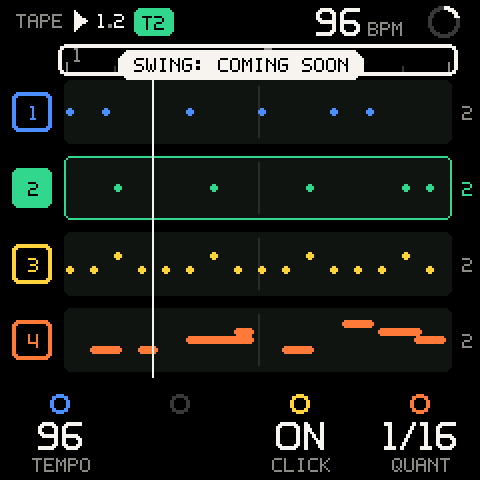
A control shows ...: COMING SOON | It is reserved for a feature that isn't built yet. Nothing changed. |
| A knob or row is grey | It can't act right now: it has no job on this row, or the page's state blocks it. The chapter's own table says why. |
| I'm lost | Tap HOME until you reach TAPE. It always gets you out, and it never stops the music. |
Getting started
From Getting started.
| What happens | Why, and what to do |
|---|---|
| The stock screen stays and no logo plays | Safe mode: OCT- and OCT+ were held at power-on, or the OS couldn't get its memory. Switch off and on again without touching the keys. |
| A button seems to do nothing until I let go | Screen buttons act on release, so they can take part in SHIFT combinations. Only PLAY and REC act on press. |
| Holding HOME doesn't go back | A hold is SHIFT; only a quick tap is back. Change the tap time under SETUP > CONTROLS > BACK TAP. |
| A knob shows only a dark ring | That knob has no job on this row, or its feature isn't built yet. Move the cursor with ALGORITHM or hold SHIFT for the second row. |
...: COMING SOON | The control is reserved for a feature that isn't built yet; nothing changed. |
| SHIFT + a top key didn't mute at once | Mutes and solos wait for the launch line while the tape plays (@ NEXT BAR). Set LAUNCH to OFF (SHIFT + the 5th white key) for instant changes. |
8 TRACKS: NO MORE | A session holds eight tracks. Delete one first. |
STOP RECORDING FIRST | Tracks can't be added, duplicated or deleted while recording or counting in. Press REC to stop. |
| My loops are gone after switching off | Only saved projects survive power-off, and nothing loads by itself. Save with SHIFT + SAVE; load on PROJECT. |
TAPE
From TAPE.
| What happens | Why, and what to do |
|---|---|
| REC doesn't start recording right away. | LAUNCH is BEAT or BAR: recording waits for the next line (the REC light blinks). Set LAUNCH to OFF for instant punch-in. From stop, the count-in bar comes first; turn COUNT-IN off to skip it. |
| My notes land slightly off where I played them. | QUANT is 1/16: notes snap to the nearest 1/16. Set it to OFF for free timing. |
| I can't change track. | The selected track is recording or counting in. Press REC to stop recording first. |
| A length change doesn't happen. | It waits for the next bar line (the digit blinks). If the tape is stopped or the track is empty it happens at once; TOO LONG or FULL means it was refused. |
| Shortening a track lost my notes. | They are hidden, not gone. Set the length back and they return. |
| A knob won't stay where I turn it while the tape plays. | Its automation lane takes over when you let go. Hold SEL and turn it to clear the lane, or record over it with REC. |
SAVE says NOTHING TO CAPTURE. | Capture only keeps the last loop of the selected track's length. Press SAVE sooner after playing, and check that the tape is playing and REC is off. A tempo change or a track change also empties it. |
| SHIFT + REC cleared the track when I wanted undo. | Holding it 1.5 s clears. Release within half a second for undo. SHIFT + REC again undoes the clear. |
REDO says NOTHING TO REDO after several undos. | Redo keeps only the take undone last. |
| The click doesn't sound while playing. | CLICK is off; only the count-in clicks. Turn it on at the ruler (K3), with the SHIFT key, or in SETUP > RECORD. |
| A queued mute, solo or recording vanished. | Stopping the tape or changing LAUNCH drops anything waiting for the line. |
I can't find a track's LEVEL on TAPE. | Levels, mutes and solos are on MIX, one detent right of TAPE. |
| Some of my tracks aren't on the screen. | TAPE shows four lanes at a time. Turn ALGORITHM: the lanes scroll to follow the selected track (the bar at the far left shows where you are). |
ADD SOUND TRACK says 8 TRACKS: NO MORE. | Eight is the most. Delete a track you don't need first. |
DUPLICATE says FULL: NO ROOM TO COPY. | All tracks share one note memory, and the copy doesn't fit in what is left. Clear or delete a track first. |
| The tape is empty after switching off. | The session lives in memory until you save it: SHIFT + SAVE (see PROJECT). |
MIX
From MIX.
| What happens | Why, and what to do |
|---|---|
| A mute or solo doesn't happen when I turn the knob. | LAUNCH is BEAT or BAR and the tape is playing: it waits for the next line (the value blinks). Set LAUNCH to OFF for instant changes. |
| A waiting mute disappeared. | Stopping the tape or changing LAUNCH drops waiting changes. Set it again. |
| A track is silent, but its level is up and it isn't muted. | Another track is soloed. Its fader is drawn as an outline. Turn the other track's SOLO off, or SHIFT + the top F. |
| A soloed track is silent. | It is also muted. Mute wins; turn its MUTE off. |
| Turning the level doesn't change a held note. | Level applies from the next note. |
| The cursor jumped back to all the strips. | MIX always opens there. Turn ALGORITHM to a strip. |
| I can't see all my tracks. | MIX shows four strips at a time. Turn ALGORITHM: the strips scroll to follow the selected track. |
| SHIFT + a knob does nothing on MIX. | MIX has no second row. A track's length is on TAPE, or on MIX > T2's first row. |
| A level won't stay where I turn it while the tape plays. | It is automated: the lane takes over when you let go. Hold SEL and turn it to clear the lane. |
SOUND
From SOUND.
| What happens | Why, and what to do |
|---|---|
| The macros jumped back to 0. | You loaded a preset, or edited the voice in the stock editor. The edited voice is the new voice, with the old macros baked in. |
| TONE does almost nothing. | The voice has few or quiet modulators (an organ with all carriers, a pure sine). Try CHARACTER, or raise a modulator's LEVEL on its OP row. |
| Another track's vibrato changed. | The LFO wave and speed are shared and follow the selected track's voice. |
A row in the browser says USE EMPTY TRACK. | The track has notes and the row would change it between synth and KIT. Use an empty track, or clear this one. |
A row in the browser says STOP REC. | You are recording or armed to record. Stop, then load. |
| The browser closed by itself. | It keeps the sound and closes 4 s after the last knob turn. Turn PRESETS to open it again. |
| No preview when moving through KITS. | Kits don't preview. Play the pads on the keys. |
| No preview while playing a big chord. | The preview waits while 11 or more notes sound. Let go of some keys. |
K4 on VOICE says POLY/MONO: COMING SOON. | POLY/MONO is not built into Groove OS. Set it in the stock editor (FULL EDITOR, or EDIT). |
A black key in the deep editor says POLY/MONO: NOT MAPPED YET. | The MONO and POLY keys do nothing there. Use the stock editor. |
| Hold SEL + a macro cleared its automation instead of moving x10. | On a macro, hold SEL always means clear. Turn without SEL, or assign a value to that knob first. |
Hold SEL + turn says NOT A VALUE FOR A KNOB. | ASSIGN mode is on and that value (a name character, a macro) can't go on a knob. Turn ASSIGN off in KNOBS for x10. |
| ASSIGN mode is off again. | It turns off each time you open the editor from SOUND. Switch it on in KNOBS. |
| My knob assignments are gone. | Loading another sound (a preset, a SysEx voice, ERASE VOICE, an edit in the stock editor) clears them, with the macros. |
| PRESETS does something else on the stock editor. | On the stock pages the stock firmware owns the knobs. Press HOME first. |
| A voice I sent over SysEx didn't load. | See the toast: a bad checksum, a cut message, a KIT track, or the browser was open. MIDI: What gets refused lists them. |
| The SYSEX bank is gone from the browser. | It is there only while you browse it after BROWSE. Send the bank again. |
KIT and the GROOVE bank
From KIT and the GROOVE bank.
| What happens | Why, and what to do |
|---|---|
CLEAR T2 FIRST when turning K1 KIT or choosing MAKE SYNTH TRACK. | The track has hits or notes and would change kind. Clear it (CLEAR ALL HITS, or SHIFT + hold REC), or use an empty track. |
The browser shows USE EMPTY TRACK on a kit or a voice. | Same reason: the track has notes. Load another kit instead, or use an empty track. |
The browser shows STOP REC. | A track can't change kind while recording or armed. Stop first. |
| OCT-/OCT+ don't change the octave on KIT. | On KIT they choose the bar of the step grid. The pads never move with the octave. |
OCT: THE BAR OF A KIT | You pressed OCT-/OCT+ on KIT while a synth track is selected. |
| The step grid shows only one bar. | The track is one bar long. Set LENGTH or BARS on TAPE. |
| Hits all play at the same loudness. | VELO on the kit row is fixed (40-127). Set it to KEY. |
| A step's VELO change isn't heard. | VELO on the kit row is fixed, and it overrides each hit's velocity. Set it to KEY. |
| The open hat stops when the closed hat plays. | They share choke group A. Set one pad's CHOKE to OFF or B. |
| A pad is silent. | Its SOUND is OFF, it is muted (M on the pad), or its LEVEL is 0. |
| The pads lost their sounds and tuning. | K1 KIT loaded a template and you chose LOAD. It can't be undone; set the pads again, and use the browser (with HOME) to try kits. |
T1 FULL when adding a step. | The track holds as many events as it can. Remove some hits. |
8 TRACKS: NO MORE on ADD KIT TRACK. | The tape has 8 tracks. Delete one, or turn an empty synth track into a KIT with K1 on KIT. |
| The new KIT track is DUSTY (or STEEL), not PUNCH. | ADD KIT TRACK picks the template by tempo. Turn K1 KIT on the kit row to change it. |
K3/K4 on the kit row say COMING SOON. | All-pad TUNE and DECAY are not built. Set TUNE and DECAY on each pad. |
| SHIFT + SEL doesn't turn CHORD on. | CHORD input is off on KIT tracks. |
| ENV moved the KIT selection to pad 1. | ENV opens SOUND on its first pad. Pick your pad again with a black key. |
SCALE
From SCALE.
| What happens | Why, and what to do |
|---|---|
| Black keys make no sound. | MODE is EASY (black keys are always silent) or FILTER (the out-of-scale keys are). Set MODE to SNAP or OFF. |
| A key plays a different note from the one pressed. | MODE is SNAP or EASY. That is the point of those modes; set OFF to play chromatically. |
| Changing ROOT or SCALE does nothing to the sound. | MODE is OFF, or the selected track is a KIT. Pick a mode; kits ignore the scale. |
| The key LEDs stay dark. | LEDS is OFF, MODE is OFF, or you are on a page that drives the LEDs itself. Turn K4 right. |
| The key LEDs show a pattern that isn't the scale. | Chord input is on: the LEDs show the chord pads. Turn it off with SHIFT + SEL or on the CHORD page. |
| The chord pads ignore MODE. | By design: the pads use ROOT and SCALE only. |
| Turning OCTAVE or TRANSP only shows a message. | They mirror the stock settings. Use OCT- / OCT+, or hold an OCT button and turn ALGORITHM. |
| Hold SEL + key didn't change the root. | It sets the root on the SCALE page only. On SEQ the same gesture moves the step cursor. |
| The scale is back to C major after power-on. | Every power-on starts fresh. Load your project on the PROJECT page to get its SCALE settings back. |
CHORD
From CHORD.
| What happens | Why, and what to do |
|---|---|
| The pads play single notes. | Chord input is off. Press SEL on CHORD, or SHIFT + SEL on any melodic page, for CHORD ON. |
CHORD ON, but the keys play drums. | The selected track is a KIT. Kits keep their pads; select a synth track. |
| No chords while browsing presets. | The browser is audition-only. Close it (SEL keeps the sound, HOME puts the old one back). |
| The chords are in the wrong key. | The key is SCALE's ROOT and SCALE. Change it on the SCALE page. |
| The chords changed after you changed SCALE's MODE. | They didn't: MODE never affects chords. Check ROOT and SCALE. |
| The chord is too high or too low. | Use OCT- / OCT+ (the stock octave), or lower SPREAD. |
| A chord cuts off when you let go, even with LATCH on. | LATCH holds the performance mode, not the chord. For held chords use the arpeggiator's LATCH, or record the chord. |
| A pad plays only one or two notes. | A performance key is active (ARP, SPLIT, L+R). Release it, or tap it again if LATCH is on. |
| The top seven keys play single notes. | By design: only the eight white keys from the first C are pads. |
| A chord step in SEQ has fewer notes than the pad. | Steps hold four notes; the 5th and extensions are dropped first. |
| SHIFT + SEL does nothing on KIT. | Chord input is not available on KIT. Switch on a melodic page. |
| SHIFT + SEL on PROJECT saved instead of switching chords. | On PROJECT that gesture saves into the slot at the cursor. Switch chords from any other melodic page. |
ARP
From ARP.
| What happens | Why, and what to do |
|---|---|
ARP says SEQ ON THIS TRACK. | The selected track's SEQ pattern is on. Turn it off with SEQ, or select another track. |
| You want to change the arp's settings without turning it on or off. | SHIFT + ARP opens the page as it is. |
| The old chord played when you turned ARP back on. | LATCH was on: ARP off keeps the latched chord. Play a new chord to replace it, or turn LATCH off. |
The arp turned off when you changed track (SEQ: ARP OFF). | That track's pattern is running; one generator per track. |
| Keys play drums, not the arp. | The selected track is a KIT: kits keep their pads. |
| The arp stops when you let go. | LATCH is off. SHIFT + K1 right. |
| A new chord adds to the old one instead of replacing it. | You were still holding a key. Let go of everything, then press the new chord. |
| SAVE captured instead of printing. | The arp was off or had no notes. Latch a chord first. |
| The arp is out of time with the tape. | Stopped, it free-runs; it locks to the grid once the tape plays. |
| SWING and VELO do nothing. | Not built yet. |
| You want a different arp on each track. | There is one arpeggiator, on the selected track. Print it onto one track, then move on to the next. |
SEQ
From SEQ.
| What happens | Why, and what to do |
|---|---|
| SEQ took you to TAPE instead of the SEQ page. | The selected track's pattern was on, so SEQ turned it off. Press SEQ again, or use SHIFT + SEQ to open the page without turning anything off. |
| The pattern doesn't play. | The tape is stopped (press PLAY), or the pattern is OFF. |
| You want every pattern to stop. | SEQ > PATTERN > ALL SEQ OFF. |
MOVE CANCELLED when you let go of SEL. | You left the SEQ grid (or changed track) while carrying the step. Nothing moved; try again on the grid. |
SEQ says ARP ON THIS TRACK. | The arp is on. Turn it off with ARP first. |
| Keys don't write steps; they play the arp or drums. | You are not on the SEQ page, or the selected track is a KIT (use KIT's own steps). |
| Keys write chords instead of single notes. | You held the next key before letting go of the last. Play detached, or remove notes on the step level. |
| Pads write chords you didn't expect. | Chord input is on. SHIFT + SEL turns it off. |
| Steps past 16 don't appear. | The pads show 16 at a time: SHIFT + OCT+ for the next 16, or move the cursor there. The overview shows all 64. |
| LENGTH or a STRETCH didn't change anything yet. | The pattern is playing: it waits for the pattern end (@ PATTERN END). Stop the tape to apply it at once. |
STRETCH is dimmed (OVER 32). | Stretching would pass 64 steps. Shorten LENGTH first. |
SQUEEZE said NOTES DROPPED. | Two notes fell on one step; the first stayed. Patterns have no undo: paste a copy onto another track first (COPY PATTERN, then PASTE PATTERN there). |
| A step played only sometimes. | Its CHANCE is below 100 %. |
| Other tracks got notes while you recorded. | Their patterns were running. Undo on each track (SHIFT + REC), or turn SEQ off before recording. |
PATTERN EMPTY on SAVE. | Write some steps first. |
ALREADY PRINTED. | The track already holds exactly these notes. |
| TRANSP and DIR on the pattern's SHIFT row do nothing. | Not built yet: their knobs show only a dark ring. |
| The pattern is gone after power-off. | Save the project (PROJECT): patterns, stored patterns and chains are saved with it. |
UNSTORED EDITS: TURN AGAIN when picking a pattern. | The working copy has changes not stored (P1*). STORE TEMPLATE first, or turn again to drop them. |
LOAD TEMPLATE dimmed EMPTY. | Nothing is stored there. Pick another with K1. |
STORE TEMPLATE dimmed NO ROOM, or TEMPLATES FULL. | The 16 stored patterns' 3 KB are full. Store over a pattern you no longer need. |
| Changes vanished while a chain played. | The chain moved on to the next stored pattern. Store changes before the chain goes on. |
| A pattern switch waits longer than one pattern. | The old and the next pattern only both start from step 1 there (different lengths); at the latest it lands at the top of the loop. |
PROJECT
From PROJECT.
| What happens | Why, and what to do |
|---|---|
SHIFT + SAVE asks SAVE PROJECT 2? | The music is playing: saving stops it. Choose SAVE, or stop first and save without a question. |
SHIFT + SAVE asks SAVE OVER PROJECT 1? | The session is new and all three slots are full, or you chose a slot that holds another project. Choose SAVE to replace it, or delete a slot first. |
STORAGE OFF | The flash checks at start-up did not pass, so nothing is ever written. Your session still works; it is lost at power off. |
PROJECT 3 IS EMPTY | You pressed SEL on an empty slot. Save into it with SHIFT + SEL. |
DELETE is dimmed | The slot it acts on is empty. Put the cursor on a saved slot first. |
SHIFT + SEL ON A SLOT SAVES | You pressed SHIFT + SEL on DELETE or ERASE ALL. Put the cursor on a slot. |
SAVE FAILED: OLD SAVE KEPT | The flash write did not verify. The slot still holds its previous version. Try again. |
LOAD FAILED: NOTHING LOST | The saved project did not pass its checks. Your session is unchanged. |
| The header dot comes back right after a save | Something changed after the save: a knob, a note, a SEQ step. Save again. |
| My MIDI channels or BACK TAP are back to defaults after a load or power-on | Those settings aren't part of a project and aren't saved. Set them again on SETUP. |
MIDI
From MIDI.
| What happens | Why, and what to do |
|---|---|
| Notes from my controller don't sound | Send them on a track's channel: SETUP > CONNECT > MIDI CH shows the range (1-4: track 1 on channel 1). |
| Notes from my controller play the wrong track's sound | Each channel is a track. Change the controller's channel, or MIDI CH on SETUP > CONNECT. |
| Notes on another track's channel sound but don't record | They record only while the tape records (REC on). A plain SAVE captures only the selected track's notes. |
| My DAW gets no clock from the FM-1 | Clock out isn't sent on the device yet, even with MIDI CLK OUT. Set EXT and let the DAW send clock. |
| The FM-1 doesn't follow my DAW's tempo | Set SETUP > CONNECT > MIDI CLK to EXT, and have the DAW send clock. |
On EXT the tempo I set by hand jumps back | The incoming clock sets the tempo. Change it on the DAW. |
| A Program Change does nothing | It must be on the selected track's channel, with the browser closed, on a SOUND track. |
KIT TRACK: NO PROGRAM CHANGE | The selected track is a KIT. Select a synth track. |
| A knob CC does nothing the first time | The first value only sets where the knob is. Move it again. |
| A button CC opens nothing on a stock screen | The panel CCs only drive Groove OS pages. Tap HOME on the FM-1 to come back first. |
| A SysEx voice went to the wrong track | It goes to the selected track. Select the track first, then send. |
| I sent a bank and nothing seems to happen | The question waits while the browser, another question or a stock page is up. Close it, and BANK: 32 VOICES appears. |
| The SYSEX tab is gone from the browser | It lasts only while you browse the bank. Send the bank again. |
| I want to replace one of the FM-1's own presets over SysEx | Start in safe mode (OCT- + OCT+ at power-on) and send it to the stock firmware. |
| Holding HOME doesn't toggle Bluetooth | It only does on the SETUP page. Press GLO first. |
Settings (SETUP)
From Settings (SETUP).
| What happens | Why, and what to do |
|---|---|
| Holding HOME doesn't toggle Bluetooth. | Hold it on SETUP's tabs, not in the SYSTEM list or ABOUT, and press nothing else while you hold. Elsewhere a held HOME is SHIFT. |
| Turning K1 on CONNECT only shows a message. | Bluetooth is toggled by holding HOME on this page, not by the knob. |
| My settings are back to defaults. | The FM-1 was switched off. CONTROLS and CONNECT aren't saved; RECORD comes back with a project load. |
| Loading a project changed CLICK, COUNT-IN, LAUNCH or QUANT. | They're saved with each project. Set them and save the project again. |
MIDI CLK is OUT but my DAW gets no clock. | Clock out isn't sent on the device yet. Use EXT and let the DAW send clock. |
| A quick HOME tap shows the SHIFT map, or a hold goes back. | Adjust CONTROLS > BACK TAP: raise it if taps become SHIFT, lower it if holds become BACK. |
| After turning SELECT, the keys still act like the old page for a moment. | That is WHEEL SETTLE. Lower it for a faster change. |
| The preset browser is silent. | CONTROLS > PREVIEW is OFF. |
| Turning SELECT on SETUP lands on CHORD or MIX. | SETUP isn't on the wheel; SELECT moves to the wheel pages beside TAPE. Press GLO to go back to where you were. |
| SEL does nothing on RECORD, CONTROLS or CONNECT. | Only SYSTEM opens a list. Use the knobs on the other tabs. |
| On STOCK GLOBAL the knobs change stock settings, not Groove OS. | That page belongs to the stock firmware. Tap HOME to come back to SETUP. |
Installing and recovering firmware
From Installing and recovering firmware.
| What happens | Why, and what to do |
|---|---|
fm1_enter_uboot.py finds no synth | A music app or the MIDI server holds the port. Quit them and run killall MIDIServer first. |
The flasher waits for usb:4c4a:8057 forever | Download mode timed out. Enter it again (step 2) and start the flasher right away. |
| The flasher stops: too many sectors | More differs than --max-sectors allows. Check the printed layout; raise the limit only if you expect a large change. |
| The stock settings were reset after installing | The settings area moved with this build. Set them again on the stock GLO page. |
| The screen freezes or keys are silent after an install | Switch on with OCT- and OCT+ held (safe mode) and reinstall the previous package, or go back to stock. |
The packager rejects my FM-1.fwsc | It isn't the exact V15 file. Download it again from M-VAVE. |