Chapter 10
PERFORM
PERFORM is the stage view: a screen for playing a song live, built to be read in a dark room at arm's length. The keys become the performance surface: white keys mute tracks and trigger punch-in effects, black keys launch scenes, and the four knobs are throws that sweep the whole mix. While the music plays, PERFORM is locked against accidents.
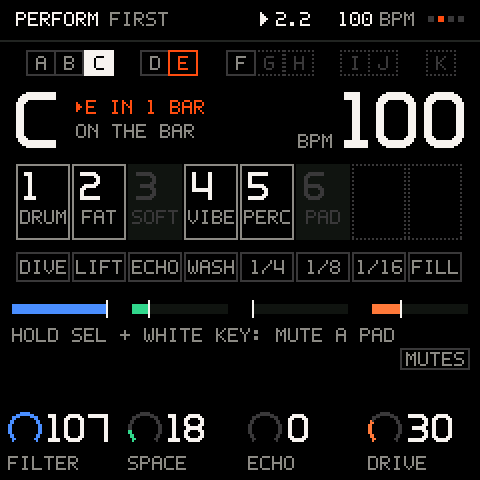
The screen
SELECT turns to PERFORM, the fourth view.
| Part | What it shows |
|---|---|
| The scene row (top) | A to K, laid out like the black keys that launch them. The playing scene is filled, a queued one blinks, a stored one is framed, an empty one is dotted. |
| The big letter | The scene playing. Beside it, what is coming: ▸E IN 1 BAR, or ON THE BAR. |
| The big number | The tempo. |
| Eight track cells | Number and name (four letters) of each track. Playing is framed; muted is dark; a mute that is queued blinks. |
| Eight punch-ins | DIVE, LIFT, ECHO, WASH, 1/4, 1/8, 1/16, FILL. A lit one is on. |
| Four throw bars | FILTER, SPACE, ECHO, DRIVE, each as a bar with a white tick at the project's own value. |
| The knobs | K1 to K4: the four throws, with their values. |
There is no hint line here: the screen is built so the keys and the knobs explain themselves. The keybed tag says MUTES.
The keys
The 16 white keys and 11 black keys are the surface. From the left, white keys count 1 to 16.
White keys 1 to 8: mutes
| You do | What happens |
|---|---|
| Tap a key | Mutes or unmutes that track, on the launch line (see LAUNCH in TRACKS). The cell blinks until it lands. |
| Hold a key (a quarter second) | Solo while held, at once. Let go and everything comes back. |
| Hold SHIFT (SHIFT is HOME held down) and tap several | The mutes are staged: they all land together when you let go of SHIFT, at the next line. Tap a staged key again to take it out. |
This is how you drop a whole group of parts in and out on the bar, not one at a time. Only as many keys act as you have tracks.
Pad mutes
A kit is one track, so muting it takes all the drums out. For the classic drop, the kick out and the hats on, mute the kit's pads instead: hold SEL and tap white keys 1 to 8. Each is a pad of the kit, pad 1 on key 1.
| You do | What happens |
|---|---|
| Hold SEL | White keys 1 to 8 show the kit's pads: lit is playing, dark is muted, blinking is queued. |
| Hold SEL and tap a key | That pad mutes or unmutes on the launch line (T1 PAD 1 OUT, T1 PAD 1 IN). Tap several and they land together. |
| Tap it again before the line | Takes it out of the queue. |
The kit is the selected track if it is a KIT, otherwise the first KIT track. With LAUNCH on BAR the pads land on the next bar, on BEAT the next beat; with LAUNCH OFF or the music stopped they land at once. A pad mute is the pad's own MUTE (the PAD menu's row): it stays when you leave PERFORM, and it is saved with the project.
Careful: every press of SEL on PERFORM is also a tempo tap. Two presses between 0.15 and 2 seconds apart set the tempo to that gap, so hold SEL once and tap all the pads you want in that one hold.
Pro tip: for a drop on the bar, hold SEL, tap the kick's key a beat before the line, and let go. Do the same on a later drop to bring the kick back in.
White keys 9 to 16: punch-ins
Punch-ins are effects you play. Hold the key to have it on; tap it to latch it on, and tap a latched one to let it go. Leaving PERFORM or stopping the music lets every latch go, so a stutter never follows you to another screen. While one is latched the header says PUNCH LATCHED.
| Key | Name | What it does |
|---|---|---|
| 9 | DIVE | The filter closes down. |
| 10 | LIFT | The filter opens up, with resonance. |
| 11 | ECHO | Every note repeats three times. |
| 12 | WASH | More reverb. |
| 13 | 1/4 | Repeats the current slice of the music in quarter notes. |
| 14 | 1/8 | The same in eighths. |
| 15 | 1/16 | The same in sixteenths. |
| 16 | FILL | Plays the fill (see below). |
They work on the sequencer's events, so there is no audio buffer to run out.
FILL
Hold FILL. Steps whose condition is FILL play, and steps marked !FILL rest; a KIT track that has no such steps plays a busier beat instead (sound tracks without them play on as they were). Nothing is stored: let go and the groove returns. Set the conditions in SEQ and KIT.
Black keys: scenes
A scene remembers what plays: which stored pattern each track is on, and which tracks are muted. There are eleven, A to K, one on each black key.
| You do | What happens |
|---|---|
| Tap a black key | The scene launches on the next bar. The key and the cell blink until it lands. |
| Tap it again before the bar | Cancels the launch. |
| SHIFT + a black key | Captures what plays right now into that scene (SCENE CAPTURED). |
Scenes build forward: set up a section, capture it into a key, set up the next, capture that, and then play from key to key. Scenes are saved with the project.
The key lights
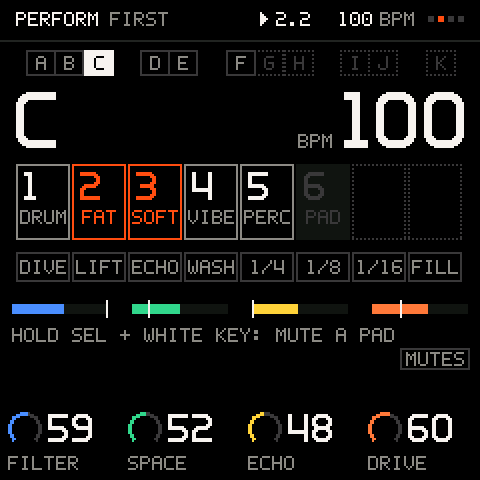
On this view the key lights are the stage display: lit means playing (a track, the scene, a punch-in), dark means muted, and blinking means queued. While you hold SEL, white keys 1 to 8 show the kit's pads instead. The lights are on or off only, so a muted track is simply dark.
The throws
K1 to K4 are four throws for the whole mix:
| Knob | What it sweeps |
|---|---|
K1 FILTER | The master filter. |
K2 SPACE | How much of the mix goes into the reverb. |
K3 ECHO | How much goes into the delay. |
K4 DRIVE | The drive. |
They move continuous values only, and they stay where you leave them, because encoders cannot feel your hand. The white tick on each bar is the project's own value. Press SHIFT + SEL and all four glide back to the project's values over one bar. A throw is never saved: the song is never changed by it.
Careful: a throw only works on an effect that is switched on. The starter projects have the throw effects on. See MIX and FX.
Tempo
SEL taps the tempo: tap along with the drummer, and it follows. Its press is the tap, also when you hold it for pad mutes. The second tap already sets it, and the average of the last three gaps keeps it steady.
The stage lock
PERFORM is the one view that guards itself while the music plays.
- No destructive gesture works. Holding SHIFT + REC says
LOCKED: PERFORM, and nothing is cleared. Stopped, the lock is off: PERFORM answers like any other view (NOTHING TO DELETE HERE). - A knocked SELECT does not leave. While the transport plays or records (the count-in too), the first detent says
TURN AGAIN TO LEAVE, and a second within a second leaves. Stopped, PERFORM is a view like the others and one detent leaves. - HOME stays. A tap of HOME does not leave PERFORM: you leave it with SELECT, on purpose.
Shift on PERFORM
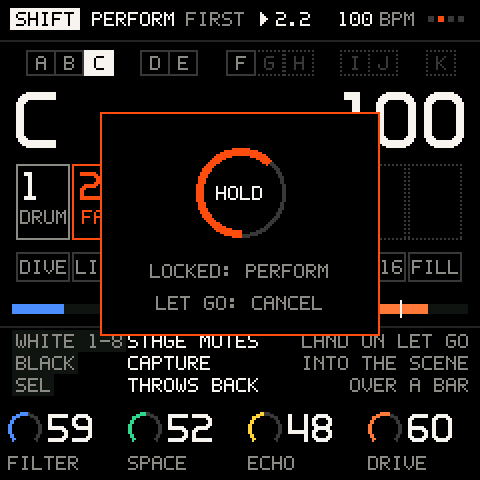
Hold HOME and PERFORM keeps its stage and puts a band over the throws: white keys 1 to 8 stage mutes, the black keys capture a scene, SEL brings the throws back.
Recording on PERFORM
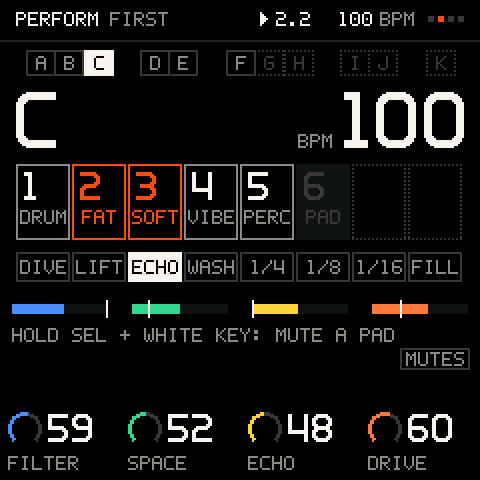
REC here is the ordinary record, an overdub: it records the notes you play. It does not record scene changes, mutes or throws.
Playing a set
PERFORM works for a whole set when you prepare it in the other views first:
- Build each part on its own and store the patterns (SEQ).
- For each section, mute what should not play, and capture it into a black key.
- On stage, launch scenes on the bar, throw the filter into the chorus, punch in a fill.
- Between songs, load the next project from PROJECT. Loading needs a short silence, because the FM-1 reads its flash and changes every sound.
Troubleshooting
| What happens | Why, and what to do |
|---|---|
TURN AGAIN TO LEAVE | The music is playing. Turn SELECT once more within a second, or stop first. |
LOCKED: PERFORM | Deleting is locked while the music plays. Stop the music, or go to another view. |
| A throw does nothing | The effect it sweeps is switched off. Check FX. |
| A mute key did nothing | The key is beyond your tracks, or the mute is queued (the cell blinks) because LAUNCH waits for the bar. |
| SEL + a white key did nothing | The project has no KIT track. Pad mutes need one. |
| A pad is still muted on another screen | A pad mute is the pad's own MUTE. Unmute it here with SEL + its key, or in the PAD menu. |
| A scene did not launch | It is queued for the bar (the key blinks), or you tapped it twice, which cancels. |
| A punch-in will not stop | It is latched: tap it again, or stop the music. |
| The throws no longer match the project | They stay where you left them. SHIFT + SEL glides them back. |