Chapter 5
KIT and the GROOVE bank
A KIT track plays eight drum pads from one track, so a whole beat needs one track instead of four. KIT shows the pads, lets you shape each one, and edits their hits on a step grid. The GROOVE bank is the set of 32 sounds built into Groove OS that the pads, and any synth track, draw on.
A kit or a single voice
Every track is either a synth track or a KIT track.
| Synth track | KIT track | |
|---|---|---|
| What it plays | One voice, across the keys | Eight pads, each with its own sound |
| Where it comes from | ADD SOUND TRACK on TAPE, or any single voice in the browser: GROOVE, A-D, SYSEX | ADD KIT TRACK on TAPE, a template from the browser's KITS bank, or K1 on KIT |
| Its page | SOUND | KIT |
| The keys | Notes | Pads (the octave never moves them) |
| CHORD input | Works | Off |
A single drum voice, such as PUNCH KICK from GROOVE, is a synth track's
voice: it plays on every key, pitched where the sound is pitched. Only a
KITS template makes a KIT.
A track changes kind only while it is empty and not recording. Its notes mean pitches on a synth track and pads on a KIT, so Groove OS refuses to reinterpret them.
Making a KIT
The quickest way is a new track. On TAPE, with the cursor on the ruler,
press SEL for TAPE > ACTIONS and choose ADD KIT TRACK: a new last
track (up to 8) that is already a KIT, selected: T5 NEW KIT TRACK. The
template follows the tempo: DUSTY below 100 BPM, PUNCH from 100 to
125.9 BPM, STEEL from 126 BPM. Its TRACK sound is the voice a new synth
track would have had. See TAPE: Actions.
DUPLICATE T2 in the same menu copies a KIT track with its template,
VELO and all eight pads, and its hits.
To turn a track you already have into a KIT, use the browser, on any page:
- Select an empty track (SHIFT + ALGORITHM).
- Turn PRESETS, then K1 to the KITS bank.
- Turn PRESETS to
PUNCH KIT,DUSTY KITorSTEEL KIT. The track becomes a KIT at once. Play the keys to hear it. - Press SEL to keep it, or HOME to put the synth track back.
From KIT: if the selected track is a synth track, KIT shows a card instead of pads. Turn K1 to make it a KIT.
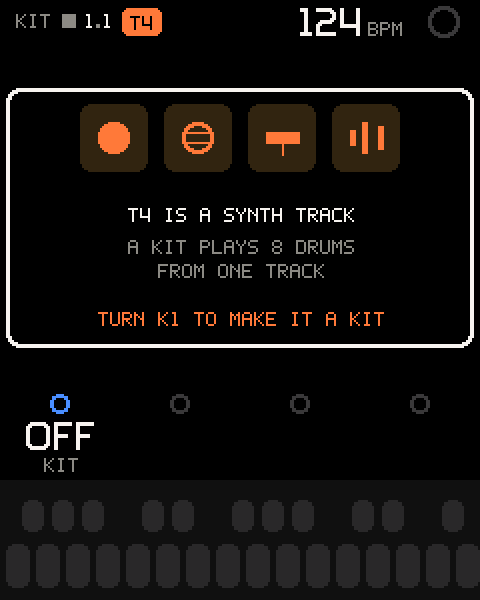
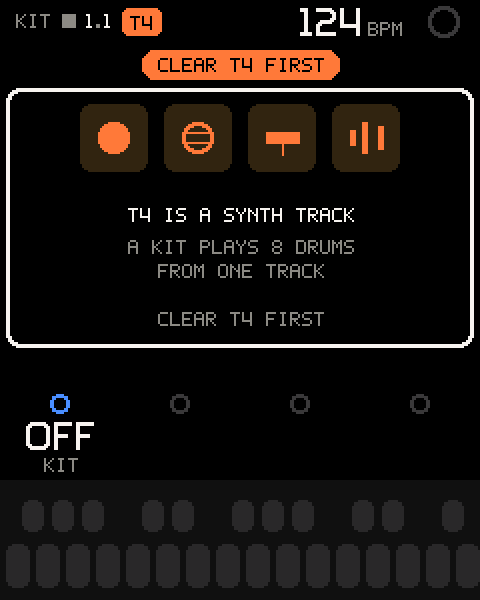
To go back to a synth track, empty the track and use MAKE SYNTH TRACK
(see Kit actions), turn K1 KIT to OFF, or load a
single voice from the browser.
Opening KIT
| Control | What it does |
|---|---|
| SEL on a KIT track (TAPE) | Opens KIT. |
| ALGORITHM | Moves the cursor: the kit row at the top, then pads 1 to 8. |
| SEL on a pad | Opens that pad's step grid. |
| SEL on the kit row | Opens the kit actions. |
| HOME | Up one level; from the pads, back to TAPE. |
The pads screen
| Area | What it shows |
|---|---|
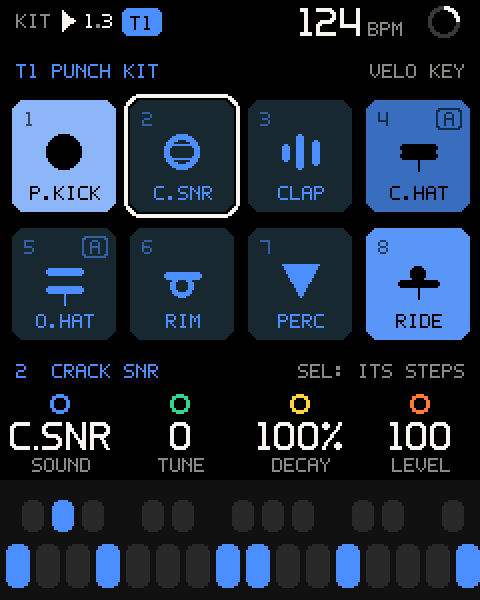
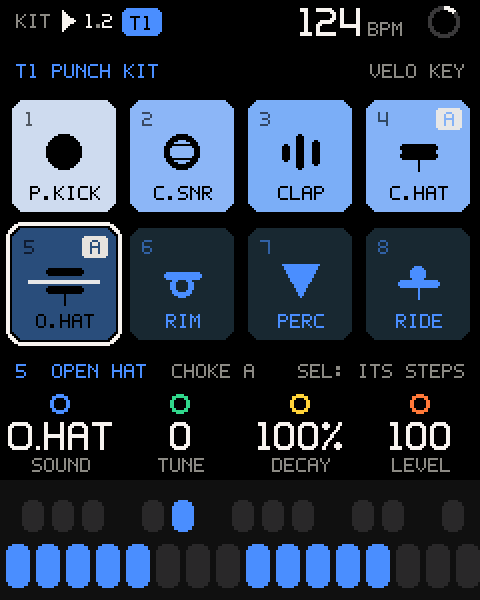
| Kit row | The track and kit (T1 PUNCH KIT), and the velocity mode (VELO KEY). Outlined when the cursor is on it. |
| Pads | 1-4 on top, 5-8 below: number, a picture of the sound, its short name. A letter at the top right is its choke group; M means muted. |
| Hit flash | A pad lights as it plays: brighter for harder hits, as long as the sound rings. |
| Choke | A choked pad is struck through, and the group letters light on both pads. |
| Info line | The selected pad's full sound name and choke group, and SEL: ITS STEPS. On the kit row: SEL: CLEAR ALL, SYNTH TRACK. |
Playing the pads
With a KIT track selected, the keys play its pads on every OS page. The keys are counted from the lowest one, so OCT-/OCT+ and transpose never move a pad. Note names below are at the default octave.
| Keys | What they do |
|---|---|
| White keys F3 to F4 | Pads 1 to 8, velocity sensitive. |
| White keys G4 to G5 | Pads 1 to 8 again, for the other hand. |
| Black keys F#3 to A#4 | Select pad 1 to 8 and play it once. Not recorded. The KIT cursor moves to that pad. |
| Black keys C#5, D#5, F#5 | Nothing. |
White-key hits record like any notes when you press REC: count-in, overdub, quantize and undo work the same as on a synth track. The key lights show the pads as they hit, and the selected pad's black key.
Pad values
Put the cursor on a pad. K1-K4 edit it; hold SHIFT for the second row.
| Row | Values | What it sets |
|---|---|---|
| K1 SOUND | OFF, TRACK, then the 12 drum sounds | What the pad plays. See the table below. |
| K2 TUNE | -12 to +12 | Pitch in semitones. Pitched sounds follow it like a key; snares, clap, hats, ride and rim shift their fixed frequencies. |
| K3 DECAY | 14% to 379% | Length against the sound as designed (100%). Each step is about 12%; six steps double or halve it. |
| K4 LEVEL | 0 to 100 | Pad level, in steps of 2. 100 = the sound as designed. |
| SHIFT + K1 CHOKE | OFF, A, B | Choke group. |
| SHIFT + K2 MUTE | OFF, ON | Silences the pad. Its hits stay. |
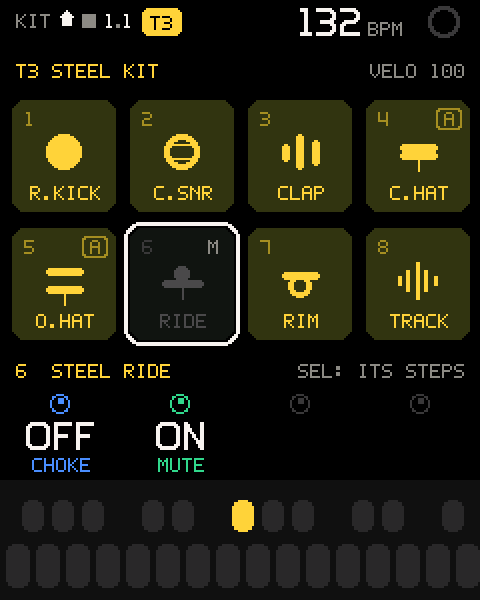
The drum sounds are the first 12 sounds of the GROOVE bank:
| SOUND | Full name | Picture |
|---|---|---|
OFF | NO SOUND | A dash |
TRACK | TRACK SOUND: the track's own voice | A waveform |
P.KICK | PUNCH KICK | Drum head |
BOOM | BOOM KICK | Drum head |
R.KICK | RUMBLE KCK | Drum head |
D.KICK | DUSTY KICK | Drum head |
C.SNR | CRACK SNR | Head with wires |
D.SNR | DUSTY SNR | Head with wires |
CLAP | TIGHT CLAP | Three bursts |
C.HAT | CLOSED HAT | Cymbals shut |
O.HAT | OPEN HAT | Cymbals apart |
RIDE | STEEL RIDE | One wide cymbal |
RIM | RIMSHOT | Stick across a head |
PERC | METAL PERC | Bell |
Turning a pad's SOUND to a hat puts it in choke group A if it had none. Turning a hat into anything else sets its choke to OFF.
The TRACK sound
TRACK plays the KIT track's own voice: the voice it had before it
became a KIT. It plays at C4, plus TUNE. Edit it on SOUND > VOICE, or
with EDIT in the stock editor.
- On an empty track, load a voice with PRESETS and press SEL.
- Turn PRESETS to the KITS bank, load a kit and press SEL.
- On KIT, move the cursor to a pad and turn K1 SOUND to
TRACK.
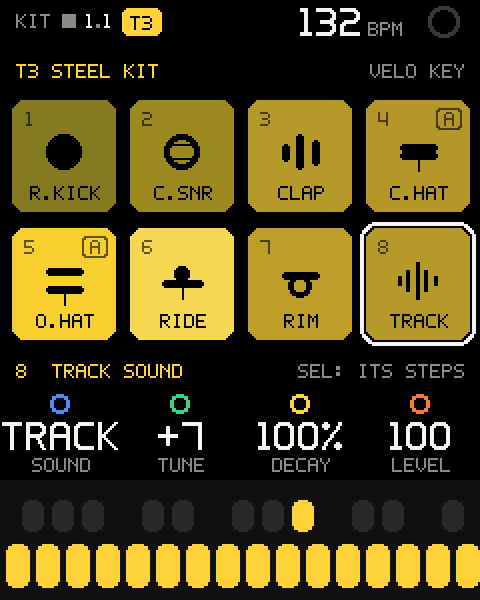
Pro tip: A voice that sustains keeps sounding while you hold its key, and releases like a synth note. Drum sounds always play whole, however short the hit.
Choke
Pads in the same choke group cut each other: a hit on one silences the others in that group. Every template puts the closed and open hat in group A, so closing the hat cuts the open one. Group B is free for your own pairs, for example two toms or a kick and a long BOOM.
Velocity
K2 VELO on the kit row sets how hard every hit plays.
| Value | What it does |
|---|---|
KEY | Each hit plays at the key's velocity, or at the velocity it was recorded or programmed with. |
| 40, 64, 80, 100, 127 | Every hit of this kit plays at this velocity: live, recorded, and programmed steps alike. New hits are recorded at it too. |
The kit row's velocity mode shows at the top right of the pads screen.
The kit row
Put the cursor on the kit row at the top.
| Row | Values | What it sets |
|---|---|---|
| K1 KIT | OFF, PUNCH, DUSTY, STEEL | On a KIT: loads that template's eight pads under the pattern. OFF makes it a synth track again, only when empty. |
| K2 VELO | KEY, 40, 64, 80, 100, 127 | See Velocity. |
| K3, K4 | - | Empty: their rings are dark and they have no legend. Tuning or shortening all pads at once is not built; turning them shows TUNE: COMING SOON or DECAY: COMING SOON. Set TUNE and DECAY on each pad. |
A template change shows T1 DUSTY KIT (your track and kit).
Changing the kit with K1 replaces all eight pads' SOUND, TUNE, DECAY,
LEVEL, CHOKE and MUTE with the template's; the hits stay. When you have
edited any pad, it asks first: LOAD DUSTY KIT?, PAD EDITS ARE LOST,
with Cancel highlighted (ALGORITHM to LOAD, SEL to answer,
HOME to keep your pads). Pads as the template left them change at
once, one template per detent.
Pro tip: To try kits and come back, use the browser: HOME there puts your pads back exactly.
Kit actions
Press SEL on the kit row.
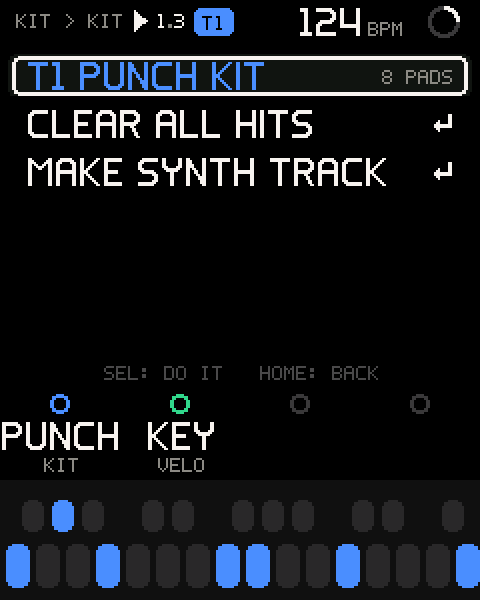
| Row | What it does |
|---|---|
CLEAR ALL HITS | Asks CLEAR ALL HITS? (SHIFT + REC BRINGS THEM BACK). ALGORITHM picks CANCEL or CLEAR, SEL confirms, HOME cancels. Clears the whole track, T1 CLEARED. SHIFT + REC undoes it. |
MAKE SYNTH TRACK | Turns an empty KIT track back into a synth track, T1 SYNTH TRACK. If the track has hits: CLEAR T1 FIRST. |
Pad steps
Press SEL on a pad to open its step grid. The grid is the tape itself: 8 pad rows by the 16 steps of one bar, the entered pad's row lit. What you program here plays and records like any take, and TAPE shows it. There is no separate pattern to print.
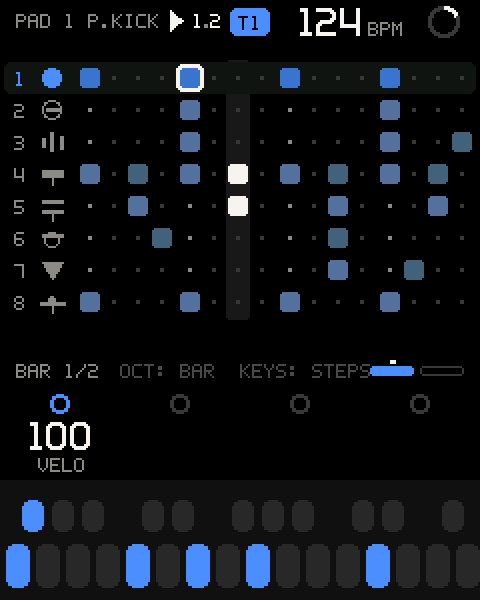
| Area | What it shows |
|---|---|
| Header | PAD 1 P.KICK: the pad you are editing, then the track badge (T1) and, while the KIT's steps play from SEQ, the SEQ badge. A full header shortens it to 1 P.KICK. |
| Rows | Each pad's hits in the bar on screen, brighter for higher velocity. |
| Playhead | A column that follows the loop; red while recording. |
| Bottom line | BAR 1/2, OCT: BAR KEYS: STEPS, and one marker per bar: filled = on screen, a dot above = where the playhead is. |
| Control | What it does |
|---|---|
| White keys | Steps 1 to 16 of the bar on screen. A tap adds or removes the pad's hit there, at the key's velocity (or VELO's). You hear a hit you add. |
| White key held + K1 | Sets that step's velocity. Letting go then does not toggle the step. |
| Black keys F#3 to A#4 | Switch to pad 1 to 8's row and play it once. |
| ALGORITHM | Moves the cursor: the pad at the start, then every step of every bar. It turns faster when you spin it. |
| SEL on a step | Adds or removes the hit, at VELO's velocity, or 100 with VELO at KEY. |
| OCT- / OCT+ | Previous or next bar. Shows BAR 2/4. |
| HOME | Back to the pads. |
A hit belongs to a step if it lies within 1/32 note of that step's 1/16 line, so unquantized playing still lands on the grid.
Step values
| Cursor | Row | Values | What it sets |
|---|---|---|---|
| The pad | K1-K4, SHIFT | As on the pads screen | The pad's SOUND, TUNE, DECAY, LEVEL, CHOKE, MUTE. |
| A step | K1 VELO | -, 1 to 127 | The hit's velocity. - = no hit. Turning up from - adds a hit at 64; turning down to 0 removes it. |
| A step | K2-K4 | - | Empty (dark rings). NUDGE, CHANCE and RATCHET per step are not built; turning them shows NUDGE: COMING SOON and so on. |
Program a pattern
- On KIT, move the cursor to a pad and press SEL.
- Tap the white keys for the steps you want.
- Press a black key to switch to another pad's row, and tap its steps.
- Press OCT+ for the next bar, if the track is longer than one bar.
- Press PLAY to hear it. Keep editing while it loops.
Hits you add in one visit to the grid are one take: SHIFT + REC undoes them together. While recording, they join the take being recorded.
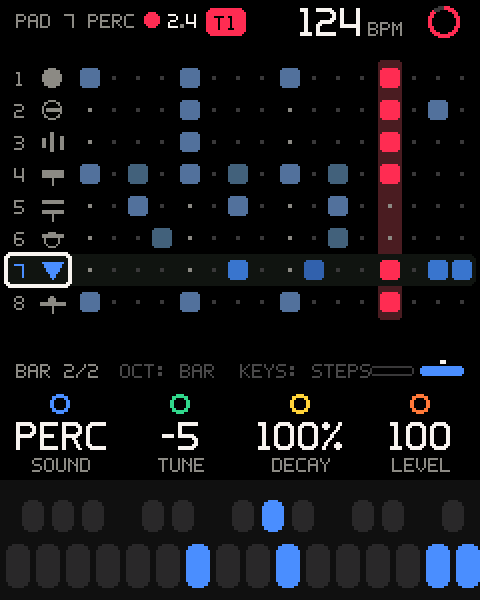
Pro tip: Set the track's length on TAPE first (LENGTH, BARS). The grid shows as many bars as the track has.
Pad actions
Press SEL with the cursor on the pad (the first position in the grid).
| Row | What it does |
|---|---|
CLEAR PAD HITS | Asks CLEAR PAD 3 HITS? (THIS CAN'T BE UNDONE). Removes every hit of this pad on the track: PAD CLEARED, or NO HITS. |
COPY PAD | Not built: the row says SOON, and SEL shows PAD COPY: COMING SOON. |
PASTE PAD | Not built: the row says SOON, and SEL shows PAD PASTE: COMING SOON. |
How a kit plays
- One voice per pad. A new hit on a pad cuts its previous one, like a drum machine.
- Drums play whole. A drum sound rings out fully however short the key press or recorded note.
- Choke cuts the other pads of the same group (see Choke).
- Voice budget. All KIT tracks together use at most 6 of the FM-1's 12 voices. A hit beyond that cuts the kit voice that has rung longest, nearly always a tail, so melodic tracks keep their notes.
- Pads and melodic notes don't cut each other. The one exception is a TRACK pad whose voice uses key scaling or detune.
The kits
The KITS bank holds three templates. All share one pad order, so your hands learn it once: 1 kick, 2 snare, 3 clap or rim, 4 closed hat, 5 open hat, 6 rim or clap (STEEL: ride), 7 percussion, 8 ride or percussion. Every pad starts at LEVEL 100; the sounds carry the balance.
| Pad | PUNCH | DUSTY | STEEL |
|---|---|---|---|
| 1 | P.KICK | D.KICK | R.KICK |
| 2 | C.SNR | D.SNR | C.SNR, DECAY 64% |
| 3 | CLAP | RIM | CLAP |
| 4 | C.HAT, choke A | C.HAT, choke A, DECAY 72% | C.HAT, choke A |
| 5 | O.HAT, choke A | O.HAT, choke A, DECAY 64% | O.HAT, choke A |
| 6 | RIM | CLAP, TUNE -3 | RIDE |
| 7 | PERC, TUNE -5 | BOOM, TUNE +7, DECAY 51% | RIM |
| 8 | RIDE | PERC, TUNE -12 | PERC, TUNE +7 |
| For | House, 118-132 BPM | Lo-fi and hip-hop, 70-95 BPM | Techno, 125-140 BPM |
The GROOVE bank
GROOVE (GROOVE in the browser, G 01-G 32) is a bank of 32 original
DX7 voices for lo-fi, house and techno, built into the firmware. It
does not use or change the FM-1's banks A to D. Load any of them on a
synth track from the browser; the first 12 are also the pad sounds.
"Play at" is where the sound is as designed. Kicks, basses, keys and METAL PERC follow the key; snares, clap, hats, ride and rim sound the same on every key.
| # | Name | TYPE | Role | Play at |
|---|---|---|---|---|
| 1 | PUNCH KICK | DRUM | Kick, 909-style: short pitch drop, thump and click | C4 |
| 2 | BOOM KICK | DRUM | Kick, 808-style: long sine boom, tune it by key | C4 |
| 3 | RUMBLE KCK | DRUM | Techno kick: punch with a dirty low swell | C4 |
| 4 | DUSTY KICK | DRUM | Lo-fi kick: soft round thump, no click | C4 |
| 5 | CRACK SNR | DRUM | Snare, 909-style: tone body and bright noise | C4 |
| 6 | DUSTY SNR | DRUM | Lo-fi snare: darker, woody, a little longer | C4 |
| 7 | TIGHT CLAP | DRUM | Clap: three noise bursts and a tail | C4 |
| 8 | CLOSED HAT | DRUM | Closed hi-hat, bright and tight; harder = brighter | C4 |
| 9 | OPEN HAT | DRUM | Open hi-hat, about 0.4 s | C4 |
| 10 | STEEL RIDE | DRUM | Ride: metallic ping and a long wash | C4 |
| 11 | RIMSHOT | DRUM | Rim or cross-stick: short woody click | C4 |
| 12 | METAL PERC | DRUM | Tuned metallic percussion or FM tom; play it melodically | C4 |
| 13 | DUSTY DUO | DRUM | One voice, two drums: dusty kick on keys up to E3, soft hat from F#4 up | C3 and C5 |
| 14 | PUNCH DUO | DRUM | One voice, two drums: 909-ish kick up to E3, bright hat from F#4 up | C3 and C5 |
| 15 | WARM SUB | BASS | Sub bass: round sine with a touch of 2nd harmonic | C3 |
| 16 | ORGAN BASS | BASS | House organ bass, punchy | C3 |
| 17 | PLUCK BASS | BASS | Deep-house pluck; the brightness decays like a filter | C3 |
| 18 | ZAP BASS | BASS | Acid-style squelch; harder = more squelch | C3 |
| 19 | ROLL BASS | BASS | Rolling techno bass: short, dark, tight | C3 |
| 20 | THUMB BASS | BASS | Lo-fi finger bass: round, woody thumb attack | C3 |
| 21 | DUSTY EP | KEYS | Mellow electric piano with a soft tine | C4 |
| 22 | TINE EP | KEYS | Bright DX-style electric piano with a bell tine | C4 |
| 23 | SOFT KEYS | KEYS | Soft felt-piano keys for mellow chords | C4 |
| 24 | STAB ORGAN | KEYS | 90s house organ stab | C4 |
| 25 | BRIGHT PNO | KEYS | Bright house piano stab | C4 |
| 26 | DUB STAB | KEYS | Dub-techno chord stab: short, dark, filtered | C4 |
| 27 | CHORD STAB | KEYS | Bright detuned rave and house chord stab | C4 |
| 28 | VIBES | KEYS | Mellow vibraphone for lo-fi melodies | C5 |
| 29 | WARM PAD | PAD | Warm slow pad, detuned, gentle movement | C4 |
| 30 | DARK PAD | PAD | Dark evolving techno pad or drone | C4 |
| 31 | SOFT LEAD | LEAD | Mellow flute-like lead with delayed vibrato | C5 |
| 32 | NOISE RISE | FX | Noise riser for transitions; hold the key | C4 |
On SOUND, a GROOVE voice shows its number and role under its name, such
as G 21 KEYS. The DUO sounds show SPLIT.
Pro tip: DUSTY DUO and PUNCH DUO put a kick and a hat in one voice on a synth track. They are not kits: for eight pads, load a template from KITS.
The GROOVE bank as SysEx
The same 32 voices also ship as DX7 SysEx files in the repository, for use with the stock firmware or other DX7 tools. Groove OS does not need them: GROOVE is already built in.
| File | What it is |
|---|---|
sounds/syx/fm1-groove-kit-bank.syx | All 32 as one DX7 32-voice bank (4104 bytes). |
sounds/syx/01-PUNCH-KICK.syx ... 32-NOISE-RISE.syx | Each voice as one DX7 single-voice message. |
While Groove OS runs, sending the bank asks BANK: 32 VOICES and lets
you browse it onto a track; a single voice goes onto the selected track
(see MIDI: Sounds over SysEx). Neither
touches the FM-1's own presets.
In safe mode (the stock firmware) the stock bank screen appears instead, where K1-K4 choose bank A, B, C or D.
Careful: In safe mode a bank replaces that bank's 32 factory presets, and a single voice overwrites the stock firmware's current preset slot in flash immediately. The FM-1 cannot send its presets back, so keep a copy of the factory banks before you send anything there.
Troubleshooting
| What happens | Why, and what to do |
|---|---|
CLEAR T2 FIRST when turning K1 KIT or choosing MAKE SYNTH TRACK. | The track has hits or notes and would change kind. Clear it (CLEAR ALL HITS, or SHIFT + hold REC), or use an empty track. |
The browser shows USE EMPTY TRACK on a kit or a voice. | Same reason: the track has notes. Load another kit instead, or use an empty track. |
The browser shows STOP REC. | A track can't change kind while recording or armed. Stop first. |
| OCT-/OCT+ don't change the octave on KIT. | On KIT they choose the bar of the step grid. The pads never move with the octave. |
OCT: THE BAR OF A KIT | You pressed OCT-/OCT+ on KIT while a synth track is selected. |
| The step grid shows only one bar. | The track is one bar long. Set LENGTH or BARS on TAPE. |
| Hits all play at the same loudness. | VELO on the kit row is fixed (40-127). Set it to KEY. |
| A step's VELO change isn't heard. | VELO on the kit row is fixed, and it overrides each hit's velocity. Set it to KEY. |
| The open hat stops when the closed hat plays. | They share choke group A. Set one pad's CHOKE to OFF or B. |
| A pad is silent. | Its SOUND is OFF, it is muted (M on the pad), or its LEVEL is 0. |
| The pads lost their sounds and tuning. | K1 KIT loaded a template and you chose LOAD. It can't be undone; set the pads again, and use the browser (with HOME) to try kits. |
T1 FULL when adding a step. | The track holds as many events as it can. Remove some hits. |
8 TRACKS: NO MORE on ADD KIT TRACK. | The tape has 8 tracks. Delete one, or turn an empty synth track into a KIT with K1 on KIT. |
| The new KIT track is DUSTY (or STEEL), not PUNCH. | ADD KIT TRACK picks the template by tempo. Turn K1 KIT on the kit row to change it. |
K3/K4 on the kit row say COMING SOON. | All-pad TUNE and DECAY are not built. Set TUNE and DECAY on each pad. |
| SHIFT + SEL doesn't turn CHORD on. | CHORD input is off on KIT tracks. |
| ENV moved the KIT selection to pad 1. | ENV opens SOUND on its first pad. Pick your pad again with a black key. |