Chapter 3
MIX
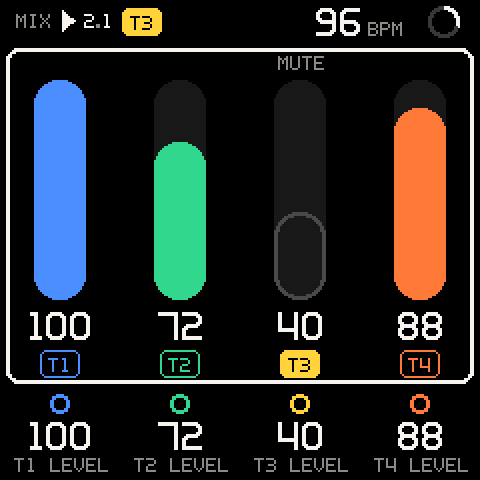
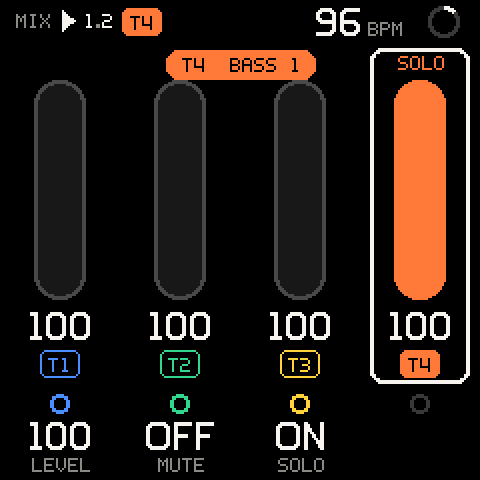
MIX is the mixer: one channel strip per track, with its level, mute and solo. Turn SELECT one detent right of TAPE to reach it. Lengths and the rest of the arrangement stay on TAPE.
Getting there
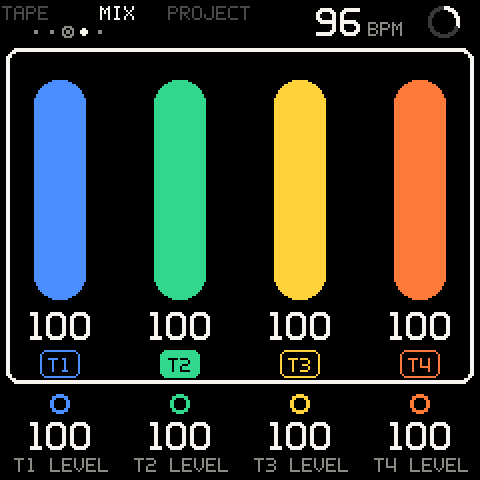
MIX sits right of TAPE on the wheel: SCALE, CHORD, TAPE, MIX, PROJECT. While you turn SELECT, the header shows the page and its neighbours for a second, with a dot per page (TAPE's is ringed).
HOME goes back to TAPE.
The strips
| Part | What it shows |
|---|---|
| Fader | Filled to the track's level, in the track's colour. An outline when the track is silent: muted, or another track is soloed. Dimmed while another track is soloed. |
MUTE / SOLO (above) | The track is muted or soloed. |
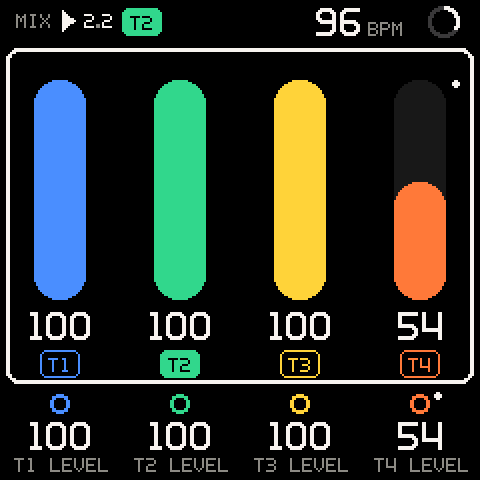
| Dot (right of the fader, top) | The level is automated; red while it is being recorded. |
| Number (below) | The level, 0-100. Grey at 0. |
Chip T1-T8 | Filled: the selected track. |
| White outline round the fader, blinking | A mute or solo waiting for the launch line. |
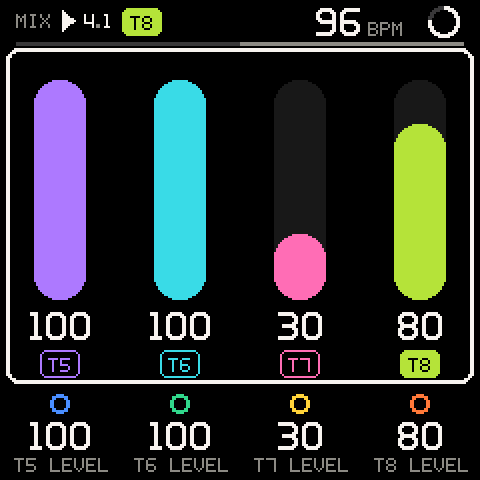
| Bar (above the strips) | With more than four tracks: which four the page shows. |
The key lights show the selected track's notes as they play, as on TAPE.
More than four tracks
MIX shows four strips at a time, each standing over its knob. With five or more tracks, the strips scroll as the selection moves, just enough to keep the selected track in view, and a bar under the header shows which part of the track list you see. With fewer than four tracks, the strips sit at the left and the spare knobs are dark.
The cursor
MIX always opens with the cursor round all the strips shown. Turn ALGORITHM to put it on one strip; that selects the track (a toast names it). Turn back to the left end to return to all of them.
| Cursor on | K1 | K2 | K3 | K4 | SEL |
|---|---|---|---|---|---|
| All strips | The first strip's level (T1 LEVEL) | The second's (T2 LEVEL) | The third's (T3 LEVEL) | The fourth's (T4 LEVEL) | - |
| One strip | LEVEL | MUTE | SOLO | - | Opens the track's actions (MIX > T2) |
With the cursor round all the strips, each knob sits under its own strip: four faders at once. With eight tracks and T5 to T8 in view, the knobs read T5 LEVEL to T8 LEVEL.
MIX has no second row: with SHIFT held, K1-K4 show dark rings and do nothing. SHIFT + the keys and SHIFT + ALGORITHM work here as on every page.
Levels
| Row | Values | What it sets |
|---|---|---|
LEVEL, T1 LEVEL-T8 LEVEL | 0-100 | The track's volume. 2 per detent, 4 when turned fast. At once, never queued. 0 is silence. |
All tracks start at 100. Level works like a fader: 50 is about 12 dB down, 25 about 24 dB down. It turns down the output of the sound's carrier operators, so the tone of the sound stays the same. A new level applies from the next note the track plays; notes already sounding keep theirs. Setting 0 silences the track at once.
Levels are performance knobs: with REC on, turning the selected track's level records it as automation (a take with the pass's notes); without REC, SAVE captures it. An automated level has a dot by its fader and by its knob, and the fader and number follow the lane while the tape plays. Hold SEL and turn it to clear the lane (always CLEAR on a level, never x10; no lane: NO AUTOMATION). See Automation.
Mute and solo
On a strip, K2 is MUTE and K3 is SOLO. Turn right for ON, left for OFF.
From any page, without moving the cursor: hold HOME (SHIFT) and press the top octave's C (M) or D (S) to mute or solo the selected track, E to bring every muted track back, or F to turn every solo off. See SHIFT.
| Row | Values | What it sets |
|---|---|---|
MUTE | OFF, ON | The track plays, or is silent. Muting cuts its sounding notes. |
SOLO | OFF, ON | While any track is soloed, only soloed tracks play. Several tracks can be soloed at once. |
A muted track stays silent even when soloed. Mute and solo don't change the level; unmuting brings the track back at the level it had. On TAPE a muted track's chip reads M, a soloed one S.
Queued mute and solo
While the tape plays with LAUNCH on BEAT or BAR, mute and solo wait for the next beat or bar line, like a clip launcher. With LAUNCH OFF, or while stopped, they are immediate.
While a change waits:
- The value shows where it is going and blinks until it lands.
- The fader's white outline blinks, and so does the track's chip on TAPE.
- A toast shows it outlined, for example
T3 MUTE ON @ NEXT BAR(or@ NEXT BEAT). It fills, readingT3 MUTE ON, when the change lands.
To cancel a waiting change, turn the knob back before the line. Stopping the tape, or changing LAUNCH, drops every waiting change.
To bring a part in on the downbeat:
- Set LAUNCH to
BAR(SHIFT + the 7th white key, or SETUP > RECORD). - With the tape playing, put the cursor on the track's strip.
- Turn K2 left (
MUTE OFF). The track comes in on the next bar line.
Or, from any page: select the track (SHIFT + ALGORITHM), then SHIFT + the top C.
Pro tip: Queue several changes inside one bar: solo the drums, mute the bass. They all land together on the same line. SHIFT + the top F (
ALL SOLOS OFF) brings the whole mix back on the next line; SHIFT + the top E (ALL MUTES OFF) unmutes everything together.
Track actions
SEL on a strip opens the track's actions (MIX > T2). Its first row is the track itself, with its name and length; there K1 is LENGTH and SHIFT + K1 BARS, as on TAPE.
| Row | What it does |
|---|---|
CLEAR T2 | Asks CLEAR T2?, then empties the track. SHIFT + REC brings it back. |
DUPLICATE T2 | A copy of the track right after it, selected (T3 DUPLICATE). |
DELETE T2 | Asks DELETE T2?, then removes the track; no undo. The last track stays. |
TAKES | The take list. Not built yet (SOON). |
To add a track, use TAPE > ACTIONS. See Actions.
Troubleshooting
| What happens | Why, and what to do |
|---|---|
| A mute or solo doesn't happen when I turn the knob. | LAUNCH is BEAT or BAR and the tape is playing: it waits for the next line (the value blinks). Set LAUNCH to OFF for instant changes. |
| A waiting mute disappeared. | Stopping the tape or changing LAUNCH drops waiting changes. Set it again. |
| A track is silent, but its level is up and it isn't muted. | Another track is soloed. Its fader is drawn as an outline. Turn the other track's SOLO off, or SHIFT + the top F. |
| A soloed track is silent. | It is also muted. Mute wins; turn its MUTE off. |
| Turning the level doesn't change a held note. | Level applies from the next note. |
| The cursor jumped back to all the strips. | MIX always opens there. Turn ALGORITHM to a strip. |
| I can't see all my tracks. | MIX shows four strips at a time. Turn ALGORITHM: the strips scroll to follow the selected track. |
| SHIFT + a knob does nothing on MIX. | MIX has no second row. A track's length is on TAPE, or on MIX > T2's first row. |
| A level won't stay where I turn it while the tape plays. | It is automated: the lane takes over when you let go. Hold SEL and turn it to clear the lane. |