Chapter 9
SEQ
SEQ is a step sequencer with a pattern of up to 64 steps for every track. Write steps from the keys, one note or a whole chord per step, give each step its own length, ratchet, gate, chance, transpose, accent and slide, and the pattern plays in lock with the tape on its track's sound. Several tracks can run their patterns at once; 16 stored patterns, shared by all tracks, keep the versions you want to come back to, and a chain plays them in turn. When a pattern is right, print it onto the tape with SAVE.
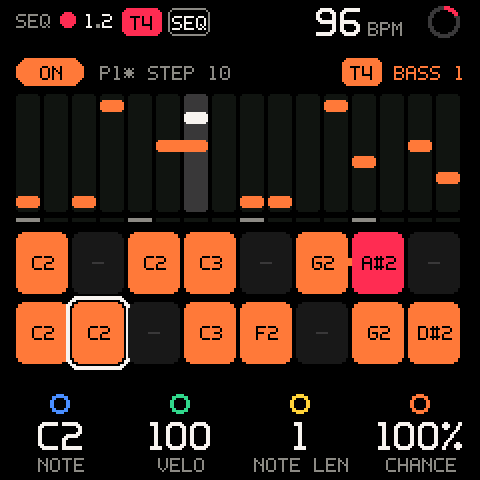
Turning SEQ on and off
SEQ works on the selected track's pattern. Patterns on other tracks keep playing whatever you do with it.
| Control | What it does |
|---|---|
| SEQ (release), this track's pattern off | Turns it on and opens the SEQ page (T1 SEQ ON). |
| SEQ (release), this track's pattern on | Turns it off and returns to TAPE (T1 SEQ OFF), from any page. |
| SHIFT + SEQ | Opens the SEQ page. Nothing turns on or off. |
| HOME | Leaves the page. The patterns keep running. |
| PLAY on SEQ, tape stopped | Turns the selected track's pattern on and starts the tape. |
| REC on SEQ, stopped or playing without recording | Turns the selected track's pattern on and starts recording (count-in and launch line as usual). |
SEQ > PATTERN > ALL SEQ OFF | Turns every track's pattern off at once (ALL PATTERNS OFF). |
- The SEQ light and the
SEQheader badge are on while any track's pattern is on, even on another track. - Turning a pattern off keeps its steps and settings and everything already on the tape. It does not stop the transport.
- A pattern turns on and off at once: it does not wait for the launch line.
- A pattern only plays while the tape plays. Stopped, it waits.
Pro tip: To edit a pattern while it plays, come back with SHIFT + SEQ: a plain SEQ would turn it off.
One generator per track
A track is driven by its pattern or by the arpeggiator, never both.
| Situation | Result |
|---|---|
| SEQ while the arp is on | Refused: ARP ON THIS TRACK. |
| PLAY or REC on SEQ while the arp is on | The transport starts, the pattern stays off: ARP ON THIS TRACK. |
| ARP while the selected track's pattern is on | Refused: SEQ ON THIS TRACK. |
The arp can play the selected track while patterns run on the others. See ARP.
The screen
| Part | What it shows |
|---|---|
ON / OFF pill | The selected track's pattern, in the track's colour. |
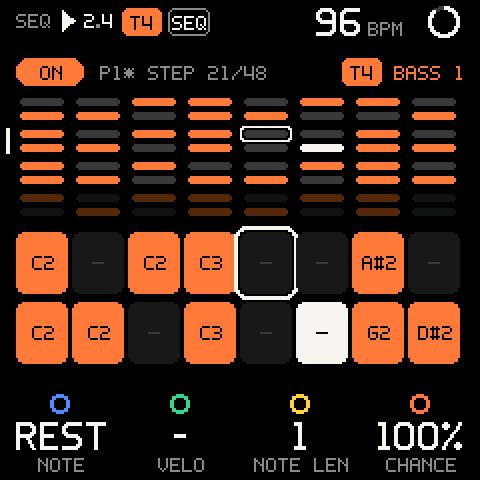
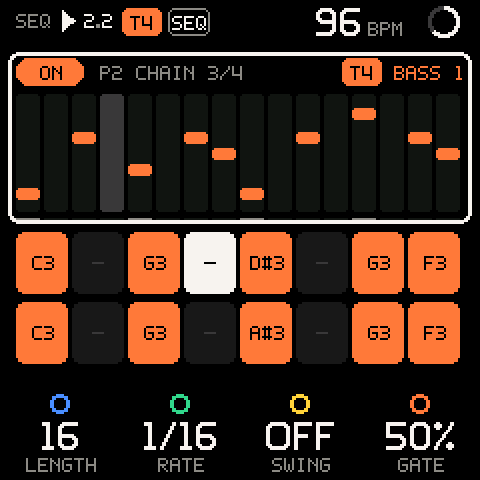
P2* STEP n | The stored pattern the track plays (P2; * = changed since it was stored) and the cursor step; over 16 steps STEP 21/48 (cursor / LENGTH). With a chain and the cursor on the pattern row: P2 CHAIN 3/4. The same line shows P1>P2 NEXT (blinking) while a pattern switch waits, MOVE 3>21 while you move a step, and STRETCH NEXT (or LENGTH NEXT, RATE NEXT; blinking) while a change waits for the pattern end. |
| Track chip, right | The track and its sound (T4 BASS 1). |
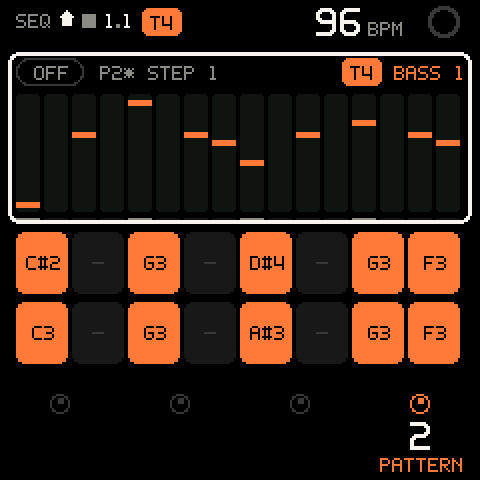
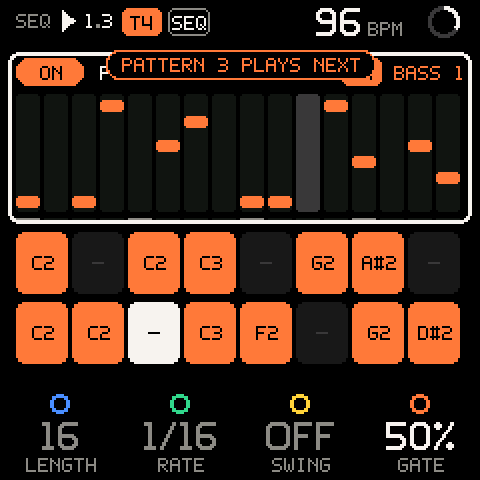
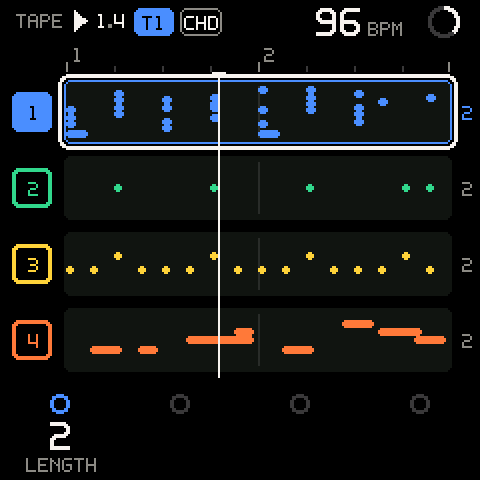
| Pitch roll, top (16 steps or fewer) | One lane per step, a bar per note, height = pitch. A chord stacks its notes in its lane; a tied step runs on into the next. The playhead's lane is lit; the ticks under the lanes mark every fourth step. |
| Overview, top (over 16 steps) | All 64 steps as eight rows of eight dots, a gap every 16: track colour = a note, dark = a rest, white = the playhead, outline = the cursor. Steps past LENGTH are dim: they are kept, not played. A white bar on the left marks the 16 steps on the pads. |
| Pads, bottom | 16 steps in two rows of eight: the 16 that hold the cursor (with the cursor on the pattern row and the tape playing, the playhead's). |
| Pad looks | Meaning |
|---|---|
| Track colour, note name | A note (C2). |
| Track colour, root over symbol, dots | A chord (A over m7), one dot per note. |
| Dark with a dash | A rest. |
| Dimmer, empty | Past the pattern's LENGTH. |
| White | The playhead. |
| Red | The playhead while it is being recorded. |
| White outline | The cursor. |
| Small bar to the next pad | The step is tied into the next one. |
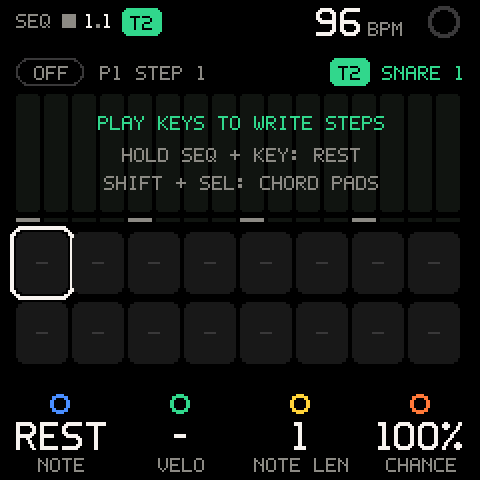
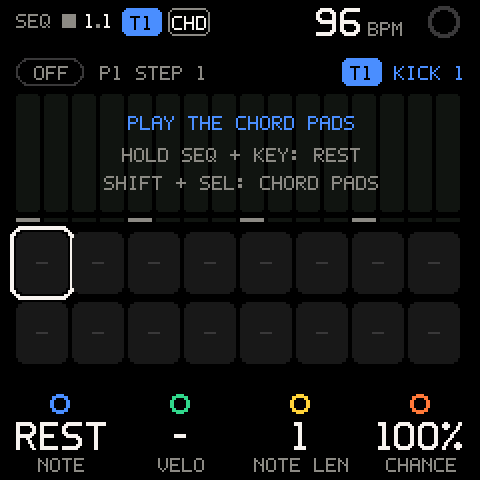
On an empty pattern the roll says PLAY KEYS TO WRITE STEPS (with chord input on: PLAY THE CHORD PADS), HOLD SEQ + KEY: REST and SHIFT + SEL: CHORD PADS (chord input on or off).
Moving the cursor
| Control | What it does |
|---|---|
| ALGORITHM | Moves the cursor: first the pattern row (a white outline round the roll), then steps 1 to LENGTH. Over 16 steps, a fast turn moves several steps per detent. |
| SHIFT + OCT+ / OCT- | Over 16 steps: the next / previous 16 (STEPS 17-32), the cursor at the same place in them. At 16 steps or fewer: ALL STEPS SHOWN. |
| Hold SEL + a white key | Puts the cursor on that step of the 16 shown: the white keys from the lowest one up. |
| Hold SEL + ALGORITHM on a step | Moves the step (see Moving steps). |
| SEL on the pattern row | Opens SEQ > PATTERN, the pattern actions. |
| SEL on a step | Opens SEQ > STEP n, the step's notes. |
Playing a key always puts the cursor back on the steps.
Pattern settings
With the cursor on the pattern row:
| Row | Values | What it sets |
|---|---|---|
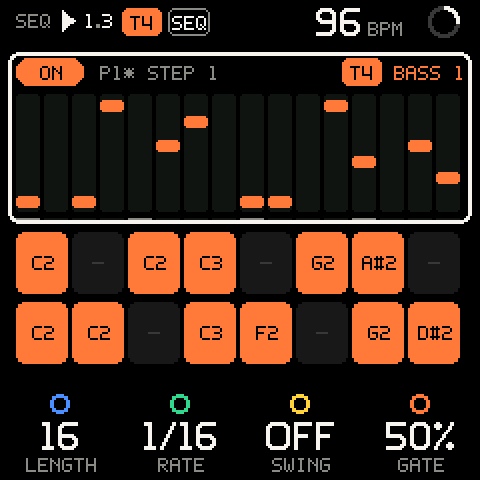
| K1 LENGTH | 1 to 64 | How many steps the pattern has. Steps past it are kept, not played: turn LENGTH up again and they are back. |
| K2 RATE | 1/4, 1/8, 1/8T, 1/16, 1/16T, 1/32 | The step length (T = triplet). |
| K3 SWING | OFF, 51% to 75% | Delays every other step. |
| K4 GATE | 10% to 100%, in 5 % steps | How long each note sounds, as a share of the step. |
Defaults: 16 steps, 1/16, swing OFF, gate 50%.
| Row (SHIFT) | Values | What it sets |
|---|---|---|
| SHIFT + K1 TRANSP | - | Not built yet (TRANSP: COMING SOON). |
| SHIFT + K2 DIR | - | Not built yet (DIR: COMING SOON). |
| SHIFT + K4 PATTERN | 1 to 16 | The stored pattern this track plays. See Stored patterns. |
While the pattern plays, LENGTH and RATE wait for the pattern's end (see Changes while playing); the knob shows the new value at once. Stopped, they change at once.
Locked to the tape
Step 1 lands on the loop's bar line, and the pattern starts over at the top of the loop. A 12-step pattern in a 2-bar loop at 1/16 plays 12 + 12 + 8 steps, the same on every pass: what you record is what you heard.
Writing steps
- Press SEQ. The cursor is on step 1.
- Play a key. The note goes into the cursor step, you hear it, and the cursor steps on.
- Keep playing. After the last step the cursor wraps to step 1.
| Input | What it writes |
|---|---|
| A key | That note, at the velocity you played, into the cursor step. |
| Keys held together | One chord step, up to four notes. |
| Hold SEQ + any key | A rest; the cursor steps on. Releasing SEQ afterwards does not turn SEQ off. |
| A chord pad (chord input on) | The pad's chord in one step. See Chord steps. |
- Keys pass through SCALE first: in SNAP or EASY a step gets the mapped note. See SCALE.
- Step entry works stopped or playing. Previews sound on the track but are never recorded.
- The key LEDs show the steps on the white keys: lit = a note, dark = a rest. While stopped, the cursor step blinks; while playing, the playhead runs along them.
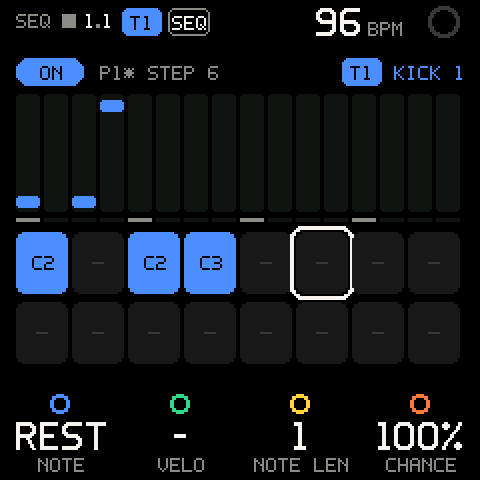
Step settings
With the cursor on a step:
| Row | Values | What it sets |
|---|---|---|
| K1 NOTE | A note (C#4), or REST | The step's note; a chord's lowest note. Turn a rest up for C4; turn a note down past the lowest note for a rest. |
| K2 VELO | 1 to 127, - on a rest | The step's velocity. On a chord it moves every note by the same amount (each keeps its own). |
| K3 NOTE LEN | 1 to 64 steps | How many steps the note lasts (GATE % of all of them). A later note cuts it. |
| K4 CHANCE | 5% to 100%, in 5 % steps | How often the step plays. The dice are fixed: the same rolls on every play, until you reroll them (REROLL CHANCE). |
| Row (SHIFT) | Values | What it sets |
|---|---|---|
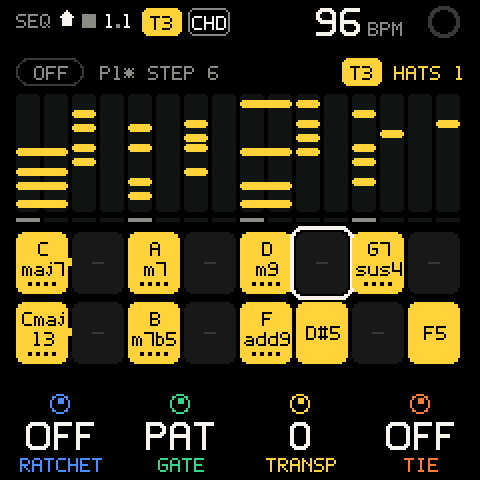
| SHIFT + K1 RATCHET | OFF, 2X to 4X | Repeats the note that many times inside the step. |
| SHIFT + K2 GATE | PAT (the pattern's), 5% to 100% | This step's gate. |
| SHIFT + K3 TRANSP | -24 to +24 | Plays the step that many semitones up or down. |
| SHIFT + K4 TIE | OFF, ON, SOME | The note lasts its whole NOTE LEN, legato into the next. On a chord it sets every note; SOME = only some are tied (set them per note on the step level). |
ACCENT (full velocity) and SLIDE (legato into the next note) are on the step level.
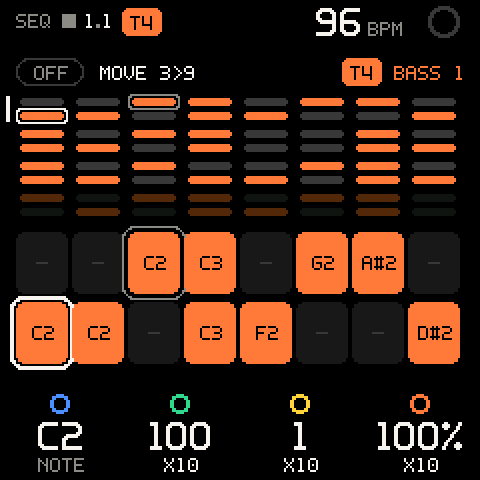
Moving steps
- Put the cursor on the step.
- Hold SEL and turn ALGORITHM. The step is picked up: the status line says
MOVE 3>9, the step's pad keeps a grey outline, the cursor shows where it goes. - Let go of SEL. The step lands: on an empty step it moves (
STEP 3 > 9); on a filled one the two swap (STEP 3 <> 9 SWAPPED). Nothing is lost.
The step takes its notes and all its settings along. Released on its own place, nothing happens (MOVE: SAME STEP). With the cursor on the pattern row, SEL + ALGORITHM only jumps.
To copy a step instead, use COPY STEP and PASTE STEP on the step level.
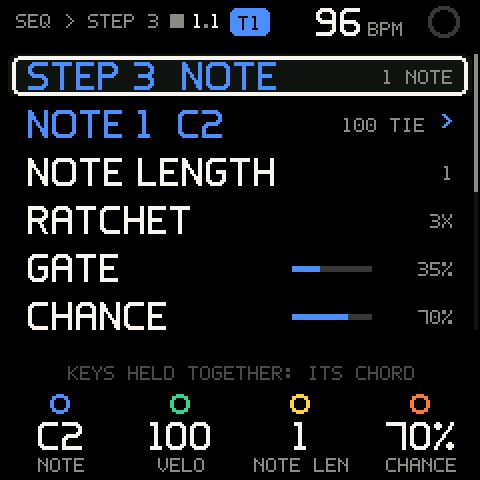
The step level (SEQ > STEP)
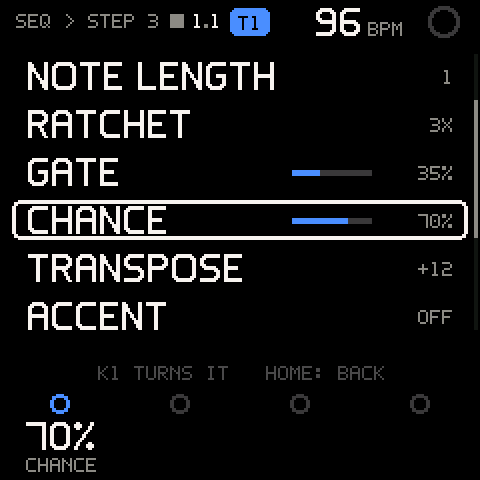
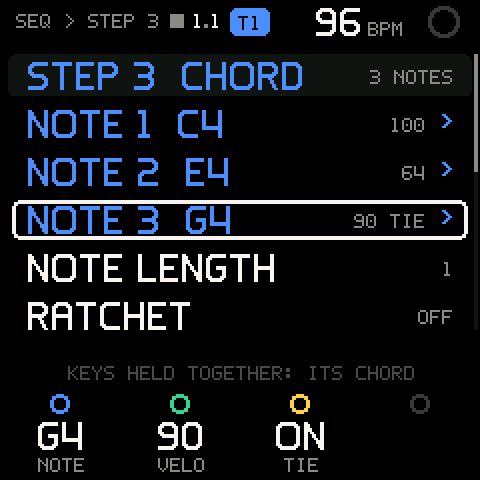
SEL on a step opens its own level, SEQ > STEP n. ALGORITHM scrolls; a bar on the right shows where you are.
| Row | What it does |
|---|---|
STEP n NOTE / CHORD / REST | The step itself: K1-K4 as on the SEQ page. The right side counts its notes. |
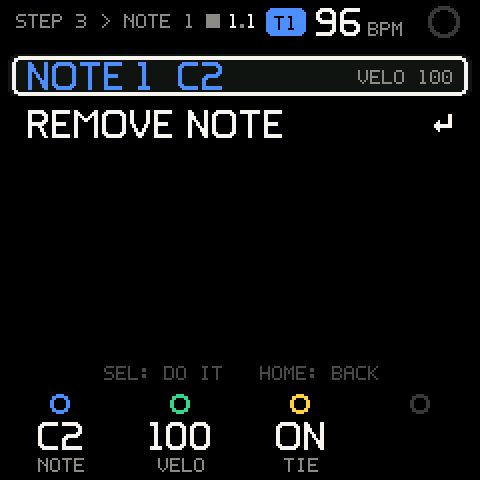
NOTE 1 C3 ... | One row per note, with its own velocity (and TIE when it is tied). K1 moves this note, K2 sets its velocity, K3 its tie; the other notes keep theirs. A tied note lasts the step's whole LENGTH, the others the gate's share. SEL opens the note: STEP n > NOTE k, with REMOVE NOTE (NOTE REMOVED; removing the last one leaves a rest, REST). |
NOTE LENGTH, RATCHET, GATE, CHANCE, TRANSPOSE, ACCENT, SLIDE | The step's settings, one per row. K1 turns the row's value. GATE and CHANCE show a bar; a CHANCE of 100 % reads ALWAYS here. |
COPY STEP | Copies the whole step, its notes and settings (STEP COPIED). |
PASTE STEP | Pastes it here (STEP PASTED, or COPY A STEP FIRST). |
CLEAR STEP | Makes the step a rest with default settings (STEP CLEARED). |
On this level the keys rewrite this step and the cursor stays: one key replaces it, keys held together make its chord. The step keeps its settings. HOME goes back.
Pattern actions (SEQ > PATTERN)
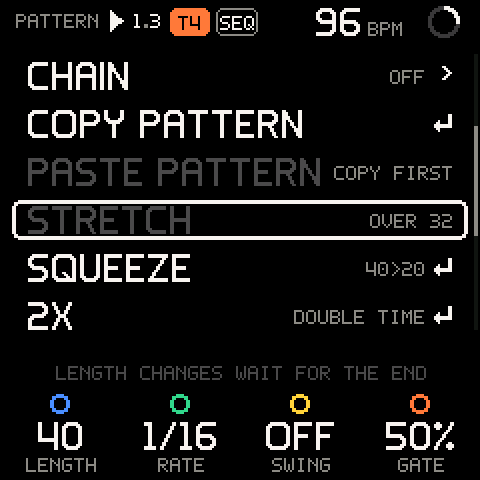
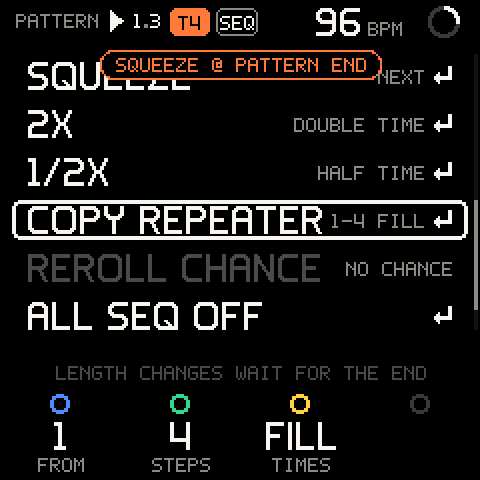
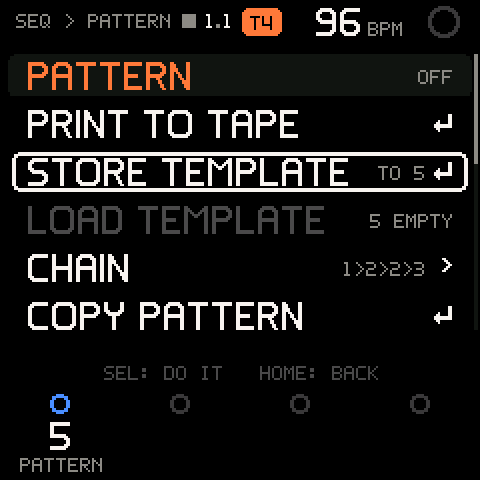
SEL on the pattern row opens the pattern's actions, a list that scrolls with ALGORITHM. The top row, PATTERN, shows whether the pattern is ON or OFF (or what waits for the pattern end) and keeps the pattern settings on K1-K4. A row that can't act now is dimmed with the reason on the right; SEL on it says why (STRETCH: OVER 32). The line at the bottom reads SEL: DO IT HOME: BACK, or LENGTH CHANGES WAIT FOR THE END while the pattern plays.
| Row | What it does |
|---|---|
PRINT TO TAPE | Prints the pattern onto the selected track (see Printing to tape). |
STORE TEMPLATE | Stores the pattern as stored pattern n (K1 picks n; the right side says TO 5), all 64 steps. The track then plays pattern n (T1 STORED AS PATTERN 5). Over another stored pattern it asks first (REPLACE PATTERN 5?, ITS STORED STEPS ARE LOST). Dimmed NO ROOM when the patterns' memory is full. |
LOAD TEMPLATE | Asks LOAD PATTERN 5?, then copies stored pattern n (K1) over this pattern, all 64 steps, hidden ones too (LOADED PATTERN 5). The stored one doesn't change. Dimmed 5 EMPTY for an empty one. Waits for the pattern end while playing. |
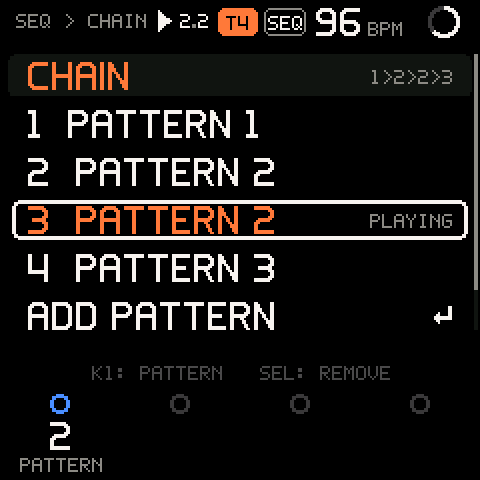
CHAIN | Opens SEQ > CHAIN (see Chains). The right side shows it (1>2>2>3, 1 ENTRY, or OFF). |
COPY PATTERN | Marks this track's pattern as the one to paste (T1 PATTERN COPIED). |
PASTE PATTERN | Asks PASTE T1 PATTERN?, then copies that track's pattern, as it is now, over this one: steps, length, rate, swing, gate (PASTED: 16 STEPS). The right side names the source (FROM T2). Dimmed: COPY FIRST, or THIS PATTERN on the copied track itself. |
STRETCH | Twice as long: each step moves to twice its place, rests between, lengths doubled (16>32). Dimmed over 32 steps (OVER 32). |
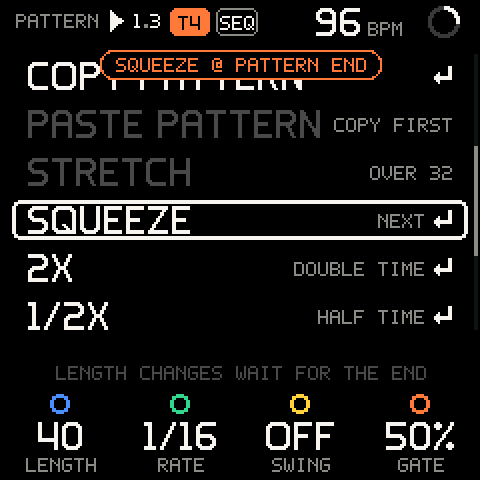
SQUEEZE | Half as long: every other step, lengths halved (16>8). A step that loses its place to a note says so: 3 NOTES DROPPED. Dimmed on a 1-step pattern (1 STEP). |
2X | Double time in the same length: the pattern squeezed, then played twice (DOUBLE TIME: 16 STEPS, or n NOTES DROPPED). |
1/2X | Half time in the same length: the first half stretched over all of it; the second half's notes drop (HALF TIME: 16 STEPS, or n NOTES DROPPED). |
COPY REPEATER | Repeats a block right after itself. K1 FROM (the step it starts at; the cursor step), K2 STEPS (the block's length), K3 TIMES (FILL = up to LENGTH). The right side shows it (1-4 X3). The pattern grows if the copies need it, up to 64 steps (REPEATED: 32 STEPS). Dimmed NO ROOM when the block has no room after it. |
REROLL CHANCE | New dice for CHANCE (CHANCE REROLLED). Dimmed NO CHANCE while no step has a chance below 100 %. |
ALL SEQ OFF | Every track's pattern off (ALL PATTERNS OFF). Dimmed NONE ON while no pattern is on. |
CLEAR PATTERN | Asks CLEAR THE PATTERN? (ITS STEPS ARE LOST). Choose CLEAR with ALGORITHM and SEL: every step becomes a rest (T4 PATTERN CLEARED). LENGTH, RATE, SWING and GATE stay. This cannot be undone. |
Stored patterns
A project holds 16 stored patterns, shared by every track. Each track plays a working copy of one of them: edit it freely, and STORE TEMPLATE when you want to keep the version.
| Control | What it does |
|---|---|
| SHIFT + K4 on the pattern row | Picks the stored pattern this track plays, 1 to 16. |
| Stopped | The pattern switches at once (T1 PATTERN 2, or PATTERN 2: EMPTY for an unused one: a new, empty pattern). |
| Playing | It waits for the end of the pattern playing: PATTERN 2 PLAYS NEXT, outlined, and P1>P2 NEXT blinking, until it starts (T1 PATTERN 2 PLAYS). |
| Turning back to the pattern playing, or HOME | Cancels the switch (T1 PATTERN 1 STAYS). |
- Switching replaces the working copy with the stored one. If the working copy has changes not stored yet (
P1*), the first turn only saysUNSTORED EDITS: TURN AGAIN; turn again while it shows to switch anyway. Store first to keep them. - Every track has its own working copy: two tracks can play the same stored pattern and change it differently.
- The stored patterns share 3 KB. A pattern takes only what it holds: 16 simple 16-step patterns use under 1 KB; a full 64-step pattern of 4-note chords with every setting about 1 KB.
- The stored patterns, each track's pattern number and chain are saved with the project.
Chains
A chain plays stored patterns one after another, for example 1>2>2>3, on this track.
SEQ > PATTERN>CHAIN, SEL.- SEL on
ADD PATTERNadds an entry: the first one is the pattern the track plays, each next one repeats the last one's. The cursor moves onto it; K1 picks its pattern. The message saysADD ONE MOREafter the first andCHAIN ONonce there are two. - Press PLAY. The chain starts at its first pattern; each one plays to its end, then the next starts, and after the last it starts over. The entry playing says
PLAYING; the SEQ page saysP2 CHAIN 3/4.
| Row | What it does |
|---|---|
CHAIN | The chain (1>2>2>3), 1 ENTRY: OFF, or OFF. |
1 PATTERN 2 ... | An entry. K1 picks its pattern; SEL removes it (ENTRY REMOVED, or CHAIN OFF: UNDER 2). The entry playing is in the track's colour and says PLAYING. |
ADD PATTERN | SEL adds one. Gone once the chain holds 16. |
CLEAR CHAIN | Removes every entry (CHAIN CLEARED). |
- A pattern follows its stored copy: when the chain moves on, the working copy's changes go (the same pattern twice in a row keeps playing as it is). Store changes you want to keep.
- If the pattern on screen has unstored changes when you press PLAY, it plays first, then the chain goes on: changes are never dropped unasked at the start.
- A switch lands where the old and the next pattern both start again, at the latest at the top of the loop: patterns as long as the loop (or dividing it) switch at every end.
- PRINT TO TAPE prints the pattern on screen, not the chain; record the chain with REC instead.
Changes while playing
What changes a playing pattern's length or grid waits for the pattern end, so no pass plays half old, half new: LENGTH, RATE, STRETCH, SQUEEZE, 2X, 1/2X, PASTE PATTERN, LOAD TEMPLATE, COPY REPEATER and a switch to another stored pattern (see Stored patterns).
- The message says what and when, outlined until it lands:
STRETCH @ PATTERN END. The status line blinksSTRETCH NEXT; the row saysNEXT. - It lands on the first line where the old and the new pattern both start from step 1, at the latest at the top of the loop. Then the message says what happened (
T1 STRETCHED: 32 STEPS). - SEL on the same row again cancels it (
SQUEEZE CANCELLED). - Stopping the tape applies it at once. Stopped, or with the pattern off, everything happens at once.
Swing, gate, the step settings, moves and new notes change at once.
Chord steps
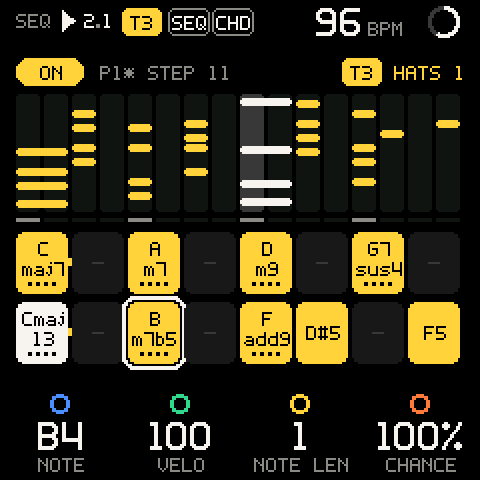
With chord input on (SHIFT + SEL, or SEL on CHORD), the keybed is the chord pad layout of CHORD, with its key, COLOUR, VOICING, SPREAD and performance keys.
- Turn chord input on. On an empty pattern the SEQ page says
PLAY THE CHORD PADS, and the key LEDs show the pads. - Press a pad. Its chord goes into the cursor step, previewed, and the cursor steps on.
- Press the next pad before letting go of the last one to tie the previous step into it.
- Hold SEQ + a key for a rest.
- A step holds up to four notes. Bigger chords lose the perfect 5th first, then the 9th, 11th, 13th and 6th; root, 3rd and 7th stay.
- The performance keys shape what is written. With SPLIT held, one press writes the bass, the next the chord.
- The pad shows the chord's name, worked out from the notes it keeps (
Cmaj7,G7sus4). - Keys held together with chord input off also make a chord step. Its pad shows the lowest note, with a dot per note.
Patterns on several tracks
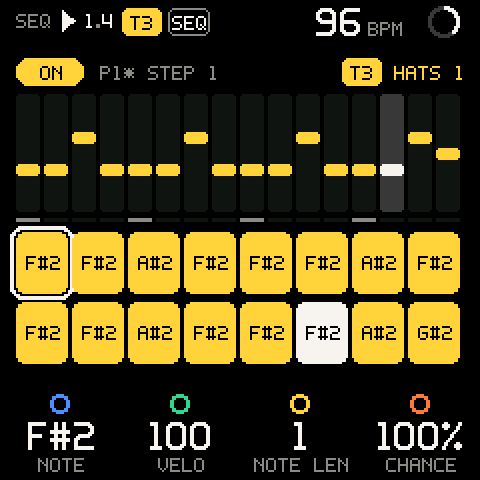
Every track has its own pattern, and all enabled patterns play at once, each on its own track with that track's sound. The SEQ page always shows the selected track's pattern.
- Press SEQ and write a pattern on, say, T4. Press PLAY.
- Select T3 with SHIFT + ALGORITHM. The page now shows T3's pattern,
OFF; T4 keeps playing. - Write T3's steps. You hear the previews over T4.
- Press PLAY to stop, then PLAY again: T3's pattern turns on and both play.
On TAPE, each track whose pattern is on shows SEQ at the end of its lane.
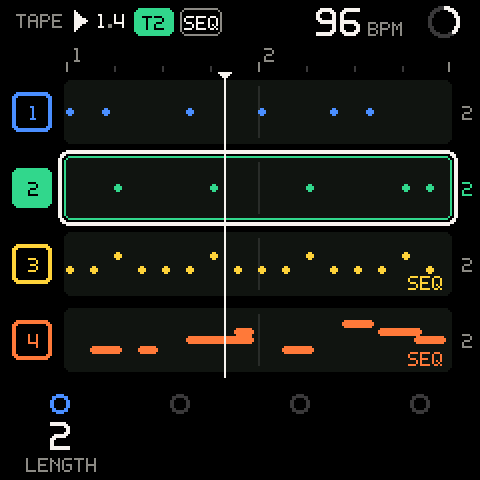
Pro tip: Draft on SEQ, keep on TAPE. Once a pattern is printed, turn SEQ off: the tape keeps it, and the track is free for the arp or for playing live.
Recording patterns
Patterns are recorded at their exact grid time, never moved by the input quantizer.
- REC records the selected track's running pattern onto that track.
- While REC records, the running patterns on the other tracks are recorded too, each onto its own track as a take of its own.
- Notes the tape already plays on a track are not doubled, so a pattern can keep running over its own recording.
Careful: Before you press REC, check the
SEQlabels on TAPE. Every running pattern goes onto its track while you record.
Printing to tape (SAVE)
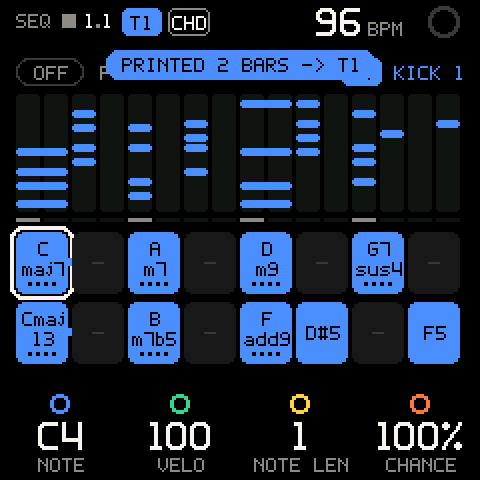
SAVE on the SEQ page (or any of its levels), or PRINT TO TAPE, prints the selected track's pattern: the pattern over the track's whole length, onto the track at once as one take, exactly where a recording would put it. No pass, no waiting; it works stopped or playing, with or without REC.
- Write the pattern.
- Press SAVE. The message says
PRINTED 2 BARS -> T1and the SAVE light flashes. - Tap SHIFT + REC to undo it.
| Message | Meaning |
|---|---|
PRINTED n BARS -> Tn | Done. |
PATTERN EMPTY | The pattern has no notes. |
Tn ALREADY PRINTED | Every note is already on the track at the same place. |
Tn FULL | The track has no room for that many notes. Nothing changed. |
The print covers the track's length: a 16-step 1/16 pattern printed on a 2-bar track fills both bars.
Troubleshooting
| What happens | Why, and what to do |
|---|---|
| SEQ took you to TAPE instead of the SEQ page. | The selected track's pattern was on, so SEQ turned it off. Press SEQ again, or use SHIFT + SEQ to open the page without turning anything off. |
| The pattern doesn't play. | The tape is stopped (press PLAY), or the pattern is OFF. |
| You want every pattern to stop. | SEQ > PATTERN > ALL SEQ OFF. |
MOVE CANCELLED when you let go of SEL. | You left the SEQ grid (or changed track) while carrying the step. Nothing moved; try again on the grid. |
SEQ says ARP ON THIS TRACK. | The arp is on. Turn it off with ARP first. |
| Keys don't write steps; they play the arp or drums. | You are not on the SEQ page, or the selected track is a KIT (use KIT's own steps). |
| Keys write chords instead of single notes. | You held the next key before letting go of the last. Play detached, or remove notes on the step level. |
| Pads write chords you didn't expect. | Chord input is on. SHIFT + SEL turns it off. |
| Steps past 16 don't appear. | The pads show 16 at a time: SHIFT + OCT+ for the next 16, or move the cursor there. The overview shows all 64. |
| LENGTH or a STRETCH didn't change anything yet. | The pattern is playing: it waits for the pattern end (@ PATTERN END). Stop the tape to apply it at once. |
STRETCH is dimmed (OVER 32). | Stretching would pass 64 steps. Shorten LENGTH first. |
SQUEEZE said NOTES DROPPED. | Two notes fell on one step; the first stayed. Patterns have no undo: paste a copy onto another track first (COPY PATTERN, then PASTE PATTERN there). |
| A step played only sometimes. | Its CHANCE is below 100 %. |
| Other tracks got notes while you recorded. | Their patterns were running. Undo on each track (SHIFT + REC), or turn SEQ off before recording. |
PATTERN EMPTY on SAVE. | Write some steps first. |
ALREADY PRINTED. | The track already holds exactly these notes. |
| TRANSP and DIR on the pattern's SHIFT row do nothing. | Not built yet: their knobs show only a dark ring. |
| The pattern is gone after power-off. | Save the project (PROJECT): patterns, stored patterns and chains are saved with it. |
UNSTORED EDITS: TURN AGAIN when picking a pattern. | The working copy has changes not stored (P1*). STORE TEMPLATE first, or turn again to drop them. |
LOAD TEMPLATE dimmed EMPTY. | Nothing is stored there. Pick another with K1. |
STORE TEMPLATE dimmed NO ROOM, or TEMPLATES FULL. | The 16 stored patterns' 3 KB are full. Store over a pattern you no longer need. |
| Changes vanished while a chain played. | The chain moved on to the next stored pattern. Store changes before the chain goes on. |
| A pattern switch waits longer than one pattern. | The old and the next pattern only both start from step 1 there (different lengths); at the latest it lands at the top of the loop. |