Chapter 10
PROJECT
A project is the whole session: tempo, tracks, sounds, kits, patterns, automation, scale and chord settings. The FM-1 keeps three projects in its own flash, apart from the stock presets. Turn SELECT to PROJECT, the last stop on the wheel after MIX.
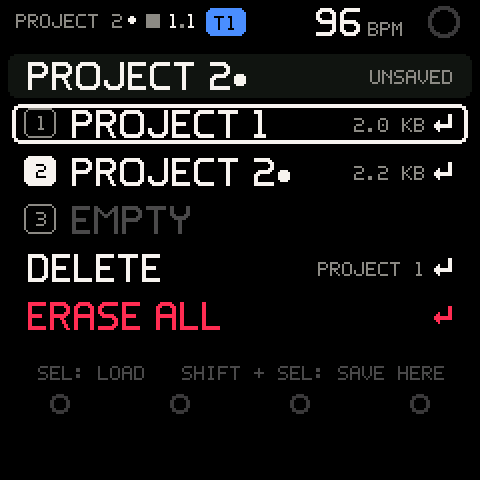
The page
| Row | What it shows | SEL | SHIFT + SEL |
|---|---|---|---|
| The session (in a well) | NEW PROJECT, or the slot it came from (PROJECT 2). On the right: UNSAVED with a dot after the name while it has changes since the last save or load, SAVED when it has none. | Saves it where it belongs (see Saving). | The same. |
1-3 | Each slot: the name it was saved with (PROJECT 1) and its size (2.0 KB), or EMPTY. The session's own slot has a filled number, and a dot while the session has unsaved changes. | Loads it (see Loading). On an empty slot: PROJECT 3 IS EMPTY. | Saves the session into that slot. |
DELETE | The slot the cursor was on last, on the right (PROJECT 1). Dimmed while that slot is empty. | Asks, then empties that slot. | Shows SHIFT + SEL ON A SLOT SAVES. |
ERASE ALL | In red. | Asks, then empties all three slots. | Shows SHIFT + SEL ON A SLOT SAVES. |
Turn ALGORITHM to move the cursor. The line at the bottom reminds you: SEL: LOAD SHIFT + SEL: SAVE HERE. The cursor starts on slot 1.
The unsaved dot
While the session has changes that no slot holds, a dot follows the page name in the header of every page (TAPE •, PROJECT 2 •). It goes when you save or load. The FM-1 checks for changes a few times a second, so the dot can appear a moment after the edit.
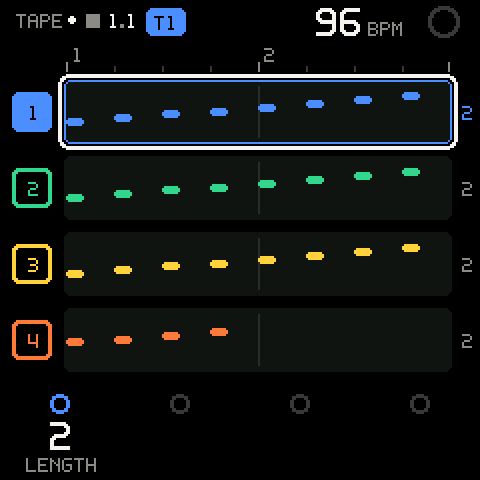
A delete or an erase of the slot the session came from makes it NEW PROJECT again, with the dot: nothing holds it any more.
Saving
SHIFT + SAVE, from any page, saves the session into its own slot. A new session goes into the first empty slot; with all three full it goes to slot 1, and asks first.
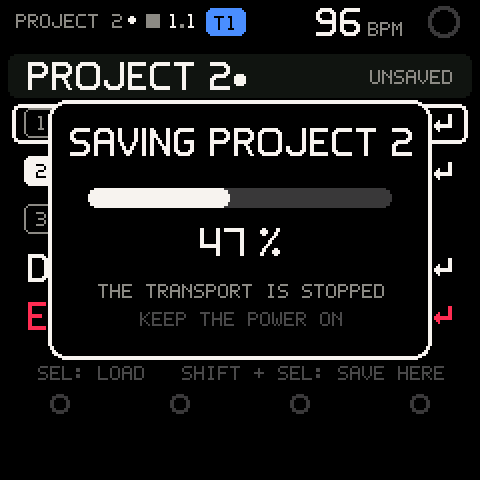
A save stops the transport: the tape, a take being recorded, the arp and every pattern stop, and every sounding note is let go. Then a card shows SAVING PROJECT 2, its progress in %, THE TRANSPORT IS STOPPED and KEEP THE POWER ON. A toast says SAVED PROJECT 2 when it's done.
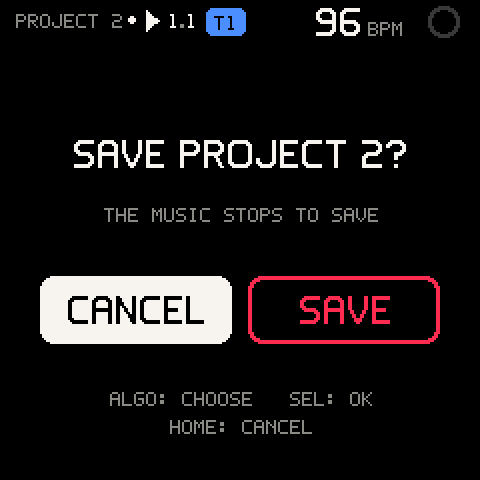
A save goes ahead at once when the music is stopped and the slot is empty or the session's own. Otherwise it asks, with CANCEL highlighted:
| Situation | Question | Second line |
|---|---|---|
| The music plays (or counts in) | SAVE PROJECT 2? | THE MUSIC STOPS TO SAVE |
| Stopped, into a slot that holds another project | SAVE OVER PROJECT 1? | ITS SAVED PROJECT IS REPLACED |
| Playing, into a slot that holds another project | SAVE OVER PROJECT 1? | IT IS REPLACED; THE MUSIC STOPS |
| Control | What it does |
|---|---|
| ALGORITHM | Chooses CANCEL or SAVE. |
| SEL | Does what is highlighted. |
| HOME | Cancels: the music keeps playing. |
A save writes a fresh copy and only then retires the old one: a power cut during a save leaves the previous version intact. A save that fails says SAVE FAILED: OLD SAVE KEPT.
Pro tip: Stop with PLAY first, then SHIFT + SAVE: no question, and you choose the moment the music stops.
Loading
Put the cursor on a saved slot and press SEL. If the session has no unsaved changes, it loads at once. With unsaved changes it asks first: LOAD PROJECT 1?, UNSAVED CHANGES ARE LOST. Turn ALGORITHM to LOAD and press SEL, or HOME to keep what you have.
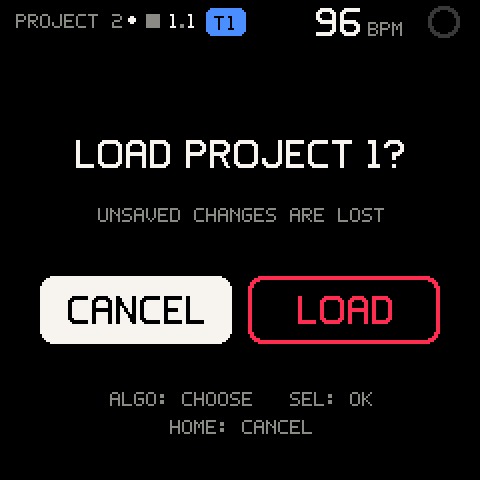
A load stops the transport, like a save, and replaces the whole session. A toast says LOADED PROJECT 1. A load that fails says LOAD FAILED: NOTHING LOST: the session is as it was. A load can't be undone.
The FM-1 always starts with a new, empty session. Load a project from here after power-on.
Deleting and erasing
DELETE acts on the slot the cursor was on last, named on its right. Put the cursor on a slot, then on DELETE, and press SEL: DELETE PROJECT 2?, ITS SAVED PROJECT IS LOST. Choose DELETE to empty the slot (DELETED PROJECT 2).
ERASE ALL asks ERASE ALL 3 SLOTS?, EVERY SAVED PROJECT IS LOST. Choose ERASE to empty all three (ALL SLOTS ERASED).
Careful: A delete or an erase can't be undone. Your session stays as it is, so you can save it again straight away.
What a project stores
| Part | What is kept |
|---|---|
| Engine | Tempo, the selected track, the number of tracks (1-8), and TAPE's settings: click, input quantize, launch grid, count-in, the length of new tracks. |
| SCALE | Root, scale, key mode, key LEDs. |
| CHORD | The Chord Map settings, octave, latch (and the latched chord mode) and the global CHORD input switch. |
| ARP | On/off, latch, mode, rate, octaves, gate (not the notes you were holding). |
| Patterns | The 16 stored SEQ patterns every track shares. |
| Each track | SOUND or KIT, length, level, mute, solo; its sound with its macros, the knob assignments, the operators you switched off and any edits; its kit pads (KIT tracks); its recorded notes with their takes (undo of a take continues after a load); its knob automation; its SEQ pattern (all 64 steps, chord steps and per-note values), its stored-pattern number and chain. |
Not stored: the playhead, recording state, queued launches, sounding notes, the capture memory, the undo history, clipboards, and SETUP's CONTROLS and CONNECT settings (the MIDI channels and clock, BACK TAP, WHEEL SETTLE, PREVIEW).
Each slot holds up to about 15.7 KB. The FM-1 packs a project as it saves it (a typical song takes 2 to 4 KB; eight full tracks with every automation lane and pattern used still fit), and the slot rows show the packed size.
Storage off
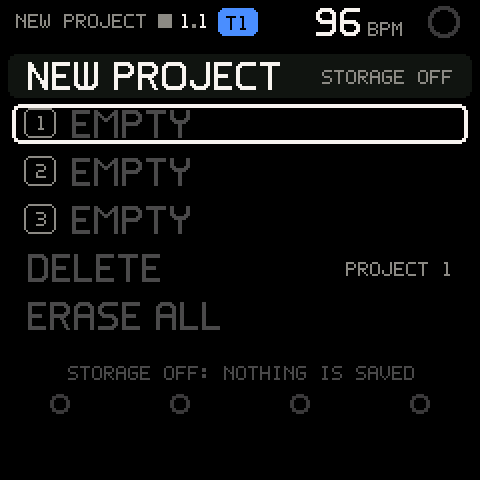
At start-up the FM-1 checks the project area of its flash. If the checks do not pass, nothing is ever written: the session row says STORAGE OFF, the slots show EMPTY, and the line at the bottom reads STORAGE OFF: NOTHING IS SAVED. Every verb shows STORAGE OFF. Your session still works; it is lost at power off.
Troubleshooting
| What happens | Why, and what to do |
|---|---|
SHIFT + SAVE asks SAVE PROJECT 2? | The music is playing: saving stops it. Choose SAVE, or stop first and save without a question. |
SHIFT + SAVE asks SAVE OVER PROJECT 1? | The session is new and all three slots are full, or you chose a slot that holds another project. Choose SAVE to replace it, or delete a slot first. |
STORAGE OFF | The flash checks at start-up did not pass, so nothing is ever written. Your session still works; it is lost at power off. |
PROJECT 3 IS EMPTY | You pressed SEL on an empty slot. Save into it with SHIFT + SEL. |
DELETE is dimmed | The slot it acts on is empty. Put the cursor on a saved slot first. |
SHIFT + SEL ON A SLOT SAVES | You pressed SHIFT + SEL on DELETE or ERASE ALL. Put the cursor on a slot. |
SAVE FAILED: OLD SAVE KEPT | The flash write did not verify. The slot still holds its previous version. Try again. |
LOAD FAILED: NOTHING LOST | The saved project did not pass its checks. Your session is unchanged. |
PROJECT TOO BIG: 17 KB | The session, packed, is larger than a slot. Nothing was written; the slot keeps what it held. Delete stored patterns, automation lanes or a track you do not need, then save again. |
| The header dot comes back right after a save | Something changed after the save: a knob, a note, a SEQ step. Save again. |
| My MIDI channels or BACK TAP are back to defaults after a load or power-on | Those settings aren't part of a project and aren't saved. Set them again on SETUP. |