Chapter 11
Recording and undo
You can play a part into a track, keep the loop you just played without having pressed record, turn a pattern into a recording, and move knobs while recording so the sound moves on every pass. Everything you do on any track can be taken back: undo works across all tracks and says what it undid.
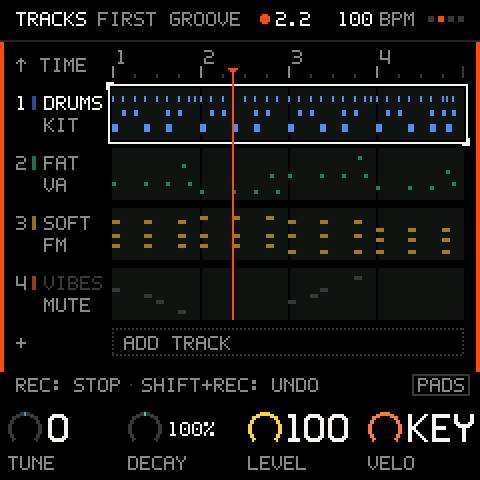
Recording a loop
REC records onto the selected track. PLAY starts the music on the press and stops it on the release; hold it and turn K1 to set the tempo without stopping.
| Control | Stopped | Counting in | Playing |
|---|---|---|---|
| PLAY | Starts at bar 1, on the press. | Stops on the release, cancelling the count-in. | Stops on the release. Recording ends, and anything queued is dropped, except a queued length, which lands. |
| REC | Arms, counts in one bar, then plays and records. With COUNT-IN off it plays and records at once. | Cancels the count-in. | Starts or stops recording, on the launch line. |
To record a first loop:
- Select the track (ALGORITHM) and pick a sound (turn PRESETS).
- Press REC. A large numeral counts the beats of the one-bar count-in. The click sounds even if
CLICKis off. - Play. The loop goes round; keep adding notes if you like.
- Press REC to stop recording. The music keeps playing.
- Press PLAY to stop.
While recording:
- The left and right edges of the screen's body light up in the signal colour, the header's transport glyph is a red dot, and you cannot change track (
RECORDING T1 - REC TO STOP: stop recording first). - Recording is an overdub: what the track already has keeps playing and your new notes are added. There is no replace mode. To start over, clear the track (hold SHIFT + REC on it; SHIFT is HOME held down) or undo the take.
- One REC session is one take. Undo removes it as one piece.
- The track loops over its own length (set in the TRACK menu, 1 to 8 bars, 4/4).
- Everything you play is recorded: the keys, the chord pads, the arpeggiator (at its exact grid time) and incoming MIDI. The notes of a sequencer pattern are not: PRINT writes them (see below).
Pro tip: to add to a track, leave the music playing, select the track and press REC. With
LAUNCHonBAR, recording starts cleanly on the next bar line.
Metronome, count-in and quantise
The click, count-in and input quantise are on the TIME row and the TIME menu of TRACKS, and on the SHIFT keys: A4 CLICK, B4 COUNT-IN, F4 and G4 QUANT. A blank session starts with the click on, count-in on and quantise 1/16; the starters (except EMPTY) start with the click off. With QUANT on, notes snap to the nearest 1/16 as they are recorded; with it off they stay where you played them. The sequencer and the arpeggiator are never quantised: they are already on the grid.
Launch quantise
While the music plays, LAUNCH decides when REC, mutes, solos, and pattern and length changes happen.
LAUNCH | Record in and out, mute, solo | Length and pattern changes |
|---|---|---|
OFF | At once | At once |
BEAT | On the next beat | On the next bar line or pattern end |
BAR (the default) | On the next bar line | On the next bar line or pattern end |
Set it in the TIME menu, or with the SHIFT keys C4, D4 and E4. While something waits, it blinks. Press REC again before the line to cancel a waiting recording. A note you play up to a 32nd before the line still belongs to the new take. Stop, track select, undo, redo, clear and levels are always immediate.
Capture: keep what you just played
You do not have to press REC to keep a good idea. Play along with the music running, and when a pass was good, press SHIFT + SAVE: the last loop of the selected track, its notes and its knob moves, becomes a take on the track.
- Select a track and press PLAY. Leave REC off.
- Play along until you have played something you like.
- Hold SHIFT and press SAVE.
You do not have to hit the loop's end exactly. Press within a beat after the loop comes round and capture keeps the pass that just ended, whole, not one that misses its first notes. Later than that, it keeps the last loop's length of time up to the press.
The toast says how long it was (T3 CAPTURED 2 BARS) and the take can be undone like any other. If it says PLAY, THEN CAPTURE, the music was stopped (capture only listens while it plays); NOTHING TO CAPTURE means no notes or knob moves were played in the last loop. Capture remembers the last 128 note events and 64 knob moves.
Pro tip: loop the music and just play. When a pass works, press SHIFT + SAVE as the loop comes round: up to a beat late still keeps that pass.
PRINT: a pattern or an arpeggio becomes a recording
On the SEQ screen, SHIFT + SAVE prints the pattern onto the track, and on the ARP screen with a chord held it prints the arpeggio: one press, one take, covering the track's whole length. After a print the track plays the notes whether the pattern is on or not.
Knob moves
Recording captures the knobs as well as the notes. With REC on and the music playing, turn a knob of the selected track and the move is written where the playhead is and replays every loop. The knobs that record are:
- the track's four macros (see SOUND);
- the track's level and its SEND (on MIX);
- seven effect values: the filter's cutoff and resonance, the delay, reverb, chorus and phaser mixes, and the drive's gain.
An effect value is global (one chain for all tracks), so a lane on any track moves it.
Touch mode. While your hand is on a knob, what the lane had under it is replaced; when you let go, the lane goes back to what it had, so the rest of the loop stays as it was. Moves play back smoothly: the knob's steps are joined into ramps.
Each track draws its moves as lanes, one per knob, in the knob's colour: hold SEL on TRACKS to see them, or open the AUTOMATION view in the TRACK menu. While you hold SEL, turning a knob clears that lane.
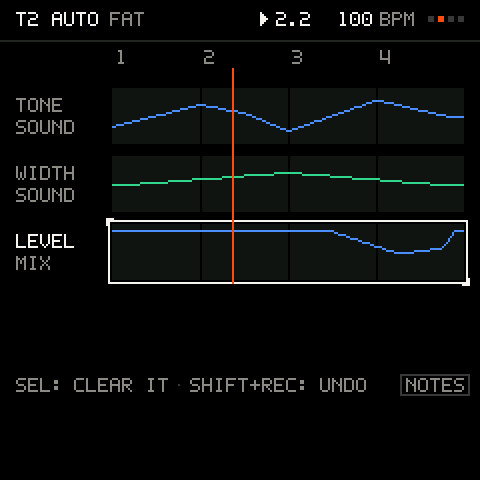
A track holds 96 breakpoints in all. If a recording would run out it thins the move harder and finally stops writing, while the knob still sounds. On FM tracks, a macro move takes effect from the next note, not inside a note you are holding. Lanes cannot be reshaped (no depth, offset or smoothing): record again or clear them.
Undo across tracks
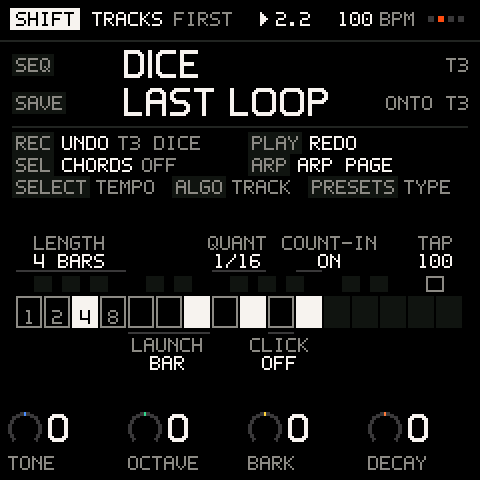
A tap of SHIFT + REC takes back the newest thing you did on any track, and SHIFT + PLAY brings it back. They work in order, up to 16 steps, wherever you are, PERFORM included. A toast names what was undone (UNDO T3 TAKE, UNDO T3 DICE, UNDO DELETE T5), and the SHIFT screen shows what the next undo and redo would take (REC UNDO T3 DICE).
After each new thing undo can take back, once the toasts before it are done and nothing is recording, a toast tells you how: SHIFT+REC: UNDO T3 DICE. It uses the same names as the table below and shows once for each new undo step. After an undo the toast is the usual UNDO T3 DICE.
| Undo takes back | Shown as |
|---|---|
| A recorded take: its notes and knob moves together | T3 TAKE |
| A take that holds only knob moves | T3 KNOBS |
| A capture (it is a take) | T3 TAKE |
| A print | T3 PRINT |
| A longer loop's repeats, with the length (TRACKS, KIT) | T3 LENGTH |
| A clear of a track | T3 CLEAR |
| A DICE roll, on a kit or on a pattern | T3 DICE |
| A deleted track, with its notes, sound, pattern, locks and lanes, back at its place | DELETE T5 |
| A cleared automation lane | named in the toast |
| Pattern edits: a pattern's clear, a step's clear, the pattern transforms (paste, stretch, squeeze, 2X, 1/2X, repeater, load), and a pattern grown by whole bars with its repeats | T1 PATTERN |
| A step's parameter lock edit | T1 LOCKS |
Careful: pattern edits and lock edits keep only their newest undo each: an edit by hand after one ends it. Undo brings the notes of a cleared pattern or step back, but not the parameter locks it dropped.
Holding SHIFT + REC longer is not undo: held for half a second a ring fills and names the delete it will do, and at 1.5 seconds it does it (with a question). Let go before that and nothing happens.
Troubleshooting
| What happens | Why, and what to do |
|---|---|
| REC does not start recording at once | LAUNCH is BEAT or BAR: it waits for the line (the REC light blinks). Set LAUNCH to OFF, or from a stop, turn COUNT-IN off. |
| My notes land slightly off | QUANT is 1/16: they snap to the nearest 1/16. Set it to OFF for free timing. |
| I cannot change track | The track is recording or counting in. Press REC to stop first. |
FULL | The track or the project holds as many note events as it can (384 a track, 1,536 in all). Clear something. |
STOP RECORDING FIRST | Tracks cannot be added, duplicated or deleted while recording. |
| SHIFT + REC cleared the track when I wanted undo | A hold of 1.5 seconds clears. A tap shorter than half a second is undo; SHIFT + REC again undoes the clear. |
NOTHING TO UNDO | The journal has nothing newer, or it holds only what already went out of date. |
NOTHING TO CAPTURE or PLAY, THEN CAPTURE | Capture needs the music playing and something played in the last loop. |
| The capture lost the first notes of the pass | It was pressed more than a beat after the loop came round, so it kept the loop's length up to the press. Undo it, play the pass again and press as it ends. |
| A knob will not stay where I turn it | The track has a lane for it, and it takes over when you let go. Hold SEL and turn the knob to clear it. |
| The click is silent while playing | CLICK is off; only the count-in clicks. Turn it on at the TIME row or with the SHIFT key A4. |