Chapter 7
KEYS
KEYS is not a screen you play on; it is a layer over the keybed. What you set here holds on every screen: the notes you play are passed through your scale and your chords before any track hears them. Set a key and a scale once and every wrong note becomes a right one. Switch the chords on and one finger plays a whole chord.
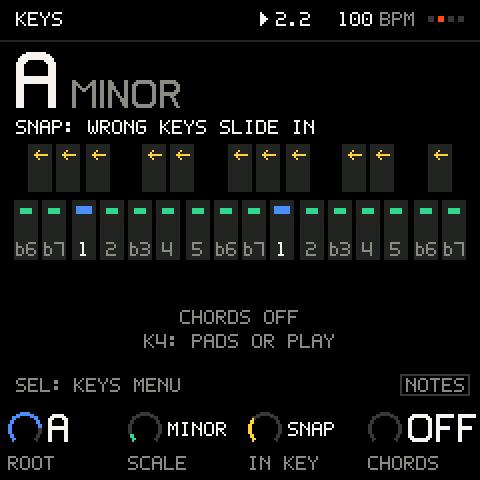
ROOT, SCALE, IN KEY
| Knob | Values | What it sets |
|---|---|---|
K1 ROOT | C to B (flats in the flat keys) | The key of the project. Or hold SEL and press a key: that key's note is the root. |
K2 SCALE | 12 scales: MAJOR, MINOR, DORIAN, PHRYGIAN, LYDIAN, MIXOLYD (mixolydian), LOCRIAN, HARM MIN (harmonic minor), MEL MIN (melodic minor), MAJ PENTA (major pentatonic), MIN PENTA (minor pentatonic), BLUES | The set of notes that belong. |
K3 IN KEY | OFF, SNAP, FILTER, WHITE | What happens to the keys that do not belong. |
K4 CHORDS | OFF, PADS, PLAY | Whether the keys play chords (see below). |
IN KEY is on as SNAP in every starter, and every starter is in A minor, so on the starters every white key is right. A blank session (SETTINGS > STARTUP NEW) begins in C major with IN KEY OFF.
| IN KEY | What the keys do |
|---|---|
OFF | Every key plays itself. Chromatic. |
SNAP | A key that is in the scale plays itself; any other key slides to the nearest note that is. It never goes silent. |
FILTER | Keys in the scale play; the others are silent. The lit keys are the ones that sound, which is a good way to learn a scale. |
WHITE | The scale is laid out on the white keys, root on every C: C D E F G A B are degrees 1 to 7. The black keys are silent. |
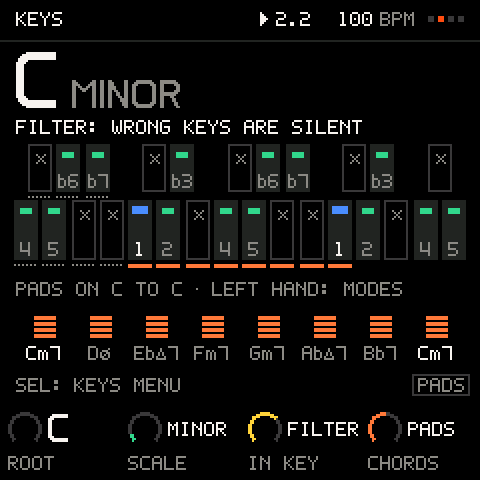
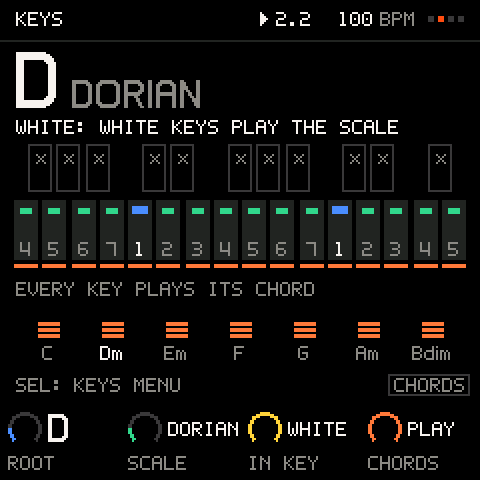
The picture is the keybed as it is on the FM-1: blue is the root, green keys are in the scale, yellow arrows show where a wrong key slides, a cross means silent, and the scale degree is under each key. The key lights on the panel follow it (with SCALE LEDS on and IN KEY not OFF): the keys that are in the scale light, the root included. With IN KEY OFF, or SCALE LEDS off, the lights show the notes that sound instead. The scale also decides the rows of the sequencer and what DICE writes: it never leaves your key.
Pro tip: theory users set
IN KEYtoOFFfor a chromatic keybed, or toFILTERto see the scale. Beginners can leave it onSNAPand never think about scales at all.
Chords
K4 CHORDS has three settings. SHIFT + SEL (SHIFT is HOME held down) switches the chord pads on (PADS) and off again from any screen (not on a KIT); PLAY is set with K4.
PADS
The keybed becomes the chord map. The eight white keys from the first C are chord pads, and each pad plays the chord of your key on its own letter: the A key plays the A chord, the D key the D chord. In A minor the pads are C, Dm, Em, F, G, Am, B°, C; in D major C#°, D, Em, F#m, G, A, Bm, C#°. The pads rise in pitch from left to right. With the root on C (C major, C minor and so on) they are simply the chords on degrees 1 to 7 and 1 again an octave up. On the KEYS page the tonic chord's name is drawn in white and the others in grey. The black keys between the pads are silent, so a finger brushing one makes no noise. The seven keys above the last pad play normally.
The seven keys to the left of the first C are the left hand's: the lowest, F, is LATCH, and the six above it are performance keys. Hold one with your left hand while you play pads with the right:
| Key | What it does |
|---|---|
| F (lowest) | LATCH: while on, a performance key toggles its mode instead of acting while held |
| F# | ARP UP: each pad press plays the next note of the chord, upwards |
| G | ARP DOWN: downwards |
| G# | INV UP: each press raises one more note an octave |
| A | INV DOWN: lowers notes an octave |
| A# | SPLIT: the bass note first, then the rest |
| B | L+R: the two lowest notes, then the rest |
PLAY
Every key that is in your scale plays the chord on its degree: one key, one chord. Play a bass line and a chord line with the same hand.
The chord editor
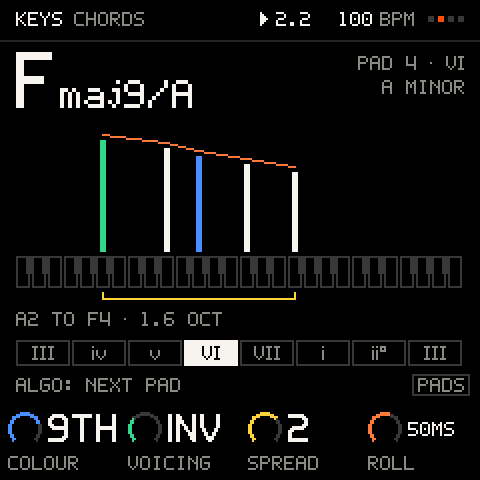
KEYS menu > CHORDS opens the chord editor: how the chords sound. ALGORITHM chooses which pad it shows (or play a pad: the picture follows), and the keys light with the chord's notes.
| Knob | Values | What it sets |
|---|---|---|
K1 COLOUR | TRI, 7TH, ADD, 9TH, EXT | How rich: triads, sevenths, add9 and sus chords, ninths and elevenths, thirteenths and sharp elevens. |
K2 VOICING | ROOT, INV, SUB, MIX | Root position; the same chords voice-led, each taking the inversion nearest the tonic's; substitutes of the same weight (sus chords, sixths); three pads borrowed from the parallel mode. |
K3 SPREAD | 0 to 3 | Close; bass an octave down; open; open with the bass two octaves down (about three octaves). |
K4 ROLL | OFF, 10MS, 20MS, 35MS, 50MS, 75MS, 100MS, 150MS | A strum: the time between notes, lowest first. |
Pentatonics and the blues are harmonised in the nearest seven-note scale (major pentatonic as major, minor pentatonic and blues as natural minor).
Chords into steps
With chords on, press a chord pad on the SEQ screen and the chord is written into the step (up to four notes).
The KEYS menu
SEL opens the menu.
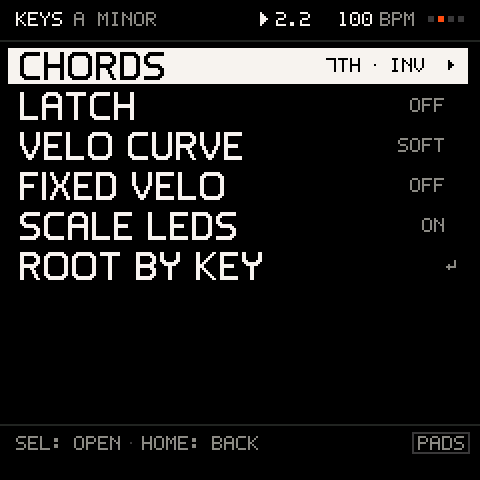
| Row | What it does |
|---|---|
CHORDS ▸ | The chord editor. |
LATCH | The chord latch (ON or OFF): the same as the F key in PADS mode. |
VELO CURVE | SOFT, LINEAR or HARD: how your touch maps to velocity. |
FIXED VELO | OFF, or one velocity from 1 to 127 for every key. |
SCALE LEDS | ON or OFF: lights the keys that are in the scale (the root included). |
ROOT BY KEY ↵ | Press a key and its note becomes the root (PRESS A KEY: THE ROOT). |
Where the layer does not reach
A KIT track's pads and the RENAME editor keep their own keys, whatever KEYS says. Everything else, including the keys that play the sequencer's notes, goes through KEYS.
Troubleshooting
| What happens | Why, and what to do |
|---|---|
| A key plays a different note than the one I pressed | IN KEY is on SNAP and the key is outside the scale. Set it to OFF for a chromatic keybed. |
| A key is silent | IN KEY is FILTER or WHITE: the key is outside the scale or black. |
| The keys play chords I did not ask for | CHORDS is on. SHIFT + SEL switches it off. |
| SHIFT + SEL does nothing | You are on a KIT track: its keys are pads. |
| A pad plays a different chord than it did on 1.0 | Since 1.1 each white pad plays the chord on its own letter (the A key the A chord). In a key on C nothing changed. Your recorded notes and patterns play as before. |
| The chords do not fit the scale | They always do: pentatonic scales use the nearest seven-note scale for chords. |