Chapter 4
SOUND
SOUND shapes the selected track's voice: four macros for quick changes, the voice's algorithm and LFO, and each of its six operators. The PRESETS knob, on any page, opens the preset browser that picks the voice in the first place.
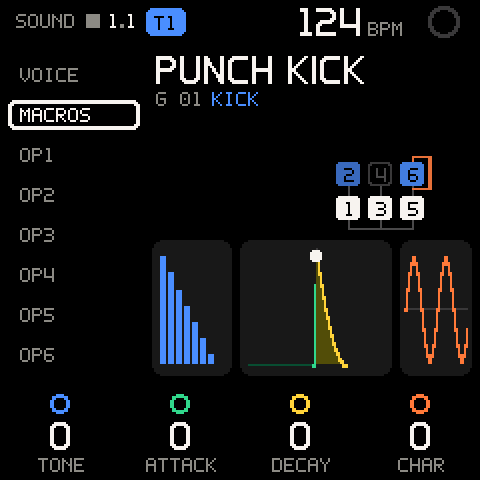
Opening SOUND
SOUND always shows the selected track. It is not on the SELECT wheel.
| Control | What it does |
|---|---|
| SEL on a track (TAPE) | Opens that track's SOUND page. A KIT track opens KIT instead (see KIT). |
| ENV | Opens SOUND with the cursor on MACROS, from any OS page. Press ENV again to go back to where you were. The ENV light is on while SOUND is open. |
| SHIFT + ALGORITHM | Selects the previous or next track. SOUND follows it. |
| HOME | Back to TAPE. |
The screen
| Area | What it shows |
|---|---|
| Left list | What the cursor walks: VOICE, MACROS, OP1 to OP6. ALGORITHM moves the cursor. |
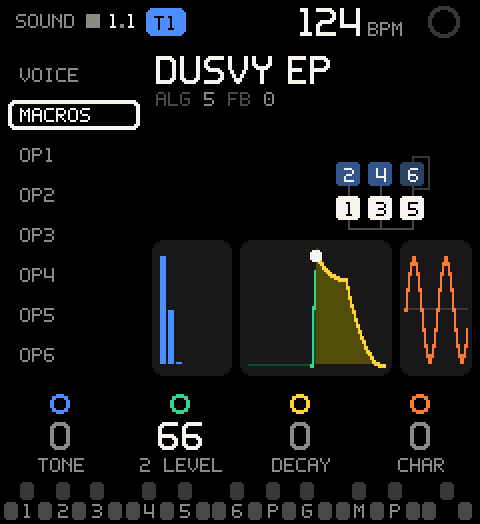
| Name | The voice's name. Under it, a GROOVE sound shows its number and role (G 01 KICK). Any other voice shows ALG and FB (feedback, orange when above 0). |
| Algorithm | The DX7 algorithm as the DX7 manual draws it: carriers on the bottom row feeding the output line, each modulator above what it modulates. |
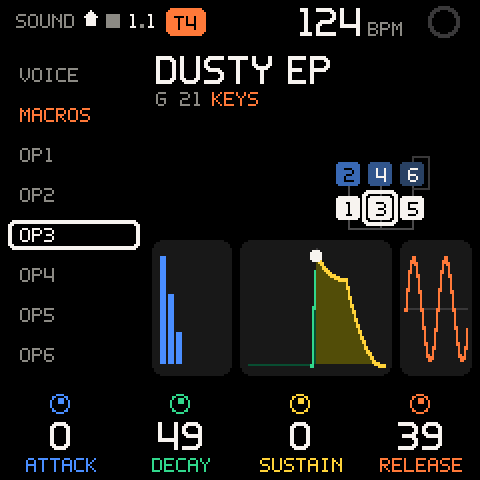
| Three pictures | The spectrum (TONE), the envelope (ATTACK and DECAY), the wave (CHARACTER), drawn from the voice as it plays now. |
| Legend | What K1-K4 set for the cursor row. Hold SHIFT for the second row, where there is one. |
MACROS
SOUND opens on MACROS. Four knobs shape any voice without touching its operators one by one. Every macro runs from -50 to +50 in steps of 2 (4 when you spin the knob fast). At 0 you hear the voice exactly as it was loaded.
| Row | Values | What it sets |
|---|---|---|
| K1 TONE | -50 to +50 | Darker to brighter. Lowers or raises the modulators' levels (the FM index), and tilts carriers pitched above the main one: a kick's click, a snare's noise, an organ's upper drawbars. |
| K2 ATTACK | -50 to +50 | Snappier to softer. Left gives a faster attack with a brighter onset. Right gives a slower attack with a duller onset, and takes the click off keys and pianos. Drums stay one-shots: their attack never gets longer than about 25 ms. |
| K3 DECAY | -50 to +50 | Shorter to longer. Moves every operator's decay and release, and the pitch envelope if it moves. Left can turn a held note into a pluck. Right lets it ring longer and sustain higher. |
| K4 CHARACTER | -50 to +50 | Cleaner to dirtier. Changes feedback and pulls the operators' detune together or spreads it apart for a chorus. Right of 0 it also pushes modulators off their ratios for an inharmonic growl, or spreads FM-noise modulators apart. The legend reads CHAR. |
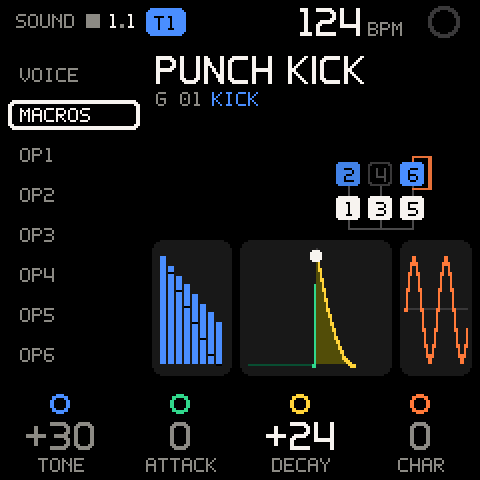
The macros never silence a voice. The loudest carrier is never turned down, operators that are off stay off, and attack and decay stop at safe limits. Turn a macro back to 0 and you get the loaded voice back byte for byte, however far you went.
Each track keeps its own voice and its own four macro values. Loading a new preset sets all four back to 0.
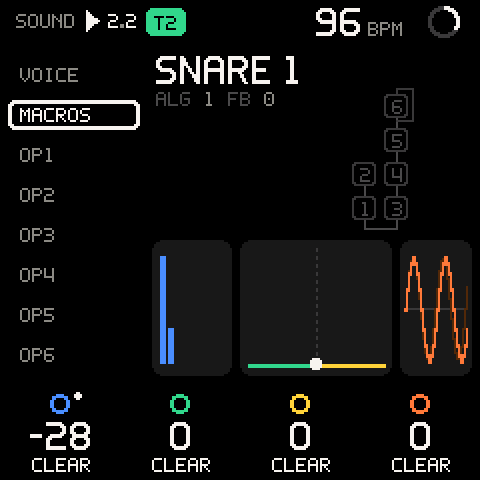
Automation. The macros are performance knobs: with REC on, turning
one records its move onto the selected track, and without REC, SAVE
captures the last loop's moves with the notes. An automated macro has a
dot by its legend circle (red while it records), and its value follows
the lane while the tape plays. Each note takes the macro's value at its
note-on. Hold SEL and turn it to clear its lane: the held legend says
CLEAR over every macro, and the toast says T1 TONE CLEARED. UNDO
brings the lane back. A macro without a lane says NO AUTOMATION and
doesn't move: on a macro, hold SEL never means x10. A knob that
carries an assigned value (see Knob assignment) is
not a macro and is not automated. See Automation.
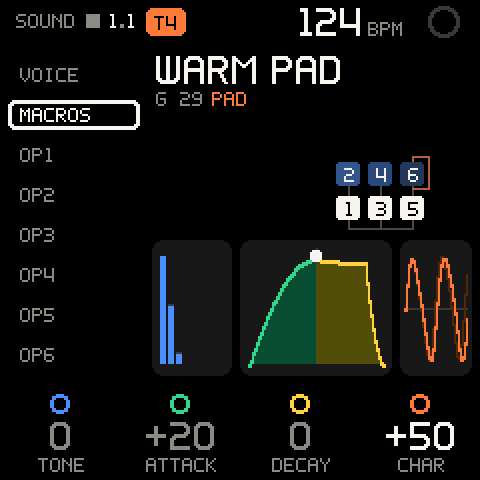
Pro tip: Macros sit on top of the voice. Edits on VOICE and OP1-OP6 change the voice underneath and keep your macro settings, so you can change the algorithm without losing the TONE you dialled in.
The pictures
The three pictures follow the knobs and ease into place as you turn.
| Picture | Colour | What it shows |
|---|---|---|
| Spectrum | Blue (TONE) | Eight harmonic bars: how far the sound spreads. Turned darker, grey shows the loaded voice behind the bars. Turned brighter, a gap marks where each bar was. |
| Envelope | Green, yellow | The loudest carrier's envelope. The dotted line is the key press: attack (green, ATTACK) left of it, decay, sustain and release (yellow, DECAY) right of it. The white dot is the peak. |
| Wave | Orange (CHARACTER) | Two periods of the main carrier's wave as FM bends it. Feedback and grit bend it further. A dim second trace shows detune. A fixed-frequency carrier (FM noise) is drawn as noise. |
In the algorithm, carriers are white. Modulators are blue, brighter the louder they are. An operator with level 0 is only outlined. The feedback loop is orange and gets brighter with more feedback. On an OP row, the cursor's operator is outlined.
VOICE
Move the cursor to VOICE for the voice's global values.
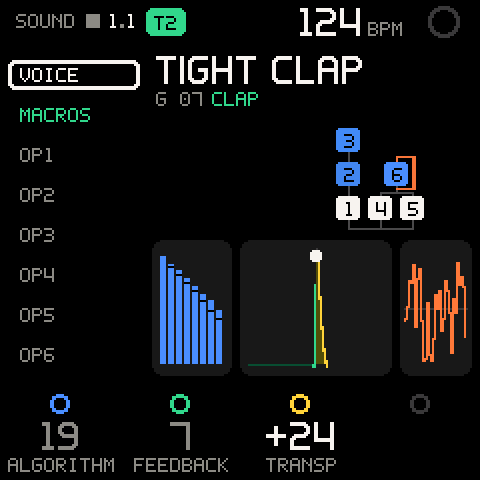
| Row | Values | What it sets |
|---|---|---|
| K1 ALGORITHM | 1 to 32 | The DX7 algorithm. The drawing redraws at once. |
| K2 FEEDBACK | 0 to 7 | Feedback on the algorithm's feedback operator. |
| K3 TRANSP | -24 to +24 | Transpose in semitones. |
| K4 | - | Empty: its ring is dark and it has no legend. POLY/MONO is not built into Groove OS; turning K4 shows POLY/MONO: COMING SOON. Set POLY/MONO in the stock editor (FULL EDITOR). |
Hold SHIFT for the second row: the stock LFO.
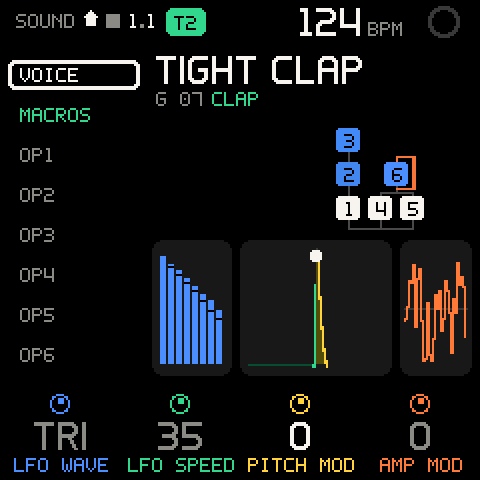
| Row | Values | What it sets |
|---|---|---|
| K1 LFO WAVE | TRI, SAW-, SAW+, SQR, SIN, S&H | The LFO's waveform. |
| K2 LFO SPEED | 0 to 99 | LFO rate. |
| K3 PITCH MOD | 0 to 99 | LFO depth on pitch (vibrato). |
| K4 AMP MOD | 0 to 99 | LFO depth on level (tremolo). |
SPEED, PITCH MOD and AMP MOD move 4 per detent when you spin the knob fast.
Careful: The FM-1 has one LFO. Its wave and speed follow the selected track's voice, so selecting another track changes them for every track.
VOICE actions
Press SEL on VOICE to open its actions. ALGORITHM picks a row,
SEL does it, HOME goes back. The voice's values stay on
K1-K4.
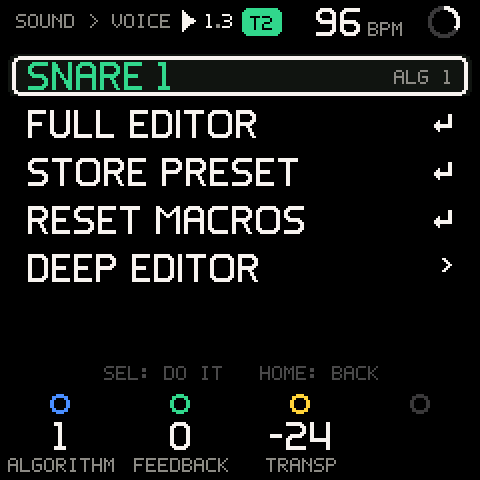
| Row | What it does |
|---|---|
FULL EDITOR | Opens the stock DX7 editor for this voice. Shows STOCK EDITOR: HOME = BACK. |
STORE PRESET | Opens the stock editor and shows HOLD SAVE TO STORE. The stock firmware stores the voice into its own current preset slot. |
RESET MACROS | Asks first: RESET MACROS?, TONE ATTACK DECAY CHAR GO TO 0, Cancel highlighted. RESET sets all four macros to 0 and shows T1 MACROS RESET (your track number). |
DEEP EDITOR | Opens the deep editor (SOUND > EDIT) on VOICE. See The deep editor. |
Operators OP1-OP6
Move the cursor to OP1 ... OP6 to edit one operator. It is outlined
in the algorithm drawing.
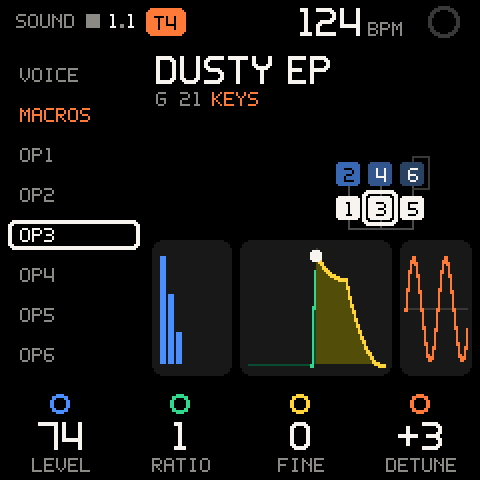
| Row | Values | What it sets |
|---|---|---|
| K1 LEVEL | 0 to 99 | Output level. On a carrier: loudness. On a modulator: brightness. 0 turns the operator off. |
| K2 RATIO | 0.50, 1 to 31 | Coarse frequency ratio. An operator in fixed-frequency mode shows its range instead: 1HZ, 10HZ, 100, 1K. |
| K3 FINE | 0 to 99 | Fine frequency, about 1 % of the ratio per step. |
| K4 DETUNE | -7 to +7 | Detune. |
Hold SHIFT for the operator's envelope.
| Row | Values | What it sets |
|---|---|---|
| K1 ATTACK | 0 to 99 | Attack time. 0 is instant, higher is slower. |
| K2 DECAY | 0 to 99 | Decay time, higher is longer. |
| K3 SUSTAIN | 0 to 99 | Sustain level. 0 means the operator dies away with the key held. |
| K4 RELEASE | 0 to 99 | Release time after the key is let go, higher is longer. |
All operator values move 4 per detent when you spin the knob fast. SEL on an operator opens the deep editor on that operator (next section).
The deep editor
The deep editor is every value of the voice, in groups. It lives under SOUND, not on the EDIT button (which still opens the stock editor), and it edits the same voice your macros sit on: turn anything here and your TONE, ATTACK, DECAY and CHARACTER stay where they are.
Getting in and around
| Control | What it does |
|---|---|
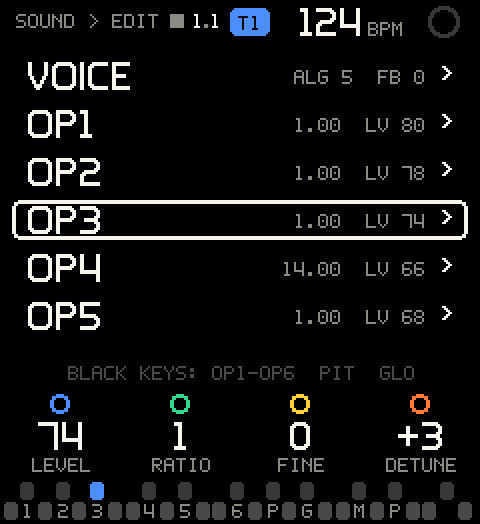
SEL on OP1-OP6 (SOUND) | Opens SOUND > EDIT with the cursor on that operator. |
SEL on MACROS (SOUND) | Opens SOUND > EDIT on KNOBS. |
DEEP EDITOR in VOICE's actions | Opens SOUND > EDIT on VOICE. |
| ALGORITHM | Moves the cursor: through the groups on the list, through a group's rows inside it. |
| SEL on a group | Opens it (SOUND > OP3). |
| K1-K4 | Edit the four values of the cursor row. The legend names them in the four colours. On the list they edit the group's main row, so you can tweak without going in. |
| Hold SEL + turn a knob | x10 steps on a number. In ASSIGN mode: puts that value on the knob (see Knob assignment). A macro knob (on KNOBS) always clears its automation lane instead, never x10; with no lane it says NO AUTOMATION. The held legend says X10, ASSIGN or CLEAR. |
| HOME | Back one level: from a group to the list (on the same group), from the list to SOUND. |
| White keys | Play the voice while you edit. |
The black keys
Inside the editor the black keys do what their printed legends say, like
the stock EDIT page. The key of the open group is lit, and the line over
the legend reminds you: BLACK KEYS: OP1-OP6 PIT GLO.
| Key | Legend | Opens |
|---|---|---|
| F#3, G#3, A#3 | OP1 OP2 OP3 | That operator |
| C#4, D#4 | OP4 OP5 | That operator |
| F#4 | OP6 | OP6 |
| G#4 | PIT | PITCH EG |
| A#4 | GLO | VOICE (the global values) |
| C#5, D#5 | MONO POLY | Nothing: shows POLY/MONO: NOT MAPPED YET |
| F#5 | (blank) | Plays a note |
Inside a group a black key switches straight to the other group; HOME still takes you to the list. On the list it moves the cursor to that group; press SEL to open it.
The groups
Values show as the DX7 shows them. Ranges are the DX7's own.
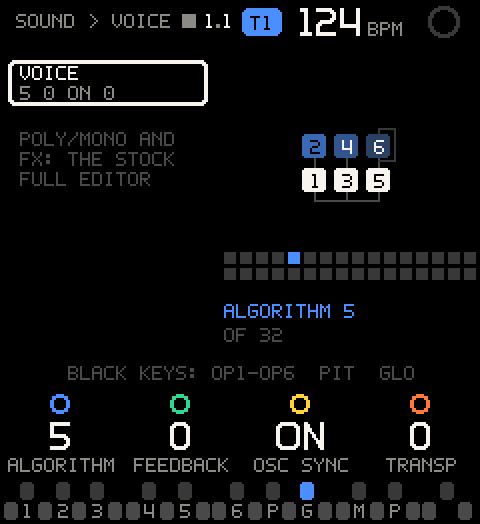
VOICE (key GLO): one row. The algorithm is drawn as the DX7 manual draws it, with a strip showing where it sits among the 32.
| Row | K1 | K2 | K3 | K4 |
|---|---|---|---|---|
| VOICE | ALGORITHM 1-32 | FEEDBACK 0-7 | OSC SYNC ON/OFF (key sync of the oscillators) | TRANSP -24 to +24 |
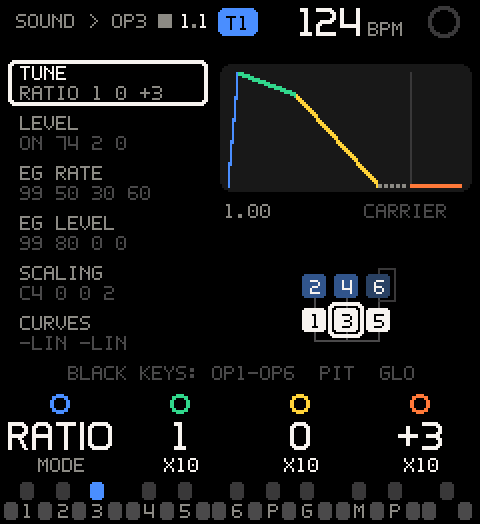
OP1-OP6 (keys OP1-OP6): six rows. The picture is the operator's
envelope (one colour per stage, the dotted part is the key held, the
line the key-up), its frequency (1.00, 100HZ), whether it is a
CARRIER or a MODULATOR, and the algorithm with this operator
outlined. On the list each operator shows its frequency and level
(1.00 LV 74), or OFF.
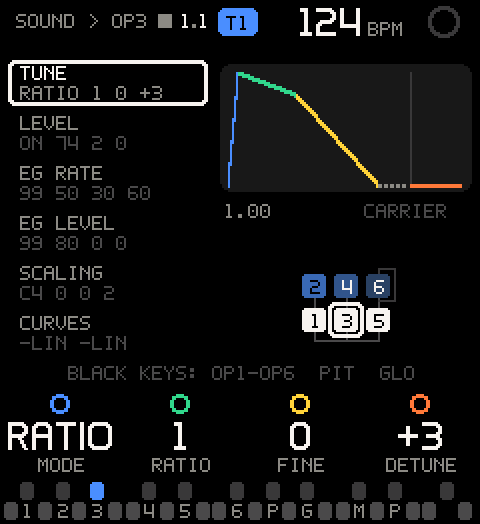
| Row | K1 | K2 | K3 | K4 |
|---|---|---|---|---|
| TUNE | MODE RATIO/FIXED | RATIO 0.50, 1-31 (fixed: 1HZ, 10HZ, 100, 1K) | FINE 0-99 | DETUNE -7 to +7 |
| LEVEL | ON ON/OFF | LEVEL 0-99 | VELO 0-7 (velocity sensitivity) | AMS 0-3 (amp mod sensitivity) |
| EG RATE | RATE 1-4, 0-99 each (99 = fastest) | |||
| EG LEVEL | LEVEL 1-4, 0-99 each | |||
| SCALING | BREAK A0 to C9 (key scaling break point; C4 is middle C) | L DEPTH 0-99 | R DEPTH 0-99 | RATE SC 0-7 (rate scaling) |
| CURVES | L CURVE -LIN -EXP +EXP +LIN | R CURVE | - | - |
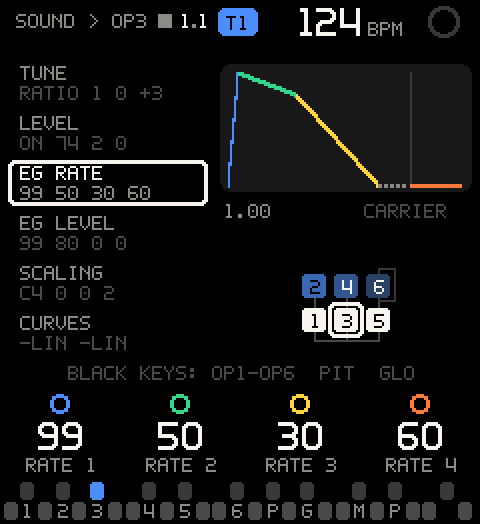
ON switches the operator off without losing its LEVEL: it plays at 0 until you switch it on again. The switch is part of the sound and is saved with the project.
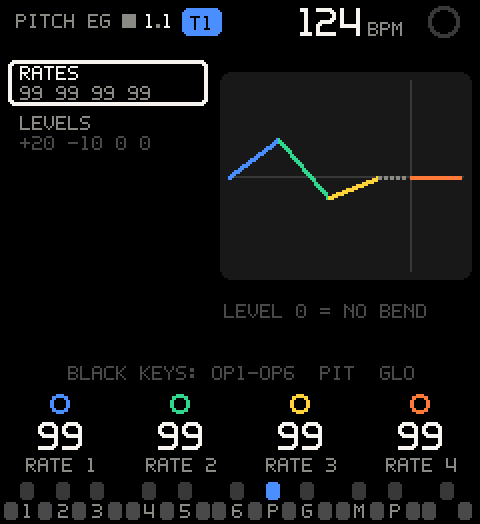
PITCH EG (key PIT): RATES (RATE 1-4, 0-99) and LEVELS (LEVEL 1-4, -50 to +49; 0 = no bend). The picture draws the bend around the centre line.
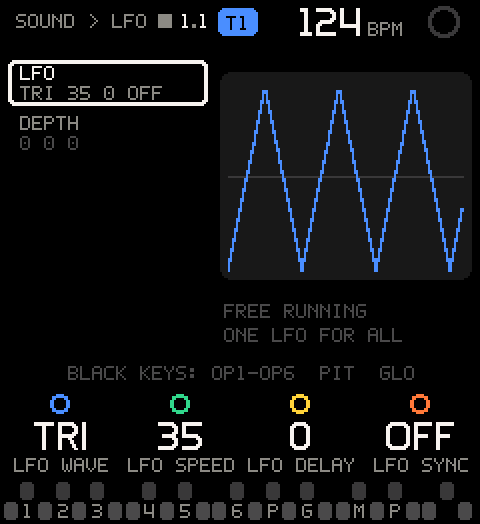
LFO: LFO (WAVE TRI, SAW-, SAW+, SQR, SIN, S&H; SPEED 0-99; DELAY
0-99; SYNC ON/OFF) and DEPTH (PITCH MOD 0-99, AMP MOD 0-99, PITCH SNS
0-7). The picture draws the wave, with a line where the DELAY ends, and
says KEY SYNC ON or FREE RUNNING. The FM-1 has one LFO: it follows
the selected track's voice (ONE LFO FOR ALL).
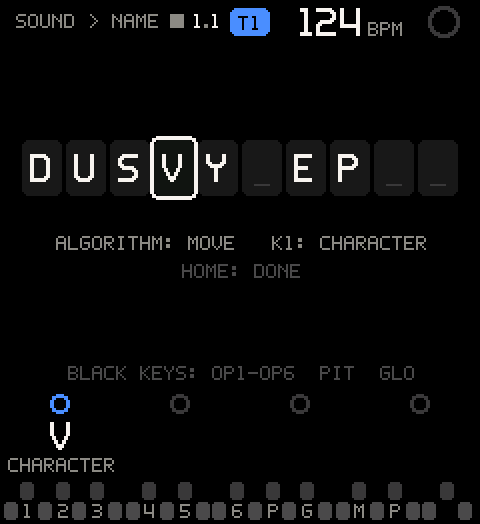
NAME: the voice's ten characters. ALGORITHM moves along the
name, K1 picks the character (space, A-Z, 0-9 and - . ! # % ' ( ) + , / : = ? _; the legend shows SPACE for a space). HOME when you are
done. The track's name follows at once.
KNOBS: see Knob assignment.
POLY/MONO and the effects are not in the voice's edit buffer, so the deep
editor can't reach them. VOICE says so on screen (POLY/MONO AND FX: THE STOCK FULL EDITOR): use the stock editor for them.
Knob assignment
SOUND > MACROS normally gives you TONE, ATTACK, DECAY and CHARACTER. Any of the four knobs can instead carry one value of the voice, for example OP2's LEVEL or the FEEDBACK, so the thing you tweak most is one detent away on SOUND.
- Open
KNOBS(SEL on MACROS, then SEL). - SEL on
ASSIGN MODE: it showsON, the toast saysASSIGN: HOLD SEL + TURN, and the foot of the screen saysASSIGN: HOLD SEL + TURN A KNOBon every editor page while it is on. - Go to the value (HOME, a group, or a black key), hold SEL. The
legend now says
ASSIGNunder every value that can go on a knob. - Turn the knob you want to use. The toast confirms:
K2 = OP2 LEVEL. The value itself doesn't move.
Every value in VOICE, OP1-OP6, PITCH EG and LFO can go on a knob. The
NAME's characters and the macros can't: turning one says NOT A VALUE FOR A KNOB.
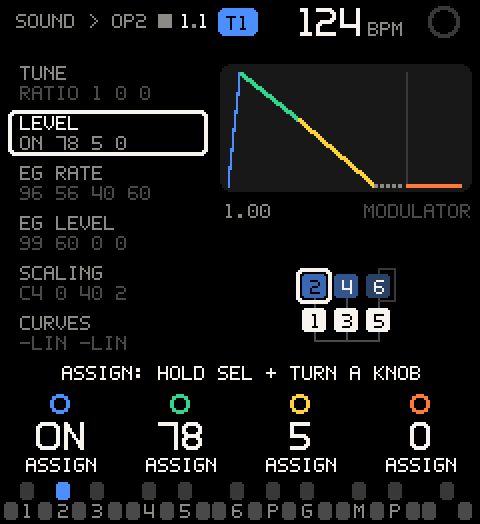
The value goes on the same knob you turned: turn K2 to put it on
K2. Back on SOUND > MACROS that knob's legend names it (2 LEVEL =
OP2's LEVEL) and edits it; the other knobs keep their macros.
| To | Do this |
|---|---|
| See what is assigned | Open KNOBS. Each row shows its knob and what it carries. |
| Clear one knob | SEL on its row in KNOBS (SEL: MACRO). The macro comes back, with the value it had: K2 = ATTACK. |
| Turn ASSIGN mode off | SEL on ASSIGN MODE again (ASSIGN OFF). It is also off every time you open the editor from SOUND. |
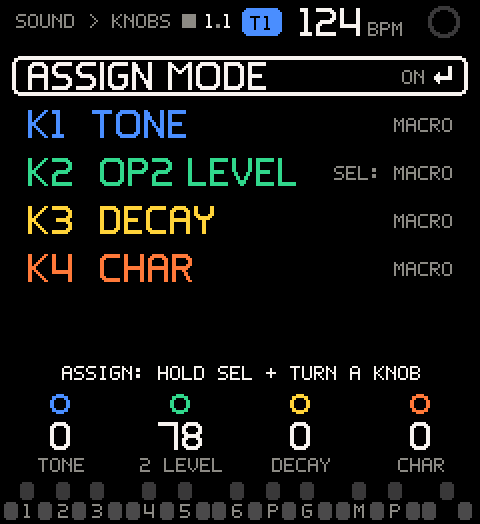
On the list, KNOBS shows MACROS, 2 ASSIGNED or ASSIGN ON.
Assignments belong to the track's sound and are saved with the project.
Loading another sound (a preset, a SysEx, the stock editor's changes)
clears them, with the macros. The macro under an assigned knob keeps
working on the sound; it is only off the knob.
Pro tip: Put an operator's LEVEL on a knob to play a modulator like a filter, or FEEDBACK next to TONE for grit on demand. Record while you turn: it is still the voice changing from the next note on.
COPY, PASTE, ERASE
The three actions sit at the end of the list, under NAME.
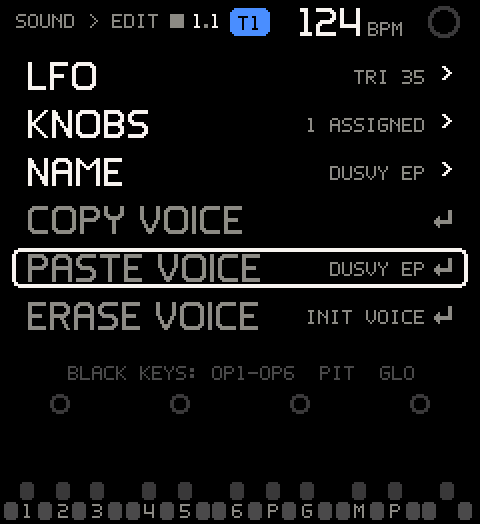
| Row | What it does |
|---|---|
COPY VOICE | Copies the track's sound: voice, macros, operators on/off and knob assignments. Shows T1 VOICE COPIED. |
PASTE VOICE | Shows the copy's name (EMPTY before you copy). Asks PASTE VOICE? (THIS TRACK'S VOICE, MACROS AND KNOBS, CANCEL first), then replaces this track's sound with the copy: T1 VOICE PASTED. Nothing copied yet: COPY A VOICE FIRST. |
ERASE VOICE | Asks ERASE VOICE? (BACK TO THE DX7 INIT VOICE), then loads the DX7 INIT VOICE (OP1 alone, a sine), macros and assignments cleared: T1 VOICE ERASED. |
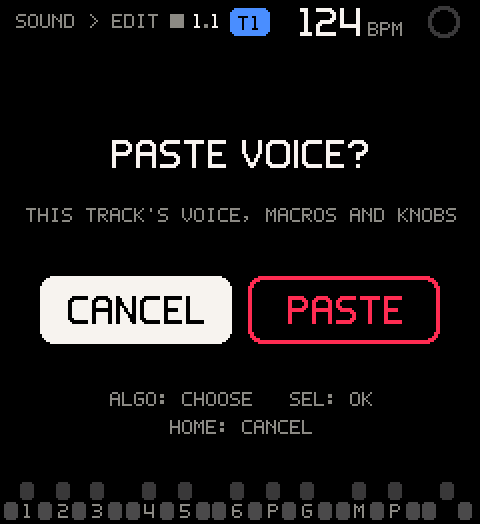
Copy on one track, select another (SHIFT + ALGORITHM), paste: the same sound on two tracks, to vary one of them.
SOUND on a KIT track
On a KIT track the list shows VOICE and then the eight pads (1 P.KICK
... 8 RIDE). The pad under the cursor is the one the KIT page has
selected, and the name and pictures show that pad's voice with its TUNE,
DECAY and LEVEL applied.
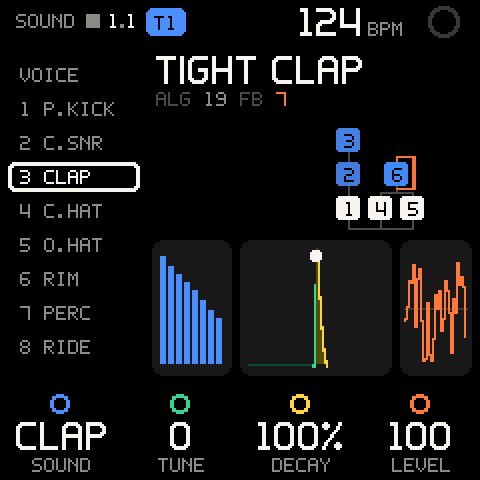
| Cursor | K1-K4 | SHIFT + K1-K4 |
|---|---|---|
VOICE | ALGORITHM, FEEDBACK, TRANSP of the track's own voice, the one TRACK pads play | The LFO row |
| A pad | SOUND, TUNE, DECAY, LEVEL | CHOKE, MUTE |
The pad values are the same as on KIT; see KIT.
ENV, LFO and EDIT
| Control | What it does |
|---|---|
| ENV | Opens SOUND on MACROS, where K2 ATTACK and K3 DECAY are. On a KIT track it lands on pad 1 and selects it. It does not turn on the stock envelope page. |
| LFO | Opens the stock LFO page. Press LFO again or HOME to come back. |
| EDIT | Opens the stock DX7 editor, the same as FULL EDITOR. Press EDIT again or HOME to come back. |
The stock editor pages
The LFO page and the full editor are the FM-1's own screens. While one is open, the stock firmware draws the screen and owns the knobs and SELECT (which steps through its groups). PLAY, REC, ARP, SEQ and HOME stay with Groove OS.
When you come back, SOUND takes whatever you changed:
- If you changed only the algorithm, LFO, transpose or name, the change goes into the voice and your macros stay.
- Any other edit makes the edited voice the new voice. The macros go to 0, with what they did baked in.
The preset browser
Turn PRESETS on any OS page to browse sounds for the selected track. The browser opens over the page you are on.
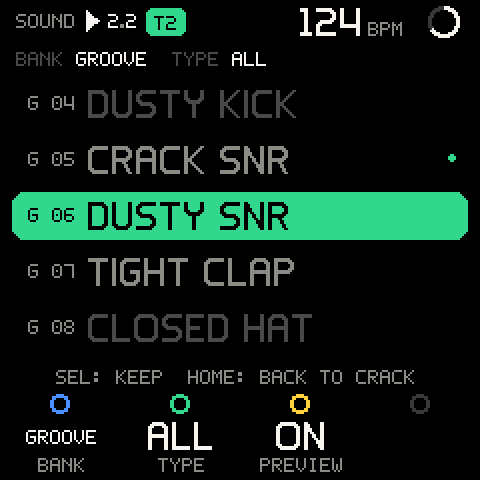
| Control | What it does |
|---|---|
| PRESETS, first detent | Opens the browser with the highlight on the track's sound. Nothing loads yet. |
| PRESETS or ALGORITHM | Moves the highlight and loads that sound on the track at once. |
| SHIFT + PRESETS | Next or previous bank. Also opens the browser. |
| K1 BANK | Next or previous bank. |
| K2 TYPE | Filters the list: ALL, DRUM, BASS, KEYS, PAD, LEAD, FX. |
| K3 PREVIEW | ON: each move plays the new sound once. OFF: silent, you hear it on the keys. |
| Keys | Play the loaded sound, to audition it. |
| K4 | Nothing. |
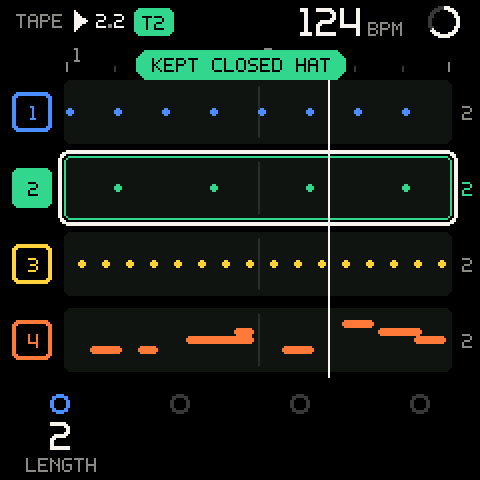
| SEL | Keeps the sound and closes. Shows KEPT <NAME>. |
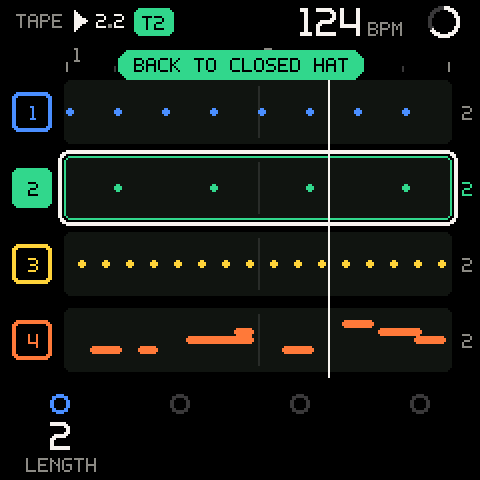
| HOME | Puts back the sound the track had when the browser opened, macros and knob assignments included, and closes. Shows BACK TO <NAME>. |
| Any other button or SELECT | Keeps the sound, closes, then does its normal job. ARP and SEQ work without closing it. |
| 4 s without a knob turn | Keeps the sound and closes. |
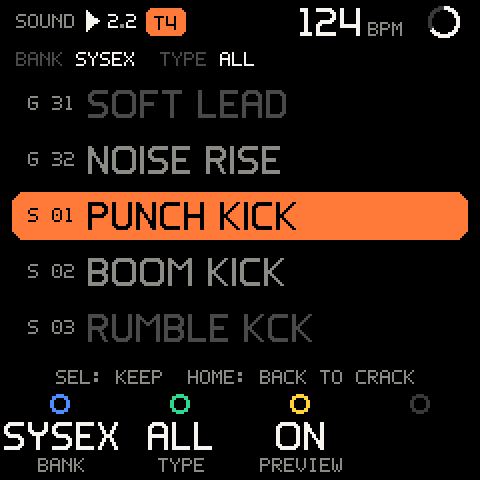
The line over the list shows the BANK and the TYPE. The filled row
is the sound loaded now. The line under the list reminds you: SEL: KEEP HOME: BACK TO <the old sound> (its first six letters). A dot at the
right marks the sound the track had when you opened the browser.
Audition, keep or revert
- Select the track (SHIFT + ALGORITHM).
- Turn PRESETS one detent. The browser opens on the track's sound.
- Turn PRESETS or ALGORITHM. Each detent loads the next sound and, with PREVIEW on, plays it.
- Play the keys to try it in context, even while the loop plays.
- Press SEL to keep it, or HOME to go back to the old sound.
Banks
The list runs through all banks in order: KITS, GROOVE, then A to D (and SYSEX after D while a received bank is open). Turning past the end of one bank goes into the next.
| Bank | Shown as | What it holds |
|---|---|---|
| KITS | KITS, rows K 1-K 3 | The three kit templates: PUNCH KIT, DUSTY KIT, STEEL KIT. A template is not a voice: it makes the track a KIT. See KIT. |
| GROOVE | GROOVE, rows G 01-G 32 | The 32 FM-1 Groove sounds built into the firmware. See the GROOVE bank. |
| A, B, C, D | A-D, rows A 01-D 32 | The FM-1's own 128 presets, read from its memory. The browser never changes them. |
| SYSEX | SYSEX, rows S 01-S 32 | A DX7 bank you just sent over MIDI, while you browse it. Only there after BROWSE on the bank's question; gone when the browser closes. See Loading sounds over SysEx. |
Types
TYPE filters by each sound's role. Only KITS and GROOVE carry roles, so any TYPE other than ALL hides banks A to D and SYSEX.
| TYPE | What it shows |
|---|---|
| ALL | Everything. |
| DRUM | The three kits and GROOVE's kicks, snares, clap, hats, ride, percussion and the two DUO sounds. |
| BASS | GROOVE's six basses. |
| KEYS | GROOVE's electric pianos, keys, organ, piano, stabs and vibes. |
| PAD | GROOVE's two pads. |
| LEAD | SOFT LEAD. |
| FX | NOISE RISE. |
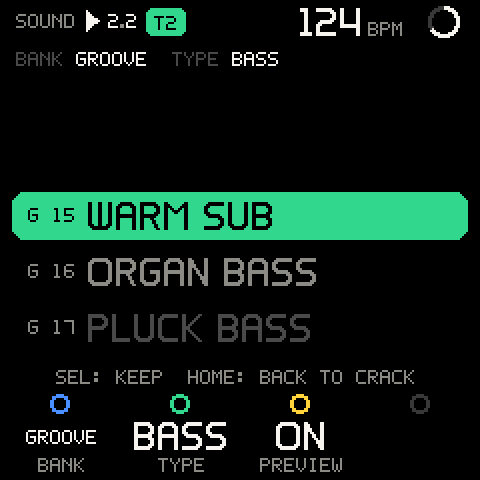
PREVIEW plays each sound at the pitch it was designed for, for 0.3 s: basses and the DUO sounds on C3, VIBES and SOFT LEAD on C5, the rest on C4. Banks A to D preview on C4. Kits do not preview: play their pads. While 11 or more notes are sounding, the preview waits.
Why a row is dimmed
A sound and a kit use a track's notes differently. So a track that already holds notes cannot switch between a single voice and a kit. When the highlight lands on such a row, the row is outlined instead of filled, nothing loads, and the reason shows in red:
| Reason | Why, and what to do |
|---|---|
USE EMPTY TRACK | The track has notes, and this row would change it between a synth track and a KIT. Pick a row of the same kind, clear the track, or use an empty track. |
STOP REC | You are recording or about to record, so the track must not change kind. Stop recording first. |
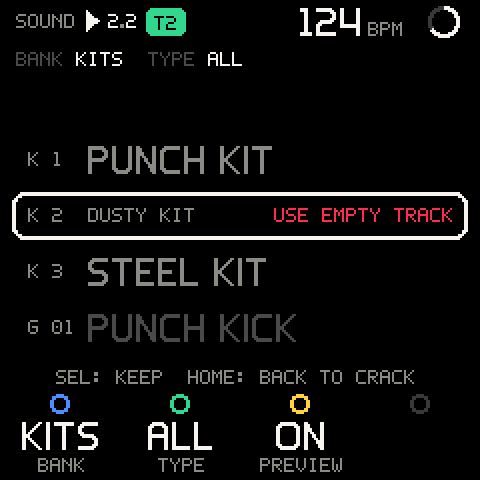
On a KIT track, another KITS row always loads: it swaps the pad sounds under the pattern and keeps the notes.
Pro tip: Turn TYPE to DRUM, BASS or KEYS before you browse. The list shrinks to the sounds for that part and skips the 128 factory presets.
Loading sounds over SysEx
The GROOVE bank is built in; you don't need to send anything to use it. To bring in other DX7 sounds, send them over MIDI (USB, Bluetooth or the MIDI input) from any SysEx tool: Dexed, SysEx Librarian, fm1-editor.com.
| You send | The selected track gets |
|---|---|
| One DX7 voice (163 bytes) | That voice, at once: VOICE <NAME> LOADED. Macros at 0, knob assignments cleared, the LFO following the new voice. |
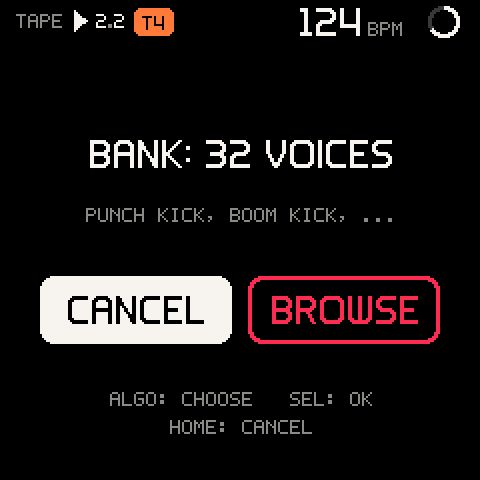
| A DX7 bank (4104 bytes) | A question, BANK: 32 VOICES, with the first voices' names under it and CANCEL first. BROWSE opens the browser on a SYSEX tab: move through the 32 voices, each loads and previews, SEL keeps one, HOME puts the old sound back. |
In the SYSEX tab the rows are S 01-S 32, the bank reads SYSEX, and
TYPE is set to ALL (SysEx voices carry no roles). Turning back past
S 01 walks into the other banks, as usual. The question waits while a
stock page, another question or the browser is up, and shows when you
leave it.
A sound from SysEx is a sound like any other: the macros shape it, EDIT changes it, and a project SAVE keeps it with the session. It is never written into the FM-1's own presets (banks A to D). HOME in the browser brings back exactly what the track had. The details, and what gets refused, are in MIDI: Sounds over SysEx.
Careful: A voice can't go onto a KIT track (
KIT TRACK: NO SYSEX VOICE), and a voice sent while the browser is open is refused (CLOSE PRESETS FOR SYSEX). In the SYSEX tab a KIT track follows the usual rule: a voice loads only on an empty KIT track, which then becomes a synth track.
Troubleshooting
| What happens | Why, and what to do |
|---|---|
| The macros jumped back to 0. | You loaded a preset, or edited the voice in the stock editor. The edited voice is the new voice, with the old macros baked in. |
| TONE does almost nothing. | The voice has few or quiet modulators (an organ with all carriers, a pure sine). Try CHARACTER, or raise a modulator's LEVEL on its OP row. |
| Another track's vibrato changed. | The LFO wave and speed are shared and follow the selected track's voice. |
A row in the browser says USE EMPTY TRACK. | The track has notes and the row would change it between synth and KIT. Use an empty track, or clear this one. |
A row in the browser says STOP REC. | You are recording or armed to record. Stop, then load. |
| The browser closed by itself. | It keeps the sound and closes 4 s after the last knob turn. Turn PRESETS to open it again. |
| No preview when moving through KITS. | Kits don't preview. Play the pads on the keys. |
| No preview while playing a big chord. | The preview waits while 11 or more notes sound. Let go of some keys. |
K4 on VOICE says POLY/MONO: COMING SOON. | POLY/MONO is not built into Groove OS. Set it in the stock editor (FULL EDITOR, or EDIT). |
A black key in the deep editor says POLY/MONO: NOT MAPPED YET. | The MONO and POLY keys do nothing there. Use the stock editor. |
| Hold SEL + a macro cleared its automation instead of moving x10. | On a macro, hold SEL always means clear. Turn without SEL, or assign a value to that knob first. |
Hold SEL + turn says NOT A VALUE FOR A KNOB. | ASSIGN mode is on and that value (a name character, a macro) can't go on a knob. Turn ASSIGN off in KNOBS for x10. |
| ASSIGN mode is off again. | It turns off each time you open the editor from SOUND. Switch it on in KNOBS. |
| My knob assignments are gone. | Loading another sound (a preset, a SysEx voice, ERASE VOICE, an edit in the stock editor) clears them, with the macros. |
| PRESETS does something else on the stock editor. | On the stock pages the stock firmware owns the knobs. Press HOME first. |
| A voice I sent over SysEx didn't load. | See the toast: a bad checksum, a cut message, a KIT track, or the browser was open. MIDI: What gets refused lists them. |
| The SYSEX bank is gone from the browser. | It is there only while you browse it after BROWSE. Send the bank again. |