Chapter 5· Groove OS 1.4
SOUND
Play along as you read: Play it live opens a working FM-1, running its real software, on the screen this part of the page is about. Tap a control's name in the text to find it on the panel.
Every sound track has a sound of its own, FM or virtual analog, and you shape it three ways: with the four macros on TRACKS, in the SOUND view and its editors, and by picking a different sound in the browser. This chapter covers all three, plus the four banks A to D that hold the sounds, loading sound packs from the website, copying sounds between tracks and sending DX7 voices from a computer.
Two engines
| FM | VA (virtual analog) | |
|---|---|---|
| What it is | The FM-1's own engine: six operators, 32 algorithms. | A subtractive synth added by Groove OS. |
| Good for | Electric pianos, bells, plucks, organs, basses with bite, metallic hits. | Warm basses, pads, saw leads, plucks, drums. |
| Voices | 12, shared by every FM track and FM kit. | 8, shared by every VA track and VA kit. |
| Where | FM SOUND and FM KIT tracks. | VA SOUND and VA KIT tracks. |
A track remembers both: switching its engine in the TRACK menu and back loses nothing. The FM-1's stock firmware plays one sound at a time; with Groove OS, every track has its own.
The four macros
On TRACKS, to are four controls named for the selected sound and chosen so that each one clearly changes it, both ways. They are the quickest way to make a sound yours.
| Sound | K1 | K2 | K3 | K4 |
|---|---|---|---|---|
| KNOCK BOOM | TUNE | SWEEP | DECAY | DIRT |
| GROWL | ZAP | SQUEAL | PUNCH | SLIDE |
| DUSTY EP | TONE | CHORUS | BARK | DECAY |
| GRIT SUB (VA) | TONE | WIDTH | GROWL | PUNCH |
Most sounds in the sound packs have names like these. The rest get TONE ATTACK DECAY CHAR on FM and CUTOFF RESO ENV DRIVE on VA, and so does any sound without names of its own: the FM-1's factory voices, a DX7 bank you load, a voice you send. Values run from -50 to +50, one a click (hold for ten); 0 is the sound as designed. RESET MACROS in the SOUND menu puts them all back to 0.
Macros are performance controls: with on, a macro you turn is recorded onto the track and replays every loop (see Recording and undo). On FM tracks a macro move takes effect from the next note, not inside a note you are holding.
After the sound come the track's own effects: press for its DRIVE, CRUSH, FILTER and SLICER, and its two sends (see TRACK FX).
Try it·On the FM-1
Turn K1, the first macro: SOFT KEYS changes at once. Play a few keys to hear it.
K1The SOUND view
Open it with on a track, then SOUND ▸. (On a kit that row is PADS + STEPS ▸ and opens the drum grid instead; a MIDI OUT track has no such row.) to are still the macros, with a picture over each knob. The button goes straight to the SOUND menu below, with this view behind it.
| On an | The picture is |
|---|---|
| FM track | The algorithm as a wiring diagram: carriers (ink, on the bottom row, into OUT), modulators (grey, above what they modulate), operators switched off (dark), the feedback loop. Under it, one small picture per macro. |
| VA track | The filter's response as the macros shape it: the cutoff handle in blue, the resonance peak in green, the envelope's sweep as a yellow arrow; then the oscillator, filter envelope and amp envelope. |
| MIDI OUT track | Only its channel: there is no sound to shape. |
Hold (SHIFT is held down) here to clear the track (it asks, like TRACKS and MIX).
The sound editors
in the SOUND view opens the SOUND menu, a list of groups (twelve on an FM track, five on a VA track). Pick one and its editor opens: a picture plus four knobs, and gives four more. steps to the next group (the dots at the top right show where you are), goes back to the menu. The button jumps straight to the amp envelope, to the LFO, to the menu; press the same one again to return.
FM groups
| Group | K1 to K4 | With SHIFT |
|---|---|---|
VOICE | ALGORITHM (1 to 32), FEEDBACK (0 to 7), OSC SYNC, TRANSP | |
OP1 to OP6 | LEVEL, RATIO, FINE, DETUNE | ATTACK, DECAY, SUSTAIN, RELEASE of that operator |
PITCH ENV | LEVEL 1 to LEVEL 4 | RATE 1 to RATE 4 |
LFO | LFO WAVE (TRI, SAW-, SAW+, SQR, SIN, S&H), LFO SPEED, LFO DELAY, PITCH MOD | AMP MOD, PITCH SNS, LFO SYNC, LFO SPEED |
AMP ENV | ATTACK, DECAY, SUSTAIN, RELEASE | |
PLAY | MONO (POLY or MONO), GLIDE (FULL or FINGER), GLIDE TM, TRANSP | BEND UP, BEND DN, PITCH SNS, PITCH MOD |
NAME | CHARACTER, POSITION, INSERT, DELETE |
Two groups are the synth's, not the track's, and their title says ALL TRACKS: the amp envelope (with SEL switching it on or off) and (mono, glide, bend range; its TRANSP is the track's own). Change them and every FM track hears it. The FM engine also has a single LFO, so the LFO's wave and speed are shared too, although the screen does not say so.
Careful: the FM editor does not put every DX7 parameter on a knob. Per-operator EG levels and rates 1 to 4, keyboard scaling, curves, velocity sensitivity and fixed-frequency mode are kept as they were loaded or imported, but cannot be edited from the panel.
VA groups
| Group | K1 to K4 | With SHIFT |
|---|---|---|
OSC | WAVE (SAW, SQUARE, TRI, SINE), SUPER (0 to 100: how loud six detuned copies are beside the centre oscillator, seven in all), DETUNE (their spread), SUB | NOISE, PW (pulse width), DRIFT, LEVEL |
FILTER | TYPE (LP24 ladder, LP12, BP, HP, or OFF), CUTOFF, RESO, DRIVE | |
FILTER ENV | ATTACK, DECAY, SUSTAIN, RELEASE | AMOUNT, KEY TRACK, VELOCITY, CUTOFF |
AMP ENV | ATTACK, DECAY, SUSTAIN, RELEASE | VELOCITY, LEVEL, MONO, GLIDE |
LFO | WAVE (TRI, SINE, SQUARE, S&H for sample and hold), RATE, PITCH, CUTOFF |
A VA sound can be POLY, MONO or LEGATO, with glide; those are on the AMP ENV group's SHIFT row.
The SOUND menu's actions
| Row | What it does |
|---|---|
RESET MACROS ↵ | Puts the four macros back to 0 (asks). On FM and VA tracks. |
COPY SOUND ↵ | Copies the track's sound. FM tracks only. |
PASTE SOUND ↵ | Pastes it onto the selected track, which can be another one (asks; dimmed until something is copied: COPY A SOUND FIRST). FM tracks only. |
INIT SOUND ↵ | Starts the sound from the DX7's initial voice (asks). FM tracks only. |
The preset browser
Turn . The browser opens on the track's own sound, and that first detent already moves one row the way you turned, so two clicks right are two sounds on. The list is KITS first (PUNCH, DUSTY and STEEL), then the FM-1's four banks, A to D, slot by slot: 32 slots each, every one an FM (DX7) voice or a VA sound. Moving through it auditions: each sound plays a short note of its own on a spare voice (a kit row plays nothing), and the track keeps its own sound until you decide. (SETTINGS > CONTROLS > PREVIEW turns the preview note off.)
Each row shows the sound's name, then its type and engine in grey: BASS VA, KEYS FM, DRUMS KIT. A voice with no type reads DX7, as the FM-1's own factory voices do. An arrow marks the sound the track has now, a dot a favourite. Slots that hold nothing (erased, or data the FM-1 cannot read) are left out of the list.
Play the keys while you browse and you hear the highlighted sound, not the track's: play a bass line through each bass before you pick one. The notes go through the keybed as usual (the octave, the track's OCTAVE, IN KEY, the velocity curve), at the velocity you play. On a kit row the keys play that kit's pads as on KIT (the white keys pads 1-8 twice, the black keys 1-8 each pad), on any track, a kit track included; on a sound row a kit track's keys play notes. A note you hold keeps the sound it started with until you let go, even if you move on, take the sound or close the browser; the next key plays whatever is highlighted then. Playing keeps the browser open (the 8 seconds count from the last key, move or octave change). and OCT+ move the keybed as they always do and leave the browser open on the same row, so you can hear a bass an octave down before you take it.
Audition notes are never recorded: with REC on they are heard, not taken. Once the browser closes, the keys play (and record) the track again.
| Control | What it does |
|---|---|
| or | Move through the list. |
| Take the sound: the track gets it, and switches engine if the sound needs a different one. | |
| / OCT+ | The keybed's octave, as anywhere; the browser stays open on its row. |
| (or any other control) | Close, leaving the track as it was. |
TAB | ALL, FAVOURITES, RECENT (the last eight you took) and SYSEX (only while a bank you sent is open). |
FAV | Turn right to mark the highlighted sound as a favourite (a dot), left to unmark it. |
TYPE | Filters every tab: ALL, BASS, KEYS, PAD, LEAD, PLUCK, DRUMS, FX. A DX7 voice has no type, so it shows only under ALL. |
BANK | Jumps to the first row of the next or previous bank: KITS, then A to D. Its legend shows the highlighted row's slot: D02 is bank D, slot 2 (KITS on a kit). |
| Steps the TYPE filter from anywhere. |
Entering a bank with names it in a toast: BANK C · LO-FI for a sound pack loaded from the website (its name is stored inside the bank), BANK A · FACTORY for a bank that is still as it left the factory, and just BANK C for anything else.
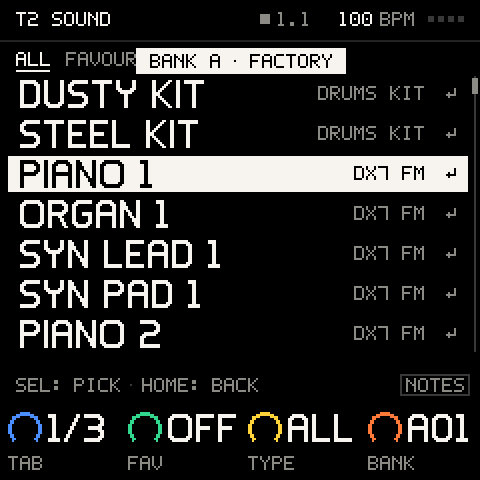
A track that is playing takes its new sound on the next bar line (T2 ACID LINE @ NEXT BAR), so changes land in time (a voice from a SYSEX bank lands at once). A VA sound you take starts with its macros at 0. The browser closes by itself after 8 seconds without a move, leaving the track as it was. Kits are listed too: on an empty track, taking a kit makes it a KIT track, and on a kit track it swaps the sounds under the same beat. Rows that cannot apply right now are dimmed and say why (CLEAR THE TRACK FIRST for a sound that would change a track with notes from a sound to a kit or back, STOP REC FIRST while recording).
A TYPE with nothing in the current tab says so (NO KEYS IN FAVOURITES), and does nothing then.
Careful: a VA sound auditions only while a track slot is free, so with eight tracks a VA row is silent while you browse, on the keys too. Taking it still works. A kit row always plays its kit with the FM drum voices, also over a VA KIT track (taking it there gives the VA drums).
Careful: favourites and
RECENTremember a slot, not a sound. After you load another bank into that letter, they point at whatever sits in the slot now.
Try it·On the FM-1
Tap HOME twice, then turn PRESETS a few clicks: each sound plays as you pass it. SEL takes the one you like.
HOMEPRESETSSELThe banks
The FM-1 keeps four banks of 32 sounds, A to D, in its own flash, apart from your projects. Out of the factory they hold the FM-1's 128 DX7 voices. With Groove OS 1.2 any slot can hold a Groove OS VA sound as well as an FM voice, and you change what a bank holds by loading a sound pack from the website: a sound pack is a bank of 32, it goes into one letter and replaces what was there, so the FM-1 holds up to four at once.
What stays built in, whatever the banks hold: the three kits and their drum sounds, INIT VOICE (the DX7's plain sine, which a new SOUND track starts on) and EMPTY's four sounds. A bank that is erased, or holds sounds the FM-1 cannot read, shows only what it can; KITS and a new track still play.
Sound packs
Eleven sound packs come with Groove OS, free: CORE, a good first one, plus ten genres. Each is one bank of 32 and a whole groovebox: a drum kit in slots 1 to 8, and 24 sounds in slots 9 to 32 (bass, chords and keys, leads, pads and FX), FM and VA side by side. CORE fits any style; each genre pack is made for one genre. Each also has two or three songs made only with it (see Songs inside). Any sound pack goes into any letter.
| Sound pack | What it sounds like |
|---|---|
CORE | No. 01, start here: an all-round drum kit and 24 flexible staples (basses, keys, leads, pads, FX) that fit any style. Its songs are in different styles |
LO-FI | Dusty keys, tape-warm bass, a soft kit. 70 to 90 BPM |
BOOM BAP | Hard drums with swing, round bass, jazzy keys and stabs. 85 to 95 BPM |
TRAP | Long 808 basses, crisp hats for rolls, dark bells and pads. 130 to 150 BPM, played half time |
HOUSE | A four-on-the-floor kit, organ and chord stabs, bouncy bass. 120 to 126 BPM |
TECHNO | A driving kick, metallic percussion, rumble and acid basses, dark textures. 125 to 135 BPM |
UK GARAGE | A skippy 2-step kit, warm subs, organ chords and stabs. 130 to 138 BPM |
DNB | Fast breakbeat drums, deep sub and reese basses, airy pads. 170 to 175 BPM |
SYNTHWAVE | A big gated snare, analog arps and basses, bright leads, lush pads. 85 to 115 BPM |
AMAPIANO | Log drum bass, shakers, soft piano chords and pads. 110 to 115 BPM |
AFRO | Rolling percussion, warm bass, bright plucks and keys. 100 to 120 BPM |
The first column is the name shows on the FM-1 (BANK C · LO-FI). The 24 sounds are slots 9 to 32 of the letter (C09 to C32). The kit is listed under KITS, after PUNCH, DUSTY and STEEL, and its eight pad sounds are in the bank's list too. Taking the kit and what a song keeps of it: see KIT.
Putting a bank back to factory
SETTINGS > STORAGE > RESET BANK puts one bank back to the FM-1's own factory sounds, on the unit, with no computer. Pick BANK A to BANK D; it asks first (ITS 32 PRESETS BACK TO FACTORY). K4 then reads BANK A · FACTORY again. See SETTINGS.
The 1.1 VA pack
On Groove OS 1.1 the VA sound pack's 63 sounds lived in their own part of the flash. Groove OS 1.2 uses that part to load banks safely, so the first bank you load takes the VA pack's place. The sound packs have VA and FM sounds for every genre, and a song that uses a VA pack sound keeps it (see Songs keep their sounds).
Loading banks from the website
The Sounds page lists the eleven sound packs under Sound packs, CORE first. The play button on a sound pack's cover plays a preview of 20 to 30 seconds in the browser; Add to FM-1 puts it into one of A to D. Each sound pack also has a page of its own (See inside; /sounds/lo-fi for LO-FI) with its preview, its songs, its kit's 8 pads and its 24 sounds, each one playable in the browser, and Add to FM-1 there too. Loading needs Chrome or Edge on a computer, the FM-1 on Groove OS 1.2 or later and its USB cable, and the account you bought Groove OS with, signed in.
- Connect the FM-1 with its USB cable and switch it on.
- Press Add to FM-1 on a sound pack. The page connects (the browser asks once to allow MIDI) and reads what A to D hold.
- The page asks
Put it in bank…, with a button for each letter that says what it holds now:Factory, a sound pack's name (or a bank the page loaded before),Empty, orOwn sounds. Nothing is picked for you. Press the letter. - What is there now is backed up in this browser first, then the sound pack goes in, and the page reads it back to check it. The FM-1 says
LOADING BANK Cwhile it writes, thenBANK C LOADED. - On the FM-1, open PRESETS and turn to that letter:
BANK C · LO-FI. The 24 sounds areC09toC32, and the kit is underKITS, on the drum track.
The page stamps the sound pack's name into the bank, which is what K4 shows. Adding a sound pack to a letter that already holds it writes nothing. Once the page has read the FM-1, a sound pack it holds says so, with its letter: On your FM-1 · bank C.
The FM-1 takes a bank only while the music is stopped and PRESETS is closed. If it is playing, or the browser is open, the page waits: stop the music or close PRESETS, and it carries on by itself.
Safe against a cut
A bank load is safe against a pulled cable or a power cut: each bank is either the old one or the new one, never half of each. If the power goes while the FM-1 is copying the new bank in, it finishes the copy by itself at the next power-on. If the load stops earlier (the cable, a closed tab), the FM-1 says BANK D NOT LOADED and the bank is as it was: load it again.
Backups
Before every load the page reads A to D and keeps a copy in this browser. The Backups section of the Sounds page (/sounds#backups) lists each one: Put back writes all four letters back as they were (and backs up what is there first), Download saves it as a file, to keep it safe or take it to another computer. A backup file you downloaded opens there too.
Careful: the backups live in the browser you loaded from. Another browser or another computer does not have them, and clearing the site's data removes them. Download a backup you want to keep.
DX7 banks
DX7 banks have a page of their own, /sounds/dx7: the Sounds page's Classic DX7 banks card opens it. Drop or choose a .syx file that holds a 32-voice DX7 bank, hear its 32 voices in the browser, then put the bank into a letter with the same Put it in bank… question, backed up first like a sound pack. Its name on the FM-1 comes from the file name, up to 10 characters. A single DX7 voice still goes onto a track: see Sending DX7 sounds.
Right after you install
When the Install page has put Groove OS on the FM-1, its Start with CORE card (See sound packs) brings you to the sound packs on the Sounds page. With 1.4 the six courses are on the FM-1 already (see Learn on your FM-1). Nothing is loaded until you pick a sound pack and a letter. For a first beat, start with CORE: its kit and 24 sounds fit any style, and its songs show what they can do. Then add the genres you play, up to four sound packs at once. See Getting started.
Songs keep their sounds
A track keeps its own copy of its sound, FM or VA, with its macros, and the project saves that copy. Loading a bank, or putting one back to factory, never changes a song: it plays the same whatever the banks hold, on any FM-1.
Songs inside
Every sound pack has two or three songs made only with its own kit and sounds. On the sound pack's page, Add song to FM-1 puts one into an empty project slot (see PROJECT). A song keeps its own sounds, so it plays the same whether its sound pack is in a bank or not.
To use a song's sounds in a new song, start from it: duplicate the project, keep the tracks you like and replace the rest.
Sending DX7 sounds
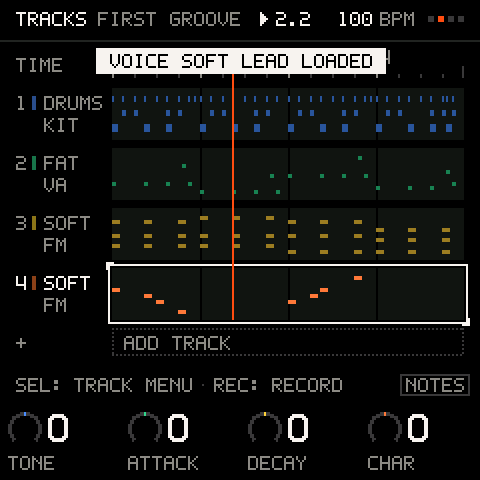
Send a DX7 single voice from a computer or a DX7 editor, and it becomes the selected track's sound at once (VOICE SOFT LEAD LOADED), with the track's macros back at 0. If the selected track is a VA track it switches to FM, as taking an FM sound in the browser does, so you hear the voice and the track is named after it. Send a 32-voice DX7 bank and the FM-1 asks BANK: 32 VOICES: picks CANCEL or BROWSE, confirms. BROWSE opens the browser on a SYSEX tab with the 32 voices.
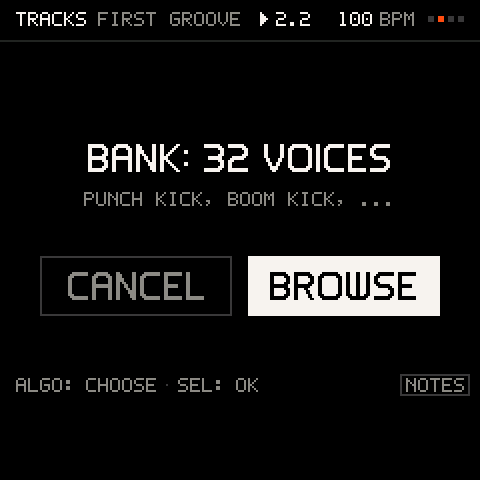
A bank lives only while you browse it: when the browser closes the bank is let go, and the voice you kept stays on the track (its sound is saved with the project). To use another voice later, send the bank again. Each message is checked before anything changes: its length and its DX7 checksum, and values outside the DX7's ranges are brought back into range.
| Toast | Why |
|---|---|
SYSEX: BAD CHECKSUM | The data does not match its checksum. Send it again. |
SYSEX: WRONG LENGTH | The message ended early or ran long, or another MIDI message cut into it. |
SYSEX: ONE AT A TIME | A voice arrived before the one before it was loaded. Send them one at a time. |
BANK IGNORED: ONE IS OPEN | A bank is already waiting. Close it first. |
BANK: NO MEMORY | No room for the bank right now. Try again in a moment. |
KIT TRACK: NO SYSEX VOICE | A voice cannot replace a kit. Select a sound track. |
CLOSE PRESETS FOR SYSEX | A voice arrived while the browser was open. Close it and send again. |
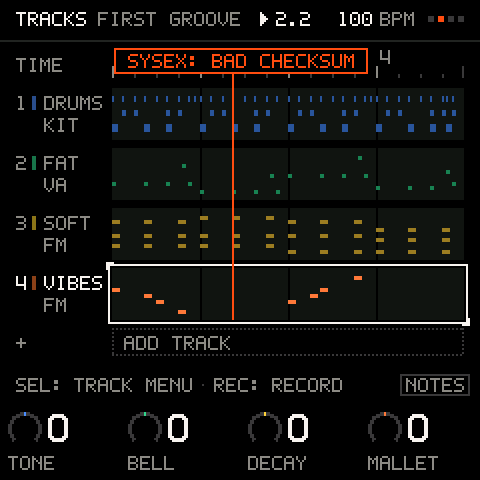
Pro tip: select the track first (), then send. A voice or bank always goes to the selected track.
A DX7 bank sent over MIDI never reaches banks A to D while Groove OS runs, so it cannot overwrite them. To keep a DX7 bank on the FM-1, add it into a letter from the DX7 page (see DX7 banks).
Program Change messages also load sounds: see MIDI and sync.
Fixes to the FM engine
Groove OS patches three faults of the stock FM engine at install: operator detune that is too wide, fast LFOs that run too slow, and a note ended by a velocity-0 note-on that kept sounding. Sounds you made on a stock FM-1 may therefore sound slightly different.
Troubleshooting
| What happens | Why, and what to do |
|---|---|
| The macros jumped back to 0 | You took a different sound. Macros belong to the sound. |
TONE does almost nothing | The sound has few or quiet modulators (an organ of all carriers, a pure sine). Try another macro, or raise a modulator's LEVEL on its operator group. |
| Another track's vibrato changed | The LFO's wave and speed are shared by all FM tracks. |
| A row in the browser is dimmed | The track has notes and the sound is a different kind (a kit), or you are recording. The toast says which. |
| The browser closed by itself | It closes after 8 seconds idle, leaving the track as it was. Turn to open it again. |
| The keys play a different sound in the browser | They play the highlighted row, so you can try it before you take it. Close the browser () and they play the track again. |
| Notes played in the browser are missing from the take | Audition notes are never recorded. Close the browser to record. |
| No sound while browsing a VA row | With eight tracks there is no spare VA slot. Take the sound to hear it. |
| PRESETS lists only KITS, or a bank has gaps | Those slots are erased or hold data the FM-1 cannot read. Load a sound pack from the Sounds page, or put it back with SETTINGS > STORAGE > RESET BANK. |
| A TYPE filter hides the factory voices | They have no type (DX7). Set back to ALL. |
| The GROOVE and VA sounds of 1.1, or its VA pack, are not in PRESETS | In 1.2 sounds are bank content: add a sound pack (CORE is a good first one) from the Sounds page. Songs that use the old sounds still play them. |
| A new track plays a plain sine | That is INIT VOICE, a new SOUND track's first sound. Turn to pick one. |
BANK D NOT LOADED | The load stopped (the cable, a closed tab) and the bank is as it was. Load it again. |
| The Sounds page waits and does not load a sound pack | The music is playing or PRESETS is open on the FM-1. Stop it or close PRESETS, and the page carries on. |
| A favourite now plays a different sound | Favourites remember the slot. Another bank went into that letter. |
| My DX7 voice did not load | See the toast: the table above lists them. |