Chapter 18· Groove OS 1.4
Troubleshooting
Play along as you read: Play it live opens a working FM-1, running its real software, on the screen this part of the page is about. Tap a control's name in the text to find it on the panel.
When something looks wrong, start here. This chapter covers the three safety nets (safe mode, the crash log, reinstalling), what to do if the screen stays dark, and a table of the messages and problems you are most likely to meet. Each chapter also ends with a short table for its own screen.
Before anything else
| What happens | Why, and what to do |
|---|---|
| Nothing responds, or the screen is frozen | Switch off, then on. The session resumes from the autosave. If it happens again, start in safe mode (below) and see the crash log. |
| I am lost | Tap : it goes back one level and, from any view but PERFORM, to TRACKS. It never stops the music. On PERFORM, turn . |
| A knob ring is dark | That knob has no job on the row the cursor is on. Move the cursor with , or hold for a second row. |
| A row is dimmed | It cannot act now. Press on it: a toast says why. |
| I lost a change | Tap (hold , tap ): undo takes back the last thing you did, on any track. See Recording and undo. |
Safe mode
Safe mode starts the FM-1 as if Groove OS were not there: the stock screens and controls run, and nothing of Groove OS does, until the next power cycle. Use it to:
- see whether a problem is Groove OS's or the unit's;
- get back to the stock interface for a session;
- send a DX7 bank from a DX7 editor straight to the FM-1's own presets (banks A to D), which Groove OS does not let through (the website's DX7 page can also put a DX7 bank into a letter: see DX7 banks);
- reinstall after an install that left Groove OS unusable.
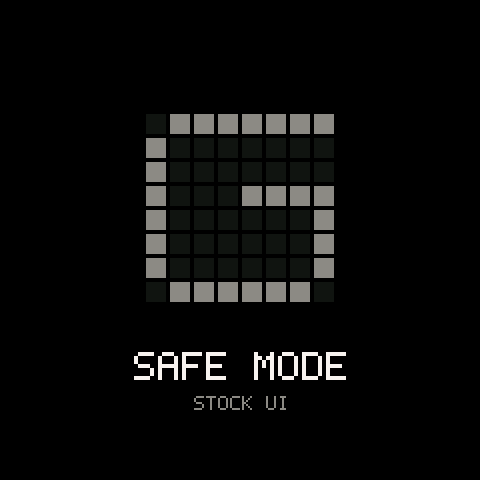
To start it: switch the FM-1 off. Hold and OCT+ together, switch it on, and keep them held for about three seconds. The boot screen shows a grey G with SAFE MODE and STOCK UI under it, and then the stock screens appear.
To leave it: switch off and on again without touching the keys.
Your projects are not touched. Groove OS stays installed.
If the screen stays dark
- Switch the FM-1 off and on again. A dark screen right after an install is common; the first boot takes a moment.
- Switch it on in safe mode (above). If the stock screens appear, Groove OS is installed but not starting: reinstall it (below).
- If nothing appears, plug the FM-1 into a computer with a data cable and open the Install page in Chrome or Edge. Press connect FM-1. If the page sees the unit it says what it runs. If the unit is waiting in its updater, the button reads finish install: press it and keep the tab open.
- If the page cannot finish, use the way back on the same page to install M-VAVE's V15, from any state. It erases saved Groove projects. See the way back.
- The last resort is USB download mode, at the end of Install, update and the way back.
The updater is part of the FM-1 and is always there, so a half-finished install can be finished.
Crash log
If the FM-1 crashes, it restarts by itself, and Groove OS keeps a report. The next boot says so once, in a message at the top that stays for a few seconds:
RESTARTED AFTER A CRASH · REPORT SAVED
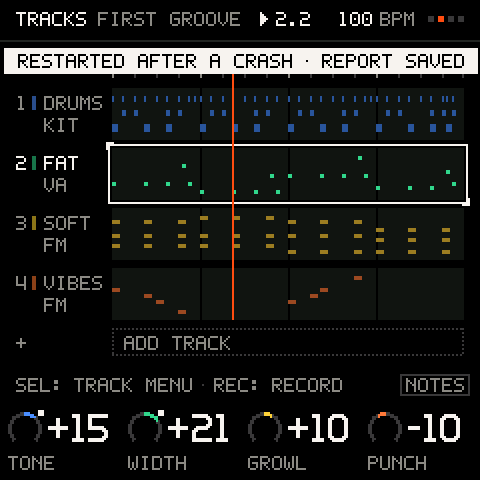
Your music is not lost: the autosave is brought back at power-on (set STARTUP to RESUME; see PROJECT), and everything you saved is untouched.
What a report holds. The cause of the crash, the CPU's state, the last 16 controls you used (page and control numbers only), and the state of the transport and engines. It has no notes, sounds, project names or track names, and no audio. The report stays on the FM-1 until someone reads it over USB; nothing is sent anywhere by itself.
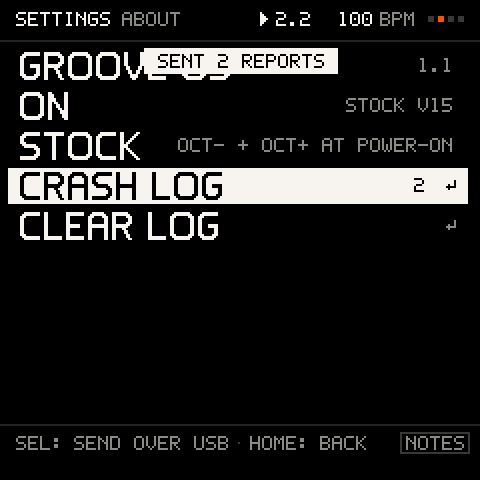
Where to find it. SETTINGS > ABOUT shows CRASH LOG n, how many reports the FM-1 holds.
| Row | What it does |
|---|---|
CRASH LOG n ↵ | (SEND OVER USB) sends the reports over USB MIDI (SENT 2 REPORTS). |
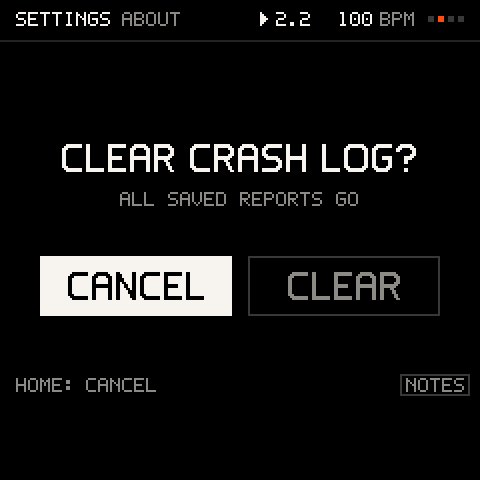
CLEAR LOG ↵ | Erases the reports (asks). |
If it keeps crashing, write to us: say what you were doing just before, and the Groove OS version from
ABOUT. Keep the reports on the FM-1 until we have helped you: they tell us what went wrong, and we will show you how to send them.
Reinstalling
Reinstalling Groove OS keeps your projects unless the page tells you the storage layout moves, in which case it offers export all first.
- Open the Install page, connect the FM-1, and read
your FM-1 runs. - If it says
already installed, the build on the FM-1 is the one the page offers. To reinstall it anyway, go back to V15 first (the way back) and then install again. - If the FM-1 runs an older Groove OS, press install: the page updates it.
- If it waits in its updater, press finish install.
Details: Install, update and the way back.
Messages
| You see | What it means |
|---|---|
8 TRACKS: NO MORE | A project holds eight tracks. |
THE LAST TRACK STAYS | You cannot delete the last track. |
STOP RECORDING FIRST | Tracks cannot be added, copied or deleted while recording. |
CLEAR THE TRACK FIRST | A track with notes cannot change between a sound and a kit. |
ARP ON THIS TRACK / SEQ ON THIS TRACK | A track plays its arpeggiator or its sequencer, not both. |
4 NOTES: THE STEP IS FULL | A step holds four notes. |
LOCKS FULL: 64 IN USE | Parameter locks are used up. Clear some. |
PATTERNS FULL | All 16 stored patterns are used. |
FULL | A track or the project holds as many note events as it can. |
TOO LONG | The track lengths would take more than 168 bars to line up. |
PLAY, THEN CAPTURE / NOTHING TO CAPTURE | Capture needs the music playing and something played. |
NOTHING TO UNDO / NOTHING TO REDO | The journal holds nothing in that direction. |
NOTHING TO CLEAR ON T2 | The track has no recorded notes and its pattern has none. A CLEAR takes both, the pattern a DICE roll wrote included. See The TRACK menu. |
TEMPO: MIDI CLOCK | The MIDI clock is EXT; the incoming clock sets the tempo. |
KIT STEPS OFF / KIT STEPS ON | on the drum grid switched the kit's steps off and went to TRACKS (the hits stay and play on); from anywhere else opened the grid and switched them on. See The step grid. |
TURN AGAIN TO LEAVE / LOCKED: PERFORM | PERFORM guards itself while the music plays (toward KEYS; toward MIX one detent leaves). |
ALL SLOTS FULL: PICK ONE | Three project slots are used. |
SAVE FAILED: OLD SAVE KEPT | The write could not finish; the old project is intact. |
PROJECT TOO BIG | A project is limited to 11,968 bytes. |
A MOMENT: AUTOSAVING | The autosave is writing. Wait for it. |
LOADING BANK D / BANK D LOADED | The website is loading a sound bank into D, and has finished. See Loading banks from the website. |
BANK D NOT LOADED | The load stopped (the cable, a closed tab) and bank D is as it was. Load it again. |
SAVING SAMPLES / SAMPLES SAVED | Your own sounds on the website is putting your kit on the FM-1, and has finished. See Adding it to the FM-1. |
SAMPLES NOT SAVED | Adding your kit stopped part-way. Plug in again and press Add to FM-1 again: it carries on where it stopped. |
2 SAMPLES MISSING | The song uses sounds this FM-1 doesn't have. Their pads play built-in drums instead until the sounds are uploaded again. See Songs remember their sounds. |
SONG FULL: 16 SAMPLES | A song holds up to 16 of your sounds. Put a kit track back on a built-in kit to make room. |
SAVE YOUR SONG THEN OPEN LEARN | You picked a course in SETTINGS > LEARN, and the song you have open has unsaved changes. Press , then pick it again. See Learn on your FM-1. |
A course's name with THE MUSIC STOPS | You picked a course in SETTINGS > LEARN: it asks before it starts. Turn to START and press , or keep CANCEL to stay. Your saved songs stay as they are. |
ADD THE COURSES FROM THE WEBSITE in LEARN | The courses are missing on this FM-1. Run the update on the Install page again: it puts the six courses back. |
STEP 03 / 11 / GLO: GUIDE on the bottom line | You are in a course: the step you are on, and shows its card. STEP 03 COMPLETE means you just earned it. |
UPDATE: FINISH THE UPDATE AT GROOVE-OS.COM/INSTALL | The last step of an install did not finish, so MAIN FX, KEYS, SETTINGS and the sound editor cannot open yet. THIS PAGE says why (NOT INSTALLED, OUT OF DATE, DAMAGED). Your songs are safe and everything else works. Connect on the Install page and press Finish the install (see Installing). |
Common problems
| What happens | Why, and what to do |
|---|---|
| No sound from a track | Is it muted or is another track soloed (MIX)? Is its LEVEL up? Has it a sound (select it and turn )? Is the pattern switched on () and the music playing? Is the FM-1's volume up? |
| PRESETS lists only KITS, or a bank has gaps | Those slots are erased or hold data the FM-1 cannot read. Load a sound pack from the Sounds page, or put it back with SETTINGS > STORAGE > RESET BANK. |
| The Sounds page waits and does not load a sound pack | The music is playing or PRESETS is open on the FM-1. Stop the music or close PRESETS: the page carries on by itself. |
| shows a card instead of SETTINGS | You are in a course, where a tap of shows Learn's card. Hold for a second for SETTINGS. See Learn on your FM-1. |
| My sounds are gone after an update | Updates on the Install page put them back. After an update made another way, or if putting them back stopped, open Your own sounds: Put my sounds back, or Add to FM-1 again. |
| Fast FM chords crackle after the FM-1 has been on for a long time | A known issue: switching the FM-1 off and on clears it. It was there in 1.1 too, and a fix is in progress. |
| A scene changed the mutes but not a track's pattern | The track's SEQ was off when the scene was captured, or it is a KIT track or plays a recording: a scene leaves those as they are. A scene from a song saved before 1.4.1 has no patterns yet: capture it again ( + the black key). See Black keys: scenes. |
| A track sounds quiet | MIX LEVEL, then the sound's own LEVEL macro, then the master. |
| The keys play wrong notes | IN KEY is on SNAP: set it to OFF in KEYS. |
| The keys play chords | CHORDS is on: switches it off. |
| A change I made lands late | LAUNCH is BEAT or BAR: it waits for the line. Set it to OFF in the TIME menu. |
| I moved the cursor and pressed a key on the drum grid, and my hit disappeared | Each white key is one step, wherever the cursor is: the first white key is step 1, the second step 2. Pressing a step's key again takes its hit off. Press the key of the step you want; the cursor is only for editing a hit. See The step grid. |
| I want to delete one note in a sound track's sequencer | Put the cursor on the step, hold and press any key: a rest, the notes gone, the cursor on the next step. (held) clears the step with its settings and locks, and asks first. |
| The drums are out of time with my notes | QUANT is OFF, or the track has a TIMING offset. Check the TIME row and the TRACK menu. |
| Notes from a MIDI keyboard do not sound | Send them on a track's channel: see MIDI and sync. |
| A project will not load | A project can only be loaded by a build with the same storage format. Check the build that saved it. |
| My loops are gone after switching off | Only saved projects and the autosave come back. Check STARTUP is RESUME. |
| The browser installer says my browser is not supported | Use Chrome or Edge on a computer. |
| The installer says my FM-1 runs another custom firmware | Groove OS installs over M-VAVE's V15. The page does it in two steps: V15 back on from M-VAVE's own file, then Groove OS. Back up what the other firmware saved first, with its own tools. See Coming from another custom firmware. On an older M-VAVE firmware (V14), the page says the same, and the same two steps work. |
| The installer says the FM-1 did not answer | Close other programs that use MIDI and connect again. If M-VAVE's updater app is open, quit it so it lets go of the FM-1. If it stays silent, switch the FM-1 off and on. |
Still stuck?
Write to us. Say what the FM-1 shows and what you did just before, and we will help you get it playing again.