Chapter 3
TRACKS
TRACKS is the home view: your music as one lane per track, up to eight, with the tempo and the click at the top. This is where you select a track, turn its four macros, add and remove tracks, and reach each track's settings. A tap of HOME leads back here from every view but PERFORM.
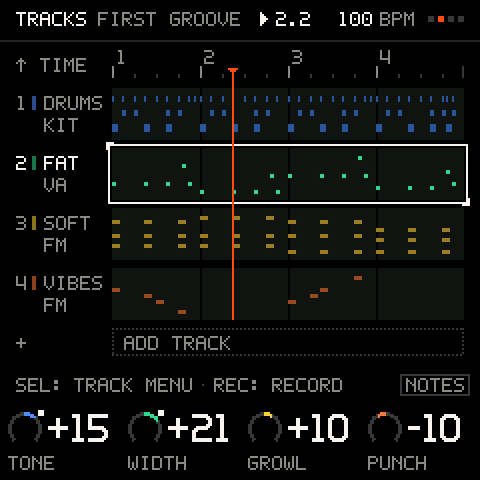
The screen
| Part | What it shows |
|---|---|
| TIME row | A ruler with the project's bars and beats; it reads ▲ TIME while the cursor is on a track, because TIME is the row above: turn ALGORITHM back to reach it. With the cursor on it, the beat grid, the click and the swing, drawn as one bar. |
| A lane | One track. Its number, its name (up to five letters) and its type (FM, VA, KIT, MIDI; MUTE or SOLO while it is muted or soloed) on the left; its notes across, in the track's colour. Drums are drawn as three rows of marks (kicks low, hats and ride high, the rest between). |
| The selected lane | Full colour and a white frame. The other lanes are dimmer, and a lane's repeats dimmer still. |
| The loop end | A track shorter than the screen's span marks where its loop restarts. |
| The playhead | A thin line across the lanes, in the signal colour (orange). |
+ ADD TRACK | The last row, while you have fewer than eight tracks. |
| Legend | K1 to K4: what the cursor is on. |
A muted track draws dimmer. Four lanes show at a time; with more, the window scrolls to keep the selected track in view.
The cursor
Turn ALGORITHM to move the cursor through TIME, each track, and + ADD TRACK. Moving onto a lane selects that track. The selected track is the one REC records onto, the keys play, PRESETS changes and DICE rolls. A toast names it and its sound. SHIFT + ALGORITHM (SHIFT is HOME held down) selects the previous or next track from any screen.
| Cursor on | K1 to K4 | SEL |
|---|---|---|
| TIME | TEMPO, SWING, QUANT, CLICK | The TIME menu |
| A track | Its four macros (see below) | The TRACK menu |
| + ADD TRACK | Choose FM SOUND, VA SOUND, FM KIT or VA KIT |
The macros
Each sound ships with four macros, named for what they do to that sound: a kick reads TUNE CLICK DECAY DIRT, an electric piano TONE CHORUS BARK DECAY, a fat bass TONE WIDTH GROWL PUNCH. A value of 0 is the sound as it was designed; turning either way changes it audibly. They read from -50 to +50 and move one a click (hold SEL for ten). Sounds without curated macros get TONE ATTACK DECAY CHAR (FM) or CUTOFF RESO ENV DRIVE (VA).
| Track type | K1 to K4 |
|---|---|
| FM SOUND | The sound's four macros |
| VA SOUND | The preset's four macros (or CUTOFF RESO ENV DRIVE) |
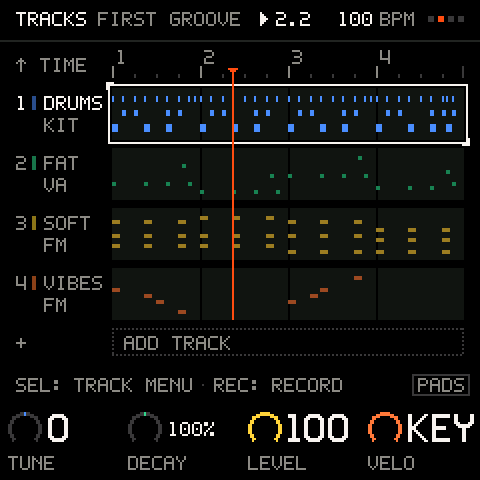
| KIT | The selected pad's TUNE, DECAY and LEVEL, then the kit's VELO |
| MIDI OUT | LENGTH, OCTAVE, TRANSP, MIDI CH (the channel it sends on) |
Turning a macro while you record writes the move onto the track: see Recording and undo.
The TIME row
Put the cursor on TIME. The four knobs are the project's.
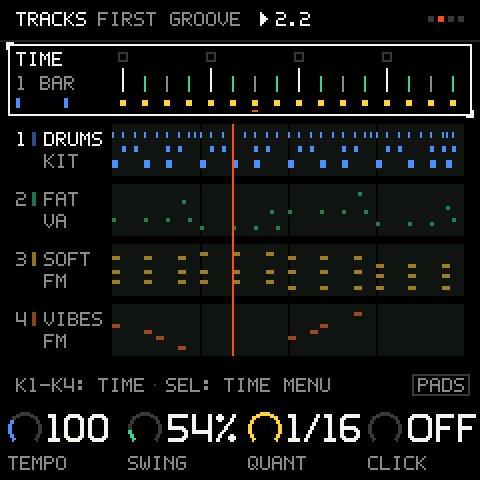
| Knob | Values | What it sets |
|---|---|---|
K1 TEMPO | 40 to 240 BPM | The tempo of everything: the loops, the click, the arpeggiator, the sequencer. |
K2 SWING | OFF, then 51 to 75 % | Pushes the off-beat 16ths later. OFF (50 %) is straight. Kit steps and sequencer patterns on a 1/16 grid follow it (a pattern with a swing of its own keeps that); notes you recorded are not moved. |
K3 QUANT | OFF, 1/16 | Snaps notes you play to the nearest 1/16 as they are recorded. The arpeggiator and the sequencer are never quantised: they are already on the grid. |
K4 CLICK | OFF, ON | A click on every beat, accented on the bar. With it off, only the count-in clicks. |
New projects record with QUANT on 1/16 (the starters too); set it to OFF for free timing.
Press SEL on TIME for the TIME menu:
| Row | What it sets |
|---|---|
COUNT-IN | ON: REC from a stop counts in one bar first. OFF: it records at once. |
LAUNCH | OFF, BEAT, BAR (the default): when recording, mutes, solos and pattern and length changes happen while the music plays. See Launch quantise. |
CLICK VOL | The click's volume, 0 to 100, one a click. |
MIDI CLOCK | INT, OUT, EXT: see MIDI and sync. |
TAP TEMPO | Tap SEL to set the tempo. |
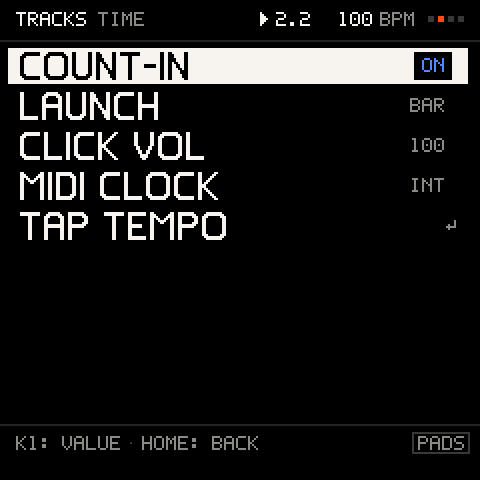
Other ways to set the tempo: hold PLAY and turn K1 on any screen (1 BPM a click; the toast says the tempo, and the music keeps playing when you let go), SHIFT + SELECT from any screen (1 BPM per detent), tap the SHIFT key F#5, or press SEL on PERFORM. The second tap already sets the tempo; the average of the last three gaps follows. While the MIDI clock is EXT the incoming clock sets the tempo and these say TEMPO: MIDI CLOCK.
Adding a track
Move the cursor to + ADD TRACK and press SEL. Choose what the track is.
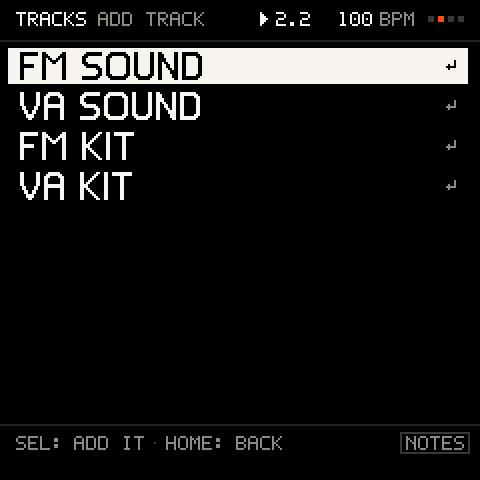
| Choice | What you get |
|---|---|
FM SOUND | A track that plays the FM-1's own FM engine, with a sound of its own. Several FM tracks can play different sounds at once. |
VA SOUND | A track on Groove OS's virtual-analog synth: subtractive basses, pads, leads and plucks. |
FM KIT | A whole drum kit on one track, eight pads, played by the FM engine. |
VA KIT | The same kit, played by the VA drum models. |
The new track is selected (the toast says NEW TRACK or NEW KIT TRACK), so you can press PRESETS to pick its sound right away. A new FM track starts with a GROOVE sound of its own, chosen by its place (the fifth track gets VIBES), so it does not sound like the track before; a new VA track starts as VA SOUND. A project holds up to eight tracks (8 TRACKS: NO MORE). Drums take one track, not four: a kit's eight pads are one part. FM tracks and FM kits share the FM-1's 12 voices (all kits together use at most six of them, so a busy beat never steals your bass); VA tracks and VA kits share eight VA voices.
New projects start with four tracks. A kit added by hand picks DUSTY under 100 BPM, PUNCH from 100 to 125 BPM and STEEL from 126 BPM up; change it any time with the kit's own menu (see KIT).
The TRACK menu
Put the cursor on a track and press SEL.
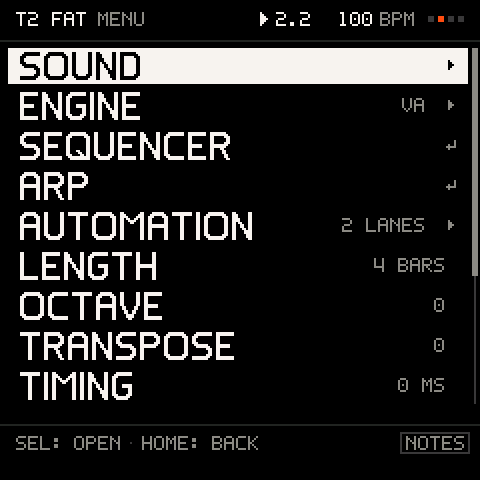
| Row | What it does |
|---|---|
SOUND ▸ | The track's sound: its picture and editors (SOUND). A MIDI OUT track has no such row. |
PADS + STEPS ▸ | On a KIT, instead of SOUND and SEQUENCER: the kit's one screen, the pads and their steps (KIT), as SEQ opens it. |
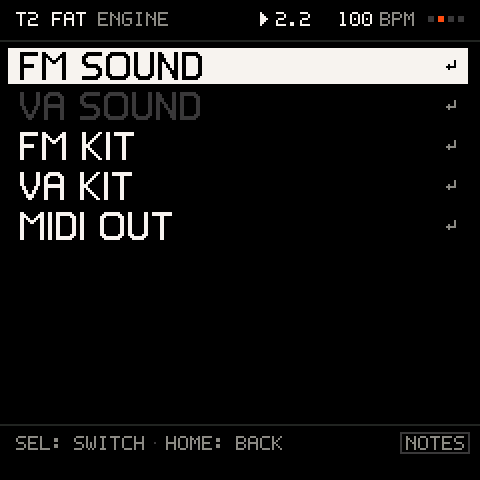
ENGINE ▸ | Switch the track's engine: FM SOUND, VA SOUND, FM KIT, VA KIT or MIDI OUT. The current one is dimmed (IT IS ALREADY). |
SEQUENCER ↵ | Switch the track's pattern on and open the sequencer (SEQ). Not listed on a KIT (PADS + STEPS). |
ARP ↵ | Switch the arpeggiator on for this track (ARP). Not listed on a KIT. |
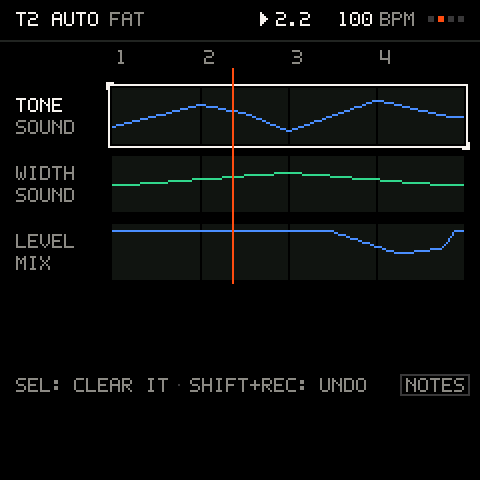
AUTOMATION ▸ | The track's recorded knob moves, one lane each; SEL clears the lane under the cursor. Dimmed until a move is recorded (NO KNOB MOVES RECORDED YET). |
LENGTH | The loop length, 1 to 8 bars. |
OCTAVE | The track's octave, -3 to +3 (the same as OCT- and OCT+). Dimmed on a KIT (DRUMS HAVE NO OCTAVE). |
TRANSPOSE | The track's pitch against the others, -24 to +24 semitones. Dimmed on a KIT (DRUMS DON'T TRANSPOSE). |
TIMING | Shift the track earlier or later against the others, up to 12 ticks, shown in milliseconds at this tempo. |
MIDI OUT CH | MIDI OUT tracks only: the channel the track sends its notes on, 1 to 16 (MIDI and sync). |
MIDI CH | The channel the track listens on, 1 to 16 (MIDI and sync). Every track has it, MIDI OUT tracks too. |
RENAME ▸ | Name the track (up to five letters). |
DUPLICATE ↵ | Copy the track, with its sound, notes and pattern, into a new track (parameter locks are not copied). |
CLEAR ↵ | Clear the track's notes and knob moves (asks). Dimmed with nothing to clear (NOTHING TO CLEAR). |
DELETE ↵ | Remove the track (asks). Undo brings it back at the same place with everything on it. |
Hold SHIFT + REC on a lane for the same CLEAR. You cannot delete the last track (THE LAST TRACK STAYS).
Switching the engine
A track remembers both its FM sound and its VA sound: switch to VA and back and nothing is lost. A sound track can become a kit (and the other way round) only while it is empty, because recorded notes would mean something different: the row is dimmed with CLEAR ITS NOTES FIRST. A MIDI OUT track has no sound at all: see MIDI and sync.
Length and loops
Every track loops over its own length, 1 to 8 bars in 4/4, one bar per detent. A 1-bar hat and a 4-bar chord part run together and realign by themselves, so tracks of different lengths make polymeter. A longer loop repeats what was there; a shorter one hides the notes past the new end, and they come back if you lengthen it again. The repeats are one undo step: a tap of SHIFT + REC takes the copies and the length back (UNDO T1 LENGTH), and SHIFT + PLAY brings both again. (While you record, the length still grows but the copies are not an undo step of their own.) The keys F3, G3, A3 and B3 under SHIFT set 1, 2, 4 or 8 bars, and holding SEL while you turn LENGTH doubles or halves it per detent.
A track that plays a sequencer pattern loops over its own length too. The pattern starts at the top of the track's loop and restarts there, so what the lane shows, what PRINT writes and what you hear agree: a 12-step pattern in a 2-bar loop plays 12 steps, 12 steps and 8, the same every pass. Turn LENGTH down and the loop's end cuts the pattern there. The sequencer's own LENGTH and RATE do the opposite: they lengthen the loop, by whole bars up to eight, when the pattern no longer fits (T3 2 BARS), and never shorten it.
With LAUNCH on BEAT or BAR, a length change on a track that is playing waits for the next bar line, and the toast outlines it until it lands. A few mixes of odd lengths would take more than 168 bars to realign; those are refused with TOO LONG.
Names
RENAME opens an editor where every key types its letter (the tag says LETTERS). K1 picks a letter, K2 the position, K3 inserts or deletes, K4 switches between letters and numbers; HOME finishes. The first key you type starts a new name: the old one is cleared, so nothing of it is left over. To change one letter of the old name instead, turn K1 or K2 first; from then on the keys type in place. Track names are saved with the project. A track you have not renamed is named after the sound it plays: the first word of the sound's name, up to five letters (FAT for FAT BASS, SOFT for SOFT KEYS), DRUMS for a KIT and MIDI for a MIDI OUT track. Pick another sound and the name follows; once you rename a track the name stays.
Knob lanes
Hold SEL on TRACKS and the selected lane shows its knob lanes: every knob move recorded on the track, drawn over the lane in the knob's colour. While you hold SEL, turning a knob that has a lane clears it (the legend says CLEAR under that knob); the first detent clears, and the rest of that hold does nothing. A knob with no lane moves ten at a time instead (the legend says X10). Each clear can be undone.
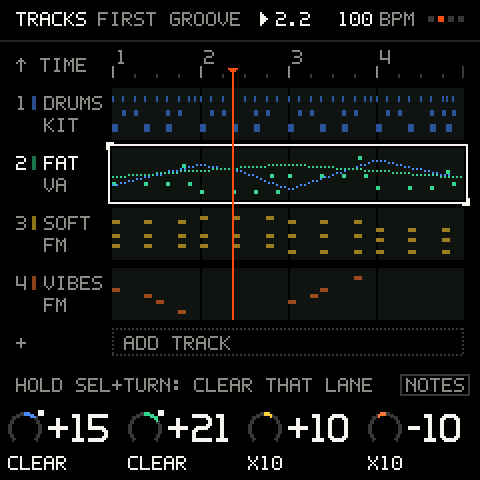
The AUTOMATION view in the TRACK menu draws each lane as the curve it plays over the longest loop, up to four on screen. SEL clears the lane under the cursor.
What a track can hold
| What | Limit |
|---|---|
| Tracks | 8 |
| Recorded note events | 384 per track, 1,536 per project (a note is two events) |
| Knob-move breakpoints | 96 per track |
| Pattern steps | Do not count against the recording limits |
A take that goes past a limit stops (FULL).
Troubleshooting
| What happens | Why, and what to do |
|---|---|
8 TRACKS: NO MORE | A project holds eight tracks. Delete one first. |
STOP RECORDING FIRST | Tracks cannot be added, duplicated or deleted while recording or counting in. |
CLEAR THE TRACK FIRST | A track with notes cannot change between a sound and a kit. Clear it, or add a new track. |
FULL: NO ROOM TO COPY | The tracks share one note memory, and the copy does not fit in what is left. Clear or delete something first. |
TOO LONG | The lengths you asked for would take more than 168 bars to line up. Choose lengths that divide each other. |
| A mute, solo or length change did not happen | LAUNCH is on BEAT or BAR: it waits for the line (the item blinks). Set LAUNCH to OFF for instant changes. |
| A knob will not stay where I turn it while the music plays | The track has a recorded lane for that knob, and it takes over when you let go. Hold SEL and turn the knob to clear the lane. |
| A longer loop came with copies I did not want | Lengthening repeats what is there. Tap SHIFT + REC: UNDO T1 LENGTH takes the copies and the length back. |
| The tempo knob does nothing | The MIDI clock is EXT: the incoming clock sets the tempo. |