Chapter 2
The controls
Every screen of Groove OS works the same way, so you only learn the controls once. ALGORITHM is the cursor, K1 to K4 change what the cursor is on, SEL opens it, HOME goes back. This chapter names every control, explains the three kinds of screen (views, menus and editors), and covers SHIFT, undo, help and the keys.
The panel
| Control | What it does |
|---|---|
| SELECT (left encoder) | Turns between the five views: TRACKS, MIX, KEYS, PERFORM, PROJECT. With SHIFT: tempo, 1 BPM per detent. |
| PRESETS (encoder) | Turn it to open the sound browser and move through the sounds. With SHIFT: step the TYPE filter. |
| ALGORITHM (right encoder) | The cursor: it walks the lanes, strips, steps, rows and groups of the screen. With SHIFT: the previous or next track, from any screen. |
| K1-K4 | Four colour knobs (blue, green, yellow, orange). They change what the cursor is on; the legend under the screen names each one. With SHIFT: a second row of four, on the few screens that have one. |
| SEL (push) | Opens the cursor's menu, or does the row it is on. Hold it and turn a knob for ten steps at a time, or to clear a lane. |
| HOME | A tap goes back one level, and from any view but TRACKS and PERFORM on to TRACKS. Held, it is SHIFT. |
| PLAY | Starts the music on the press and stops it on the release. Hold it and turn K1 for the tempo, from any screen (the music keeps playing). With SHIFT: redo. |
| REC | Records onto the selected track. With SHIFT: tap for undo, hold to delete. |
| SEQ | The selected track's sequencer. With SHIFT: DICE. |
| ARP | The arpeggiator. With SHIFT: its page. |
| SAVE | Saves the project. With SHIFT: keep the last loop you played (or PRINT, on SEQ and ARP). |
| FX, ENV, LFO, EDIT | The effects, the amp envelope, the LFO and the sound editor. Press again to go back. |
| GLO | SETTINGS. |
| OCT-, OCT+ | The selected track's octave, -3 to +3. On a KIT's step grid they page through the bars; on the sequencer, SHIFT + OCT or SEL + OCT does. |
| The 27 keys (F to G) | Play the selected track. What they do depends on the screen; the keybed tag says what (see The keys). |
Each knob on screen is drawn as a ring with its value, and the ring turns: bipolar values fill from the middle. If a knob has no job on the row the cursor is on, its ring is dark and the legend shows a dash.
Views, menus and editors
There are only three kinds of screen.
| Kind | What it is | Examples |
|---|---|---|
| VIEW | A picture of your music that you work on directly. Five of them are on the SELECT wheel; the sequencer, KIT, SOUND, the arpeggiator and the effects are views you open from a track. | TRACKS, MIX, KEYS, PERFORM, PROJECT, SEQUENCER, KIT, SOUND |
| MENU | A list of rows. | The TRACK menu, the TIME menu, the PATTERN menu, SETTINGS |
| EDITOR | A picture plus the four knobs, for editing one thing. | The FX editor, the CHORDS editor, RENAME, the sound editor's groups |
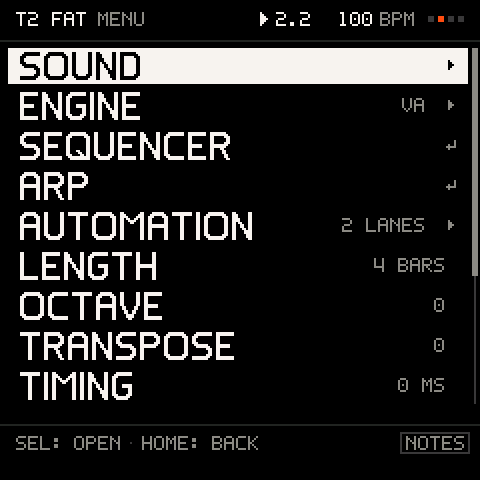
In a menu, a row can be one of four things:
| Row | What SEL does |
|---|---|
A value (LENGTH 4 BARS) | Nothing: it is edited with K1. |
Ends in ▸ | Opens a deeper menu or editor. |
Ends in ↵ | Does the action. |
| Dimmed | It cannot act right now. SEL (or K1) says why in a toast. |
HOME goes back one level. The cursor position of each menu is remembered. The STEP menu on SEQ reopens on the row you used last. The PAD menu on KIT finds that row by its name, so the same row comes back even though the hit's rows come and go with the step; with a hit under the cursor it opens on HIT VELO, the hit's first row, unless the row you used last is further down.
The screen
The top line is the header: where you are (the view, and the project or track after it), the transport (a triangle while playing, a red dot while recording), the position as bar.beat, the tempo, four squares that flash the beat, and a small square after the title when the project has changes you have not saved. While you turn SELECT, five small marks replace the words after the title and show where you are on the wheel. The line under the picture is the hint: the next useful move. At the bottom, K1 to K4 show their value and name (the legend), and the tag at the right of the hint line says what the keys do. Short messages (toasts) appear at the top for a second or two and name what just happened, such as UNDO T3 TAKE. While a web page is linked over USB (remote control), a small link mark sits in the header (see MIDI and sync).
One rule for shortcuts
Every page follows the same rule: SHIFT + a control does its other action, and SEL held while you turn a knob moves a number ten at a time (a press of SEL opens or confirms). The hint line teaches the rest.
The hint line takes turns. It lists CONTROL: VERB pairs. When they do not all fit on one line, it shows them in turns, a new set every 3 seconds: first the page's main moves, then its hidden gestures. SETTINGS > HINTS OFF hides it as before; the footers of the menus take turns too.
| Page | First | Then |
|---|---|---|
| TRACKS, stopped | PLAY: HEAR IT · SEL: TRACK MENU | PLAY+K1: TEMPO · SHIFT+SEQ: DICE |
| TRACKS, playing | SEL: TRACK MENU · REC: RECORD | SHIFT+SAVE: KEEP THE LOOP · PLAY+K1: TEMPO |
| MIX, a track's strip | K2: MUTE · SEL: TRACK MENU | HOLD SEL+TURN: TENS · SHIFT+K3: ONE MORE SOLO |
| MIX, MAIN | SEL: THE FX EDITOR · FX: THE SAME | HOLD SEL+TURN: TENS |
| SOUND | PRESETS: SOUNDS · EDIT: EVERY OPERATOR (VA: EVERY GROUP) | PLAY+K1: TEMPO |
| The sound editor's groups | ALGO: NEXT GROUP · HOME: MENU | HOLD SEL+TURN: TENS |
| The FX editor | ALGO: NEXT EFFECT · SEL: ITS MENU | HOLD SEL+TURN: TENS |
| KEYS | SEL: KEYS MENU · HOLD SEL+KEY: ROOT | SHIFT+SEL: CHORD PADS |
| ARP | KEYS: HOLD A CHORD · ARP: OFF | SHIFT+SAVE: PRINT |
| SEQ, the pattern row | ALGO: INTO THE STEPS · SEL: PATTERN MENU | SHIFT+SEQ: DICE · SHIFT+SAVE: PRINT |
| SEQ, a step with notes | KEYS: STACK · SEL: STEP MENU | SEQ+KEY: REST · SEL+OCT: BAR |
| SEQ, an empty step | KEYS: WRITE · SEQ+KEY: REST | SEL+KEY: GO TO STEP · SEL+OCT: BAR |
| KIT, the pattern row | ALGO: INTO THE STEPS · SEL: KIT MENU | SHIFT+SEQ: DICE |
| KIT, the steps | KEYS: STEPS · SEL: PAD MENU | HOLD A KEY: CURSOR THERE · OCT: THE BAR |
| PROJECT, a slot | SEL: LOAD, SAVE, RENAME · HOME: BACK | HOLD SHIFT+REC: DELETE |
| A menu row with a number | K1: VALUE · HOME: BACK | HOLD SEL+TURN: TENS |
The undo toast. After anything undo can take back (a take, DICE, a pattern edit, a clear, a print, a longer loop, a deleted track), a toast says what SHIFT + REC would undo: SHIFT+REC: UNDO T3 DICE. It waits until the toasts before it are done and nothing is recording, and shows once for each new undo step. See Recording and undo.
Questions: everything destructive asks
Anything that can lose work stops and asks first. A question shows the action and what it costs, with two choices: ALGORITHM picks, SEL confirms, HOME cancels. The safe choice, CANCEL, is highlighted first.
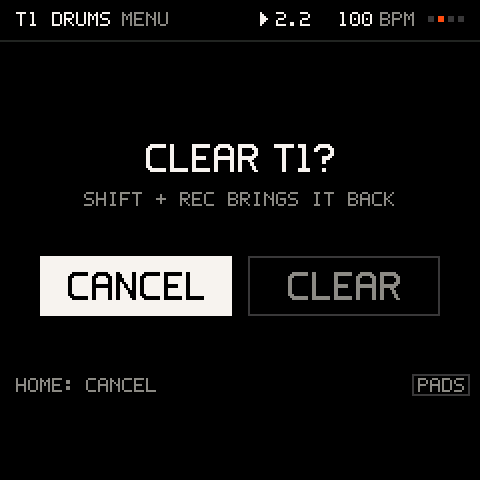
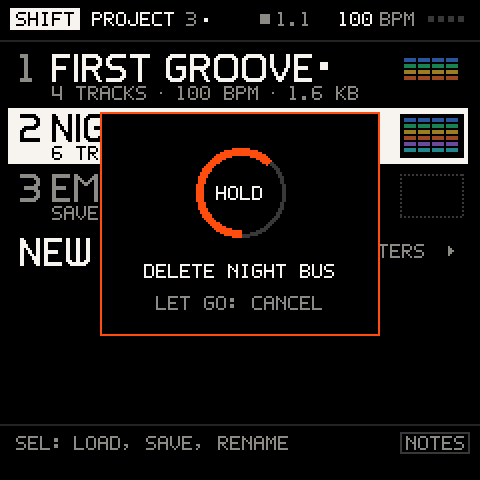
There is one gesture for every delete: hold SHIFT and hold REC with the cursor on the thing you want gone. A ring fills and names it (CLEAR T2, DELETE NIGHT BUS); let go before it fills and nothing happens. It then asks. If the cursor is on something with nothing to delete, it says so (NOTHING TO DELETE HERE).
| With the cursor on | Hold SHIFT + REC clears |
|---|---|
| A track (TRACKS or MIX) | That track's notes and knob moves (asks, undoable) |
| The TIME row | Every track (asks) |
| A step in the sequencer | That step (CLEAR STEP 5) |
| The sequencer's pattern row | The whole pattern |
| A step or pad on KIT | That pad's hits; on the pattern row, every hit |
| A project slot | The project (asks) |
| A menu row marked as destructive (CLEAR, DELETE, ERASE ALL) | That row's action |
Most things are also undoable: a tap of SHIFT + REC takes back the last thing you did on any track, and SHIFT + PLAY brings it back. See Recording and undo.
SHIFT
Hold HOME and it becomes SHIFT. You can use it without thinking about it, because the FM-1 tells you what SHIFT does while you hold it:
- At once: a button, knob or key pressed with HOME down does its SHIFT job straight away, with no waiting. The keys are SHIFT keys from the moment HOME goes down; only a key you were already holding when you pressed HOME stays a note.
- After the BACK TAP time (300 ms): the header shows SHIFT and the key lights show the current values.
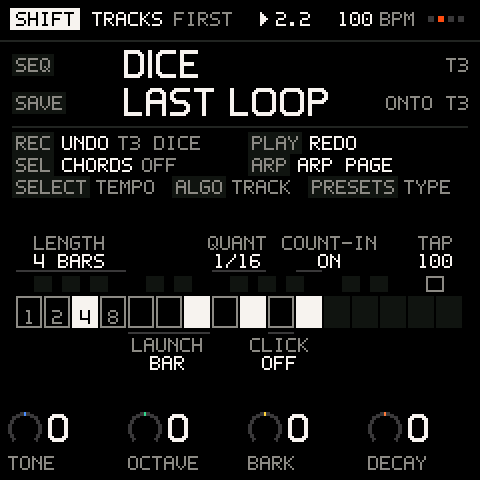
- After twice the BACK TAP time (600 ms) with nothing used: the screen fills with the SHIFT screen. It answers "what does SHIFT do here?" in words: the page's own jobs in big type at the top (
SEQ DICE T3,SAVE LAST LOOP ONTO T3,HOLD REC CLEAR T3 ASKS), then what works everywhere (REC UNDO T3 TAKE,PLAY REDO,SEL CHORDS OFF,ARP ARP PAGE), the knobs, and a picture of the keys with each SHIFT key and its current value. Using any control puts the page back.
The SHIFT screen follows the page you are on, so it is always correct for where you are. PERFORM keeps its stage and shows a band over the tick line instead.
A tap of HOME shorter than the BACK TAP time, with nothing used, is the back step. A key pressed while HOME is down counts as used, so that tap does not go back. You can change the time in SETTINGS > CONTROLS (200 to 400 ms).
Careful: while HOME is down every key is a SHIFT key, so a note played then sets the loop's length, the launch or the click instead of sounding. Tap HOME between notes, not under them.
What SHIFT does
| SHIFT + | What happens |
|---|---|
| REC (tap) | Undo the last thing you did, on any track. |
| REC (hold 1.5 s) | The cursor row's destructive action, with a question. |
| PLAY | Redo. |
| SAVE | On SEQ, and on ARP while you hold a chord: PRINT the pattern or arpeggio onto the track. Anywhere else: keep the last loop you played onto the selected track (it needs the music playing). |
| SEQ | DICE: a new line (a sound track) or a new beat (a KIT) on the selected track, in one undoable roll. |
| ARP | Opens the ARP page; nothing is switched on or off. |
| SEL | Switches the chord pads on (PADS) or off, from any screen; PLAY is set with K4 CHORDS on KEYS. Not on a KIT track. On PERFORM it glides the throws back. |
| SELECT | Tempo, 1 BPM per detent (blocked while the MIDI clock is EXT). |
| ALGORITHM | The previous or next track, wherever you are. |
| PRESETS (turn) | Opens the browser if it is closed and steps the TYPE filter. |
| K1-K4 | The second row of knobs, where a screen has one (MIX strips and the sound editor). |
| OCT-, OCT+ | On the sequencer, the previous or next bar (SEL + OCT does the same). |
The SHIFT keys
Hold HOME and the keys set how a loop records, from the first key. After the BACK TAP time their lights show the current value. They are in three groups, from the left:
| Keys | Setting | Values |
|---|---|---|
| F3, G3, A3, B3 | LENGTH of the selected track's loop (on SEQ: of the pattern, in bars of 16 steps, with the 8 key dark) | 1, 2, 4, 8 bars |
| C4, D4, E4 | LAUNCH: when record, mutes, solos and pattern changes land | OFF, BEAT, BAR |
| F4, G4 | QUANT: snap recorded notes to the grid | OFF, 1/16 |
| A4 | CLICK: the metronome | on or off |
| B4 | COUNT-IN: the bar of clicks before recording from a stop | on or off |
| F#5 | TAP: tap to set the tempo (the second tap already sets it; the average of the last three gaps follows) |
The mute and solo keys of earlier builds are gone: MIX and PERFORM do that for any track.
Buttons that open tools
SEQ, ARP, FX, ENV, LFO, EDIT and GLO open their screens from anywhere, and most go back where you were when you press them again. (The sound browser is opened by turning PRESETS.)
| Button | Opens | Press again |
|---|---|---|
| FX | The effects editor | Back |
| ENV | The sound editor on the amp envelope | Back |
| LFO | The sound editor on the LFO | Back |
| EDIT | The sound editor | Back |
| GLO | SETTINGS | Back |
| SEQ | Switches the selected track's pattern on and shows it; a pattern that already plays is only shown | On the sequencer: switches the pattern off and returns to TRACKS |
| ARP | Switches the arpeggiator on, on the selected track, and shows it | Switches it off and returns to TRACKS |
A track plays its sequencer pattern or the arpeggiator, not both, and there is one arpeggiator in the project: if the other is on, the button says so (ARP ON THIS TRACK, SEQ ON THIS TRACK) and nothing changes. On a KIT track, SEQ opens the drum step grid, which is part of the track, so there is nothing to switch. HOME only changes the view: it never switches a pattern or the arpeggiator off, and it never stops the music.
Help on the panel
Hold any of FX, ENV, LFO, EDIT, GLO, ARP, SEQ, SAVE or PLAY for a second on a view and a card says in a line what it does and what SHIFT adds (PLAY's says HOLD + K1: TEMPO. SHIFT: REDO). Let go and nothing happens: the card is only a look.
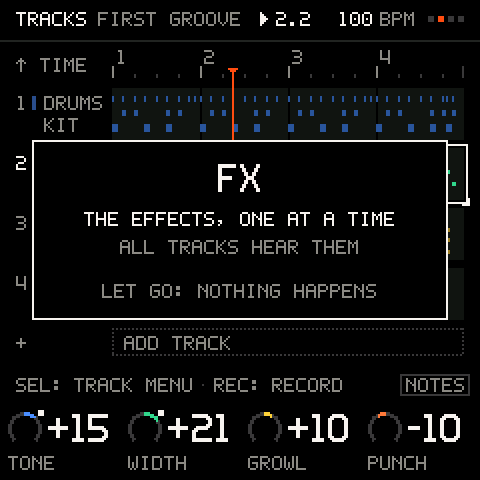
The hint line gives the next useful move on every view but PERFORM. It is on by default; SETTINGS > HINTS switches it off. The keybed tag at its right stays.
The keys
The 27 keys always play something. A tag at the right of the hint line says what, and the key lights agree.
| Tag | What the keys do | Where |
|---|---|---|
NOTES | Play the selected track's sound, through IN KEY and the chords | TRACKS, MIX, SEQ, SOUND, and most screens |
PADS | Play a kit's pads, or the chord pads | A KIT track; KEYS with CHORDS on PADS |
CHORDS | Every in-key key plays its chord | KEYS with CHORDS on PLAY |
MUTES | Mute, solo and punch in; scenes on the black keys | PERFORM |
LETTERS | Each key types its letter | RENAME |
The octave belongs to the track: OCT- and OCT+ change the selected track's octave, and the keys and chords follow it. Every key is velocity sensitive.
Fast values
Knobs accelerate: a quick turn moves further. Hold SEL and turn to move a number ten at a time; the legend says X10 under each knob it works on. This works on every screen, MIX's strips and MAIN included. A knob that has a recorded lane on the track is the exception: there the legend says CLEAR, and turning it with SEL held clears the lane (see TRACKS).
Every value that runs from 0 to 100 moves one unit a click, so you can land on any number: the macros (and their step locks), a track's LEVEL and SEND on MIX, MAIN's four, a pad's LEVEL and SEND, CLICK VOL, a pattern's GATE, GENERATE's DENSITY and the arpeggiator's SWING. A pad's CONDITION still moves 5 % a click.
Troubleshooting
| What happens | Why, and what to do |
|---|---|
| Holding HOME does not go back | A hold is SHIFT; only a quick tap is back. Change the tap time in SETTINGS > CONTROLS > BACK TAP. |
| A key changed a setting instead of playing | HOME was down: every key is then a SHIFT key, at once. Let go of HOME before you play. |
| A tap of HOME did not go back | A key or a knob was used while HOME was down, so it counted as SHIFT. Tap HOME again on its own. |
| A button does nothing until I let go | Screen buttons act on release, so they can take part in SHIFT. REC acts on press; PLAY starts on the press and stops on the release. |
| PLAY did not stop when I let go | You turned K1 while holding it, so the hold set the tempo and the music plays on. Press PLAY again to stop. |
| The hint line changes by itself | It has more moves than fit on one line and shows them in turns, every 3 seconds. |
| A knob ring is dark | That knob has no job on this row. Move the cursor with ALGORITHM, or hold SHIFT for a second row. |
| A row is dimmed | It cannot act now. Press SEL on it: a toast says why. |
| SELECT will not leave PERFORM | While the music plays it takes two detents. See PERFORM. |