Chapter 8
ARP
The arpeggiator plays the notes you hold one at a time, in time with the tape, on the selected track's sound. Turn it on with ARP, hold a chord, and shape the pattern with four knobs; record it with REC or print a whole loop of it at once with SAVE.
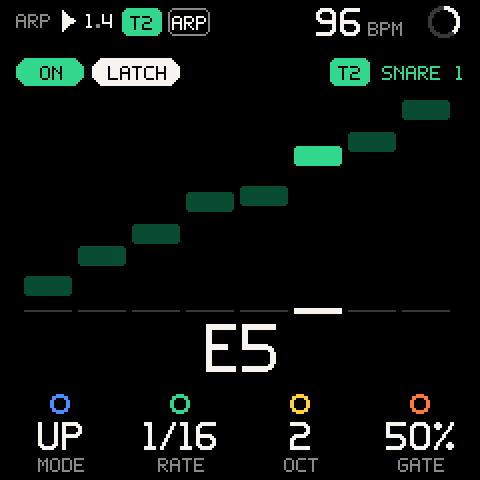
Turning ARP on and off
| Control | What it does |
|---|---|
| ARP (release) | ARP off: turns it on and opens the ARP page (ARP ON). ARP on: turns it off and returns to TAPE (ARP OFF), from any page. |
| SHIFT + ARP | Opens the ARP page. The arp stays as it is, on or off. |
| HOME | Leaves the page. The arp keeps running while you work on TAPE, MIX, SOUND or anywhere else. |
While the arp is on, the ARP button is lit and an ARP badge sits in the header of every page. Turning it off never touches SEQ patterns. With LATCH on, the latched chord stays: ARP on again plays it at once. With LATCH off, turning it off empties the note set.
There is one arpeggiator, and it always plays the selected track. Select another track (SHIFT + ALGORITHM) and the arp moves with you, keeping its notes and settings.
One generator per track
A track is driven by the arp or by a SEQ pattern, never both.
| Situation | Result |
|---|---|
| ARP while the selected track's SEQ pattern is on | Refused: SEQ ON THIS TRACK. |
| SEQ while the arp is on | Refused: ARP ON THIS TRACK. |
| You select a track whose pattern is running, with the arp on | The arp turns off: T3 SEQ: ARP OFF. |
SEQ patterns on other tracks keep playing while the arp plays the selected one.
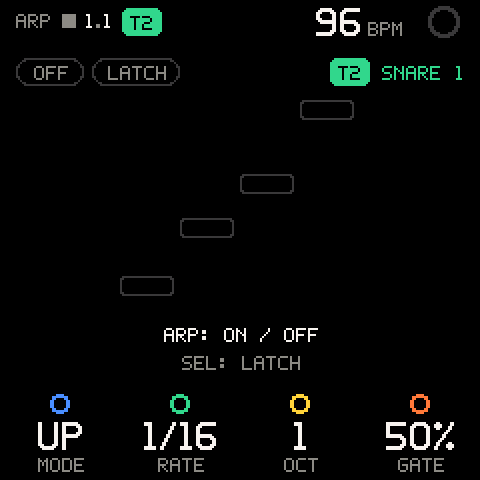
Playing
- Press ARP. The page opens with
ONlit andPLAY A CHORD. - Hold two or more keys. The arp plays them one per step, at RATE.
- Let go: the arp stops (unless LATCH is on).
- The keys go into the arp instead of sounding, on any page, as long as the selected track is a synth track.
- Keys pass through SCALE first, so the arp plays the mapped notes. See SCALE.
- The set holds up to 10 notes. Each note keeps the velocity you played it with.
- With chord input on, a chord pad puts its whole chord into the arp. See Using chord pads.
Timing
| Tape | What the arp follows |
|---|---|
| Playing | The tape's grid: steps sit on the loop's lines, so they record exactly. The pattern starts from its first note when the tape starts. A chord struck up to a quarter step after a line still starts on that line; later, it waits for the next. |
| Stopped | Free-runs at the tape tempo. The first key starts a step at once. |
The screen
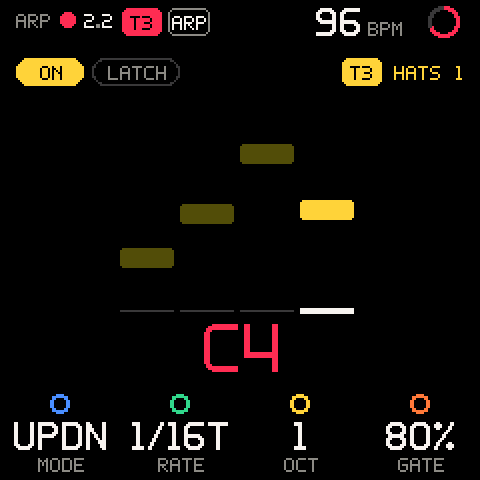
| Part | What it shows |
|---|---|
ON / OFF pill | Whether the arp is on, in the track's colour. |
LATCH pill | Lit while LATCH is on. |
| Track chip, right | The track the arp plays and its sound (T2 SNARE 1). |
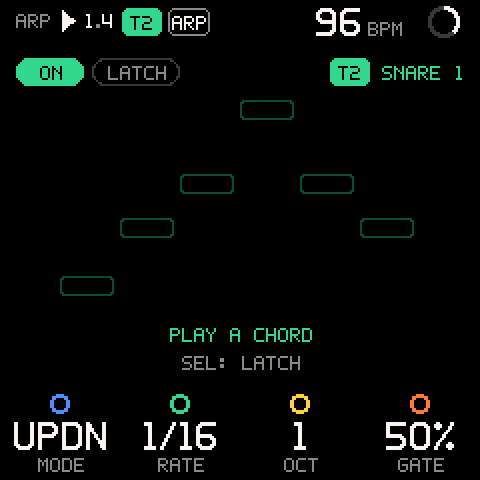
| Staircase | The pattern: one block per step, height = pitch. The mode is its shape: UP climbs, UPDN is a mountain. The playing step lights up and hops. |
| Note name, big | The note playing now; red while it is being recorded. |
With no keys held, a ghost of the mode's shape stays on screen (drawn over C E G C), so turning MODE shows what it does before you play. The key LEDs show a light running along the keys as the arp plays.
Controls
| Row | Values | What it sets |
|---|---|---|
| K1 MODE | UP, DOWN, UPDN, RAND, ORDER | The order of the notes. |
| K2 RATE | 1/4, 1/8, 1/8T, 1/16, 1/16T, 1/32 | The step length (T = triplet). |
| K3 OCT | 1 to 4 | How many octaves the pattern spans. |
| K4 GATE | 10% to 100%, in 5 % steps | How long each note sounds, as a share of the step. |
Defaults: UP, 1/16, 1, 50%. A saved project keeps ON/OFF, LATCH, MODE, RATE, OCT and GATE, but not the notes you were holding. See PROJECT.
Modes
| MODE | Pattern |
|---|---|
UP | Lowest to highest, then again. |
DOWN | Highest to lowest. |
UPDN | Up, then down; the top and bottom notes are not repeated. |
RAND | A random step each time, never the same one twice in a row. |
ORDER | In the order you pressed the keys. |
OCT repeats the set in higher octaves: with C E G held and OCT at 2, UP plays C E G, then the same an octave up. Notes that would go above the top of the MIDI range fold down by octaves.
SHIFT row
Hold HOME (SHIFT) to show the second row.
| Row | Values | What it sets |
|---|---|---|
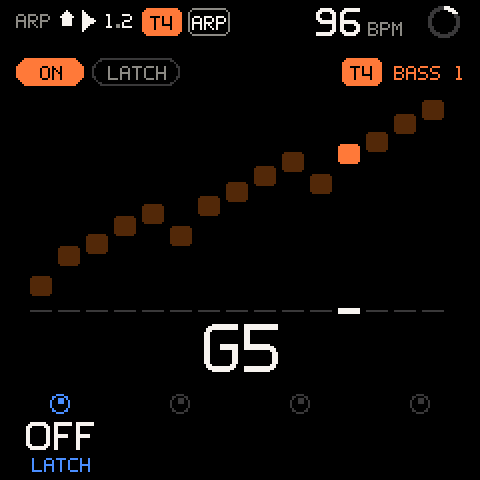
| SHIFT + K1 LATCH | OFF, ON | Turn right for ON, left for OFF. A message confirms: LATCH ON / LATCH OFF. SEL on the page flips it too. |
| SHIFT + K2 SWING | - | Not built yet: the slot is empty (a dark ring), and turning says SWING: COMING SOON. |
| SHIFT + K3 VELO | - | Not built yet: the slot is empty, and turning says VELO: COMING SOON. |
| SHIFT + K4 | - | Unused. |
LATCH
With LATCH on, the notes stay after you let go. Press SEL on the ARP page to turn it on or off (LATCH ON / LATCH OFF), or use SHIFT + K1.
- The next chord you press after letting go of every key replaces the latched one.
- Keys added while others are still held join the set.
- Turning LATCH off drops every note you are not holding.
Pro tip: LATCH first, then play the chord. Your hands are free for the knobs, and SAVE can print the arp without you holding anything.
Recording the arp
The arp's notes are recorded at their exact grid time, never moved by the input quantizer (a 1/32 arp stays 1/32).
- Press ARP and set up the pattern.
- Press REC. After the count-in, hold (or latch) a chord.
- The note name turns red while it records onto the selected track. Press REC again to stop.
Notes the tape already plays on that track are not doubled: you can leave the arp running over its own recording.
With REC off and the tape playing, what the arp plays is remembered like anything you play: SAVE on another page captures the last loop of it (see TAPE).
Printing the arp (SAVE)
SAVE on the ARP page, while the arp is on and has notes, prints it: the arp's pattern over the selected track's whole length, written onto the track at once as one take. No pass, no waiting. It works stopped or playing, with or without REC.
- Turn the arp on, latch a chord.
- Press SAVE. The message says
PRINTED 2 BARS -> T2(the track's length and number) and the SAVE light flashes. - Tap SHIFT + REC to undo it if you don't like it.
The print starts the pattern on the track's first line, exactly as it would play from the top of the loop. In RAND it writes the random sequence the arp would play next.
| Message | Meaning |
|---|---|
PRINTED n BARS -> Tn | Done. |
Tn ALREADY PRINTED | Every note is already on the track at the same place. |
Tn FULL | The track has no room for that many notes. Nothing changed. |
With the arp off or empty, SAVE on the ARP page is an ordinary capture.
Using chord pads
With chord input on (see CHORD), a chord pad sends its chord into the arp instead of sounding it. Press a pad and the arp plays that chord; press another and it plays the new one. With the arp's LATCH on, a pad press after all keys are up replaces the latched chord.
Troubleshooting
| What happens | Why, and what to do |
|---|---|
ARP says SEQ ON THIS TRACK. | The selected track's SEQ pattern is on. Turn it off with SEQ, or select another track. |
| You want to change the arp's settings without turning it on or off. | SHIFT + ARP opens the page as it is. |
| The old chord played when you turned ARP back on. | LATCH was on: ARP off keeps the latched chord. Play a new chord to replace it, or turn LATCH off. |
The arp turned off when you changed track (SEQ: ARP OFF). | That track's pattern is running; one generator per track. |
| Keys play drums, not the arp. | The selected track is a KIT: kits keep their pads. |
| The arp stops when you let go. | LATCH is off. SHIFT + K1 right. |
| A new chord adds to the old one instead of replacing it. | You were still holding a key. Let go of everything, then press the new chord. |
| SAVE captured instead of printing. | The arp was off or had no notes. Latch a chord first. |
| The arp is out of time with the tape. | Stopped, it free-runs; it locks to the grid once the tape plays. |
| SWING and VELO do nothing. | Not built yet. |
| You want a different arp on each track. | There is one arpeggiator, on the selected track. Print it onto one track, then move on to the next. |