Chapter 2
Learn on your FM-1
Play along as you read: Play it live opens a working FM-1, running its real software, on the screen this part of the page is about. Tap a control's name in the text to find it on the panel.
Learn is six short courses that run on the FM-1 itself: no computer, no screen but the FM-1's own, no connection. Take it on a train or to the park. A card says what to try next, you play, and the FM-1 notices when you have really done it. The music you make is yours, and it keeps playing while you learn.
What you need
Groove OS 1.4 on the FM-1 (see Installing). The six courses come with it: there is nothing to add. Tap (SETTINGS), then LEARN, to start one. Starting a course uses no song slot, and your songs, sounds, samples and favourite sounds stay just as they are.
The courses
| No. | Course, as the FM-1 names it | What you play |
|---|---|---|
| 1 | FIRST GROOVE | Your first groove, from silence, in a few minutes. |
| 2 | LOCK IT IN | Swing, a tighter kit and a bassline that locks in. |
| 3 | YOUR SOUND | Make a preset your own: four knobs and two effects. |
| 4 | SPACE + MIX | Every part in its place: levels, reverb and echo. |
| 5 | PLAY IT LIVE | Drops, throws, punch-ins and scenes, on the bar. |
| 6 | YOUR OWN KIT | Your own drum sounds on the pads, in a groove. |
They follow on from each other, but you can start anywhere. Each one also runs in your browser, on Learn, to try before you pick up the FM-1.
Opening a course
Tap for SETTINGS, turn down to LEARN (the last row) and press . The six courses are listed in order. Turn to one and press .
- If the song you have open has changes you have not saved, the FM-1 says
SAVE YOUR SONG THEN OPEN LEARN. Press , then try again. - Otherwise it asks first, with the course's name and
THE MUSIC STOPS. CANCEL is chosen first: turn toSTARTand press . The course starts on a fresh song, on TRACKS, with its first card showing.
Starting a course uses no song slot: the course is the song you are working on, the autosave keeps it, and it is there again when you switch on. It takes a slot only when you save it, which is the course's last step. Your saved songs stay as they are.
Not sure where Learn is? Hold for a second on any view: the help card says SETTINGS and TAP IT. LEARN IS INSIDE. Let go and nothing happens.
Inside a course, changes job: a tap shows the card, and holding it for a second opens SETTINGS.
Coming back to a course
Your progress lives in the song. Switch the FM-1 on and the autosave brings the course back where you left it; a course you saved opens from PROJECT (its slot, LOAD). Tap and the card is on the step you were on. Choosing the course again in LEARN starts it fresh, on a new song.
First Groove
First Groove starts from silence, on a fresh song with four tracks ready to play: DRUMS (the PUNCH kit), BASS (FAT BASS), KEYS (SOFT KEYS) and LEAD (VIBES). There are no notes yet. The tempo is 110 BPM with a little swing, the key is A minor and the arpeggiator's LATCH is on. Everything you hear by the end, you made.
It has eleven steps in four chapters: CHAPTER 1: BEAT, CHAPTER 2: KEY AND CHORDS, CHAPTER 3: MOTION and CHAPTER 4: YOUR GROOVE. The card titles are the FM-1's own words.
Beat
| Step | Card | What you do | What you learn |
|---|---|---|---|
| 1 | MAKE A BEAT | On DRUMS, hold and tap (SHIFT + SEQ; SHIFT is held down). DICE writes a beat. Roll again for another. | DICE writes a beat for you, in notes you can change. |
| 2 | HEAR YOUR BEAT | Press . Your drums loop. Listen as long as you like. | A tap of takes back the last roll, if you liked the one before better. |
Try it·On the FM-1
This is the real course. Hold SHIFT (HOME) and tap SEQ: DICE rolls a beat on DRUMS, and step 1 is earned.
SHIFTSEQKey and chords
| Step | Card | What you do | What you learn |
|---|---|---|---|
| 3 | CHOOSE YOUR KEY | Tap until you are on TRACKS and turn to the KEYS track. Turn to KEYS and turn to D (it is minor already), then play the white keys. | The root is the home note; the scale is the mood. Set them before you record notes. |
| 4 | STAY IN KEY | Turn (IN KEY) to WHITE and play the white keys. | With WHITE, every white key is a note of D minor, so nothing you play is wrong. |
| 5 | ONE FINGER CHORDS | Turn (CHORDS) to PLAY. With the beat playing (tap if it stopped), hold one white key and hear a chord. Try the others. | One key plays several notes, and every key gives a chord that fits. |
Try it·On the FM-1
Step 3: tap HOME, turn ALGORITHM to the KEYS track, SELECT to KEYS, K1 to D and K2 to MINOR, then play a few white keys.
HOMEALGORITHMSELECTK1K2Motion
| Step | Card | What you do | What you learn |
|---|---|---|---|
| 6 | MAKE IT MOVE | Tap and hold one white key. Your chord becomes a phrase. | The arpeggiator plays the chord note by note. LATCH keeps it going when you let go. |
| 7 | CHANGE ITS SHAPE | On ARP, turn (MODE). | The same chord in a new order. Try (RATE) too: fast or slow. |
| 8 | KEEP THE PHRASE | Hold one white key and press . Then tap to switch it off and hear the copy. | PRINT turns what the arpeggiator plays into notes on the track, so they stay when the arpeggiator is off. |
Your groove
| Step | Card | What you do | What you learn |
|---|---|---|---|
| 9 | ADD THE BASS | Tap until you are on TRACKS and turn to BASS. Hold and tap to roll a bass line. | The bass joins at the next bar, and DICE writes it in the scale you chose. |
| 10 | MAKE IT YOURS | On TRACKS, with BASS selected, turn (CUTOFF) and hear it change. | Low is warm, high is bright. Jam as long as you like. |
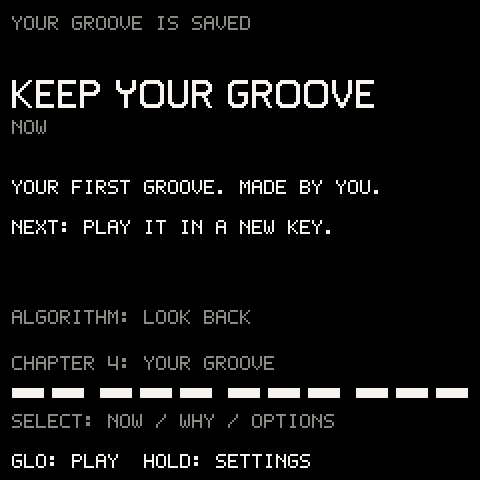
| 11 | KEEP YOUR GROOVE | Stop the music and tap . | Your notes and your progress are saved together. To name it: PROJECT, its slot, RENAME, then save again. |
Each chapter of this manual goes deeper: DICE, KEYS, ARP, PRINT and saving.
The card
The card fills the screen while it is open. The top line says where you are (STEP 03 / 11), then comes the step's title and what to do now. Under that come ALGORITHM: LOOK BACK, the chapter the step is in (CHAPTER 2: KEY AND CHORDS), and a row of eleven segments, grouped by chapter, that shows the steps you have earned. The two lines at the bottom remind you of the controls: SELECT: NOW / WHY / OPTIONS and GLO: PLAY HOLD: SETTINGS.
| Control | What it does with the card open |
|---|---|
| (tap) | Hides the card: back to playing. Tap again to see it. |
| (hold a second) | Opens SETTINGS. |
Turns between three pages: NOW (what to do), WHY / LISTEN (why it works, and what to listen for) and OPTIONS. | |
On NOW and WHY / LISTEN: looks back at earlier steps. The top line says READING EARLIER STEP; turn it back to return to the step you are on. On OPTIONS: picks a row. | |
On NOW and WHY / LISTEN: closes the card. On OPTIONS: does the row. | |
| Starts and stops the music. The card stays open. | |
| Closes the card. Held, it is still SHIFT, so works with the card open. | |
| The keys, to , and every other button | Close the card and do their usual job at once. |
While the card is hidden, the bottom line of the screen says which step you are on and how to see it again: STEP 03 / 11 and GLO: GUIDE. When you earn a step, the card stays out of your way: the line says STEP 03 COMPLETE for a moment and the music plays on. When that step finishes a chapter and you earned every step in it, it says CHAPTER 2 EARNED instead. Tap when you want the next step.
Earned by playing
A step counts only when you have really done it and heard it. The FM-1 listens to what you actually play, not to which settings you changed: a note in D minor on the KEYS track, a chord of three notes sounding while the beat plays, the arpeggiator running. Turning to D alone does not earn step 3, and a black key that stays silent in WHITE does not earn step 4.
Each earned step fills its segment, and the segments sit in four groups, one for each chapter. The step you are on has a short mark. Nothing is earned while you record.
Options
Turn to OPTIONS, pick a row with and press .
| Row | What it does |
|---|---|
SKIP STEP | Moves on to the next card without earning this one: its segment stays empty. On the last step the row reads BACK TO PLAY and closes the card. |
FREE PLAY | Pauses the guide. The step line goes from the bottom of the screen and nothing is checked, so you can just play. Tap for the card. |
FINISH GUIDE | Puts the guide away: the step line goes and nothing is checked. A tap of still shows the card, where RESUME GUIDE brings the guide back. |
After FREE PLAY or FINISH GUIDE, the first row reads RESUME GUIDE: it takes you back to the step you were on.
The last step
The last step needs a real save: the song written to its slot. If the save does not finish (SAVE FAILED: OLD SAVE KEPT), the step is not earned; save again. Once it is saved, the card opens on TRACKS with YOUR GROOVE IS SAVED. If you earned every step it says YOUR FIRST GROOVE. MADE BY YOU.; if you skipped some, YOUR GROOVE IS READY.. Then: NEXT: PLAY IT IN A NEW KEY.
Starting again
Choose the course again in SETTINGS > LEARN: it starts on a fresh song, from step 1, with every step there to earn again. The song you were on is not kept unless you saved it, so press first if you want it: a saved course stays in its slot, progress and all.
Your progress is part of the song
Where you are in the guide, the segments you earned, and whether it is paused or finished are saved with the course's song, like its notes. Save the song and load it another day: it opens where you left off. A song you export on the Projects page carries its progress too.
Progress works like the rest of the song: the autosave brings it back after you switch off, and keeps it in the song's slot.
Before a trip
The courses are on the FM-1 already. For the rest, get it ready before you go: sound packs, drum kits and your own kit from the Sounds page. Once they are on the FM-1, everything plays offline. What's on my FM-1? there shows which sound pack is in which bank, and your account, under Your FM-1, keeps a safety copy of your music (Save a safety copy).
Troubleshooting
| What happens | Why, and what to do |
|---|---|
SAVE YOUR SONG THEN OPEN LEARN | The song you have open has unsaved changes. Press , then open LEARN again. |
LEARN shows one dimmed row, ADD THE COURSES FROM THE WEBSITE | The courses are missing on this FM-1. Run the update on the Install page again: it puts the six courses back. |
LEARN does nothing | Something else is going on: a question is open, the FM-1 is saving or loading, or you are recording or counting in. Finish that first. |
| A tap of opens SETTINGS, not the card | This song is not a course. Load your saved course from PROJECT, or start one in SETTINGS > LEARN. |
| I did the step and it did not count | The FM-1 waits until it hears it. Check the card's details: the right track selected (the card names it), the music playing for steps that loop, a white key with IN KEY on WHITE, and CHORDS still on PLAY for the arpeggiator. If you chose FREE PLAY, RESUME GUIDE first. |
| A step's segment stayed empty | You moved on with SKIP STEP. To earn every step, start the course again from SETTINGS > LEARN (save this one first if you want to keep it). |
| The step line is gone from the bottom of the screen | The guide is paused (FREE PLAY) or finished, or you are on a menu. Tap for the card. |
| The last step did not count after | The save did not finish. Stop the music and save again. |
| I want empty tracks again | Choose the course again in SETTINGS > LEARN: a fresh song, from step 1. |