Chapter 7
Your own sounds
Your own kick on the pads. Bring the drums you love to the FM-1: a kick you recorded, a snare from a sample pack, a clap from your phone. Build a kit of eight pads on Your own sounds on the website, press Add to FM-1, and the FM-1 plays them like its own drums, from the keys and the step grid, with every pad's tune, decay, level and sends. Your songs remember them.
What you need
- Groove OS 1.4 on the FM-1 (see Installing).
- A computer with Chrome or Edge, and a USB data cable, to put the kit on the FM-1. On a phone you can build a kit and hear every pad; it waits in that phone's browser.
- Your account, signed in.
- Sounds, if you have your own: any common audio file (WAV, AIFF, MP3, M4A, OGG or FLAC), a voice memo from your phone, or a recording from the computer's microphone. If not, start from a free kit.
Everything you make is saved in the browser as you go (Saved in this browser as you go) and goes nowhere but to your FM-1. On the Sounds page, the drum kits end with Make your own kit, and each free kit's page has Add to FM-1 for the kit as it is, and Make it yours to open it in Your own sounds.
Six free kits to start from
Your kit. shows its eight pads from the start, empty, and above them a row of six free kits of eight pads each. Press a kit's play button to hear its beat, then Start with HOMEMADE (or ELECTRO, ACOUSTIC and so on; on a phone just the kit's name) to fill the pads with it. Or start from nothing: the first sound you put on a pad saves the kit as MY KIT 1.
| Kit | What it sounds like |
|---|---|
| HOMEMADE | Clean, punchy drums, made on the page itself. |
| ELECTRO | Tight electronic drums with a deep 808 kick. |
| ACOUSTIC | A real drum kit, close and dry, with a clap and a cowbell. |
| BOX 110 | A small early-80s drum machine: warm, a little lo-fi, with a vocal "yeah". |
| BOX 55 | A minimal rhythm box, short and clicky, that leaves plenty of room for your own sounds. |
| RHYTHM | A vintage preset rhythm box, soft and round, with a second kick and hat from another classic box. |
Mix and match. Any pad can take a sound from any free kit. Press the pad, then under A different sound choose Free kits: every pad of the six kits is there to hear and pick. ELECTRO's kick under ACOUSTIC's snare, BOX 110's "yeah" on the last pad. Your own sounds go on a pad the same way, from My sounds.
Every free sound is yours to use in anything you make, with no credit needed. The page lists where each one comes from, under Credits.
Making your kit
The page is one kit, your sounds, and one button.
Your kit. Eight pads, like a kit on the FM-1. Press a pad to hear it, or use the computer's keys 1 to 8. Give the kit a name under Name on the FM-1 (up to 8 characters: A to Z, 0 to 9, space and -): the FM-1 lists it by that name.
Pressing a pad also opens its editor:
| In the pad's editor | What it does |
|---|---|
| The waveform | Drag the edges to trim where the sound starts and ends. Auto trim finds them for you. |
| Level and Tune | How loud the pad plays (0 to 100), and higher or lower, -12 to +12 semitones. |
| Choke | Off, Group A or Group B. Pads in one group cut each other, like a closed hat cuts the open one. |
| A different sound | A file or Record (it lands on this pad), any pad of the Free kits (pick a kit, then one of its eight sounds), one of My sounds, or Clear pad. |
You can also drag a sound file from your computer straight onto any pad.
Your kits. The strip above the pads lists every kit saved in this browser (up to five kits) and says whether the open one is on your FM-1 (HOMEMADE is on your FM-1, not on your FM-1 yet, or, after a change, Changed since HOMEMADE went on your FM-1: add it again to hear the changes there). New kit starts another next to them; it never replaces one. The kit you have open is the one that goes on the FM-1.
My sounds. Your own files and recordings, ready for any pad. Drop files on Drop files here (or click to choose them), or press Record a sound. Each sound is trimmed and levelled for you. Its row plays it as the FM-1 will, shows how long it is and where it is used, and its name, up to 8 characters, is the name the FM-1 shows. Edit opens its trim and these options:
| Option | What it does |
|---|---|
| Stand-in drum | The built-in drum a song plays on this sound's pad on an FM-1 that doesn't have the sound (see Songs remember their sounds). Each sound picks one by itself, from its name or how it sounds (a file called "808 kick" gets the boom kick). Change it if you like, or choose None (silent). |
| As loud as it goes | On by default. Untick to keep the level it was recorded at. |
| Keep all the sparkle | Low sounds are kept lean, with nothing you could hear lost. Tick to keep every bit anyway: the sound then takes more room. |
| Heard on any speaker | Only on a sound that is almost all deep boom, like an 808 kick. The FM-1's own speaker barely plays such a low sound, so the page gives it a little bite on top that comes through everywhere, and the boom stays. On by default; untick to keep it pure, for big speakers and headphones. |
| Remove | Takes the sound out of My sounds, and off the pads that use it. |
Adding it to the FM-1
The bar at the foot of the page is always in view. It says in one sentence whether your kit fits (see How much fits), and holds the one button: Add to FM-1.
Plug in the FM-1, stop the music and press it. The first time, the browser asks to allow MIDI devices: choose Allow. The button goes Connecting…, then Adding… (keep the cable in and the music stopped), and the FM-1 says SAVING SAMPLES, then SAMPLES SAVED. When it is done the button says On your FM-1 and the page says HOMEMADE is on your FM-1. On a drum track, turn PRESETS and pick it under KITS (marked OWN). Signed out, the same button asks you to sign in first; your kit stays saved in the browser while you do.
Adding it again is quick: only what changed goes over. Every sound is checked on the way, so a pulled cable never leaves a broken sound behind. Plug in again and press again, and it carries on where it stopped.
If something is in the way, the page says what to do and changes nothing: the music is playing (Press PLAY on the FM-1 to stop the music), PRESETS is open, no FM-1 is found, or it needs Groove OS 1.4.
How much fits
The FM-1 has room for about two seconds of sound. That is a kit of eight short drum hits with a little to spare, or a few longer sounds, and it is why one kit goes on at a time. Low sounds like kicks and toms take less room than bright ones. Every sound is already kept as small as it can be without losing what you hear.
The page says it up front, under Your kit: room for about one kit of short hits, next to the FM-1's own kits, and short, tight sounds fit best. The bar says it plainly as you build: Fits on your FM-1, with plenty of room to spare., with room for about 3 more short sounds., with room for one more short sound., or It is full now. If your kit is too long, it says A little too long for your FM-1. (or Too long for your FM-1.) and offers the one best fix as a button: shorten the longest sound's tail (Shorten the open hat), keep a sound leaner (Make the snare leaner), or take a sound off its pad (Take the vox off its pad).
Short sounds leave room for more. Trim a kick's tail where you stop hearing it, and let the FM-1's own REVERB send make the room around a sound instead of a long recorded tail.
Finding good sounds
Finding good sounds, next to My sounds, opens the page's own help with the same advice and ready searches.
- Short and clean. One hit per sound works best: under about a third of a second, starting right on the hit. A sound that starts on time sits tight on the step grid. A loop or a whole beat is too long for a pad.
- Free sounds you can use for anything. Look for the CC0 licence, which means free for any use, no credit needed. On Freesound, filter your search to the Creative Commons 0 licence; the help's searches for kicks, snares, claps and hi-hats open just those. Sonic Pi's built-in samples and the Versilian Community Sample Library are free too, and some of the free kits come from them.
- Record your own. A voice memo on your phone works: a tap on a table, a pen on a glass, a shaker made of rice, your voice. Send the file to the computer and drop it on the page.
- The page does the rest. It trims the silence, brings each sound to a good level, keeps it as small as it can while it still sounds right, and shows at once whether it fits.
Files from your phone
Phone voice memos are usually M4A files, and the page opens them as they are; so does an MP3 or WAV from a recording app. The sound of a phone video often works too. The first 20 seconds of a long file are kept, to trim from. If a file won't open, the page says why and what to do:
- A format browsers can't open (WMA, AMR): save it as WAV, MP3 or M4A in any audio app, then drop it in again.
- A file the page could not read: it may be damaged, or in a format this browser does not read. Save it as WAV and try again.
- A MIDI file, a project or a preset holds notes or settings, not a sound: export the sound itself as audio.
Recording on the page
Press Record a sound (or Record in a pad's editor, to put the take straight on that pad) and the browser asks to use the microphone: allow it. Make the sound, then press Stop. A take lasts up to ten seconds, and the page finds the hit in it and trims around it, so you don't have to be quick. If it hears nothing, it says We heard nothing. Check the microphone and try again.
Your FM-1: what it holds, backups
At the foot of the page, folded away until you need it.
- See what's on it reads the FM-1 (reading changes nothing): its kits, its sounds and how full it is.
- Copy the FM-1's sounds into My sounds brings sounds you put on from another computer or browser into this page, with their kits, so you can change them here.
Sounds that are on the FM-1 but not on this page
The FM-1 keeps your sounds, and this browser keeps its own copy. If the FM-1 has older copies of sounds you have here (put on before you trimmed them, say), the page asks which to keep before anything is replaced:
- Refresh them (Upload) puts this page's copies on the FM-1. Songs you saved with the older copies play their stand-in drum on those pads until you pick the sound again in each song.
- Keep the FM-1's copies takes the FM-1's copies into this page instead, so your songs keep playing them. Nothing is written to the FM-1.
A copy on your computer
Save a backup saves what the FM-1 holds now as a file on your computer. Put a backup back puts one back as it was: the page shows what the file holds and asks first (Put it back). It replaces what the FM-1 has. Use it before you lend the FM-1, or to keep a set of kits for later.
Taking your kit on the FM-1
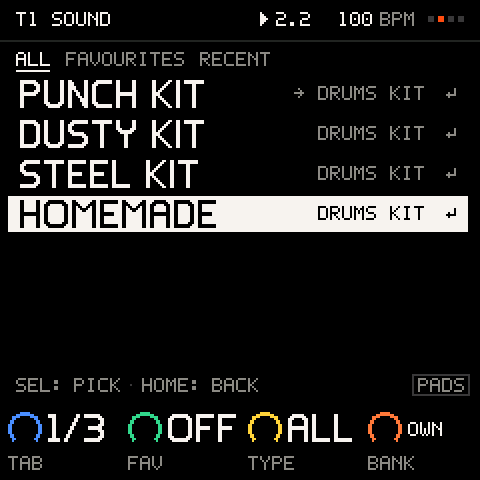
Your kits are listed in the preset browser, under KITS, after PUNCH, DUSTY and STEEL and any kits from sound packs. K4's legend says OWN on them. Your kit is not in a sound bank: banks A to D stay as they are.
- Select the drum track, or an empty track.
- Turn PRESETS and move to
KITS(K4 jumps there). - Turn to your kit. While it is highlighted the keys play its pads, so you can hear it first.
- SEL takes it: your sounds go onto the track's eight pads, with the tune, level and choke you gave them on the page. HOME keeps the kit you had.
Taking your kit swaps the sounds under the same beat, as taking any kit does (see Making a kit). It works on an FM kit and on a VA kit alike.
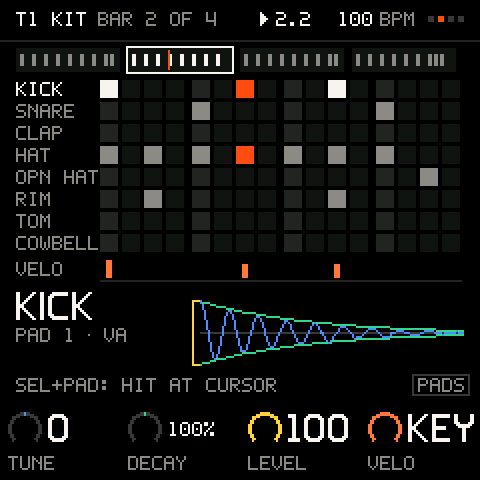
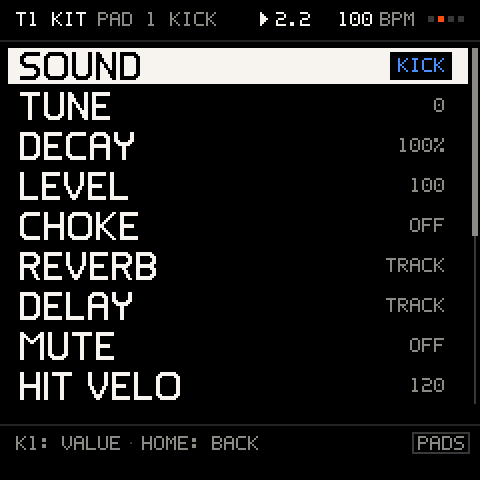
One sound on one pad: open the PAD menu (SEL on the step grid) and turn SOUND. Your sounds are listed by name at the end, after the drum sounds and the sounds of loaded kits. Put your own clap on a pad of PUNCH, next to its own kick and hats.
Playing samples
A sample pad plays like any pad: from the keys, from the step grid, with p-locks, conditions, ratchets, FLAM and NUDGE, and DICE writes beats for it. Each knob does what it does for a drum:
| Control | On a sample |
|---|---|
TUNE (K1) | Plays it higher or lower, -12 to +12 semitones. The kit's ALL TUNE adds up to 12 more either way. |
DECAY (K2) | Below 100% it plays only the start of the sound and fades its end: 50% plays about half. At 100% and above the whole sound plays. |
LEVEL (K3) | The pad's volume, as for any pad. |
CHOKE | Pads in the same group cut each other off: put an open hat and a closed one in group A. |
REVERB, DELAY | The pad's own sends, as for any pad (see The PAD menu). |
The track's TRACK FX (DRIVE, CRUSH, FILTER and SLICER), its level and its sends shape your sounds too: crush the whole kit, or filter it for a breakdown (see TRACK FX).
Songs remember their sounds
A song remembers which sound each pad plays, by the sound itself. Save it, put other kits on, play it on another FM-1 that has the same sounds: it plays the same.
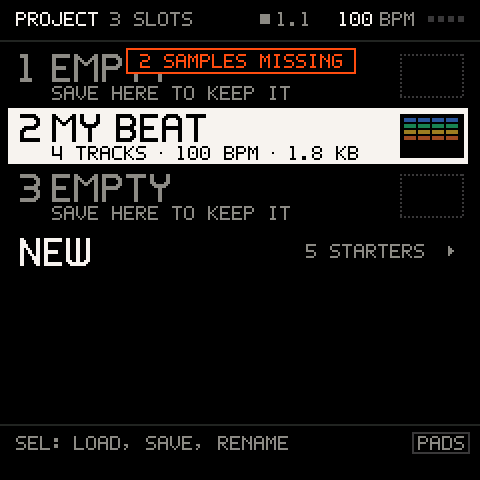
On an FM-1 that doesn't have one of its sounds (you removed it, or it is a friend's song), that pad plays its stand-in instead: the built-in drum chosen for it on the page. The FM-1 says 2 SAMPLES MISSING when the song loads, and the PAD menu's SOUND shows the name with a question mark (?KICK). The song keeps the sound's name and place: put the sound back on the FM-1 and the song plays it again.
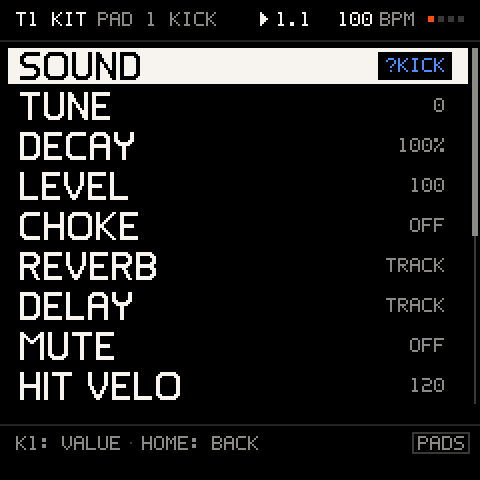
A song holds up to 16 of your sounds. A kit that would take it past that says SONG FULL: 16 SAMPLES: put a kit track back on PUNCH, DUSTY or STEEL to make room. A song saved with your sounds opens on Groove OS 1.3 too, with the stand-ins.
Careful: a song exported from the Projects page remembers its sounds but doesn't carry them. To share a song with its sounds, send the file from Save a backup with it.
Updates and the way back
Your sounds survive updates made on the Install page: it saves them in the browser before it starts and puts them back at the end, with nothing for you to do. If putting them back stops (the cable, a closed tab), the Your own sounds page says so at the top (3 sounds from before your update are safe in this browser.) and Put my sounds back, under Your FM-1, puts them on.
An update made another way (another installer, download mode) leaves the FM-1 without your sounds. Songs then play their stand-ins until you add them again from the page, where they still are.
Going back to M-VAVE's V15 leaves V15 exactly as it was: Groove OS keeps your sounds where V15 never looks. Your sounds stay in the browser for when you come back.
What samples can't do yet
- Your sounds play on kit pads, not as a sound on the keys.
- No slicing, looping or reverse.
- No recording on the FM-1 itself: record on the page, from the computer's microphone, or on your phone.
- The emulator on this website doesn't play them.
Troubleshooting
| What happens | Why, and what to do |
|---|---|
My kit is not under KITS in PRESETS | It is not on the FM-1 yet, or adding it did not finish. Open Your own sounds and press Add to FM-1. After an update made another way than the Install page, add it again. |
2 SAMPLES MISSING when a song loads | Those sounds are not on this FM-1, and their pads play stand-ins. Put them on from the page and load the song again. |
A pad's SOUND shows ?SNARE | That sound is missing on this FM-1 (above). |
SONG FULL: 16 SAMPLES | The song already uses 16 of your sounds. Put a kit track back on a built-in kit, or use fewer. |
| The page says the FM-1 is playing, or PRESETS is open | Stop the music (PLAY), or close PRESETS (HOME), then try again. Nothing was changed. |
SAMPLES NOT SAVED | Adding it stopped part-way. Plug in again and press Add to FM-1 again: it carries on where it stopped. |
A little too long for your FM-1. | Press the fix the bar offers, or trim the longest sound in its editor. |
| A file from my phone won't open | Save it as WAV, MP3 or M4A in an audio app, or send it again as a plain audio file, then drop it in. See Files from your phone. |
Recording does nothing, or We heard nothing | Allow the microphone in the browser's address bar, check the computer's input, and record again. |
| My 808 kick sounds thin on headphones | Heard on any speaker adds a little bite for the FM-1's speaker. Untick it under the sound's Edit and put the kit on again. |
| My sounds are on the FM-1 but not on this page | You added them from another browser. Under Your FM-1: Copy the FM-1's sounds into My sounds. |
| A sound is cut short | Its pad's DECAY is below 100%. Turn it up to 100%. |
| A sound is out of tune with the song | Turn its pad's TUNE, or the kit's ALL TUNE. |
| My sounds are gone after an update | The update was not made on the Install page, or putting them back stopped. Open the page: Put my sounds back, or Add to FM-1. |