Chapter 12
Settings (SETUP)
SETUP holds how the machine behaves: the recording settings, the feel of the controls, MIDI and Bluetooth, and the way to the stock settings. Press GLO to open it from any page.
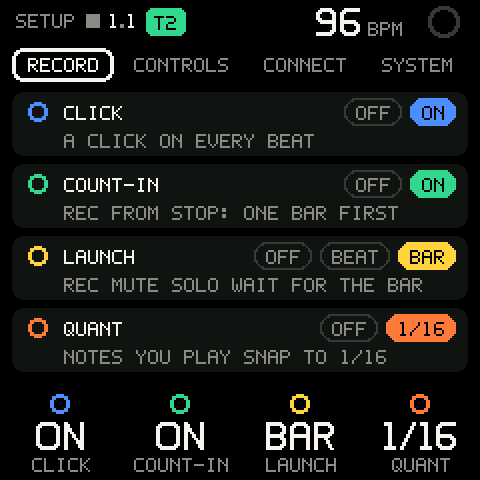
Getting around
SETUP has four tabs: RECORD, CONTROLS, CONNECT and SYSTEM. Each tab shows up to four cards, one per knob, ringed in the knob's colour. A card shows the setting, its choices (the current one lit) and one line on what the current choice does. A dim card is not built yet.
| Control | What it does |
|---|---|
| ALGORITHM | Moves between the tabs. |
| K1-K4 | Change the tab's four settings, left to right. |
| SHIFT + K1-K4 | The second row (RECORD only). |
| SEL | On SYSTEM: opens its list. Elsewhere it does nothing. |
| GLO | Takes you back to where you were before SETUP. |
| HOME tap | Up one level; from the tabs, to TAPE. |
| HOME hold | Toggles Bluetooth (see CONNECT). |
Changes take effect at once.
RECORD
| Row | Values | What it sets |
|---|---|---|
K1 CLICK | OFF, ON | ON: a click on every beat (A CLICK ON EVERY BEAT). OFF: only the count-in clicks (ONLY THE COUNT-IN CLICKS). |
K2 COUNT-IN | OFF, ON | ON: REC from stop counts in one bar first (REC FROM STOP: ONE BAR FIRST). OFF: it records at once (REC FROM STOP RECORDS AT ONCE). |
K3 LAUNCH | OFF, BEAT, BAR | When REC, mute and solo take effect while the tape plays: at once (EVERYTHING HAPPENS AT ONCE), on the next beat, or on the next bar line (REC MUTE SOLO WAIT FOR THE BAR). Length changes wait for the bar line with either grid. |
K4 QUANT | OFF, 1/16 | 1/16: notes you play snap to the nearest 1/16 as they are recorded. OFF: notes stay where you play them. |
SHIFT + K1 AUTOCLOSE | - | Not built yet. |
SHIFT + K2 CLICK VOL | - | Not built yet. |
For the two-choice settings, turn right for the right-hand choice (ON, 1/16) and left for OFF. LAUNCH moves one step per detent.
These are the same settings as on TAPE's ruler and on the SHIFT keys; change one and the others follow. See TAPE.
CONTROLS
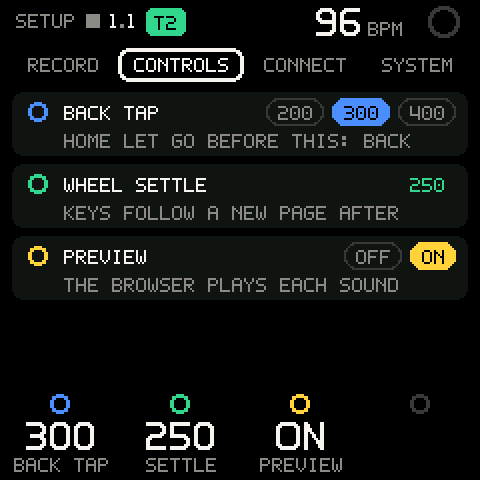
| Row | Values | What it sets |
|---|---|---|
K1 BACK TAP | 200-400 ms, 20 ms per detent; default 300 | How long a HOME press can be and still count as BACK (HOME LET GO BEFORE THIS: BACK). Hold longer and HOME is SHIFT: the SHIFT map shows and the keys become SHIFT commands. The card lights 200, 300 or 400, whichever is nearest; the legend shows the exact value. |
K2 SETTLE (WHEEL SETTLE) | 150-400 ms, 50 ms per detent; default 250 | How long SELECT must rest before the keys follow the new page (KEYS FOLLOW A NEW PAGE AFTER). While you turn through pages, the keys keep the role of the page you started on. |
K3 PREVIEW | OFF, ON; default ON | ON: the preset browser plays a short note for each sound you move to (THE BROWSER PLAYS EACH SOUND). OFF: it stays silent. See SOUND. |
Pro tip: If you often get the SHIFT map when you meant to go back, raise
BACK TAP. If BACK fires when you meant SHIFT, lower it.
CONNECT
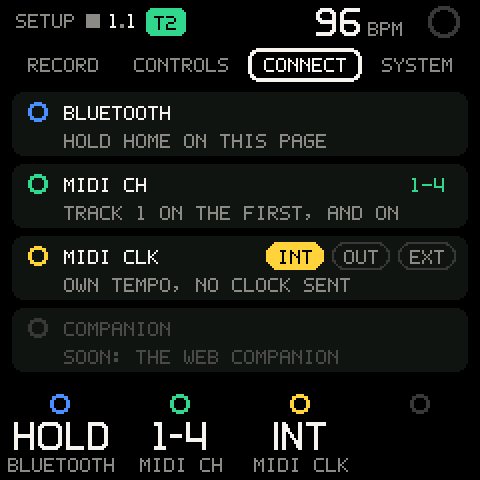
| Row | Values | What it sets |
|---|---|---|
K1 BLUETOOTH | HOLD | Bluetooth MIDI on or off, with HOME held (below). Turning K1 only shows BLUETOOTH: HOLD HOME HERE. |
K2 MIDI CH | The range of channels the tracks use: 1-4 (default, four tracks) up to 16-3; 1-8 with eight tracks | Track 1 on the first channel, each next track on the channel after it (TRACK 1 ON THE FIRST, AND ON). One channel per detent; past 16 it wraps to 1. See MIDI. |
K3 MIDI CLK | INT, OUT, EXT; default INT | INT: OWN TEMPO, NO CLOCK SENT. OUT: OWN TEMPO, CLOCK SENT (on the device nothing is sent yet: see MIDI). EXT: FOLLOWS MIDI CLOCK AND START. |
K4 COMPANION | - | Dim: SOON: THE WEB COMPANION. Turning K4 does nothing. |
Bluetooth
Everywhere else, holding HOME is SHIFT and the stock firmware never sees it. On SETUP, a long hold of HOME goes to the stock firmware, which toggles Bluetooth as it does on a stock FM-1.
- Press GLO to open SETUP. Any of the four tabs will do, but not the SYSTEM list or ABOUT.
- Hold HOME, touching nothing else, until the stock firmware registers a long press.
- Let go. HOME's light is the stock Bluetooth status light.
SYSTEM
The SYSTEM tab has one card, STARTUP, dim and not built yet (SOON: WITH PROJECTS): the FM-1 always starts with a new, empty session. Under it the tab reads SEL: STOCK GLOBAL, ABOUT. Press SEL to open the SYSTEM list (SETUP > SYSTEM).
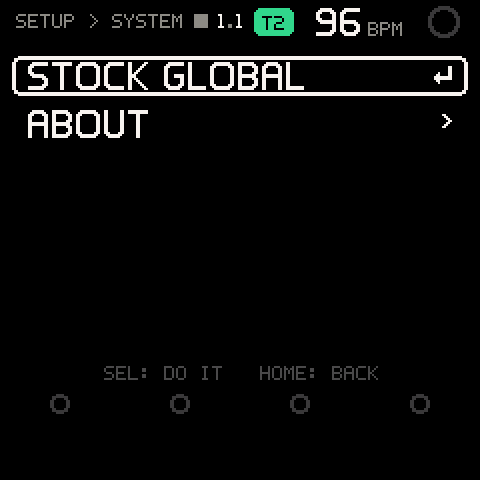
| Row | What it does |
|---|---|
STOCK GLOBAL | Opens the stock firmware's own global settings page. There the stock screen, knobs and value buttons take over; PLAY and REC still run the tape, and the printed tool buttons still open their pages. Tap HOME to come back. |
ABOUT | Shows what is installed. |
Turn ALGORITHM to a row and press SEL. HOME goes back to the tabs.
ABOUT
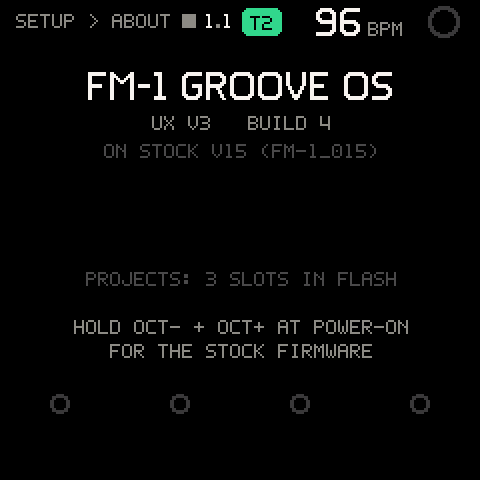
| Line | Meaning |
|---|---|
FM-1 GROOVE OS | The OS. |
UX V3 BUILD 4 | The control design and the build. |
ON STOCK V15 (FM-1_015) | The stock firmware Groove OS runs on. |
PROJECTS: 3 SLOTS IN FLASH | See PROJECT. |
HOLD OCT- + OCT+ AT POWER-ON FOR THE STOCK FIRMWARE | Safe mode: see Getting started. |
What is kept
The four RECORD settings belong to the song: a project save keeps them and a load brings them back (see PROJECT).
Nothing else on SETUP is saved. At power-on the settings are back to their defaults: click on, count-in on, launch on the bar, quantize 1/16, BACK TAP 300 ms, WHEEL SETTLE 250 ms, preview on, MIDI CH 1-4, MIDI CLK INT. A project load leaves CONTROLS and CONNECT as they are.
Troubleshooting
| What happens | Why, and what to do |
|---|---|
| Holding HOME doesn't toggle Bluetooth. | Hold it on SETUP's tabs, not in the SYSTEM list or ABOUT, and press nothing else while you hold. Elsewhere a held HOME is SHIFT. |
| Turning K1 on CONNECT only shows a message. | Bluetooth is toggled by holding HOME on this page, not by the knob. |
| My settings are back to defaults. | The FM-1 was switched off. CONTROLS and CONNECT aren't saved; RECORD comes back with a project load. |
| Loading a project changed CLICK, COUNT-IN, LAUNCH or QUANT. | They're saved with each project. Set them and save the project again. |
MIDI CLK is OUT but my DAW gets no clock. | Clock out isn't sent on the device yet. Use EXT and let the DAW send clock. |
| A quick HOME tap shows the SHIFT map, or a hold goes back. | Adjust CONTROLS > BACK TAP: raise it if taps become SHIFT, lower it if holds become BACK. |
| After turning SELECT, the keys still act like the old page for a moment. | That is WHEEL SETTLE. Lower it for a faster change. |
| The preset browser is silent. | CONTROLS > PREVIEW is OFF. |
| Turning SELECT on SETUP lands on CHORD or MIX. | SETUP isn't on the wheel; SELECT moves to the wheel pages beside TAPE. Press GLO to go back to where you were. |
| SEL does nothing on RECORD, CONTROLS or CONNECT. | Only SYSTEM opens a list. Use the knobs on the other tabs. |
| On STOCK GLOBAL the knobs change stock settings, not Groove OS. | That page belongs to the stock firmware. Tap HOME to come back to SETUP. |