Chapter 7
CHORD
CHORD turns the middle of the keybed into eight chord pads: one key, one full chord, always in the key you set on SCALE. The left hand holds performance keys that strum, invert or split the chord; four knobs decide how rich and how wide the chords are. The chord pads work on every melodic page and feed the arpeggiator and the step sequencer.
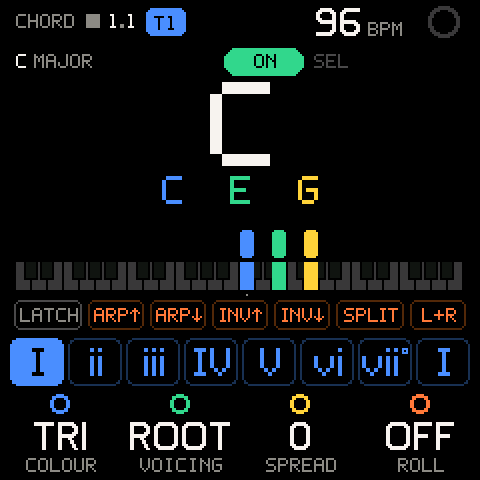
Opening CHORD and switching it on
Turn SELECT to CHORD, between SCALE and TAPE on the wheel.
Chord input is one global switch, drawn at the top of the page as a big ON / OFF pill.
| Control | What it does |
|---|---|
| SEL on the CHORD page | Flips the switch. A message says CHORD ON or CHORD OFF. |
| SHIFT + SEL (hold HOME, press SEL) | The same switch, from any Groove OS page except KIT and PROJECT (on PROJECT, SHIFT + SEL saves into a slot). |
While chord input is on, a CHD badge sits in the header of every other page (space allowing; the CHORD page shows its switch instead), and the key LEDs show the chord layout.
Chord input works on every Groove OS page while the selected track is a synth track. It stands aside, without changing the switch, when:
- the selected track is a KIT (its drum pads keep the keys),
- the preset browser is open (auditioning never plays chords),
- a stock page is up (LFO, EDIT, stock GLO).
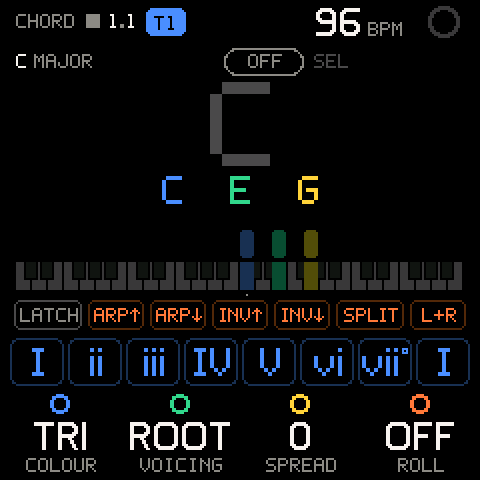
With the switch OFF, the CHORD page still shows what the pads would play, greyed, and the keys play normal notes.
The keybed
The 27 keys (F to G) split into three zones.
| Keys | Role |
|---|---|
| F (lowest) | LATCH for the performance keys. |
| F# G G# A A# B | Performance keys: ARP UP, ARP DOWN, INV UP, INV DOWN, SPLIT, L+R. Raised (black) keys go up, white keys go down. |
| C D E F G A B C (the eight white keys from the first C) | Chord pads 1 to 8: the chords on scale degrees 1 to 7, then degree 1 an octave up. |
| The black keys between the pads | Silent, so brushing one while hitting a pad makes no noise. |
| C# D D# E F F# G (the top seven keys) | Normal keys: they play single notes through SCALE, as usual. |
The zones are counted from the lowest key, so they stay put when you change the octave.
Chords are mono per press: pressing a new pad first stops the chord the last one started. Each chord has up to six notes.
The screen
| Part | What it shows |
|---|---|
| Key, top left | The key the chords are in: SCALE's root and scale, for example C MAJOR. |
| Switch, top middle | Chord input ON / OFF; SEL flips it. |
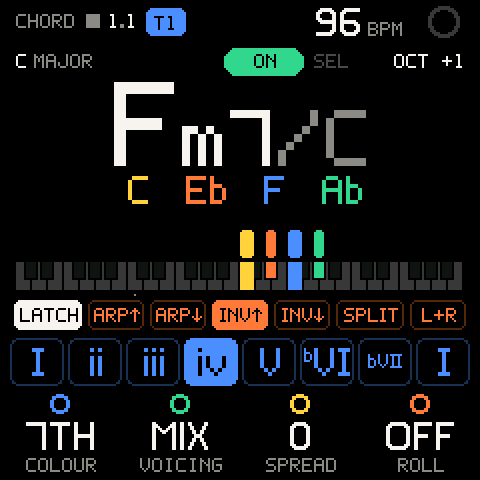
OCT +1, top right | The stock octave, when it is not 0. |
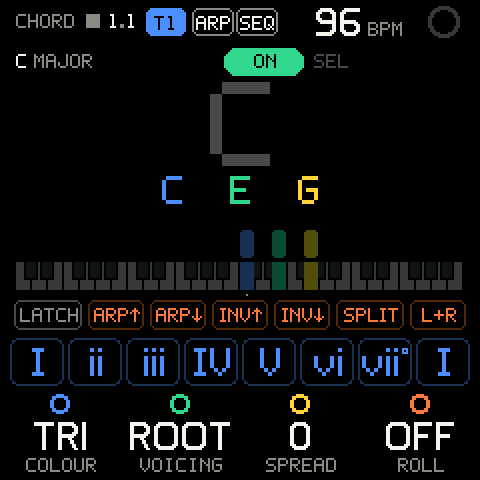
| Chord name, big | Root, symbol, and the bass after a slash when it isn't the root (Fm7/C). |
| Note names | The chord's notes, coloured by function: root blue, 3rd (or sus note) green, 5th yellow, 6th or 7th orange, 9th/11th/13th white. |
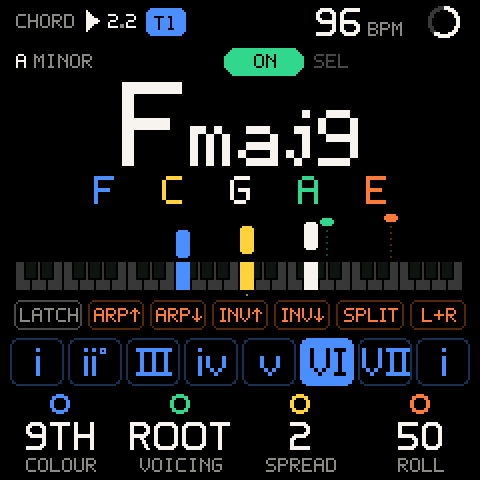
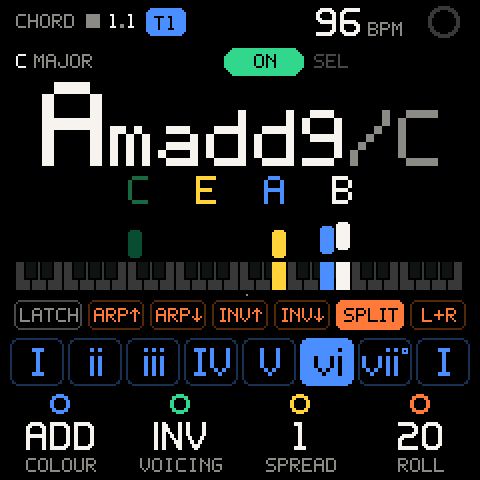
| Keyboard | Four octaves with a bar dropping onto every note. Where the bars stand is SPREAD; their staircase is ROLL. A note the roll hasn't reached yet hangs as a short head on a dotted string. A dim bar is a note this press skipped (ARP, SPLIT). |
| Performance row | LATCH, ARP↑, ARP↓, INV↑, INV↓, SPLIT, L+R in keybed order. Orange: active. White LATCH: latched. |
| Pads | The eight pads with their roman numerals. Filled blue: sounding. Blue outline: the last pad played. |
While nothing sounds, the big chord is the last pad's chord with the current settings, so turning a knob shows what the next press will play.
Chord settings
| Row | Values | What it sets |
|---|---|---|
| K1 COLOUR | TRI, 7TH, ADD, 9TH, EXT | How rich the chords are. |
| K2 VOICING | ROOT, INV, SUB, MIX | Another set of chords at the same richness. |
| K3 SPREAD | 0 to 3 | How wide the voicing is. |
| K4 ROLL | OFF, 10, 20, 35, 50, 75, 100, 150 (ms) | A strum: the time between notes, lowest first. |
The page has no SHIFT row. These settings are global, like the switch. The pads cannot be edited one at a time: all eight follow these four settings and the key.
A saved project keeps the four settings, LATCH with its latched mode, and the switch. See PROJECT.
COLOUR
Every chord is stacked in thirds from the scale, so each note is in key. COLOUR picks a recipe per chord quality; if a recipe would need a note that clashes in this scale, the pad falls back to a plainer chord. In C major the pads play:
| COLOUR | I | ii | iii | IV | V | vi | vii |
|---|---|---|---|---|---|---|---|
TRI triads | C | Dm | Em | F | G | Am | Bdim |
7TH sevenths | Cmaj7 | Dm7 | Em7 | Fmaj7 | G7 | Am7 | Bm7b5 |
ADD add9, 7sus4 | Cadd9 | Dmadd9 | Em7 | Fadd9 | G7sus4 | Amadd9 | Bm7b5 |
9TH ninths, 11ths | Cmaj9 | Dm9 | Em11 | Fmaj9 | G9 | Am9 | Bm11b5 |
EXT 13ths, #11 | Cmaj13 | Dm13 | Em11 | FM7#11 | G13 | Am9 | Bm11b5 |
Pad 8 plays pad 1's chord an octave up. Names are at most seven characters: a long one shortens maj to M (FM7#11), and drops the slash bass if it still doesn't fit.
VOICING
| VOICING | What the pads play |
|---|---|
ROOT | The COLOUR chords in root position. |
INV | The same chords voice-led: each takes the inversion closest to the tonic chord's register (C, Dm, Em/B, F/C, G/B, Am/C, Bdim, C/E). |
SUB | Substitutes of the same weight: sus2 and sus4 triads, 6ths, 6/9, 11ths. At EXT: altered dominants (7b9), #11 majors and dim7, the only notes that leave the key. |
MIX | Three pads borrowed from the parallel key. In a major key, pads IV, VI and VII become iv, bVI, bVII (in C: Fm, Ab, Bb). In a minor key, pads IV and V come from melodic minor and pad 8 from major (in A minor: D, E, A). |
SPREAD
| SPREAD | Voicing |
|---|---|
0 | Close. |
1 | The bass an octave down. |
2 | Open: every other note up an octave (C3 G3 E4 B4). |
3 | Open, with the bass two octaves down: about three octaves wide. |
ROLL
ROLL strums the chord from the lowest note up. At 150 a four-note chord takes nearly half a second to unfold. Letting go of the pad before the roll ends drops the notes it hasn't reached yet.
Key and octave
- The key comes from SCALE: its ROOT and SCALE, whatever SCALE's MODE is. Change the key there, or hold SEL + a key on the SCALE page. See SCALE.
- Seven-note scales are used as they are. Pentatonic and blues scales are harmonised in the seven-note mode that shares most of their notes and keeps their third: major pentatonic as major, minor pentatonic and blues as natural minor.
- The octave is the stock octave: OCT- / OCT+, as on every melodic page. A one-second message shows the new octave, and the CHORD page shows
OCT +1(or whatever it is) at top right. CHORD has no octave of its own. - The tonic chord sits near middle C: roots C to E start at C4 to E4, roots F to B at F3 to B3.
Performance keys
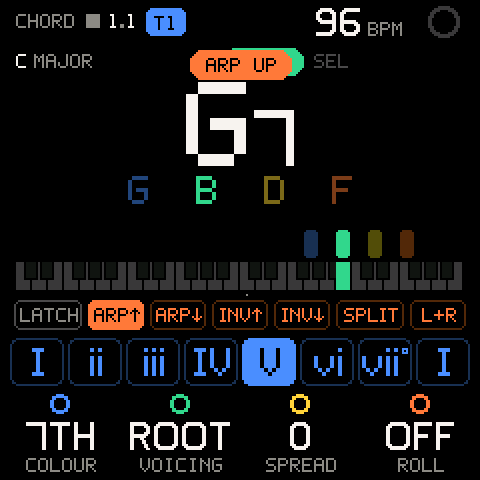
Hold a performance key with the left hand while the right hand plays pads. Each pad press then plays one step of a cycle:
| Key | Mode | Each press plays |
|---|---|---|
| F# | ARP UP | One note, lowest to highest, then round again. |
| G | ARP DOWN | One note, highest to lowest. |
| G# | INV UP | Press 1 raises the lowest note an octave, press 2 the two lowest, and so on until the whole chord is up; then again. |
| A | INV DOWN | Press 1 drops the highest note an octave, press 2 the two highest, and so on. |
| A# | SPLIT | The bass note, then the rest of the chord. |
| B | L+R | The two lowest notes, then the rest. |
- One mode at a time: the last key pressed wins. A message names it:
ARP UP,ARP DOWN,INVERSION UP,INVERSION DOWN,SPLIT BASS + CHORD,SPLIT LEFT + RIGHT. - The cycle starts over on another pad, on another mode, and when you let go of the performance key.
LATCH
- Press F (the lowest key). The message says
LATCH ONand the LATCH key lights. - Tap a performance key: its mode stays on after you let go. Tap it again to turn it off.
- Press F again for
LATCH OFF. That also clears the latched mode.
LATCH latches the performance mode, not the chord: a pad still stops when you let go of it.
Key LEDs
While chord input is on, the key LEDs show the layout on every page: the eight pads and the six performance keys lit, LATCH lit when on. The active performance key and the sounding pad blink.
Recording chords
On TAPE, MIX, SOUND, SCALE, CHORD and the other melodic pages, chord notes are played and recorded like keys: REC records them onto the selected track, through the input quantizer, and SAVE can capture them after a pass.
Pro tip: Record a chord progression first with COLOUR on
TRI, then turn COLOUR up on the next take: the same pads, richer chords, still in key.
Chords with ARP and SEQ
| With | What the pads do |
|---|---|
| ARP on | The chord's notes go into the arpeggiator instead of sounding. Press a pad and the arp plays that chord. See ARP. |
| SEQ page (step entry) | A pad writes its chord into the step at the cursor and steps on. You hear it, but it is not recorded. See SEQ. |
In SEQ step entry:
- A step holds at most four notes. Bigger chords are thinned: the perfect 5th goes first, then the 9th, 11th, 13th, 6th and an altered 5th. The root, the 3rd (or sus note) and the 7th stay, so Cmaj13 keeps C E B A.
- The performance keys shape what is written: with SPLIT held, a press writes the bass alone, the next the rest.
- Press the next pad before letting go of the last one and the previous step becomes a tie (legato).
- Hold SEQ + a key to write a rest.
Troubleshooting
| What happens | Why, and what to do |
|---|---|
| The pads play single notes. | Chord input is off. Press SEL on CHORD, or SHIFT + SEL on any melodic page, for CHORD ON. |
CHORD ON, but the keys play drums. | The selected track is a KIT. Kits keep their pads; select a synth track. |
| No chords while browsing presets. | The browser is audition-only. Close it (SEL keeps the sound, HOME puts the old one back). |
| The chords are in the wrong key. | The key is SCALE's ROOT and SCALE. Change it on the SCALE page. |
| The chords changed after you changed SCALE's MODE. | They didn't: MODE never affects chords. Check ROOT and SCALE. |
| The chord is too high or too low. | Use OCT- / OCT+ (the stock octave), or lower SPREAD. |
| A chord cuts off when you let go, even with LATCH on. | LATCH holds the performance mode, not the chord. For held chords use the arpeggiator's LATCH, or record the chord. |
| A pad plays only one or two notes. | A performance key is active (ARP, SPLIT, L+R). Release it, or tap it again if LATCH is on. |
| The top seven keys play single notes. | By design: only the eight white keys from the first C are pads. |
| A chord step in SEQ has fewer notes than the pad. | Steps hold four notes; the 5th and extensions are dropped first. |
| SHIFT + SEL does nothing on KIT. | Chord input is not available on KIT. Switch on a melodic page. |
| SHIFT + SEL on PROJECT saved instead of switching chords. | On PROJECT that gesture saves into the slot at the cursor. Switch chords from any other melodic page. |