Chapter 6
SCALE
SCALE decides what the keybed plays: pick a root and a scale, then choose whether wrong keys slide to the nearest right note, go silent, or whether the scale lives on the white keys alone. The setting is global: every synth track, the arpeggiator, SEQ step entry and the chord pads follow it.
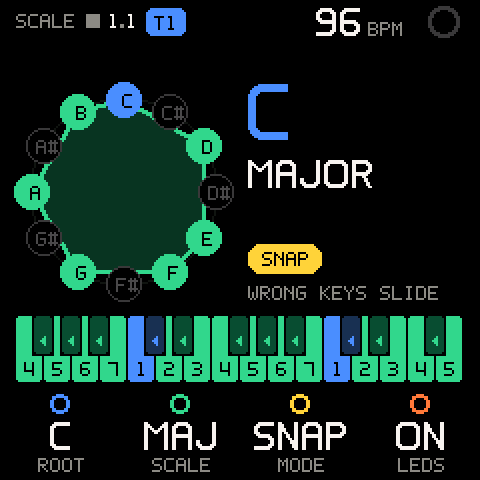
Opening SCALE
Turn SELECT to the left of TAPE: the wheel runs SCALE, CHORD, TAPE, MIX, PROJECT. SCALE is the first stop. The page has one row, so ALGORITHM does nothing here.
The screen
| Part | What it shows |
|---|---|
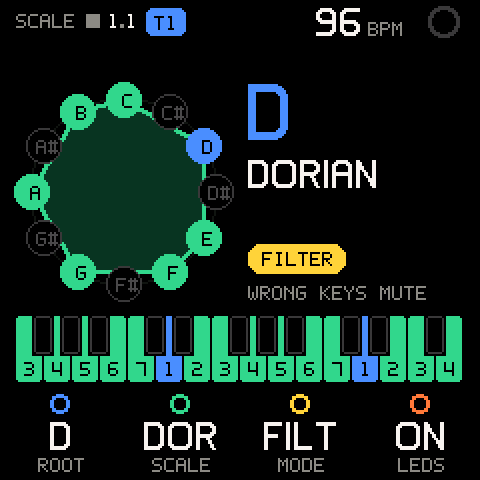
| Note clock, left | The twelve notes in a circle, C at the top. Filled dots are in the scale, hollow ones are not; the root is blue. The scale's notes are joined into a shape: turning ROOT spins it, turning SCALE reshapes it. |
| Root and scale, right | The root letter, big, and the scale's full name. |
| Mode pill | OFF, SNAP, FILTER or EASY, with a line saying what it does: PLAYS AS IS, WRONG KEYS SLIDE, WRONG KEYS MUTE, ON WHITE KEYS. |
| Keyboard, bottom | The FM-1's 27 keys (F to G) and what each one plays right now. |
How to read the keyboard:
| Key looks | Meaning |
|---|---|
| Coloured with a number | Plays itself; the number is its scale degree (1 = root). |
| Blue | Plays the root. |
| Dim with an arrow | SNAP: slides to the neighbour the arrow points at. |
| Hollow | Silent. |
| All grey | MODE is OFF: every key plays as is. |
The whole page greys out while MODE is OFF, so you can see at a glance that the scale is not applied.
Controls
| Row | Values | What it sets |
|---|---|---|
| K1 ROOT | C, C#, D ... B (wraps round) | The key's root note. |
| K2 SCALE | MAJ MIN DOR PHR LYD MIX LOC HARM MEL MAJ.P MIN.P BLUES | The scale (see the table below). Stops at both ends. |
| K3 MODE | OFF, SNAP, FILT, EASY | What happens to the keys (see Modes). |
| K4 LEDS | ON, OFF | Whether the key LEDs show the scale. Turn right for ON, left for OFF. |
| Control | What it does |
|---|---|
| Hold SEL + a key | The root becomes that key's note. A message confirms it: ROOT F#. Works on the SCALE page only. |
| OCT- / OCT+ | The stock octave, as on every melodic page. |
Scales
| SCALE | Full name | Notes (from the root) |
|---|---|---|
MAJ | MAJOR | 1 2 3 4 5 6 7 |
MIN | MINOR (natural) | 1 2 b3 4 5 b6 b7 |
DOR | DORIAN | 1 2 b3 4 5 6 b7 |
PHR | PHRYGIAN | 1 b2 b3 4 5 b6 b7 |
LYD | LYDIAN | 1 2 3 #4 5 6 7 |
MIX | MIXOLYDIAN | 1 2 3 4 5 6 b7 |
LOC | LOCRIAN | 1 b2 b3 4 b5 b6 b7 |
HARM | HARMONIC MINOR | 1 2 b3 4 5 b6 7 |
MEL | MELODIC MINOR (ascending, "jazz minor") | 1 2 b3 4 5 6 7 |
MAJ.P | MAJOR PENTATONIC | 1 2 3 5 6 |
MIN.P | MINOR PENTATONIC | 1 b3 4 5 b7 |
BLUES | BLUES | 1 b3 4 b5 5 b7 |
Root names are always written with sharps (C#, not Db).
Modes
| MODE | In-scale keys | Other keys |
|---|---|---|
OFF | Play themselves. | Play themselves (chromatic, as stock). |
SNAP | Play themselves. | Play the nearest in-scale note. A tie goes down: in C major, C# plays C and F# plays F. |
FILTER | Play themselves. | Silent. |
EASY | The scale moves onto the white keys. | Black keys are silent. |
SNAP
Every scale here has gaps of at most three semitones, so a snapped key always moves by exactly one semitone. Two keys can play the same note (C and C# both play C in C major); the note stops when you let go of the last of them.
EASY
EASY lets you play any scale on the white keys only.
- Every C key plays the root. The white keys above it play the next degrees: C D E F G A B = degree 1 2 3 4 5 6 7.
- The root sits near the C that plays it: roots C to F play at or above that C, roots F# to B below it. In A minor, the C4 key plays A3. The keybed keeps roughly its usual register.
- Pentatonic and blues scales have fewer than seven notes. The leftover white keys climb on into the next octave, and the next C starts over at the root. In A minor pentatonic, A and B play the same notes as the next C and D.
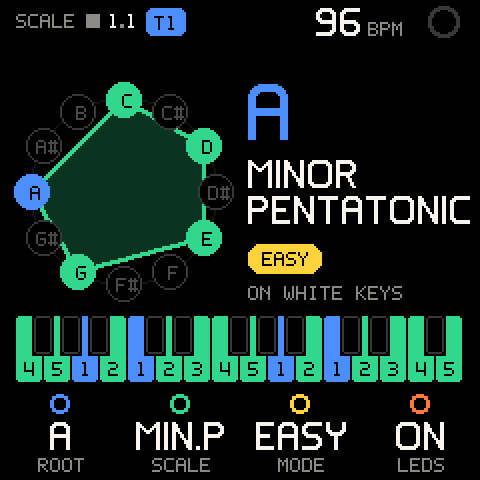
Pro tip: EASY is the fastest way to jam in an unfamiliar key: set ROOT and SCALE, then play only white keys. Every C is home.
Key LEDs
With LEDS ON and MODE not OFF, the key LEDs show the scale:
| MODE | Lit keys |
|---|---|
SNAP, FILTER | The keys that play themselves (the in-scale keys). |
EASY | Every white key. |
OFF | None. |
The LEDs show the scale on SCALE and on the pages that normally light the notes you play (TAPE, MIX, SOUND, FX). With LEDS OFF, or MODE OFF, those pages light the notes as they sound instead. While chord input is on, the LEDs show the chord pads (see CHORD); on a KIT track they show the pads.
What SCALE applies to
| Source | Follows SCALE? |
|---|---|
| Keys on any Groove OS page, synth tracks | Yes: played, recorded and sent to the arpeggiator as mapped. |
| SEQ step entry | Yes: a step gets the mapped note. |
| Chord pads (CHORD input on) | The pads build their chords from ROOT and SCALE, whatever MODE is. MODE never changes a chord. |
| The seven keys above the chord pads (CHORD input on) | Yes, like normal keys. |
| KIT tracks | No: drum pads are pads. |
| Notes already on the tape | No: SCALE changes what the keys play, not what was recorded. |
A key you hold always releases the note it started, even if you change ROOT, SCALE, MODE or the octave while it is down. Nothing hangs.
Octave and transpose (SHIFT row)
Hold HOME (SHIFT) to see the second row. It shows the stock firmware's own keybed settings.
| Row | Values | What it sets |
|---|---|---|
| SHIFT + K1 OCTAVE | The stock octave, for example +1 | Shown only. Turning it says OCTAVE: OCT- / OCT+: use those buttons. |
| SHIFT + K2 TRANSP | The stock transpose in semitones, for example +2 | Shown only. Turning it says TRANSP: HOLD OCT + ALGO: hold OCT- or OCT+ and turn ALGORITHM. |
| SHIFT + K3 VELO CRV | - | Not built yet: the slot is empty (a dark ring), and turning says VELO CRV: COMING SOON. |
| SHIFT + K4 FIXED V | - | Not built yet: the slot is empty, and turning says FIXED V: COMING SOON. |
SCALE maps the notes the keys actually send. After a stock transpose, the keyboard drawing follows: in C major with the keys moved up two semitones, the physical C key now shows degree 2.
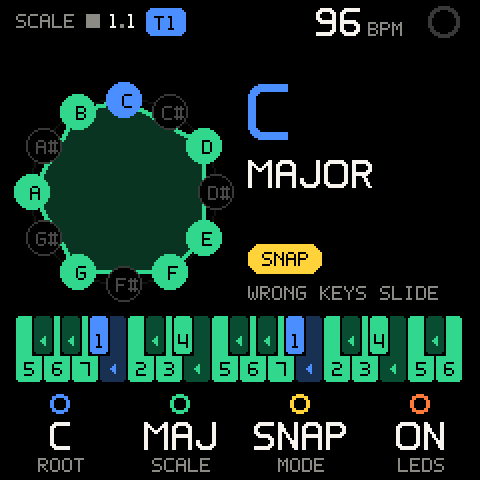
Pro tip: EASY works from the note number, not the physical key, so an octave change never scrambles its layout. A transpose that is not a whole octave does move it.
Saving SCALE
SCALE starts as C major, MODE OFF, LEDS ON at every power-on. A saved project keeps ROOT, SCALE, MODE and LEDS, and loading it brings them back. See PROJECT.
Troubleshooting
| What happens | Why, and what to do |
|---|---|
| Black keys make no sound. | MODE is EASY (black keys are always silent) or FILTER (the out-of-scale keys are). Set MODE to SNAP or OFF. |
| A key plays a different note from the one pressed. | MODE is SNAP or EASY. That is the point of those modes; set OFF to play chromatically. |
| Changing ROOT or SCALE does nothing to the sound. | MODE is OFF, or the selected track is a KIT. Pick a mode; kits ignore the scale. |
| The key LEDs stay dark. | LEDS is OFF, MODE is OFF, or you are on a page that drives the LEDs itself. Turn K4 right. |
| The key LEDs show a pattern that isn't the scale. | Chord input is on: the LEDs show the chord pads. Turn it off with SHIFT + SEL or on the CHORD page. |
| The chord pads ignore MODE. | By design: the pads use ROOT and SCALE only. |
| Turning OCTAVE or TRANSP only shows a message. | They mirror the stock settings. Use OCT- / OCT+, or hold an OCT button and turn ALGORITHM. |
| Hold SEL + key didn't change the root. | It sets the root on the SCALE page only. On SEQ the same gesture moves the step cursor. |
| The scale is back to C major after power-on. | Every power-on starts fresh. Load your project on the PROJECT page to get its SCALE settings back. |